
PHP CURL模拟提交数据 攻击N次方
 public function actionCurl(){

        $data['DATA']='{"NAME":"c","LEGEND":"c;c","GENDER":"","CITY":0,"BIRTHDAY":"","COMPANY":"","JOB":"","WEBSITE":"","ADDRESS":"","NOTE":"","CONTACTS":[],"IMS":[],"FLAGS":[]}';

        $headers=array();

        $headers[]='X-Requested-With:XMLHttpRequest';

        $headers[]='Cookie:token=3cedf24b188fd7ac57176256a2a14879-b419e6ebb414d661a6e86a30cd633ce5; PHPSESSID=ddfrjb4p8evu3cumgnsveet2o3; _ga=GA1.2.1014541392.1437467254; _gat=1';

        $headers[]='Referer:http://www.crm.com/newContact.php';

        $headers[]='Content-Type:application/x-www-form-urlencoded; charset=UTF-8';

        $headers[]='Content-Length:315';

        $headers[]='Host:www.crm.com';

        $headers[]='DNT:1';

        $headers[]='Pragma:no-cache';

        $headers[]='Connection:Keep-Alive';

        $headers[]='User-Agent:Mozilla/5.0 (compatible; MSIE 10.0; Windows NT 6.1; Trident/6.0)';

        $headers[]='Accept:application/json, text/javascript, */*; q=0.01';

        $headers[]='Accept-Encoding:gzip, deflate';

        $headers[]='Accept-Language:zh-CN';

        for ($i = 0; $i < 10; $i++) {

            $res = $this->curls($data, 'http://www.crm.com/handler/handleAddContact.php ', 'POST', $headers);

            print_r($res);

        }

    }

        /**

     *   curl请求

     * @author lid

     * @param array $data   要请求的array数组

     * @param str $url      请求的地址

     * @param str $method   大写 POST   GET

     * @param array $headers   扩展包头信息

     * @return string

     */

    public static  function curls($data, $url, $method = 'POST', $headers = array()) {

        $ch = curl_init();

        $method_upper = strtoupper($method);

        if ($method_upper == 'POST') {

            curl_setopt($ch, CURLOPT_URL, $url);

            curl_setopt($ch, CURLOPT_POSTFIELDS,  http_build_query($data));

        } else {

            $url = $url . (strpos($url, '?') ? '&' : '?') . (is_array($data) ? http_build_query($data) : $data);

            curl_setopt($ch, CURLOPT_URL, $url);

        }

        curl_setopt($ch, CURLOPT_CUSTOMREQUEST, $method_upper);

        curl_setopt($ch, CURLOPT_FOLLOWLOCATION, 1);

        curl_setopt($ch, CURLOPT_TIMEOUT, 20);

        if ($headers) {

            curl_setopt($ch, CURLOPT_HTTPHEADER, $headers);

        }

        $tmpInfo = curl_exec($ch);

        if (curl_errno($ch)) {

            exit(curl_error($ch));

        }

        curl_close($ch);

        return $tmpInfo;

    }
CURLOPT_POSTFIELDS的这个设置中,亦可以直接发送数组的,但是这样做的后果是严重增加的请求的时间,耗时大约在2秒多,同样的操作用socket方式操作则正常,在毫秒级别。
数组:curl_setopt($ch, CURLOPT_POSTFIELDS, $arrData);
修改为:curl_setopt($ch, CURLOPT_POSTFIELDS, http_build_query($post_data));
http_build_query — 生成 URL-encode 之后的请求字符串。
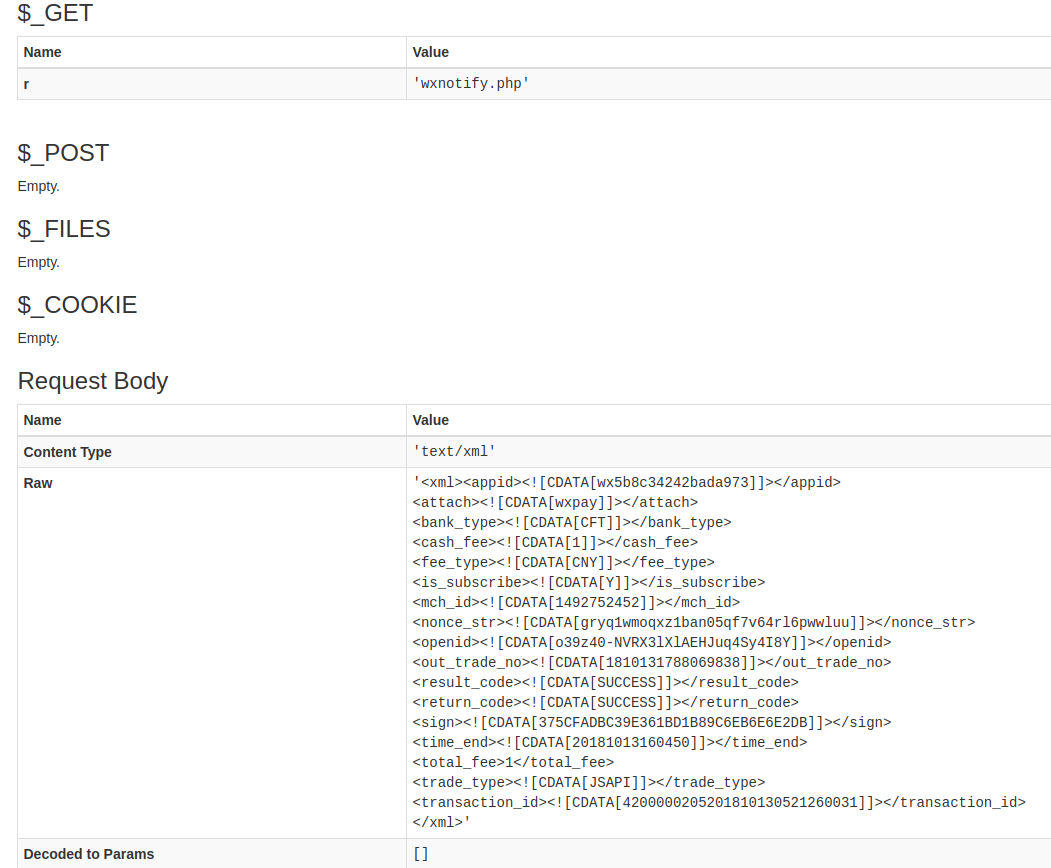
curl 发送XML数据
$xml = ('<xml>

<note>

  <to>Tove</to>

  <from>Jani</from>

  <heading>Reminder</heading>

  <body>Don\'t forget me this weekend!</body>

</note></xml>');

$url = "https://wx.api.zf.com/wxnotify.php ";

$header[] = "Content-type: text/xml";

$ch = curl_init();

curl_setopt($ch, CURLOPT_URL, $url);

curl_setopt($ch, CURLOPT_HTTPHEADER, $header);

curl_setopt($ch, CURLOPT_POST, 1);

curl_setopt($ch, CURLOPT_POSTFIELDS, $xml);

curl_setopt($ch, CURLOPT_RETURNTRANSFER, 1);

$res = curl_exec($ch);

curl_close($ch);
PHP CURL模拟提交数据 攻击N次方的更多相关文章
- curl模拟提交
function curl_post($url, $post){ $options = array( CURLOPT_RETURNTRANSFER =>true, CURLOPT_HEADER ...
- php CURL 模拟 POST 提交数据
<?php function liansuo_post($url,$data){ // 模拟提交数据函数 $curl = curl_init(); // 启动一个CURL会话 curl_seto ...
- php curl模拟post请求提交数据
最近在做校园图书馆图书信息的采集程序,既然是图书馆图书的采集,肯定有提交搜索的页面,无非是post提交,让我想到了curl模拟提交,首先通过firebug进行抓包查询下post提交后的格式如下: tx ...
- 模拟提交API数据Pyqt版
其实这个模拟提交数据之前已经写过篇: Python requests模拟登录 因为现在在做的项目中需要一个debug请求调试API,用PHP的CURL写了一个,又因Pyqt更能直观灵活的显示请求的参数 ...
- 在php中分别使用curl的post提交数据的方法和get获取网页数据的方法
在php中分别使用curl的post提交数据的方法和get获取网页数据的方法整理分享一下额,具体代码如下: (1)使用php curl获取网页数据的方法: $ch=curl_init(); //设置选 ...
- PHP curl 模拟登陆
一个比较好的类: $cookie_file=tempnam("C:/users","tmp");生成以以tmp为前缀的文件. <?php define ( ...
- php封装curl,模拟POST和GET请求HTTPS请求
<?php /** * @title 封装代理请求 * @author victor **/ class ApiRequest { /** * curl提交数据 * @param String ...
- [转]php中 curl模拟post发送json并接收json
本文转自:https://blog.csdn.net/pangchengyong0724/article/details/52103962 本地模拟请求服务器数据,请求数据格式为json,服务器返回数 ...
- php中 curl模拟post发送json并接收json(转)
本地模拟请求服务器数据,请求数据格式为json,服务器返回数据也是json. 由于需求特殊性, 如同步客户端的批量数据至云端, 提交至服务器的数据可能是多维数组数据了. 这时需要将此数据以一定的数据 ...
随机推荐
- Django 1.9 Post 时候出现 CSRF token missing or incorrect 错误
get 的时候没有问题,只有在post的时候出现出现这个错误 在方法中加入 @csrf_exempt
- ssh reverse tunnel
ssh反向通道的可用场景之一:从外网访问内网的主机.所必须的是你需要一个有ssh登录权限的公网主机. 步骤如下(将内网主机称作A,公网ssh主机地址为hostP ): 1.在内网A上执行 :local ...
- NGUI 滑动与点击事件冲突处理
弄一个既能滑动,又能点击的Scroll View.发现弄完后不能拖动了~ 因为点击事件需要Box Collider覆盖掉了Drag Scroll View的Box Collider.注意是Drag S ...
- poj 1390 Blocks
poj 1390 Blocks 题意 一排带有颜色的砖块,每一个可以消除相同颜色的砖块,,每一次可以到块数k的平方分数.问怎么消能使分数最大.. 题解 此题在徐源盛<对一类动态规划问题的研究&g ...
- oracle---jdbctest--laobai
import java.sql.CallableStatement; import java.sql.Connection; import java.sql.ResultSet; import ora ...
- 使用mosh取代ssh提高n2n网络连接稳定性
上文实现了远程n2n访问树莓派,但是ssh协议在网络状况不好的时候命令会卡住.这里发现了一个mosh协议,可以增强稳定性,使用后效果明显. 背景:使用n2n之后,在比较差的网络环境下,经常会被time ...
- TypeError: 'bool' object is not callable g.user.is_authenticated()
此问题查了stackoverflow后知道is_authenticated是一个属性而不是一个方法所以g.user.is_authenticated() 用法会报错
- PHP 图片上传
PHP上传的简单案例: Html文件: <html> <form action="index.php" name="form" method= ...
- Spring3.0目录
(1)Spring 入门知识 (2)IoC/DI基本思想的演变 (3)深入理解IoC/DI (4)Spring的简单demo
- Unix/Linux进程间通信(一):概述
序 Linux下的进程通信手段基本上是从Unix平台上的进程通信手段继承而来的.而对Unix发展做出重大贡献的两大主力AT&T的贝尔实验室及BSD(加州大学伯克利分校的伯克利软件发布中心)在进 ...