
创建展开行明细编辑表单的 CRUD 应用
http://www.runoob.com/jeasyui/jeasyui-app-crud3.html
jQuery EasyUI 应用 - 创建展开行明细编辑表单的 CRUD 应用
当切换数据网格视图(datagrid view)到 'detailview',用户可以展开一行来显示一些行的明细在行下面。这个功能允许您为防止在明细行面板(panel)中的编辑表单(form)提供 一些合适的布局(layout)。在本教程中,我们使用数据网格(datagrid)组件来减小编辑表单(form)所占据空间。
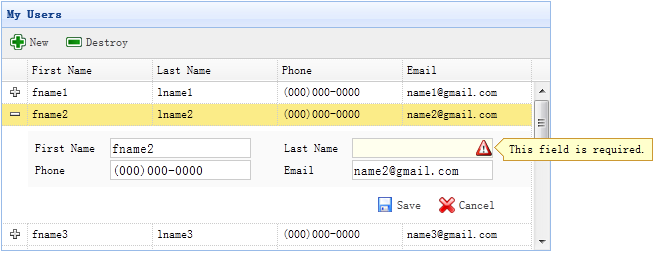
步骤 1:在 HTML 标签中定义数据网格(DataGrid)
<table id="dg" title="My Users" style="width:550px;height:250px" url="get_users.php" toolbar="#toolbar" fitColumns="true" singleSelect="true"> <thead> <tr> <th field="firstname" width="50">First Name</th> <th field="lastname" width="50">Last Name</th> <th field="phone" width="50">Phone</th> <th field="email" width="50">Email</th> </tr> </thead> </table> <div id="toolbar"> <a href="#" class="easyui-linkbutton" iconCls="icon-add" plain="true" onclick="newItem()">New</a> <a href="#" class="easyui-linkbutton" iconCls="icon-remove" plain="true" onclick="destroyItem()">Destroy</a> </div>
步骤 2:为数据网格(DataGrid)应用明细视图
$('#dg').datagrid({ view: detailview, detailFormatter:function(index,row){ return '<div class="ddv"></div>'; }, onExpandRow: function(index,row){ var ddv = $(this).datagrid('getRowDetail',index).find('div.ddv'); ddv.panel({ border:false, cache:true, href:'show_form.php?index='+index, onLoad:function(){ $('#dg').datagrid('fixDetailRowHeight',index); $('#dg').datagrid('selectRow',index); $('#dg').datagrid('getRowDetail',index).find('form').form('load',row); } }); $('#dg').datagrid('fixDetailRowHeight',index); } });
为了为数据网格(DataGrid)应用明细视图,在 html 页面头部引入 'datagrid-detailview.js' 文件。
我们使用 'detailFormatter' 函数来生成行明细内容。 在这种情况下,我们返回一个用于放置编辑表单(form)的空的 <div>。 当用户点击行展开按钮('+')时,'onExpandRow' 事件将被触发,我们将通过 ajax 加载编辑表单(form)。 调用 'getRowDetail' 方法来得到行明细容器,所以我们能查找到行明细面板(panel)。 在行明细中创建面板(panel),加载从 'show_form.php' 返回的编辑表单(form)。
步骤 3:创建编辑表单(Form)
编辑表单(form)是从服务器加载的。
<form method="post"> <table class="dv-table" style="width:100%;background:#fafafa;padding:5px;margin-top:5px;"> <tr> <td>First Name</td> <td><input name="firstname" class="easyui-validatebox" required="true"></input></td> <td>Last Name</td> <td><input name="lastname" class="easyui-validatebox" required="true"></input></td> </tr> <tr> <td>Phone</td> <td><input name="phone"></input></td> <td>Email</td> <td><input name="email" class="easyui-validatebox" validType="email"></input></td> </tr> </table> <div style="padding:5px 0;text-align:right;padding-right:30px"> <a href="#" class="easyui-linkbutton" iconCls="icon-save" plain="true" onclick="saveItem(<?php echo $_REQUEST['index'];?>)">Save</a> <a href="#" class="easyui-linkbutton" iconCls="icon-cancel" plain="true" onclick="cancelItem(<?php echo $_REQUEST['index'];?>)">Cancel</a> </div> </form>
步骤 4:保存或取消编辑
调用 'saveItem' 函数来保存一个用户或者调用 'cancelItem' 函数来取消编辑。
function saveItem(index){ var row = $('#dg').datagrid('getRows')[index]; var url = row.isNewRecord ? 'save_user.php' : 'update_user.php?id='+row.id; $('#dg').datagrid('getRowDetail',index).find('form').form('submit',{ url: url, onSubmit: function(){ return $(this).form('validate'); }, success: function(data){ data = eval('('+data+')'); data.isNewRecord = false; $('#dg').datagrid('collapseRow',index); $('#dg').datagrid('updateRow',{ index: index, row: data }); } }); }
决定要回传哪一个 URL,然后查找表单(form)对象,并调用 'submit' 方法来提交表单(form)数据。当保存数据成功时,折叠并更新行数据。
function cancelItem(index){ var row = $('#dg').datagrid('getRows')[index]; if (row.isNewRecord){ $('#dg').datagrid('deleteRow',index); } else { $('#dg').datagrid('collapseRow',index); } }
当取消编辑动作时,如果该行是新行而且还没有保存,直接删除该行,否则折叠该行。
下载 jQuery EasyUI 实例
创建展开行明细编辑表单的 CRUD 应用的更多相关文章
- 【jQuery EasyUI系列】 创建展开行明细编辑表单的CRUD应用
当切换数据网络格局(datagrid view)到detailview,用户可以展开一行来显示一些行的明细在行下面,这个功能允许您为防止在明细行面板中的编辑表单提供一些合适的布局. 步骤1.在HTML ...
- 3、easyUI-创建 CRUD可创建展开行明细编辑dataGrid(表格)
同样在上一节中讲到可以编辑的表格,现在讲一般用到的最后一个datagrid(表格)相关的展开明细可编辑的表格: 第三中表格主要应用场景在:列出表格信息,然后点击可以查看详细信息(此处是全部可以编辑,可 ...
- ASP.NET MVC 音乐商店 - 5. 通过支架创建编辑表单
在上一章,我们已经从数据库获取数据,然后显示出来,这一章,我们将允许编辑数据. 创建 StoreManagerController 控制器 我们将要创建称为 StoreManager 的控制器,对于这 ...
- C# Winform 通过FlowLayoutPanel及自定义的编辑控件,实现快速构建C/S版的编辑表单页面
个人理解,开发应用程序的目的,不论是B/S或是C/S结构类型,无非就是实现可供用户进行查.增.改.删,其中查询用到最多,开发设计的场景也最为复杂,包括但不限于:表格记录查询.报表查询.导出文件查询等等 ...
- Winform 通过FlowLayoutPanel及自定义的编辑控件,实现快速构建C/S版的编辑表单页面 z
http://www.cnblogs.com/zuowj/p/4504130.html 不论是B/S或是C/S结构类型,无非就是实现可供用户进行查.增.改.删,其中查询用到最多,开发设计的场景 也最为 ...
- [Swift通天遁地]二、表格表单-(9)快速创建一个美观强大的表单
★★★★★★★★★★★★★★★★★★★★★★★★★★★★★★★★★★★★★★★★➤微信公众号:山青咏芝(shanqingyongzhi)➤博客园地址:山青咏芝(https://www.cnblogs. ...
- 怎样利用WordPress创建自己定义注冊表单插件
来源:http://www.ido321.com/1031.html 原文:Creating a Custom WordPress Registration Form Plugin 译文:创建一个定制 ...
- ASP.NET Core Razor 编辑表单 - ASP.NET Core 基础教程 - 简单教程,简单编程
原文:ASP.NET Core Razor 编辑表单 - ASP.NET Core 基础教程 - 简单教程,简单编程 ASP.NET Core Razor 编辑表单 上一章节我们介绍了标签助手和 HT ...
- windev中编辑表单确认按钮的code规范建议
编辑表单的确认操作,是一个常规操作,根据过往经验,建议按以下规范代码来撸.案例如下所示(主子表保存): //填报规范:必填项目 IF COMBO_招聘职位 = "" OR COMB ...
随机推荐
- React & shit Antd
React & shit Antd https://ant.design/components/tooltip-cn/ https://ant.design/components/tag-cn ...
- [Java] 文件上传下载项目(详细注释)
先上代码,最上方注释是文件名称(运行时要用到) FTServer.java /* FTServer.java */ import java.util.*; import java.io.*; publ ...
- 微信小程序base64编码解码以及utf-8解码
function base64_encode (str) { // 编码,配合encodeURIComponent使用 var c1, c2, c3; var base64EncodeChars = ...
- CodeIgniter自带的数据库类使用介绍
在 CodeIgniter 中,使用数据库是非常频繁的事情.你可以使用框架自带的数据库类,就能便捷地进行数据库操作. 初始化数据库类 依据你的数据库配置载入并初始化数据库类: view source ...
- RTL2832U+R820T电视棒windows下安装sdr# 以及搭建ADS-B使用VirtualRadar看飞机的教程
本文中提到的软件随后我会打包给出下载地址.这篇文章是我根据网上的教程和自己的经验修改的详细版本,为了方便入门新手.先来说说RTL2832U+R820T在windows下安装sdr#的方法.首先科普下s ...
- [hdu 1067]bfs+hash
题目链接:http://acm.hdu.edu.cn/showproblem.php?pid=1067 queue里面果然不能放vector,还是自己写的struct比较省内存…… #include& ...
- 常用原生客户端js
var el = document.createElement('pre'); // 创建 <pre></pre>元素 el.id = 'sss'; // 添加id <p ...
- Navicat Premium mysql
#Sql语句 创建一表格 ),name ),age ),sex )); #添加语句 ,,'男'); ,,'男'); #删除 delete from user3;#user3中所有数据全删 delete ...
- 图论:2-SAT
先象征性地描述一下问题:一组(或者一个)东西有且仅有两种选择,要么选这个,要么选那个,还有一堆的约束条件 图论问题,当然是建边跑图喽 给出模型: 模型一:两者(A,B)不能同时取 那么选择了A就只能选 ...
- 【BZOJ3132】上帝造题的七分钟 [树状数组]
上帝造题的七分钟 Time Limit: 20 Sec Memory Limit: 128 MB[Submit][Status][Discuss] Description “第一分钟,X说,要有矩阵 ...