
CSV Format
【CSV Format】
The comma separated values format (CSV) has been used for exchanging and converting data between various spreadsheet programs for quite some time. RFC documents the format of comma separated values (CSV) files and formally registers the "text/csv" MIME type for CSV in accordance with RFC 2048.
1. Each record is located on a separate line, delimited by a line break (CRLF). For example:

以CRLF来区别每一个record
2. The last record in the file may or may not have an ending line break. For example:

最后一条记录可以不加CRLF
  3. There maybe an optional header line appearing as the first lineof the file with the same format as normal record lines.  This header will contain names corresponding to the fields in the file and should contain the same number of fields as the records in the rest of the file (the presence or absence of the header line should be indicated via the optional "header" parameter of this MIME type).  For example:

  可以添加head,通过optional parameter的header flag来指示

  4. Within the header and each record, there may be one or more fields, separated by commas.  Each line should contain the same number of fields throughout the file.  Spaces are considered part of a field and should not be ignored.  The last field in the record must not be followed by a comma.  For example:

  用逗号分隔

  5.  Each field may or may not be enclosed in double quotes (however some programs, such as Microsoft Excel, do not use double quotes at all).  If fields are not enclosed with double quotes, then double quotes may not appear inside the fields.  For example:

  可以有也可以没有双引号


  6.  Fields containing line breaks (CRLF), double quotes, and commas should be enclosed in double-quotes.  For example:

  如果有CRLF, 双引号,逗号,则这些符号必须放置在双引号中。
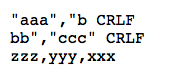
7. If double-quotes are used to enclose fields, then a double-quote appearing inside a field must be escaped by preceding it with another double quote. For example:
  使用双引号时,必须前置双引号以escape
参考:http://www.rfc-editor.org/rfc/rfc4180.txt

CSV Format的更多相关文章
- djangoadmin导出csv
from django.contrib import admin from .models import Order,OrderItem from django.http import HttpRes ...
- xls===>csv tables===via python ===> sqlite3.db
I've got some files which can help a little bit to figure out where people are from based on their I ...
- Python操作csv文件
1.什么是csv文件 The so-called CSV (Comma Separated Values) format is the most common import and export fo ...
- django后台admin csv 格式表格导出
1.在app下新建一个.py文件 此例commen.py commen.py (内容)(具体怎么导出的也不知道这么写就对了) import csv from django.http import H ...
- 导出CSV乱码
导出CSV,无论是什么格式,excel打卡都是乱码 需要加上 echo "\xEF\xBB\xBF"; header("Content-Disposition:attac ...
- python 读取mysql数据至csv文件中,并发送邮件
test 代码: #coding:utf-8 ''' Created on 2019年2月18日 @author: Administrator ''' import ConfigParser impo ...
- Jmeter-Maven-Plugin高级应用:Test Results File Format-Test Results
Test Results File Format Test Results Disabling The <testResultsTimestamp> Enabling <append ...
- HTML save data to CSV or excel
/********************************************************************************* * HTML save data ...
- Qt Read and Write Csv File
This page discusses various available options for working with csv documents in your Qt application. ...
随机推荐
- Linux中查看各文件夹大小命令:du -h --max-depth=1
Linux中查看各文件夹大小命令:du -h --max-depth=1 du [-abcDhHklmsSx] [-L <符号连接>][-X <文件>][--block-siz ...
- Git常用命令以及用法
一 如何让单个文件回退到指定的版本 1. 进入到文件所在文件目录,或者能找到文件的路径 查看整个目录的修改记录 git log . 2. 回退到指定的版本 git reset f7a22076 ...
- Azure VM Scalable Sets -- 适用IAAS架构
1. 选择Virtual Machine scale set2. 选择resource manager(或创建最新)3. 基本信息配置4. 配置scale的参数(可伸缩的balance模型):VM最小 ...
- git配置ssh key并从github.com拉取repos
一.配置ssh key 1. 进入当前用户目录cd ~2. 生成ssh keyssh-keygen -t rsa -C "ABC@qq.com"ABC@qq.com账号必须是你登录 ...
- 看过自会理解, Photon Server 常见概念分析.
http://stackoverflow.com/questions/10823915/photon-server-newbie-questions/11653419#11653419 Channel ...
- Golang 编译成 DLL 文件
golang 编译 dll 过程中需要用到 gcc,所以先安装 MinGW. windows 64 位系统应下载 MinGW 的 64 位版本: https://sourceforge.net/pro ...
- I-O流概念认知升级
在文件操作基础入门中,我们提到了流的 概念,这篇我们将更多的介绍流这个东西,以及C的I/O相关知识 现在,我们从C程序员最熟悉的printf函数开始学习I/O流. 我们对printf函数一直是很喜爱的 ...
- Centos 6.3 Realtek Audio Driver Compile
/**************************************************************************** * Centos 6.3 Realtek A ...
- STL源码解析之vector自实现
最近仔细阅读了下侯捷老师的<STL源码剖析>的前三章内容:空间配置器.迭代器.traits技术,为了加强理解和掌握,特参照源码自实现Vector,以下对相关重点知识进行说明. 1. vec ...
- leetcode_sql_4,196
196. Delete Duplicate Emails Write a SQL query to delete all duplicate email entries in a table name ...