
自编jQuery插件实现模拟alert和confirm
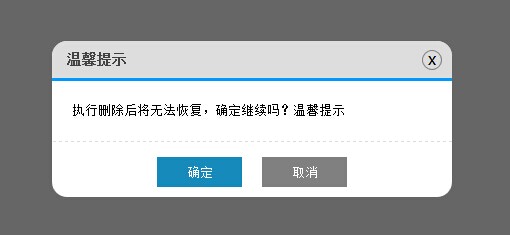
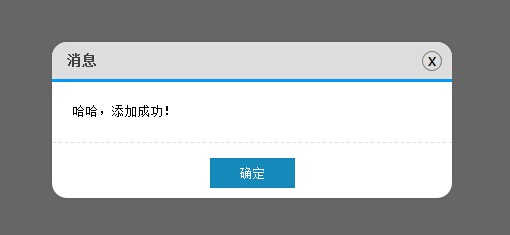
现在绝大多数网站都不用自带的alert和confirm了,因为界面太生硬了。因此这个插件就这样产生了...
来看插件的实现代码吧:
|
1
2
3
4
5
6
7
8
9
10
11
12
13
14
15
16
17
18
19
20
21
22
23
24
25
26
27
28
29
30
31
32
33
34
35
36
37
38
39
40
41
42
43
44
45
46
47
48
49
50
51
52
53
54
55
56
57
58
59
60
61
62
63
64
65
66
67
68
69
70
71
72
73
74
75
76
77
78
79
80
81
82
83
84
85
86
87
88
89
90
91
92
93
94
95
96
97
98
99
100
101
|
(function () { $.MsgBox = { Alert: function (title, msg) { GenerateHtml("alert", title, msg); btnOk(); //alert只是弹出消息,因此没必要用到回调函数callback btnNo(); }, Confirm: function (title, msg, callback) { GenerateHtml("confirm", title, msg); btnOk(callback); btnNo(); } } //生成Html var GenerateHtml = function (type, title, msg) { var _html = ""; _html += '<div id="mb_box"></div><div id="mb_con"><span id="mb_tit">' + title + '</span>'; _html += '<a id="mb_ico">x</a><div id="mb_msg">' + msg + '</div><div id="mb_btnbox">'; if (type == "alert") { _html += '<input id="mb_btn_ok" type="button" value="确定" />'; } if (type == "confirm") { _html += '<input id="mb_btn_ok" type="button" value="确定" />'; _html += '<input id="mb_btn_no" type="button" value="取消" />'; } _html += '</div></div>'; //必须先将_html添加到body,再设置Css样式 $("body").append(_html); GenerateCss(); } //生成Css var GenerateCss = function () { $("#mb_box").css({ width: '100%', height: '100%', zIndex: '99999', position: 'fixed', filter: 'Alpha(opacity=60)', backgroundColor: 'black', top: '0', left: '0', opacity: '0.6' }); $("#mb_con").css({ zIndex: '999999', width: '400px', position: 'fixed', backgroundColor: 'White', borderRadius: '15px' }); $("#mb_tit").css({ display: 'block', fontSize: '14px', color: '#444', padding: '10px 15px', backgroundColor: '#DDD', borderRadius: '15px 15px 0 0', borderBottom: '3px solid #009BFE', fontWeight: 'bold' }); $("#mb_msg").css({ padding: '20px', lineHeight: '20px', borderBottom: '1px dashed #DDD', fontSize: '13px' }); $("#mb_ico").css({ display: 'block', position: 'absolute', right: '10px', top: '9px', border: '1px solid Gray', width: '18px', height: '18px', textAlign: 'center', lineHeight: '16px', cursor: 'pointer', borderRadius: '12px', fontFamily: '微软雅黑' }); $("#mb_btnbox").css({ margin: '15px 0 10px 0', textAlign: 'center' }); $("#mb_btn_ok,#mb_btn_no").css({ width: '85px', height: '30px', color: 'white', border: 'none' }); $("#mb_btn_ok").css({ backgroundColor: '#168bbb' }); $("#mb_btn_no").css({ backgroundColor: 'gray', marginLeft: '20px' }); //右上角关闭按钮hover样式 $("#mb_ico").hover(function () { $(this).css({ backgroundColor: 'Red', color: 'White' }); }, function () { $(this).css({ backgroundColor: '#DDD', color: 'black' }); }); var _widht = document.documentElement.clientWidth; //屏幕宽 var _height = document.documentElement.clientHeight; //屏幕高 var boxWidth = $("#mb_con").width(); var boxHeight = $("#mb_con").height(); //让提示框居中 $("#mb_con").css({ top: (_height - boxHeight) / 2 + "px", left: (_widht - boxWidth) / 2 + "px" }); } //确定按钮事件 var btnOk = function (callback) { $("#mb_btn_ok").click(function () { $("#mb_box,#mb_con").remove(); if (typeof (callback) == 'function') { callback(); } }); } //取消按钮事件 var btnNo = function () { $("#mb_btn_no,#mb_ico").click(function () { $("#mb_box,#mb_con").remove(); }); } })(); |
Html代码结构如下,js里面拼接的不直观,给出如下:
|
1
2
3
4
5
6
7
8
9
|
<div id="mb_box"></div> <div id="mb_con"> <span id="mb_tit">title</span><a id="mb_ico">x</a> <div id="mb_msg">msg</div> <div id="mb_btnbox"> <input id="mb_btn_ok" type="button" value="确定" /> <input id="mb_btn_no" type="button" value="取消" /> </div> </div> |
mb_box为半透明遮罩层,将整个页面遮住,禁止操作;mb_con为提示框。之所以没把mb_con放在mb_box里面,是因为如果放里面的话,对mb_box设置的透明度会影响到mb_con,使mb_con也会变成透明的。之前也试过background-color:rgba(),可惜ie8及以下版本不支持。所以还是把mb_con拿到外面来了,通过设置z-index使其mb_box的上面。
为了使插件使用方便,特意的没有用到图片,全是通过css来控制界面效果,使用时,引用一个js文件就可以了。css样式在js中写死了,这点可能不太灵活,但使用却很方便如果你对界面样式不满意或者与你网站的色彩风格不一致,那只能自行修改了。
由于弹出层(div)无法做到像原始的alert和confirm那样做到页面阻塞效果,因此只能通过 回调函数 来进行模拟。也因为这个原因,后台数据操作只能通过回调函数配合ajax来完成的。
Demo如下:
|
1
2
3
4
5
6
7
8
9
10
11
12
13
14
15
16
17
18
19
20
21
22
23
24
25
26
27
28
29
30
31
32
33
34
35
36
37
|
<head> <title>模拟alert和confirm提示框</title> </head> <body> <input id="add" type="button" value="添加" /> <input id="delete" type="button" value="删除" /> <input id="update" type="button" value="修改" /> <script src="../js/jquery-1.4.1.min.js" type="text/javascript"></script> <script src="../js/jquery.similar.msgbox.js" type="text/javascript"></script> <script type="text/javascript"> $("#add").bind("click", function () { $.MsgBox.Alert("消息", "哈哈,添加成功!"); }); //回调函数可以直接写方法function(){} $("#delete").bind("click", function () { $.MsgBox.Confirm("温馨提示", "执行删除后将无法恢复,确定继续吗?温馨提示", function () { alert("你居然真的删除了..."); }); }); function test() { alert("你点击了确定,进行了修改"); } //也可以传方法名 test $("#update").bind("click", function () { $.MsgBox.Confirm("温馨提示", "确定要进行修改吗?", test); }); //当然你也可以不给回调函数,点击确定后什么也不做,只是关闭弹出层 //$("#update").bind("click", function () { $.MsgBox.Confirm("温馨提示", "确定要进行修改吗?"); }); </script> </body> </html> |
代码量并不多,如有什么疑问可以留言 :)
自编jQuery插件实现模拟alert和confirm的更多相关文章
- [转]jQuery插件实现模拟alert和confirm
本文转自:http://www.jb51.net/article/54577.htm (function () { $.MsgBox = { Alert: function (title, msg) ...
- jQuery插件:模拟select下拉菜单
没搞那么复杂,工作中,基本够用.. <!doctype html> <html> <head> <meta charset="utf-8" ...
- 模拟alert和confirm
啥也不说,先上图,有图有真相 :) 现在绝大多数网站都不用自带的alert和confirm了,因为界面太生硬了.因此这个插件就这样产生了... 来看插件的实现代码吧: (function () { $ ...
- 模拟alert,confirm 阻塞状态
/*** * 模拟alert弹窗 * content 为弹框显示的内容 * 确定按钮对应的下面取消关闭显示框 * **/function oAlert(content) { var oWrap = $ ...
- 最近总想着写一个模拟alert和confirm插件,代替原生的
msgbox-confirm github: https://github.com/tong-mikasa/msgbox-confirm 主要js代码,scss代码 (function($) { $ ...
- JS模拟Alert与Confirm对话框
这2个例子都是用原生JS写的,主要是用JS拼接了界面,并未做过多的事件监听.,样式用了Css3的一些特性. 调用方式则为: //Alert Alert.show('我警告你哦~'); //Confir ...
- jquery自定义对话框alert、confirm和prompt
jQuery Alert Dialogs,又一个基于jQuery的提示框插件,主要包括Alert.Confirm.prompt这三种,还有一个高级范例,可以在提示框内嵌入HTML语言,可以自定义风格样 ...
- web前端炫酷实用的HTML5应用和jQuery插件
又开始了新的一天,我们也将继续为大家分享许多优秀的HTML5应用和jQuery插件,作为前端开发者来说,这些资源可以帮助你在项目开发上派上用场.下面一起来看看这些炫酷而实用的HTML5应用和jQuer ...
- 推荐60个jQuery插件(转)
jQuery插件jQuery Spin Button自定义文本框数值自增或自减 jQuery插件JQuery Pager分页器实现javascript分页功能 jQuery插件FontSizer实现J ...
随机推荐
- Hibernate一对多、多对一关联
一对多.多对一关联:在多方加外键 示例:Group(一方)和User(多方),一个Group可以有多个User,每个User只能属于一个Group 多对一单向关联 在User(多方)中建Group ...
- 【leetcode刷题笔记】Text Justification
Given an array of words and a length L, format the text such that each line has exactly L characters ...
- ES6 随记(1)-- let 与 const
1. const(声明一个只读的常量) 这个是很好理解的,且声明时就必须赋值而不能以后再赋,不然会报错. 而个人认为它最大的用处还是在于 {} 和 [] 上,const 保证了它的内存地址(指针)不变 ...
- JQuery3 的新变化
1. for-of 循环 for-in 循环不被推荐遍历数组,forEach 循环不能中断,for-of 循环(ES6)则弥补了前两者的不足,又添加了更多拓展(比如能遍历字符串,DOM 元素等) 因此 ...
- 什么是JavaBeans?
参看维基百科,归纳出以下几条: JavaBeans是指符合某些标准的类, Bean这个名称用于涵盖这个标准, 其目的在于创建可重用的Java组件. 由于Bean是很“死板”的东西,因此它可以持久存储, ...
- PHP面向对象之对象和引用
在PHP中对象类型和简单变量类型表现可以说是大相径庭,很多数据类型都要可以在写时进行复制,如当写代码$a=$b时,两个变量因为赋予相同的值而告终.所以需要注意的是,这种情况用在对象时就会完全不同了. ...
- OC_内存管理
引言: 1.OC中的对象都是分配在堆中的 声明对象的格式: Person *person = [Person new ...
- Linux 修改DNS解决 Could not retrieve mirrorlist" 报错
CentOS yum有时出现“Could not retrieve mirrorlist ”的解决办法——resolv.conf的配置 或者IP配置文件上写入 缺少DNS引起的问题1. 无法识别域名 ...
- Mysql 导出导入
MySQL数据库导出 以root登录vps,执行以下命令导出. 1./usr/local/mysql/bin/mysqldump -u root -p123456 zhumaohai > /ho ...
- 百度竞价推广URL通配符使用说明
{keywordid} 被替换为触发该创意的关键词ID(全局唯一ID,不是字面ID),当没有对应的keywordid时,替换为0. {creative} 被替换为所点击的创意ID(全局唯一ID). 2 ...