
nginx问题之nginx: could not build server_names_hash, you should increase server_names_hash_bucket_size解决方案
昨天在nginx上部署了一个网站后,发现访问不了,再去访问之前部署的网站,发现都访问不了了,去看下下nginx,发现nginx服务停止了,没有在运行,重启了下服务,发现还是一样,就去看了下nginx的日志,发下下面这样的提示:
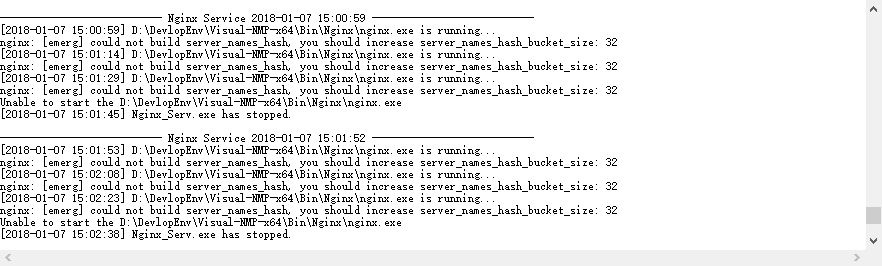
看到什么server_names_hash_bucket_size之类的,我猜测是部署网站的时候,起的主机名称太长了,改小后果然,重启nginx,马上就好了。
解决方案:
edit the http{} nginx configuration:
http {

    server_names_hash_bucket_size ;

    ...

}
- The default value of
server_names_hash_bucket_sizedepends on the size of the processor’s cache line - If a large number of server names are defined, or unusually long server names are defined, tuning the server_names_hash_max_size and server_names_hash_bucket_size directives at the http level may become necessary.
- If the default value of server_names_hash_bucket_size used at the server is not enough, means nginx complained with
could not build the server_names_hash, you should increase server_names_hash_bucket_size: 32, the directive value should be increased to the next power of two (e.g. in this case to 64). - If a large number of server names are defined, and nginx complained with the following error
could not build the server_names_hash, you should increase either server_names_hash_max_size: 512 or server_names_hash_bucket_size: 32. try to set server_names_hash_max_size to a number close to the number of server names. Only if this does not help, or if nginx’s start time is unacceptably long, try to increase server_names_hash_bucket_size. - The hash bucket size parameter is aligned to the size that is a multiple of the processor’s cache line size
nginx问题之nginx: could not build server_names_hash, you should increase server_names_hash_bucket_size解决方案的更多相关文章
- nginx windows could not build server_names_hash, you should increase server_names_hash_bucket_size: 32
nginx 为windows版本 在配置文件nginx.conf 的http{}段增加一行配置 server_names_hash_bucket_size 64; 如果64不够可以设128等
- 【记录】Nginx错误could not build the server_names_hash you should increase server_names_hash_bucket_size: 32
今天遇到这个错误,现记录下解决方案: 在nginx的配置文件的http段中增加如下配置: server_names_hash_bucket_size 64; 下面是nginx官方文档解释: 如果定义了 ...
- Cenos(6.6/7.1)下从源码安装Python+Django+uwsgi+nginx到写nginx的环境部署(一)
梳理下这几个的关系: centos是redhat的社区版操作系统. Python2.7.5是开发语言(centos6.5下自带的python是2.6.6版本,所以需要源码更新,而centos7.1下面 ...
- Master Nginx(1) - Installing Nginx and Third-Party Modules
Installing NGINX and Third-Party Modules Installing Nginx using a package manager Linux(deb-based) s ...
- 【夯实Nginx基础】Nginx工作原理和优化、漏洞
本文地址 原文地址 本文提纲: 1. Nginx的模块与工作原理 2. Nginx的进程模型 3 . NginxFastCGI运行原理 3.1 什么是 FastCGI ...
- Nginx 服务器 之Nginx与tomcat实现负载均衡
本文讲解我们如何使用Nginx做反向带服务器,实现nginx与tomcat服务器集群做负载均衡. 一.nginx与tomcat实现负载均衡 1.在/usr/local/ngnix/conf 创建 ...
- Nginx配置文件(nginx.conf)配置详解(2)
Nginx的配置文件nginx.conf配置详解如下: user nginx nginx ; Nginx用户及组:用户 组.window下不指定 worker_processes 8; 工作进程:数目 ...
- Nginx配置文件(nginx.conf)配置详解
Nginx的配置文件nginx.conf配置详解如下: user nginx nginx ; Nginx用户及组:用户 组.window下不指定 worker_processes 8; 工作进程:数目 ...
- Nginx配置配置文件nginx.conf的设置
引用自:http://www.ha97.com/5194.html #定义Nginx运行的用户和用户组user www www; #nginx进程数,建议设置为等于CPU总核心数.worker_pro ...
随机推荐
- 使用CKRule实现PVC配方计算
1,PVC计算的基本原理 配方员设计好配方,再进行抽象提炼,会出现相对于软件而言可以理解的逻辑,如属性的概念,对厂企生成的PVC产品而言,一般都有产品大类名称,花纹,颜色,长度,宽度,厚度等概念,这对 ...
- Siebel学习笔记
Siebel(escript)的学习:1.Siebel的数据类型 Primitive(原始的)---Number,Integer,Hexadecimal(十六进制),Octal(八进制),Floati ...
- jquery-tags-input 使用经历
源代码里有这么一段,是在tagsInput这里,第一次初始化的时候是正常的,但当第二次初始化的时候就会出现问题,id的值会组合为 id+new Date().getTime() 暂时不清楚作用是什么 ...
- March 5 2017 Week 10 Sunday
If you do what you love, you will never work a day in your life. 做你所爱的事情,你就不会觉得是在工作. Today, one mach ...
- python3乱码问题:接口返回数据中文乱码问题解决
昨天测试接口出现有一个接口中文乱码问题,现象: 1 浏览器请求返回显示正常 2 用代码请求接口返回数据中文显示乱码 3 使用的python3,python3默认unicode编码,中文都是可以正常显示 ...
- Jmeter入门13 jmeter发送application/octet-stream二进制流数据
http接口请求header里面 content-type: application/octet-stream (二进制流数据),如何用jmeter发送请求? 1 添加http请求头 2 http请 ...
- 转载:em(倍)与px的区别
转载出处:http://www.cnblogs.com/showker/archive/2010/05/24/1742821.html 在国内网站中,包括三大门户,以及“引领”中国网站设计潮流的蓝色理 ...
- 用批处理在windows中导出/导入无线网络信息,复制保存为bat即可
@echo offtitle 在windows中导出/导入无线网络信息 :Beginecho ========================echo 请选择操作:echo 1 查看可用的无线网络ec ...
- CryptoSwift:密码学
Hash (Digest) MD5 | SHA1 | SHA224 | SHA256 | SHA384 | SHA512 | SHA3 Cyclic Redundancy Check (CRC) CR ...
- What is a Thread?
https://computing.llnl.gov/tutorials/pthreads/ Technically, a thread is defined as an independent st ...