
nginx问题之nginx: could not build server_names_hash, you should increase server_names_hash_bucket_size解决方案
昨天在nginx上部署了一个网站后,发现访问不了,再去访问之前部署的网站,发现都访问不了了,去看下下nginx,发现nginx服务停止了,没有在运行,重启了下服务,发现还是一样,就去看了下nginx的日志,发下下面这样的提示:
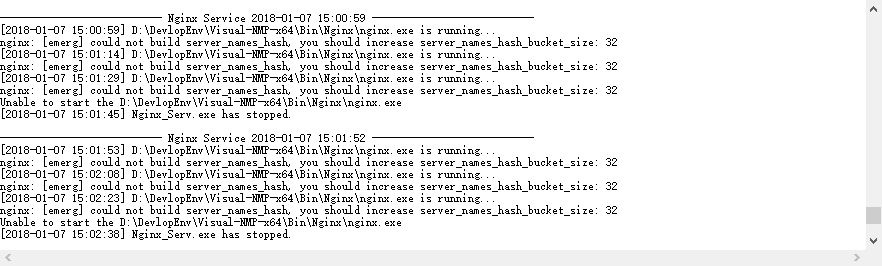
看到什么server_names_hash_bucket_size之类的,我猜测是部署网站的时候,起的主机名称太长了,改小后果然,重启nginx,马上就好了。
解决方案:
edit the http{} nginx configuration:
http {

    server_names_hash_bucket_size ;

    ...

}
- The default value of
server_names_hash_bucket_sizedepends on the size of the processor’s cache line - If a large number of server names are defined, or unusually long server names are defined, tuning the server_names_hash_max_size and server_names_hash_bucket_size directives at the http level may become necessary.
- If the default value of server_names_hash_bucket_size used at the server is not enough, means nginx complained with
could not build the server_names_hash, you should increase server_names_hash_bucket_size: 32, the directive value should be increased to the next power of two (e.g. in this case to 64). - If a large number of server names are defined, and nginx complained with the following error
could not build the server_names_hash, you should increase either server_names_hash_max_size: 512 or server_names_hash_bucket_size: 32. try to set server_names_hash_max_size to a number close to the number of server names. Only if this does not help, or if nginx’s start time is unacceptably long, try to increase server_names_hash_bucket_size. - The hash bucket size parameter is aligned to the size that is a multiple of the processor’s cache line size
nginx问题之nginx: could not build server_names_hash, you should increase server_names_hash_bucket_size解决方案的更多相关文章
- nginx windows could not build server_names_hash, you should increase server_names_hash_bucket_size: 32
nginx 为windows版本 在配置文件nginx.conf 的http{}段增加一行配置 server_names_hash_bucket_size 64; 如果64不够可以设128等
- 【记录】Nginx错误could not build the server_names_hash you should increase server_names_hash_bucket_size: 32
今天遇到这个错误,现记录下解决方案: 在nginx的配置文件的http段中增加如下配置: server_names_hash_bucket_size 64; 下面是nginx官方文档解释: 如果定义了 ...
- Cenos(6.6/7.1)下从源码安装Python+Django+uwsgi+nginx到写nginx的环境部署(一)
梳理下这几个的关系: centos是redhat的社区版操作系统. Python2.7.5是开发语言(centos6.5下自带的python是2.6.6版本,所以需要源码更新,而centos7.1下面 ...
- Master Nginx(1) - Installing Nginx and Third-Party Modules
Installing NGINX and Third-Party Modules Installing Nginx using a package manager Linux(deb-based) s ...
- 【夯实Nginx基础】Nginx工作原理和优化、漏洞
本文地址 原文地址 本文提纲: 1. Nginx的模块与工作原理 2. Nginx的进程模型 3 . NginxFastCGI运行原理 3.1 什么是 FastCGI ...
- Nginx 服务器 之Nginx与tomcat实现负载均衡
本文讲解我们如何使用Nginx做反向带服务器,实现nginx与tomcat服务器集群做负载均衡. 一.nginx与tomcat实现负载均衡 1.在/usr/local/ngnix/conf 创建 ...
- Nginx配置文件(nginx.conf)配置详解(2)
Nginx的配置文件nginx.conf配置详解如下: user nginx nginx ; Nginx用户及组:用户 组.window下不指定 worker_processes 8; 工作进程:数目 ...
- Nginx配置文件(nginx.conf)配置详解
Nginx的配置文件nginx.conf配置详解如下: user nginx nginx ; Nginx用户及组:用户 组.window下不指定 worker_processes 8; 工作进程:数目 ...
- Nginx配置配置文件nginx.conf的设置
引用自:http://www.ha97.com/5194.html #定义Nginx运行的用户和用户组user www www; #nginx进程数,建议设置为等于CPU总核心数.worker_pro ...
随机推荐
- 靠谱的div引入任何外链内容
靠谱的div引入任何外链内容 开发中经常要在div中引入一个页面,该页面可能是内部页面,可能是一个外部页面,也可能只是一个域名获取的请求. 对于内部页面的加载,建议使用jquery的load函数,如: ...
- Java设计模式—责任链模式
责任链模式的定义: 使多个对象都有机会处理请求,从而避免了请求的发送者和接受者之间的耦合关系.将这些对象连成一条链,并沿着这条链传递该请求,直到有对象处理它为止. 责任链模式的重点是在"链& ...
- setExecuteExistingDelayedTasksAfterShutdownPolicy方法与setContinueExistingPeriodicTasksAfterShutdownPolicy方法的比较
一.setExecuteExistingDelayedTasksAfterShutdownPolicy方法 这个方法大多是与schedule方法和shutdown方法搭配使用的. public voi ...
- 基本类型int强转short时发生了什么?
我们知道java中一个int类型占32bits(4字节),一个short占16bits(2字节)强制转换时只取低16位(short类型占的那16位),高16位(去掉低位多出来的那部分)属于溢出不计算, ...
- python中的 if __name__ == “__main__”: 有什么用
https://stackoverflow.com/questions/419163/what-does-if-name-main-do# 问题: What does if name == " ...
- 《浪潮之巅》(第2版):精彩的IT商战史
2011年看过第一版.以为看新版会跳过大部分看过的内容,结果发现还是从头到尾看了一遍,2011年看过的内容已经记不太确切了:) 另外IT的历史太精彩了,许多故事都知道,再看还是挺有意思.当然作者的文字 ...
- 解决SQLite打开已有路径下的db问题
最近遇到的需要加载已有路径下(sd card下)db的问题,找了一下资料,以下是解决的方法,仅供参考(转载自eoe): SQLiteOpenHelper 是Android框架为我们提供的一个非常好的数 ...
- mydumper安装和使用
安装下载安装包:wget https://launchpad.net/mydumper/0.9/0.9.1/+download/mydumper-0.9.1.tar.gz 安装依赖包:yum inst ...
- 【洛谷5292】[HNOI2019] 校园旅行(思维DP)
点此看题面 大致题意: 给你一张无向图,每个点权值为\(0\)或\(1\),多组询问两点之间是否存在一条回文路径. 暴力\(DP\) 首先,看到\(n\)如此之小(\(n\le5000\)),便容易想 ...
- 小练习——关于循环条件---for
1.打印100个“非常”的句子 static void Main(string[] args) { //打印20个“非常" Console.WriteLine("打印100个非常& ...