
nginx 方向代理
#nginx 监听原理 先监听端口 --> 再配置域名 -->匹配到就访问local 否则 没有匹配到域名就默认访问第一个监听端口的local地址
# vi nginx.conf
user nobody nobody; # 运 nginx的所属组和所有者
worker_processes 2; # 开启两个 nginx工作进程,一般几个 CPU核心就写几
error_log logs/error.log notice; # 错误日志路径
pid logs/nginx.pid; # pid 路径
events {
worker_connections 1024; # 一个进程能同时处理1024个请求
}
http {
include mime.types;
default_type application/octet-stream;
log_format main $remote_addr – $remote_user [$time_local] “$request” $status $body_bytes_sent “$http_referer” $http_user_agent” “$http_x_forwarded_for” ;
access_log logs/access.log main; # 默认访问日志路径
sendfile on;
keepalive_timeout 65; # keepalive超市时间
# 开始配置一个域名,一个server配置段一般对应一个域名
server {
listen 80; # 监听端口()
# 在本机所有ip上监听80,也可以写为192.168.1.202:80,这样的话,就只监听192.168.1.202 上的80口
server_name www.heytool.com; # 域名
root /www/html/www.heytool.com; # 站点根目录(程序目录)
index index.html index.htm; # 索引文件
# 可以有多个 location
location / {
#proxy_pass www.baidu.com # 跳到 百度页面 (网址)
root /www/html/www.heytool.com; # 站点根目录(程序目录) (本地的路径)
}
error_page 500 502 503 504 /50x.html;
# 定义错误页面,如果是500错误,则把站点根目录下的50x.html返回给用户
location = /50x.html {
root /www/html/www.heytool.com;
}
}
nginx 服务器重启命令,关闭
在Windows下使用Nginx,我们需要掌握一些基本的操作命令,比如:启动、停止Nginx服务,重新载入Nginx等,下面我就进行一些简单的介绍。
1、启动:
C:\server\nginx-1.0.2>start nginx或
C:\server\nginx-1.0.2>nginx.exe
nginx -t -c /path/to/nginx.conf 测试nginx配置文件是否正确
关闭nginx:
nginx -s stop :快速停止nginx
quit :完整有序的停止nginx
其他的停止nginx 方式:
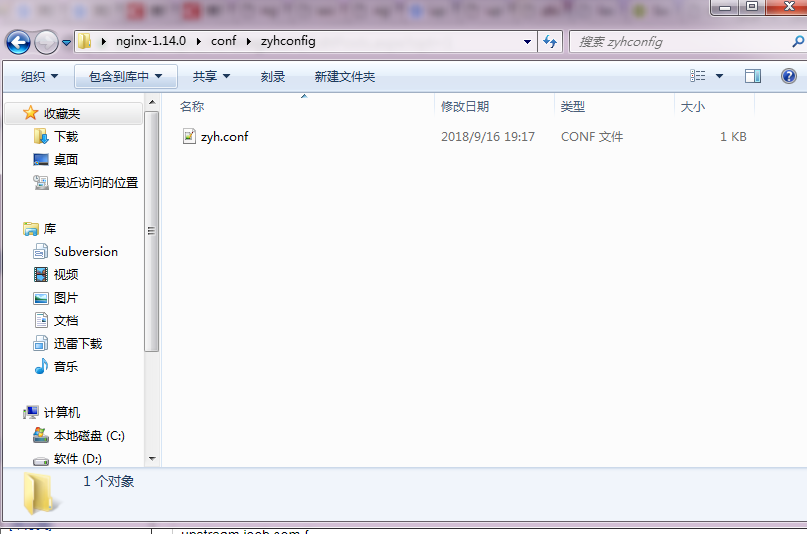
-- 定义 zyh.conf
upstream ioob.com {
server localhost:8888;
}
upstream tomcatserver2 {
server 192.168.72.49:8082;
}
server {
listen 8089;
server_name 8081.max.com;
#charset koi8-r;
#access_log logs/host.access.log main;
location / {
proxy_pass http://ioob.com;
index index.html index.htm;
}
}
-- nginx 原始配置文件 红色为引入的配置文件
#user nobody;
worker_processes 1;
#error_log logs/error.log;
#error_log logs/error.log notice;
#error_log logs/error.log info;
#pid logs/nginx.pid;
events {
worker_connections 1024;
}
http {
include mime.types;
default_type application/octet-stream;
include zyhconfig/*.conf;
#log_format main '$remote_addr - $remote_user [$time_local] "$request" '
# '$status $body_bytes_sent "$http_referer" '
# '"$http_user_agent" "$http_x_forwarded_for"';
#access_log logs/access.log main;
sendfile on;
#tcp_nopush on;
#keepalive_timeout 0;
keepalive_timeout 65;
#gzip on;
server {
listen 80;
server_name localhost;
#charset koi8-r;
#access_log logs/host.access.log main;
location / {
root html;
index index.html index.htm;
}
#error_page 404 /404.html;
# redirect server error pages to the static page /50x.html
#
error_page 500 502 503 504 /50x.html;
location = /50x.html {
root html;
}
# proxy the PHP scripts to Apache listening on 127.0.0.1:80
#
#location ~ \.php$ {
# proxy_pass http://127.0.0.1;
#}
# pass the PHP scripts to FastCGI server listening on 127.0.0.1:9000
#
#location ~ \.php$ {
# root html;
# fastcgi_pass 127.0.0.1:9000;
# fastcgi_index index.php;
# fastcgi_param SCRIPT_FILENAME /scripts$fastcgi_script_name;
# include fastcgi_params;
#}
# deny access to .htaccess files, if Apache's document root
# concurs with nginx's one
#
#location ~ /\.ht {
# deny all;
#}
}
# another virtual host using mix of IP-, name-, and port-based configuration
#
#server {
# listen 8000;
# listen somename:8080;
# server_name somename alias another.alias;
# location / {
# root html;
# index index.html index.htm;
# }
#}
# HTTPS server
#
#server {
# listen 443 ssl;
# server_name localhost;
# ssl_certificate cert.pem;
# ssl_certificate_key cert.key;
# ssl_session_cache shared:SSL:1m;
# ssl_session_timeout 5m;
# ssl_ciphers HIGH:!aNULL:!MD5;
# ssl_prefer_server_ciphers on;
# location / {
# root html;
# index index.html index.htm;
# }
#}
}
nginx 方向代理的更多相关文章
- 微信小程序使用nginx方向代理实现内嵌非业务域名
通过上一篇文章简单介绍了一下微信小程序的新组件<web-view>,实现了在小程序中内嵌业务域名的功能.但是boss要的小程序中不仅想内嵌业务域名,还想要打开一些非业务域名(无法操作web ...
- nginx方向代理详解及配置
一代理服务器1.代理服务器,客户机在发送请求时,不会直接发送给目的主机,而是先发送代理服务器,代理服务器接受客户机请求之后,在向主机发出,并接受目的主机返回的数据,存放在代开服务器的硬盘中,在发送给客 ...
- nginx方向代理
nginx 的安装 # yum install nginx 新建配置文件 # vi /etc/nginx/conf.d/resume-xyz-8081.conf 配置 upstream resume ...
- nginx 方向代理 jenkins
环境 10.0.0.20 Nginx 10.0.0.21 jenkins 10.0.0.20 nginx 进入到nginx目录,去除无用字段输入到conf.d/jenkins.conf 文件中 [ro ...
- nginx高性能WEB服务器系列之七--nginx反向代理
nginx系列友情链接:nginx高性能WEB服务器系列之一简介及安装https://www.cnblogs.com/maxtgood/p/9597596.htmlnginx高性能WEB服务器系列之二 ...
- nginx 配置方向代理出错 The character [_] is never valid in a domain name
nginx 配置方向代理出错 The character [_] is never valid in a domain name 下面是配置信息: 原因是使用的tomcat为8及以上的版本时upstr ...
- Nginx 的方向代理及配置
最近有打算研读nginx源代码,看到网上介绍nginx可以作为一个反向代理服务器完成负载均衡.所以搜罗了一些关于反向代理服务器的内容,整理综合. 一 概述 反向代理(Reverse Proxy)方式 ...
- Nginx 反向代理、负载均衡、页面缓存、URL重写以及读写分离
1.环境准备 前端Nginx:10.160.65.44 后端WEB服务器两台:10.160.65.49/10.160.65.50 2.安装Nginx: 下载nginx-1.9.15.tar.gz,放置 ...
- 最简单实现跨域的方法:用 Nginx 反向代理
本文作者: 伯乐在线 - 良少 .未经作者许可,禁止转载!欢迎加入伯乐在线 专栏作者. 什么是跨域 跨域,指的是浏览器不能执行其他网站的脚本.它是由浏览器的同源策略造成的,是浏览器对javascrip ...
随机推荐
- django(7)modelform操作及验证、ajax操作普通表单数据提交、文件上传、富文本框基本使用
一.modelForm操作及验证 1.获取数据库数据,界面展示数据并且获取前端提交的数据,并动态显示select框中的数据 views.py from django.shortcuts import ...
- 线程中断方法interrupt() 与 cancel()
(一).关于interrupt() interrupt()并不直接中断线程,而是设定一个中断标识,然后由程序进行中断检查,确定是否中断. 1. sleep() & interr ...
- 1个示例 学会 mvc 常用标签
HtmlHelper用法大全3:Html.LabelFor.Html.EditorFor.Html.RadioButtonFor.Html.CheckBoxFor @Html.***For:为由指定 ...
- 1229:密码截获----java
题目描述 Catcher是MCA国的情报员,他工作时发现敌国会用一些对称的密码 进行通信,比如像这些ABBA,ABA,A,123321,但是他们有时会在开始或结束时加入一些无关的字符以防止别国破解.比 ...
- Redis的Publish/Subscribe
Publish/Subscribe 从字面上理解就是发布(Publish)与订阅(Subscribe),在Redis中,你可以设定对某一个key值进行消息发布及消息订阅,当一个key值上进行了消息发布 ...
- 【Java集合】LinkedList详解中篇
这是关于LinkedList的第二篇文章,我将会源码分析LinkedList的部分重要代码,关键地方我都有注释说明,希望大家能比较明白的看懂! 分析源码按照顺序分析: 变量 构造方法 方法 一.变量 ...
- Java Timer定时器原理
做项目很多时候会用到定时任务,比如在深夜,流量较小的时候,做一些统计工作.早上定时发送邮件,更新数据库等.这里可以用Java的Timer或线程池实现.Timer可以实现,不过Timer存在一些问题.他 ...
- <转>MapReduce工作原理图文详解
转自 http://weixiaolu.iteye.com/blog/1474172前言: 前段时间我们云计算团队一起学习了hadoop相关的知识,大家都积极地做了.学了很多东西,收获颇丰.可是开学 ...
- FTP FileZilla Server 本地加密C# 实现
最近公司要做一个资料管理模块,因系统是C/S架构,原来小文件都是直接使用7Z压缩后保存到SQL Server数据库 而资料管理模块也就是文件上传,下载加权限管理,考虑文件较多,还可能比较大,所以打算在 ...
- BZOJ3033: 太鼓达人(欧拉回路)
题意 题目链接 Sol 第一问的答案是\(2^M\),因为每个位置只有\(0 / 1\)两种情况,最优情况下一定是每个位置代表着一个长度为\(K\)的字符串 考虑相邻两个字符串之间的转化,第二个字符串 ...