
在WebService中使用Microsoft.Practices.EnterpriseLibrary.Data配置数据库
1、 新建WebApplication1项目
1.1 新建—Web—ASP.NET Empty Web Application--WebApplication1
1.2 添加一个WebForm1
2、 新建webService项目
2.1 新建—Web—ASP.NET Empty Web Application—WebApplicationService
2.2 选择WebApplicationService—右键—Add—WebService (ASMX)-- WebServiceGSS.asmx
2.3 在项目WebApplicationService中添加引用
Microsoft.Practices.EnterpriseLibrary.Data.dll(版本4.1)
Microsoft.Practices.EnterpriseLibrary.Common.dll(版本4.1)
注意,如果报错,Microsoft.Practices.EnterpriseLibrary.Common”類型不能實例化之類的,
可能解決方法:Microsoft.Practices.ObjectBuilder.dll加到References中就哦啦~~~
写服务中的方法,
文件WebServiceGSS.asmx代码:
using System;

using System.Collections.Generic;

using System.ComponentModel;

using System.Data;

using System.Linq;

using System.Web;

using System.Web.Services;

namespace WebApplicationService

{

    [WebService(Namespace = "http://Mercer.GlobalSwitchingService/2008/09", Name = "GlobalSwitchingService")]

    [System.Web.Services.WebServiceBindingAttribute(ConformsTo = System.Web.Services.WsiProfiles.BasicProfile1_1, EmitConformanceClaims = true, Name = "GlobalSwitchingService")]

    [ToolboxItem(false)]

    public class WebServiceGSS : System.Web.Services.WebService

    {

        [WebMethod]

        public string HelloWorld()

        {

            return "Hello World";

        }

        [WebMethod(Description = "Returns a list of ReportServerURL one is for source another is for destination")]

        public DataSet GetReportServerURL(Guid sourceClientID, Guid destinationClientID)

        {

            return GSSDML.GetReportServerURL(sourceClientID, destinationClientID);

        }

        [WebMethod(Description = "Returns a list of Roles")]

        public DataSet GetReportRole()

        {

            return GSSDML.GetRole();

        }

    }

}
文件GSSDML.cs代码(和WebServiceGSS.asmx分开,条理清楚些)
using Microsoft.Practices.EnterpriseLibrary.Data;

using System;

using System.Collections.Generic;

using System.Data;

using System.Data.Common;

using System.Data.SqlClient;

using System.Linq;

using System.Web;

namespace WebApplicationService

{

    public class GSSDML

    {

        private const string DB_GSS = "DB_GSS";

        private const string DB_FAS = "DB_FAS";

        public static DataSet GetReportServerURL(Guid sourceClientID, Guid destinationClientID)

        {

            SqlDataAdapter adapter = new SqlDataAdapter();

            DataSet ds = new DataSet();

            try

            {

                using (DbConnection con = DatabaseFactory.CreateDatabase(DB_GSS).CreateConnection())

                {

                    adapter = new SqlDataAdapter();

                    adapter.SelectCommand = new SqlCommand();

                    adapter.SelectCommand.Connection = con as SqlConnection;

                    adapter.SelectCommand.CommandText = "getStudentTable";

                    adapter.SelectCommand.CommandType = CommandType.StoredProcedure;

                    //adapter.SelectCommand.Parameters.Add(new SqlParameter("@SourceClientID", sourceClientID));

                    //adapter.SelectCommand.Parameters.Add(new SqlParameter("@DestinationClientID", destinationClientID));

                    con.Open();

                    adapter.Fill(ds);

                }

            }

            catch

            {

            }

            return ds;

        }

        public static DataSet GetRole()

        {

            SqlDataAdapter adapter = new SqlDataAdapter();

            DataSet ds = new DataSet();

            try

            {

                using (DbConnection con = DatabaseFactory.CreateDatabase(DB_FAS).CreateConnection())

                {

                    adapter = new SqlDataAdapter();

                    adapter.SelectCommand = new SqlCommand();

                    adapter.SelectCommand.Connection = con as SqlConnection;

                    adapter.SelectCommand.CommandText = " SELECT * from [dbo].[Role]";

                    adapter.SelectCommand.CommandType = CommandType.Text;

                    con.Open();

                    adapter.Fill(ds);

                }

            }

            catch

            {

            }

            return ds;

        }

    }

}
服务中的Config文件
<?xml version="1.0"?>

<!--

  For more information on how to configure your ASP.NET application, please visit

  http://go.microsoft.com/fwlink/?LinkId=169433

  -->

<configuration>

  <connectionStrings>

    <add name="DB_GSS" connectionString="Database=Test; Server=.; User ID=sa;Password=123;Connection Timeout=90;MultipleActiveResultSets=true;" providerName="System.Data.SqlClient"/>

    <add name="DB_FAS" connectionString="Database=fas; Server=.; User ID=sa;Password=123;Connection Timeout=90;MultipleActiveResultSets=true;" providerName="System.Data.SqlClient"/>

  </connectionStrings>

  <system.web>

    <compilation debug="true" targetFramework="4.5.2" />

    <httpRuntime targetFramework="4.5.2" />

  </system.web>

</configuration>
3、添加WebService引用
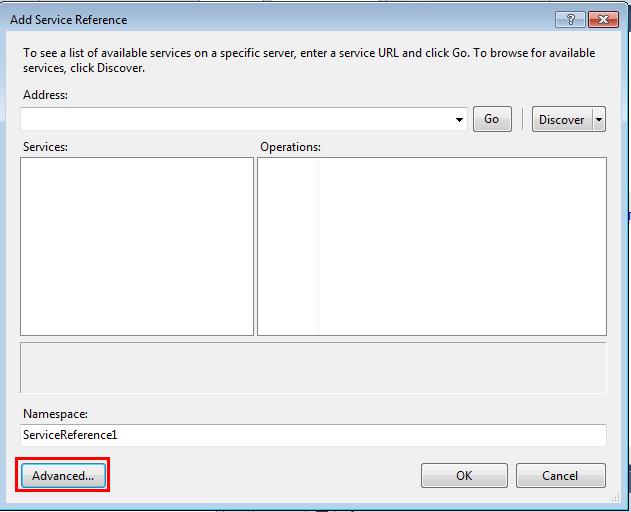
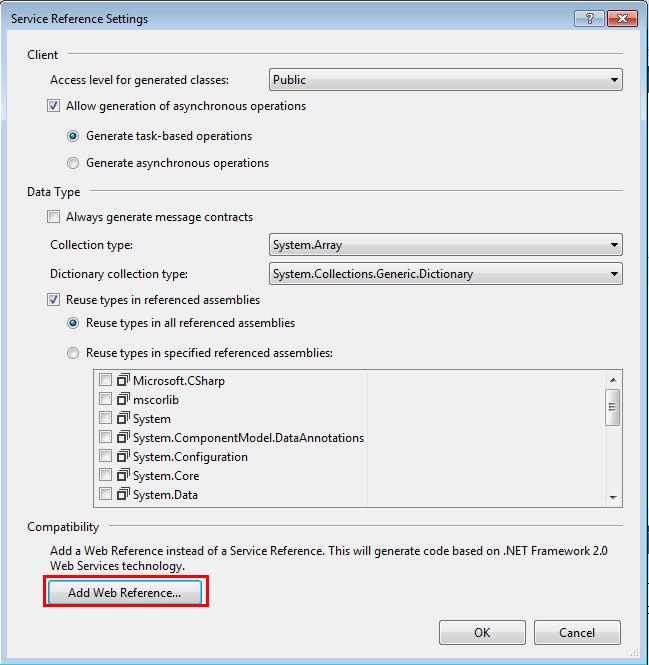

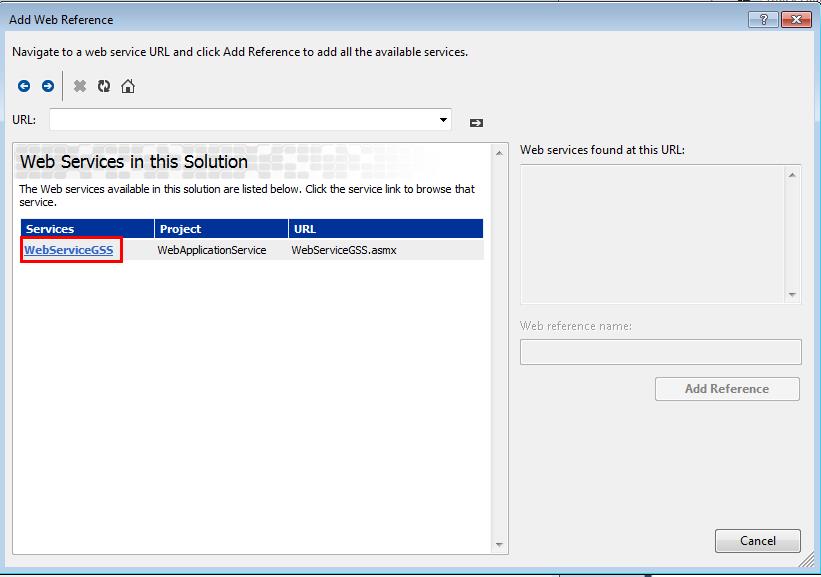
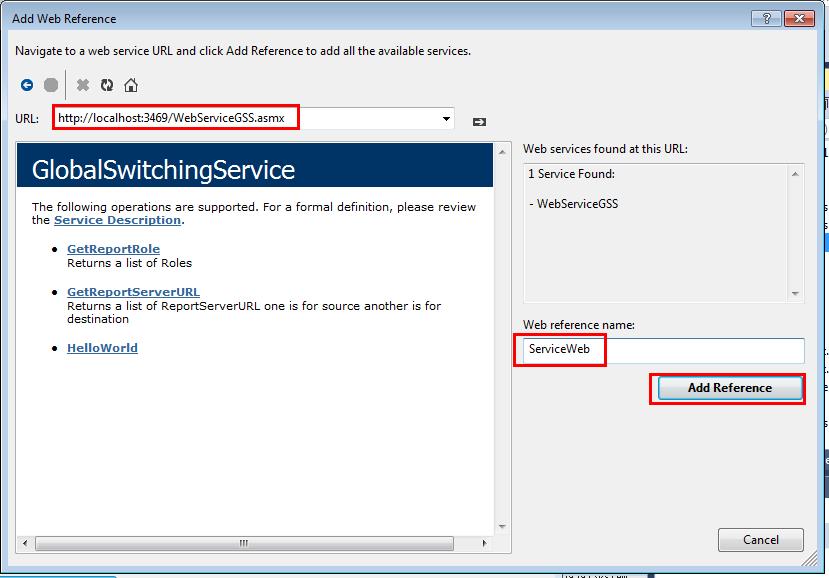
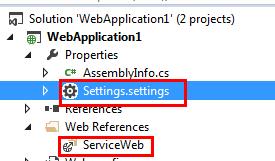
4、添加完成后会出现一个Settings.settings和Web References

5、在WebForm1.aspx.cs中写测试代码
using System;

using System.Collections.Generic;

using System.Data;

using System.Linq;

using System.Web;

using System.Web.UI;

using System.Web.UI.WebControls;

namespace WebApplication1

{

    public partial class WebForm1 : System.Web.UI.Page

    {

        protected void Page_Load(object sender, EventArgs e)

        {

            web();

        }

        public void web()

        {

            ServiceWeb.GlobalSwitchingService serviceWeb = new ServiceWeb.GlobalSwitchingService();

            //serviceWeb.Url = "http://localhost:25003/WebServiceGSS.asmx";

            //在setting中配置url

            //serviceWeb.Url = Properties.Settings.Default.GlobalSwitchingService;

            //在config中配置url

            //serviceWeb.Url = System.Configuration.ConfigurationManager.AppSettings["GlobalSwitchingService"];

            string s = serviceWeb.HelloWorld();

            Guid id = new Guid();

            DataSet ds = serviceWeb.GetReportServerURL(id, id);

            DataSet ds2 = serviceWeb.GetReportRole();

        }

    }

}
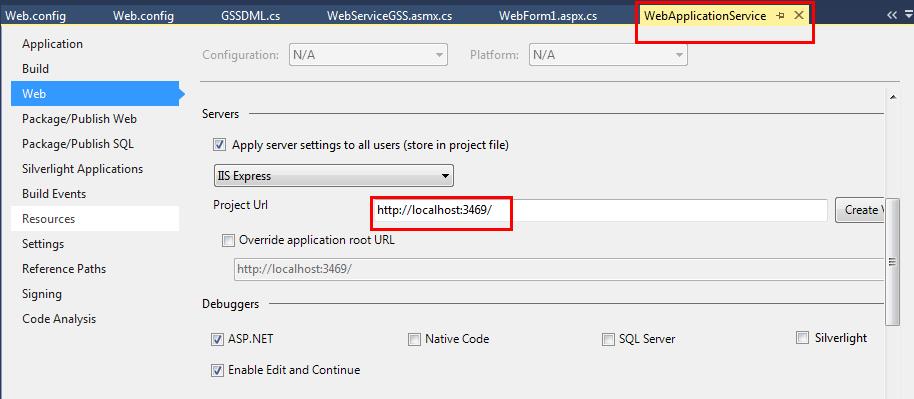
6、如果想自定义服务的端口号,可以在属性的web页设置
在WebService中使用Microsoft.Practices.EnterpriseLibrary.Data配置数据库的更多相关文章
- Microsoft.Practices.EnterpriseLibrary.Logging的使用
翻译 原文地址:http://www.devx.com/dotnet/Article/36184/0/page/1 原文作者:Thiru Thangarathinam (好强大的名字) 翻译: fl ...
- c# 之 Microsoft.Practices.EnterpriseLibrary连接Oracle
首先下载Microsoft Enterprise Library 5.0:http://www.microsoft.com/en-us/download/details.aspx?id=15104,这 ...
- Microsoft.Practices.EnterpriseLibrary
项目中使用了Microsoft.Practices.EnterpriseLibrary这个东西,根据名字猜测和微软有关系(可以翻译为:微软实践企业库). 看到了引入了两个命名空间: using Mic ...
- Could not load file or assembly 'Microsoft.Practices.EnterpriseLibrary.Common, Version=5.0.414.0, ...
使用oracle数据库一个多月依赖这问题一直都得不到解决,最近任务不是很忙了,所以决定把这问题解决掉.写一篇文章做记录. 以上错误主要是net程序oracle数据库使用了Microsoft Enter ...
- 缓存篇~第六回 Microsoft.Practices.EnterpriseLibrary.Caching实现基于方法签名的数据集缓存
返回目录 这一讲中主要是说EnterpriseLibrary企业级架构里的caching组件,它主要实现了项目缓存功能,它支持四种持久化方式,内存,文件,数据库和自定义,对于持久化不是今天讨论的重要, ...
- VS - Microsoft.Practices.EnterpriseLibrary.Logging
string fileName = AppDomain.CurrentDomain.BaseDirectory + "\\log.txt";File.AppendAllText(f ...
- 错误:创建 cachingConfiguration 的配置节处理程序时出错: 未能加载文件或程序集“Microsoft.Practices.EnterpriseLibrary.Caching,
问题: 错误:创建 cachingConfiguration 的配置节处理程序时出错: 未能加载文件或程序集“Microsoft.Practices.EnterpriseLibrary.Caching ...
- Microsoft.Practices.EnterpriseLibrary企业库问题
System.Configuration.ConfigurationErrorsException: Invalid TraceListenerData type in configuration ' ...
- java如何实现webservice中wsdlLocation访问地址的可配置化
背景:项目中调用了别的系统的webservice接口,调用成功之后发现wsdlLocation的地址是写死的,不方便修改,所以需要实现地址,包括用户名密码的可配置.项目的框架是Spring,调用web ...
随机推荐
- React中super(props)和super()以及不写super()的区别
一.constructor()和super()的基本含义 constructor() -- 构造方法 这是ES6对类的默认方法,通过new命令生成对象实例自动调用的方法.并且,该方法是类中必须要有的, ...
- 训练指南 UVALive - 3989(稳定婚姻问题)
ayout: post title: 训练指南 UVALive - 3989(稳定婚姻问题) author: "luowentaoaa" catalog: true mathjax ...
- (寒假GYM开黑)2018-2019 ACM-ICPC Brazil Subregional Programming Contest
layout: post title: 2018-2019 ACM-ICPC Brazil Subregional Programming Contest author: "luowenta ...
- REST SOAP XML-RPC分析比较
本文的标题“REST与SOAP之比较”确实有些让人误解.REST是代表性状态传输的名称首字母缩写,与其说它是标准,不如说是一种风格.然而,在我的前一篇文章中,正如我们所讨论的,众多从事Web服务的软件 ...
- 1.5(java学习笔记)this关键字
this关键字主要有三个作用 1.调用本类中的属性. public class TextThis { public static void main(String[] args){ Person p1 ...
- Exercise02_09
import javax.swing.JOptionPane; public class Acceleration { public static void main(String[] args){ ...
- Mybatis全部标签
一.定义SQL语句 (1)select 标签的使用 属性介绍: id :唯一的标识符. parameterType:传给此语句的参数的全路径名或别名 例:com.test.poso.User或user ...
- Problem B: 调用函数,输出100到200之间的所有素数
#include <stdio.h> int isPrime(unsigned int n)//定义素数函数 { int i; || n == ) ; ; i * i <= n; i ...
- 让XCode的Stack Trace信息可读
程序报错信息如下:
- PHP线程安全和非线程安全的区别
Windows版的PHP从版本5.2.1开始有Thread Safe.这两者不同在于何处?到底应该用哪种?这里做一个简单的介绍. 从2000年10月20日发布的第一个Windows版的PHP3.0.1 ...