
43-Identity MVC:UI
1-打开之前写的MvcCookieAuthSample项目, 在AccountController新加Register,Login方法
    public class AccountController : Controller

    {

        public IActionResult Register()

        {

            return View();

        }

        public IActionResult Login()

        {

            return View();

        }

    }
2-新加LoginViewModel,RegisterViewModel
namespace MvcCookieAuthSample.ViewModel

{

    public class LoginViewModel

    {

        public string Email { get; set; }

        public string Password { get; set; }

    }

}
3-在View/Account/Login.cshtml增加如下代码
<h3>Login</h3>

@model MvcCookieAuthSample.ViewModel.LoginViewModel

<div class="row">

    <div class="col-md-4">

        <form method="post">

            <hr />

            <div class="form-group">

                <label asp-for="Email"></label>

                <input asp-for="Email" class="form-control" />

            </div>

            <div class="form-group">

                <label asp-for="Password"></label>

                <input asp-for="Password" class="form-control" />

            </div>

            <button type="submit" class="btn btn-default">Login</button>

        </form>

    </div>

</div>
3-在View/Account/Register.cshtml增加如下代码
<h3>Register</h3>

@model MvcCookieAuthSample.ViewModel.RegisterViewModel

<div class="row">

    <div class="col-md-4">

        <form method="post">

            <h4>register a new account</h4>

            <hr />

            <div class="form-group">

                <label asp-for="Email"></label>

                <input asp-for="Email" class="form-control" />

            </div>

            <div class="form-group">

                <label asp-for="Password"></label>

                <input asp-for="Password" class="form-control" />

            </div>

            <div class="form-group">

                <label asp-for="ConfirmPassword"></label>

                <input asp-for="ConfirmPassword" class="form-control" />

            </div>

            <button type="submit" class="btn btn-default">Register</button>

        </form>

    </div>

</div>
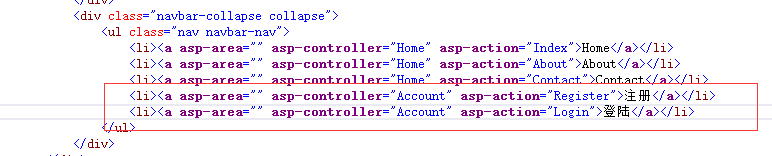
4-为了能在导航中直接跳转到当前链接中,在shared/_layout.cshtml
43-Identity MVC:UI的更多相关文章
- 任务43:Identity MVC:UI
基于原来做的cookie认证的代码:MvcCookieAuthSample 增加登陆和退出的方法: 增加Login和SignIn这两个Action方法. 在Views下面创建Account文件夹,然后 ...
- Identity MVC:UI
基于原来做的cookie认证的代码:MvcCookieAuthSample 增加登陆和退出的方法: 增加Login和SignIn这两个Action方法. 在Views下面创建Account文件夹,然后 ...
- 任务45:Identity MVC:注册逻辑实现
任务45:Identity MVC:注册逻辑实现 做登陆 在注册成功直接进行登陆,使用SignIn 这里的signIn实际上是HttpContext.Signin的封装 await _signMana ...
- 任务46:Identity MVC:登录逻辑实现
任务46:Identity MVC:登录逻辑实现 实现登陆的方法 退出方法 _layout里面增加如下的代码: Login.cshtml 运行代码测试: 这个地方的单词之前拼错了.这里进行修正 输入账 ...
- 任务47:Identity MVC:ReturnUrl实现
任务47:Identity MVC:ReturnUrl实现 在最上面加一个私有的方法 登陆也加上returnUrl Login的post方法.加入returnUrl的参数 登陆界面也需要加上 asp- ...
- 任务48:Identity MVC:Model后端验证
任务48:Identity MVC:Model后端验证 RegisterViewModel using System; using System.Collections.Generic; using ...
- 任务49:Identity MVC:Model前端验证
任务49:Identity MVC:Model前端验证 前端验证使用的是jquery的validate的组件 _ValidationScriptsPartial.cshtml 在我们的layout里面 ...
- 任务50:Identity MVC:DbContextSeed初始化
任务50:Identity MVC:DbContextSeed初始化 首先添加seed 每次应用程序启动,监测一下,是否是第一次启动.如果是第一次执行,我们需要在数据库内添加一个记录 比如说我们的用户 ...
- 任务44:Identity MVC: EF + Identity实现
使用VSCode开发 Razer的智能感知不好.所以这里切换为VS2017进行开发: 新建一个Data的文件夹来存放我们的DBContext.在Data文件夹下新建: ApplicationDbCon ...
随机推荐
- May 31st 2017 Week 22nd Wednesday
No great discovery was ever made without a bold guess. 没有大胆的猜测就没有伟大的发现. When our ancestors saw the b ...
- SpringCloud实战3-Hystrix请求熔断与服务降级
我们知道大量请求会阻塞在Tomcat服务器上,影响其它整个服务.在复杂的分布式架构的应用程序有很多的依赖,都会不可避免地在某些时候失败.高并发的依赖失败时如果没有隔离措施,当前应用服务就有被拖垮的风险 ...
- 成都夏季招聘会IT行业缺口大!
上个周末成都的夏季招聘会在新会展中心举行,我们传智播客的专业市场调查员也深入当中.了解IT行业招聘情况,我们发如今IT软件行业专区招聘的公司特别多,可是去应聘的人却非常少.这意味着IT行业正处于供不应 ...
- 【[NOI2006]最大获利】
题目 并不知到为什么这道题讲了这么久 我们发现这道题就是最小割的板子啊,完全可以套上文理分科的板子 把每个机器和\(T\)连边,容量为\(p_i\),这些\(p_i\)并不计入总贡献 对于每一个要求我 ...
- 【luoguP1563】【2016NOIP-High】玩具迷题
P1563 玩具谜题 题目描述 小南有一套可爱的玩具小人, 它们各有不同的职业. 有一天, 这些玩具小人把小南的眼镜藏了起来. 小南发现玩具小人们围成了一个圈,它们有的面朝圈内,有的面朝圈外.如下图: ...
- VS2012 Getting Started with Owin and Katana
参考地址:http://www.asp.net/aspnet/overview/owin-and-katana/getting-started-with-owin-and-katana 小提示: 该示 ...
- ES6 基础概念汇总
let const命令 声明变量 let 声明的变量 没有变量提升的效果 1 let声明的变量只在代码块内有效 for循环的计数器 2 不存在变量提升 要在声明后使用 let bar = 2 3 ...
- Alert Log删除
标题:Renaming or Deleting the Alert Log While an Oracle Instance is Up & Running (文档 ID 74966.1) Q ...
- javascript跳转页面
<script type="text/javascript"> function openNewTab() { parent.addExampleTab({ id: a ...
- JavaScript-语法专题
一.数据类型的转换 概述 JavaScript是一种动态语言,变量没有类型限制,可以随时赋予任意值 强制转换:主要是值Number(),String(),Boolean三个函数 Number函数,可以 ...