
wc.exe C++实现
Github项目地址
PSP表格
| PSP2.1 | Personal Software Process Stages | 预估耗时(分钟) | 实际耗时(分钟) |
|---|---|---|---|
| Planning | 计划 | 40 | 35 |
| · Estimate | · 估计这个任务需要多少时间 | 90 | 120 |
| Development | 开发 | ||
| · Analysis | · 需求分析 (包括学习新技术) | 100 | 140 |
| · Design Spec | · 生成设计文档 | 120 | 90 |
| · Design Review | · 设计复审 (和同事审核设计文档) | 60 | 50 |
| · Coding Standard | · 代码规范 (为目前的开发制定合适的规范) | 20 | 25 |
| · Design | · 具体设计 | 20 | 55 |
| · Coding | · 具体编码 | 300 | 450 |
| · Code Review | · 代码复审 | 40 | 60 |
| · Test | · 测试(自我测试,修改代码,提交修改) | 60 | 100 |
| Reporting | 报告 | ||
| · Test Report | · 测试报告 | 120 | 150 |
| · Size Measurement | · 计算工作量 | 10 | 10 |
| · Postmortem & Process Improvement Plan | · 事后总结, 并提出过程改进计划 | 60 | 10 |
| 合计 | 1040 | 1295 |
解题思路
项目工作被分成三个层次:基本、扩展、高级。
应该由最底层的单文件处理出发,延伸到多文件的处理。
由各项的功能如何定义和实现出发,来充实我们的程序。
- -c 统计文件中的字符数
以程序的眼光看待,任何字符(除了‘\r’),均算是一个字符。
基于这样的定义,对目标文件的每读入一个字符,若其不是‘\r’,均增加统计的字符数。 - -w 统计文件中的词的数量
词的定义多种多样,这里的定义采用一系列连续的字母或数字或下划线,为一个词;或者对于中文来说,一个字即为一个词。
基于这样的定义,我们可以把所有键盘上打出的符号视作一个栏杆,栏杆两边的有字符数部分视作是两个独立的词,以此来统计词的数量。 - -l 统计文件中共有几行
行数的判定十分明朗,当程序每读到一个‘\n’时,或文件读完毕时(但是文件有内容时),视作一个换行,如此来统计行数。 - -s 递归处理目录下符合条件的文件
C++的文件处理十分麻烦,我在此处卡了许久。需要利用封装度较低的库函数来实现对文件夹的便利和通配符的支持,还有中文的支持。由此使用了io.h、direct.h、windows.h、getopt,这四个库文件。通过自己手写封装函数来实现自己的需求。 - 返回更复杂的数据(代码行 / 空行 / 注释行)。
相较于上一个而言,这个较为简单和明确:
- 空行:本行全部是空格或格式控制字符,如果包括代码,则只有不超过一个可显示的字符,例如“{”。
- 代码行:本行包括多于一个字符的代码。
- 注释行:本行不是代码行,并且本行包括注释。一个有趣的例子是有些程序员会在单字符后面加注释:
} //注释
在这种情况下,这一行属于注释行。
设计实现过程
程序设计主要分三个部分,主要逻辑围绕着main展开。
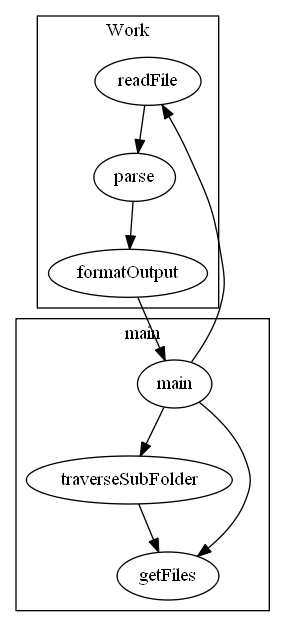
程序包含两个类,其中一个负责全流程的读入解析和输出,另外一个工具类作为中文支持存在,提供字符转换。
工具类 WStringTool中包含有
- string GbkToUtf8(const std::string& strGbk);
- string Utf8ToGbk(const std::string& strUtf8);
- wstring UTF8ToUnicode(const char* str);
- char *UnicodeToUTF8(const wchar_t* str);
- wstring GbkToUnicode(const char* strGbk);
- string UnicodeToGbk (const std::wstring& strUnicode);
六种方法,这里只使用了GbkToUnicode和UTF8ToUnicode这两个方法。
在main()中使用库文件getopt来获取命令行下每一个参数存在性。
    while(true)

    {

        int c = getopt(argc, argv, par);

        if(c == -1)

            break;

        switch (c) {

        case 'c':Work::calcChar = true;

            break;

        case 'w':Work::calcWord = true;

            break;

        case 'l':Work::calcLine = true;

            break;

        case 's':recursive = true;

            break;

        case 'a':Work::detail = true;

            break;

        case 1: //读入到文件参数

            match.push_back(optarg);

        default:

            break;

        }

    }
这里的case 1会对每一个文件都进行压入,可以通过此点来拓展出进行处理多文件的能力。
work.cpp中读入文件的操作,权衡了易用性和高效性。
bool Work::readFile(const wchar_t* fileName)

{

    ifstream fin;

    fin.open(fileName, ios::binary);

    if(fin.is_open() == false)

        return false;

    fin.seekg(0, ios::end);

    int len = static_cast<int>(fin.tellg()) + 1;

    fin.seekg(0, ios::beg);

    delete res;

    init();

    res = new char[len];

    fin.read(res, len);

    res[len-1] = '\0'; // before is 0xCD

    this->fileName = wstring(fileName);

    return true;

}
关于每一行代码的检测函数,集成度较高,解耦难度高,请到我项目地址去查看。
测试运行
运行参数:wc.exe helloworld.txt -c -w -l
运行结果:
...\helloworld.txt

The number of char is 104

The number of word is 15

The number of line is 8
运行参数:wc.exe *.txt -c -w -l
运行结果:
...\helloworld.txt

The number of char is 104

The number of word is 15

The number of line is 8

...\x.txt

The number of char is 5

The number of word is 2

The number of line is 1
运行参数:wc.exe *.txt -s -a
运行结果:
...\helloworld.txt

The number of blank-line is 0

The number of code-line is 7

The number of annotation-line is 1

...\x.txt

The number of blank-line is 0

The number of code-line is 1

The number of annotation-line is 0

...\kkkk\ssss.txt

The number of blank-line is 0

The number of code-line is 7

The number of annotation-line is 0

...\kkkk\x.txt

The number of blank-line is 0

The number of code-line is 7

The number of annotation-line is 0

...\ssss\ssss.txt

The number of blank-line is 0

The number of code-line is 7

The number of annotation-line is 0

...\ssss\x.txt

The number of blank-line is 0

The number of code-line is 7

The number of annotation-line is 0

...\kkkk\ssss\ssss.txt

The number of blank-line is 0

The number of code-line is 7

The number of annotation-line is 0

...\kkkk\ssss\x.txt

The number of blank-line is 0

The number of code-line is 7

The number of annotation-line is 0
程序运行的截图:
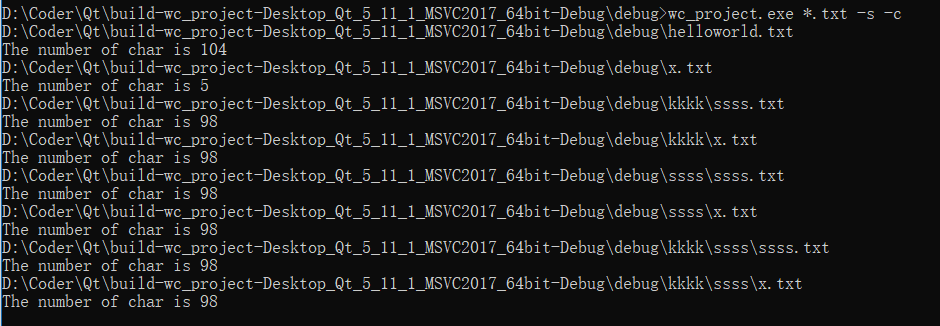
之前提及到的处理多文件的能力的拓展

项目小结
这是我个人第一次在编程中使用软件工程的思想,在实践过程中,我发现理论和实践的结合需要多次操作,才能更好的融会贯通,使得理论指导实践,成就一项良好的工程。
项目开始时选定的C++,低估了其掌握的难度,尤其是在文件的遍历和文件编码中踩坑甚多,让我看到了我在语言掌握上的不足,期待今后更加努力。
软件工程的PSP表,第一次使用,对于自己每项任务完成时间的估计没有经验参考,随着直觉估量,导致偏差过大,工程完成预期时间严重拖后,需要进行进一步的学习。
wc.exe C++实现的更多相关文章
- WC.exe【C】
gitee传送门!!!(电脑打不开github,多次尝试未果,决定先用gitee存着先) 项目要求 wc.exe 是一个常见的工具,它能统计文本文件的字符数.单词数和行数.这个项目要求写一个命令行程序 ...
- 小白のjava实现wc.exe功能
GitHub地址 项目完成情况 基本功能列表(已实现) wc.exe -c file.c //返回文件 file.c 的字符数 wc.exe -w file.c //返回文件 file. ...
- 模仿WC.exe的功能实现--node.js
Github项目地址:https://github.com/102derLinmenmin/myWc WC 项目要求 wc.exe 是一个常见的工具,它能统计文本文件的字符数.单词数和行数.这个项目要 ...
- wc.exe
1 /* 2 * 没能实现的功能:wc.exe -s递归处理目录下符合条件的文件 3 * wc.exe -x 显示图形界面 4 * 5 * 6 * 实现的功能: wc.exe -c显示文件的字符数. ...
- 软工作业1—java实现wc.exe
github项目地址 https://github.com/liyizhu/wc.exe WC 项目要求 基本功能列表: wc.exe -c file.c //返回文件 file.c 的字符数 ...
- 用c语言基本实现wc.exe功能
网址:https://github.com/3216005214/wc.exe wc项目要求 wc.exe 是一个常见的工具,它能统计文本文件的字符数.单词数和行数.这个项目要求写一个命令行程序,模仿 ...
- java实现wc.exe
Github地址:https://github.com/ztz1998/wc/tree/master 项目相关要求 实现一个统计程序,它能正确统计程序文件中的字符数.单词数.行数,以及还具备其他扩展功 ...
- (第三周)wc.exe—命令行实现对指定目录下文件的操作
一.用户需求 程序处理用户需求的模式为: wc.exe [parameter][filename] 在[parameter]中,用户通过输入参数与程序交互,需实现的功能如下: 1.基本功能 支持 -c ...
- 软工作业No.1。Java实现WC.exe
网址:https://github.com/a249970271/WC WC 项目要求 wc.exe 是一个常见的工具,它能统计文本文件的字符数.单词数和行数.这个项目要求写一个命令行程序,模仿已有w ...
- 软件工程 wc.exe 代码统计作业
软件工程 wc.exe 代码统计作业分享 1. Github 项目地址 https://github.com/EdwardLiu-Aurora/WordCount 更好地阅读本文,可点击这里 基本要求 ...
随机推荐
- 微信H5支付 EasyWechat
其中如果想在一个laravel中使用多个不同主题的支付账户,可以在方法实例对象时,将对应的参数进行修改配置. 其中小程序支付,已得到验证. 1.公众号支付等资格申请 2.公众号对应的支付商户主体申请 ...
- EMI (电磁干扰)
EMI是指电子产品工作会对周边的其他电子产品造成干扰,与此关联的还有EMC规范.是电子电器产品经常遇上的问题.干扰种类有传导干扰和辐射干扰. 电磁干扰(Electromagnetic Interfer ...
- 蓝桥杯 基础练习 BASIC-30 阶乘计算
基础练习 阶乘计算 时间限制:1.0s 内存限制:512.0MB 问题描述 输入一个正整数n,输出n!的值. 其中n!=1*2*3*…*n. 算法描述 n!可能很大,而计算机能表示的整数范围有 ...
- 使用VS2017 编写Linux系统上的Opencv程序
背景 之前写图像算法的程序都是在window10下使用VS编写,VS这个IDE结合“ImageWatch.vsix“插件,用于调试opencv相关的图像算法程序十分方便.后因项目需要,需将相关程序移植 ...
- juc原子类之五:AtomicLongFieldUpdater原子类
概要 AtomicIntegerFieldUpdater, AtomicLongFieldUpdater和AtomicReferenceFieldUpdater这3个修改类的成员的原子类型的原理和用法 ...
- Vue源码学习(一):调试环境搭建
最近开始学习Vue源码,第一步就是要把调试环境搭好,这个过程遇到小坑着实费了点功夫,在这里记下来 一.调试环境搭建过程 1.安装node.js,具体不展开 2.下载vue项目源码,git或svn等均可 ...
- Python Twisted系列教程15:测试诗歌
作者:dave@http://krondo.com/tested-poetry/ 译者: Cheng Luo 你可以从”第一部分 Twist理论基础“开始阅读:也可以从”Twisted 入门!“浏览 ...
- Python下OS模块重命名方法renames
在python中有很多强大的模块,其中我们经常要使用的就是OS模块,OS模块提供了超过200个方法来供我们使用,并且这些方法都是和数据处理相关的,这里介绍下重命名这个方法. OS的重命名方法是os.r ...
- windows 10 服务组件安装出现0x80070422错误解决方法
问题描述: windows 10通过控制面板->程序->启用或关闭Windows 功能安装Windows服务或组件时,出现0x80070422错误,提示服务禁止或未启用 问题产生原因: ...
- Python特殊语法:filter、map、reduce、lambda
filter(function, sequence):对sequence中的item依次执行function(item),将执行结果为True的item组成一个List/String/Tuple(取决 ...