
C# - WinFrm应用程序调用SharpZipLib实现文件的压缩和解压缩
前言
本篇主要记录:VS2019 WinFrm桌面应用程序调用SharpZipLib,实现文件的简单压缩和解压缩功能。
SharpZipLib 开源地址戳这里。
准备工作
搭建WinFrm前台界面
添加必要的控件,这里主要应用到GroupBox、Label、TextBox、CheckBox和Button,如下图

核心代码
构造ZipHelper类
代码如下:
 using ICSharpCode.SharpZipLib.Checksum;

 using ICSharpCode.SharpZipLib.Zip;

 using System;

 using System.Collections.Generic;

 using System.IO;

 using System.Linq;

 using System.Text;

 using System.Threading.Tasks;

 namespace ZipUnzip

 {

     class ZipHelper

     {

         private string rootPath = string.Empty;

         #region 压缩

         /// <summary>

         /// 递归压缩文件夹的内部方法

         /// </summary>

         /// <param name="folderToZip">要压缩的文件夹路径</param>

         /// <param name="zipStream">压缩输出流</param>

         /// <param name="parentFolderName">此文件夹的上级文件夹</param>

         /// <returns></returns>

         private bool ZipDirectory(string folderToZip, ZipOutputStream zipStream, string parentFolderName)

         {

             bool result = true;

             string[] folders, files;

             ZipEntry ent = null;

             FileStream fs = null;

             Crc32 crc = new Crc32();

             try

             {

                 string entName = folderToZip.Replace(this.rootPath, string.Empty) + "/";

                 //Path.Combine(parentFolderName, Path.GetFileName(folderToZip) + "/")

                 ent = new ZipEntry(entName);

                 zipStream.PutNextEntry(ent);

                 zipStream.Flush();

                 files = Directory.GetFiles(folderToZip);

                 foreach (string file in files)

                 {

                     fs = File.OpenRead(file);

                     byte[] buffer = new byte[fs.Length];

                     fs.Read(buffer, , buffer.Length);

                     ent = new ZipEntry(entName + Path.GetFileName(file));

                     ent.DateTime = DateTime.Now;

                     ent.Size = fs.Length;

                     fs.Close();

                     crc.Reset();

                     crc.Update(buffer);

                     ent.Crc = crc.Value;

                     zipStream.PutNextEntry(ent);

                     zipStream.Write(buffer, , buffer.Length);

                 }

             }

             catch

             {

                 result = false;

             }

             finally

             {

                 if (fs != null)

                 {

                     fs.Close();

                     fs.Dispose();

                 }

                 if (ent != null)

                 {

                     ent = null;

                 }

                 GC.Collect();

                 GC.Collect();

             }

             folders = Directory.GetDirectories(folderToZip);

             foreach (string folder in folders)

                 if (!ZipDirectory(folder, zipStream, folderToZip))

                     return false;

             return result;

         }

         /// <summary>

         /// 压缩文件夹

         /// </summary>

         /// <param name="folderToZip">要压缩的文件夹路径</param>

         /// <param name="zipedFile">压缩文件完整路径</param>

         /// <param name="password">密码</param>

         /// <returns>是否压缩成功</returns>

         public bool ZipDirectory(string folderToZip, string zipedFile, string password)

         {

             bool result = false;

             if (!Directory.Exists(folderToZip))

                 return result;

             ZipOutputStream zipStream = new ZipOutputStream(File.Create(zipedFile));

             zipStream.SetLevel();

             if (!string.IsNullOrEmpty(password)) zipStream.Password = password;

             result = ZipDirectory(folderToZip, zipStream, "");

             zipStream.Finish();

             zipStream.Close();

             return result;

         }

         /// <summary>

         /// 压缩文件夹

         /// </summary>

         /// <param name="folderToZip">要压缩的文件夹路径</param>

         /// <param name="zipedFile">压缩文件完整路径</param>

         /// <returns>是否压缩成功</returns>

         public bool ZipDirectory(string folderToZip, string zipedFile)

         {

             bool result = ZipDirectory(folderToZip, zipedFile, null);

             return result;

         }

         /// <summary>

         /// 压缩文件

         /// </summary>

         /// <param name="fileToZip">要压缩的文件全名</param>

         /// <param name="zipedFile">压缩后的文件名</param>

         /// <param name="password">密码</param>

         /// <returns>压缩结果</returns>

         public bool ZipFile(string fileToZip, string zipedFile, string password)

         {

             bool result = true;

             ZipOutputStream zipStream = null;

             FileStream fs = null;

             ZipEntry ent = null;

             if (!File.Exists(fileToZip))

                 return false;

             try

             {

                 fs = File.OpenRead(fileToZip);

                 byte[] buffer = new byte[fs.Length];

                 fs.Read(buffer, , buffer.Length);

                 fs.Close();

                 fs = File.Create(zipedFile);

                 zipStream = new ZipOutputStream(fs);

                 if (!string.IsNullOrEmpty(password)) zipStream.Password = password;

                 ent = new ZipEntry(Path.GetFileName(fileToZip));

                 zipStream.PutNextEntry(ent);

                 zipStream.SetLevel();

                 zipStream.Write(buffer, , buffer.Length);

             }

             catch

             {

                 result = false;

             }

             finally

             {

                 if (zipStream != null)

                 {

                     zipStream.Finish();

                     zipStream.Close();

                 }

                 if (ent != null)

                 {

                     ent = null;

                 }

                 if (fs != null)

                 {

                     fs.Close();

                     fs.Dispose();

                 }

             }

             GC.Collect();

             GC.Collect();

             return result;

         }

         /// <summary>

         /// 压缩文件

         /// </summary>

         /// <param name="fileToZip">要压缩的文件全名</param>

         /// <param name="zipedFile">压缩后的文件名</param>

         /// <returns>压缩结果</returns>

         public bool ZipFile(string fileToZip, string zipedFile)

         {

             bool result = ZipFile(fileToZip, zipedFile, null);

             return result;

         }

         /// <summary>

         /// 压缩文件或文件夹

         /// </summary>

         /// <param name="fileToZip">要压缩的路径</param>

         /// <param name="zipedFile">压缩后的文件名</param>

         /// <param name="password">密码</param>

         /// <returns>压缩结果</returns>

         public bool Zip(string fileToZip, string zipedFile, string password)

         {

             bool result = false;

             if (Directory.Exists(fileToZip))

             {

                 this.rootPath = Path.GetDirectoryName(fileToZip);

                 result = ZipDirectory(fileToZip, zipedFile, password);

             }

             else if (File.Exists(fileToZip))

             {

                 this.rootPath = Path.GetDirectoryName(fileToZip);

                 result = ZipFile(fileToZip, zipedFile, password);

             }

             return result;

         }

         /// <summary>

         /// 压缩文件或文件夹

         /// </summary>

         /// <param name="fileToZip">要压缩的路径</param>

         /// <param name="zipedFile">压缩后的文件名</param>

         /// <returns>压缩结果</returns>

         public bool Zip(string fileToZip, string zipedFile)

         {

             bool result = Zip(fileToZip, zipedFile, null);

             return result;

         }

         #endregion

         #region 解压

         /// <summary>

         /// 解压功能(解压压缩文件到指定目录)

         /// </summary>

         /// <param name="fileToUnZip">待解压的文件</param>

         /// <param name="zipedFolder">指定解压目标目录</param>

         /// <param name="password">密码</param>

         /// <returns>解压结果</returns>

         public bool UnZip(string fileToUnZip, string zipedFolder, string password)

         {

             bool result = true;

             FileStream fs = null;

             ZipInputStream zipStream = null;

             ZipEntry ent = null;

             string fileName;

             if (!File.Exists(fileToUnZip))

                 return false;

             if (!Directory.Exists(zipedFolder))

                 Directory.CreateDirectory(zipedFolder);

             try

             {

                 zipStream = new ZipInputStream(File.OpenRead(fileToUnZip));

                 if (!string.IsNullOrEmpty(password)) zipStream.Password = password;

                 while ((ent = zipStream.GetNextEntry()) != null)

                 {

                     if (!string.IsNullOrEmpty(ent.Name))

                     {

                         fileName = Path.Combine(zipedFolder, ent.Name);

                         fileName = fileName.Replace('/', '\\');//change by Mr.HopeGi

                         if (fileName.EndsWith("\\"))

                         {

                             Directory.CreateDirectory(fileName);

                             continue;

                         }

                         fs = File.Create(fileName);

                         int size = ;

                         byte[] data = new byte[size];

                         while (true)

                         {

                             size = zipStream.Read(data, , data.Length);

                             if (size > )

                                 fs.Write(data, , data.Length);

                             else

                                 break;

                         }

                     }

                 }

             }

             catch

             {

                 result = false;

             }

             finally

             {

                 if (fs != null)

                 {

                     fs.Close();

                     fs.Dispose();

                 }

                 if (zipStream != null)

                 {

                     zipStream.Close();

                     zipStream.Dispose();

                 }

                 if (ent != null)

                 {

                     ent = null;

                 }

                 GC.Collect();

                 GC.Collect();

             }

             return result;

         }

         /// <summary>

         /// 解压功能(解压压缩文件到指定目录)

         /// </summary>

         /// <param name="fileToUnZip">待解压的文件</param>

         /// <param name="zipedFolder">指定解压目标目录</param>

         /// <returns>解压结果</returns>

         public bool UnZip(string fileToUnZip, string zipedFolder)

         {

             bool result = UnZip(fileToUnZip, zipedFolder, null);

             return result;

         }

         #endregion

     }

 }
主窗体代码如下:
 using System;

 using System.Collections.Generic;

 using System.ComponentModel;

 using System.Data;

 using System.Drawing;

 using System.IO;

 using System.Linq;

 using System.Text;

 using System.Threading.Tasks;

 using System.Windows.Forms;

 namespace ZipUnzip

 {

     public partial class FrmMain : Form

     {

         public FrmMain()

         {

             InitializeComponent();

         }

         /// <summary>

         /// Unzip/Zip Operation

         /// </summary>

         /// <param name="sender"></param>

         /// <param name="e"></param>

         private void chbZip_CheckedChanged(object sender, EventArgs e)

         {

             if (this.chbZip.Checked)

             {

                 if (this.chbUnzip.Checked)

                 {

                     this.chbUnzip.Checked = false;

                 }

             }

         }

         /// <summary>

         /// Unzip/Zip Operation

         /// </summary>

         /// <param name="sender"></param>

         /// <param name="e"></param>

         private void chbUnzip_CheckedChanged(object sender, EventArgs e)

         {

             if (this.chbUnzip.Checked)

             {

                 if (this.chbZip.Checked)

                 {

                     this.chbZip.Checked = false;

                 }

             }

         }

         /// <summary>

         /// Choose File Directory

         /// </summary>

         /// <param name="sender"></param>

         /// <param name="e"></param>

         private void btnChoose_Click(object sender, EventArgs e)

         {

             if (this.chbZip.Checked)

             {

                 FolderBrowserDialog folderDialog = new FolderBrowserDialog();

                 folderDialog.Description = "Choose File Directory";

                 folderDialog.RootFolder = Environment.SpecialFolder.Desktop;

                 DialogResult dr = folderDialog.ShowDialog(this);

                 if (dr == DialogResult.OK)

                 {

                     this.txtSFP.Text = folderDialog.SelectedPath;

                 }

             }

             else if (this.chbUnzip.Checked)

             {

                 OpenFileDialog fileDialog = new OpenFileDialog();

                 fileDialog.Title = "Choose Zip Files";

                 fileDialog.InitialDirectory = Environment.GetFolderPath(Environment.SpecialFolder.Desktop);

                 DialogResult dr = fileDialog.ShowDialog(this);

                 if (dr == DialogResult.OK)

                 {

                     this.txtSFP.Text = fileDialog.FileName;

                 }

             }

         }

         /// <summary>

         /// Zip/Unzip

         /// </summary>

         /// <param name="sender"></param>

         /// <param name="e"></param>

         private void btnDo_Click(object sender, EventArgs e)

         {

             // Check

             if ((!this.chbZip.Checked) & (!this.chbUnzip.Checked))

             {

                 MessageBox.Show("Please choose operation type!", "Error");

                 return;

             }

             // Zip

             if (this.chbZip.Checked)

             {

                 try

                 {

                     string src = this.txtSFP.Text;

                     string dest = AppDomain.CurrentDomain.BaseDirectory + @"\zipfolder\ZIP" + DateTime.Now.ToString("yyyyMMddHHmmss") + ".zip";

                     if (!Directory.Exists(Path.GetDirectoryName(dest)))

                     {

                         Directory.CreateDirectory(Path.GetDirectoryName(dest));

                     }

                     ZipHelper zipHelper = new ZipHelper();

                     bool flag = zipHelper.Zip(src, dest);

                     if (flag)

                     {

                         SaveFileDialog fileDialog = new SaveFileDialog();

                         fileDialog.Title = "Save Zip Package";

                         fileDialog.InitialDirectory = Environment.GetFolderPath(Environment.SpecialFolder.Desktop);

                         fileDialog.FileName = Path.GetFileName(dest);

                         if (fileDialog.ShowDialog() == DialogResult.OK)

                         {

                             File.Copy(dest, fileDialog.FileName, true);

                             this.txtDFP.Text = fileDialog.FileName;

                         }

                         MessageBox.Show(this, "Zip Success!", "Info", MessageBoxButtons.OK);

                     }

                     else

                     {

                         MessageBox.Show(this, "Zip Failed", "Error", MessageBoxButtons.OK);

                     }

                 }

                 catch (Exception ex)

                 {

                     MessageBox.Show("Zip Failed, Err info[" + ex.Message + "]", "Error");

                 }

             }

             // Unzip

             if (this.chbUnzip.Checked)

             {

                 try

                 {

                     FolderBrowserDialog folderDialog = new FolderBrowserDialog();

                     folderDialog.Description = "Choose Unzip Directory";

                     folderDialog.RootFolder = Environment.SpecialFolder.Desktop;

                     DialogResult dr = folderDialog.ShowDialog(this);

                     if (dr == DialogResult.OK)

                     {

                         string destPath = folderDialog.SelectedPath + @"\" + Path.GetFileNameWithoutExtension(this.txtDFP.Text);

                         ZipHelper zipHelper = new ZipHelper();

                         zipHelper.UnZip(this.txtSFP.Text, destPath);

                         this.txtDFP.Text = destPath;

                     }

                     MessageBox.Show("Unzip Success!", "Info");

                 }

                 catch (Exception ex)

                 {

                     MessageBox.Show("Unzip Failed, Err info[" + ex.Message + "]", "Error");

                 }

             }

         }

     }

 }
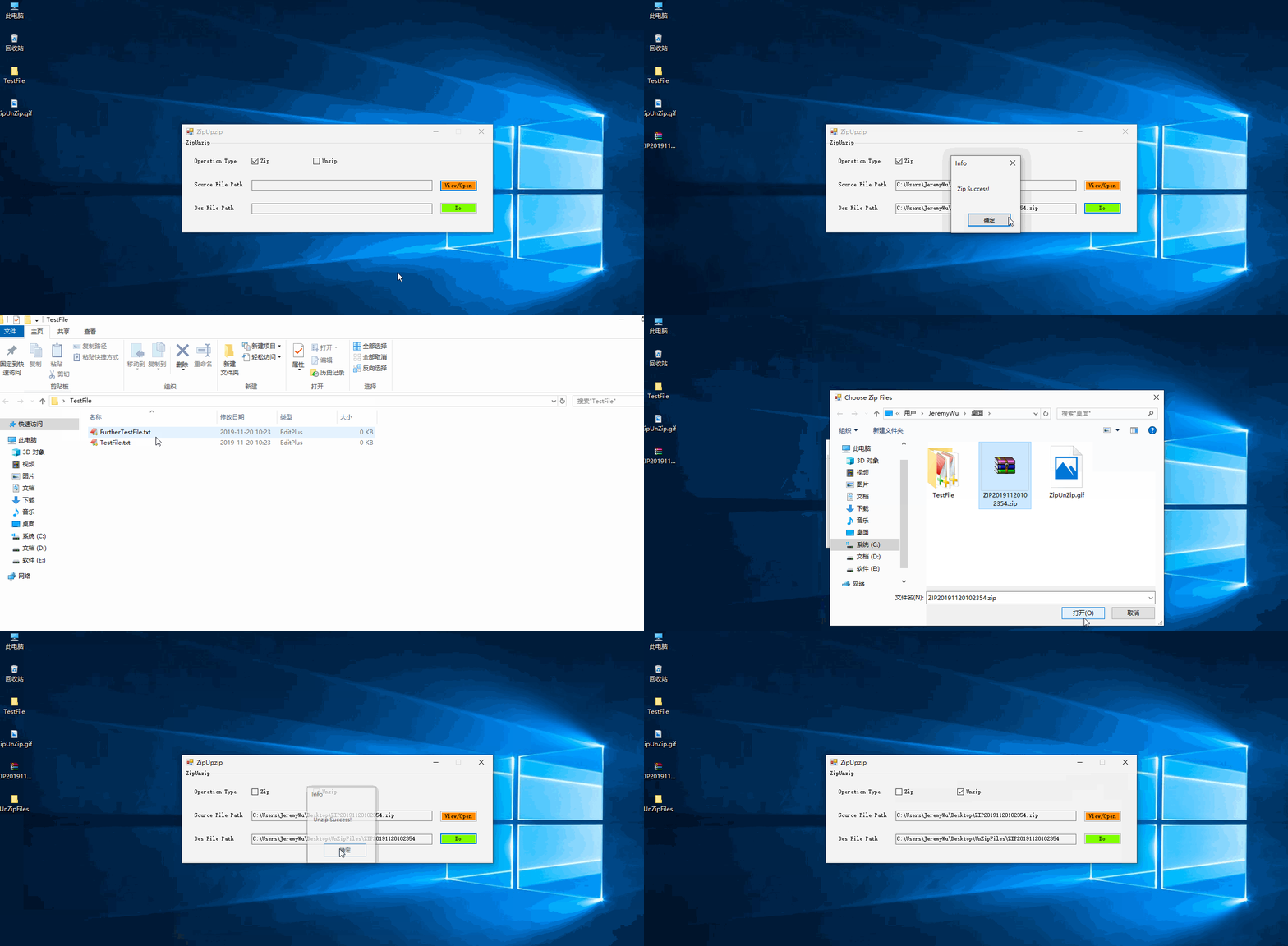
实现效果
作者:Jeremy.Wu
出处:https://www.cnblogs.com/jeremywucnblog/
本文版权归作者和博客园共有,欢迎转载,但未经作者同意必须保留此段声明,且在文章页面明显位置给出原文连接,否则保留追究法律责任的权利。
C# - WinFrm应用程序调用SharpZipLib实现文件的压缩和解压缩的更多相关文章
- c#Winform程序调用app.config文件配置数据库连接字符串 SQL Server文章目录 浅谈SQL Server中统计对于查询的影响 有关索引的DMV SQL Server中的执行引擎入门 【译】表变量和临时表的比较 对于表列数据类型选择的一点思考 SQL Server复制入门(一)----复制简介 操作系统中的进程与线程
c#Winform程序调用app.config文件配置数据库连接字符串 你新建winform项目的时候,会有一个app.config的配置文件,写在里面的<connectionStrings n ...
- C# - VS2019 WinFrm应用程序调用WebService服务
WinFrm应用程序调用WebService服务 关于WebService的创建.发布与部署等相关操作不再赘述,传送门如下:C# VS2019 WebService创建与发布,并部署到Windows ...
- 在C#中利用SharpZipLib进行文件的压缩和解压缩收藏
我在做项目的时候需要将文件进行压缩和解压缩,于是就从http://www.icsharpcode.net(http://www.icsharpcode.net/OpenSource/SharpZipL ...
- C#利用SharpZipLib进行文件的压缩和解压缩
我在做项目的时候需要将文件进行压缩和解压缩,于是就从http://www.icsharpcode.net下载了关于压缩和解压缩的源码,但是下载下来后,面对这么多的代码,一时不知如何下手.只好耐下心来, ...
- 重新想象 Windows 8 Store Apps (70) - 其它: 文件压缩和解压缩, 与 Windows 商店相关的操作, app 与 web, 几个 Core 的应用, 页面的生命周期和程序的生命周期
[源码下载] 重新想象 Windows 8 Store Apps (70) - 其它: 文件压缩和解压缩, 与 Windows 商店相关的操作, app 与 web, 几个 Core 的应用, 页面的 ...
- C# 利用ICSharpCode.SharpZipLib.dll 实现压缩和解压缩文件
我们 开发时经常会遇到需要压缩文件的需求,利用C#的开源组件ICSharpCode.SharpZipLib, 就可以很容易的实现压缩和解压缩功能. 压缩文件: /// <summary> ...
- iOS中使用ZipArchive压缩和解压缩文件-备
为什么我需要解压缩文件 有许多原因能解释为什么我要在工程中使用压缩和解压缩功能,下面是几个常见的原因: 苹果App Store的50M下载限制 苹 果公司出于流量的考虑,规定在非WIFI环境下,限制用 ...
- Java用ZIP格式压缩和解压缩文件
转载:java jdk实例宝典 感觉讲的非常好就转载在这保存! java.util.zip包实现了Zip格式相关的类库,使用格式zip格式压缩和解压缩文件的时候,须要导入该包. 使用zipoutput ...
- 使用commons-compress操作zip文件(压缩和解压缩)
http://www.cnblogs.com/luxh/archive/2012/06/28/2568758.html Apache Commons Compress是一个压缩.解压缩文件的类库. 可 ...
随机推荐
- java程序猿工具
1.做为一个程序员打字最重要 指法打字练习软件:http://home.bdqn.cn/thread-11142-1-1.html 2.JDK必不可少 JDK6.X下载 JDK ...
- C# 中代码执行 ping 操作
在代码中可以通过调用 System.Net.NetworkInformation 命名控件下的 Ping 类的 Send() 方法来实现,代码如下: var ping = new System.Net ...
- 解决安装tensorflow-gpu失败:Command "python setup.py egg_info"failed with error code 10 in.....
按照https://blog.csdn.net/shawroad88/article/details/82222811前几步安装. 又有新的报错如下: 再运行运行代码安装setuptools pip ...
- laravel5+ElasticSearch+go-mysql-elasticsearch MySQL数据实时导入(mac)
1. ElasticSearch安装 直接使用brew install elasticsearch 安装最新版本的es,基本没有障碍. 2.Laravel5 框架添加elasticsearch支持 在 ...
- Python 十大装 X 语法(一)
Python 是一种代表简单思想的语言,其语法相对简单,很容易上手.不过,如果就此小视 Python 语法的精妙和深邃,那就大错特错了.本文精心筛选了最能展现 Python 语法之精妙的十个知识点,并 ...
- C#基础知识1-深入理解值类型和引用类型
C#值类型和引用类型这个概念在刚学习的时候应该就知道了.但是我们并没有深入的去理解它.越是基础知识其实才是最有用的.对代码的优化,代码质量的提升都有帮助.通过整理本文章,对很多知识也起到了巩固的作用吧 ...
- (转)深入解析TensorFlow中滑动平均模型与代码实现
本文链接:https://blog.csdn.net/m0_38106113/article/details/81542863 指数加权平均算法的原理 TensorFlow中的滑动平均模型使用的是滑动 ...
- 前端知识体系-NodeJS相关】NodeJS基础知识全面总结
NodeJS基础知识 1. Node的全局对象和全局变量 1.1 全局对象:所有模块都可以调用的 global:表示Node所在的全局环境,类似于浏览器的window对象. process:该对象表示 ...
- 【转载】从使用到原理学习Java线程池
线程池的技术背景 在面向对象编程中,创建和销毁对象是很费时间的,因为创建一个对象要获取内存资源或者其它更多资源.在Java中更是如此,虚拟机将试图跟踪每一个对象,以便能够在对象销毁后进行垃圾回收. 所 ...
- OpenCV:图像平滑和图像模糊处理
导包: import numpy as np import cv2 import matplotlib.pyplot as plt def show(image): plt.imshow(image) ...