
关于C#调用WebServices的方法
2018-1-22
前情是我使用vs在引用高通的webservice时出现了下载错误导致无法引用这个服务,先是在网上查询了这个错误的问题及解决方案,将这个问题与解决方法发给了高通同事,可惜的是他也不清楚怎么回事,没有办法我只好再去查阅资料看看其他方法;这里总结几种方法
第一种:最常见的就是直接在项目的引用中右击添加服务引用
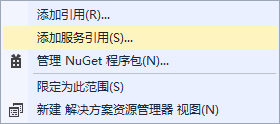
此方法用法如下:
首先需要添加引用;然后需要实例化,实例化完了之后就可以通过实例化的对象调用webservices的方法;
这个方法以前常用,可惜这次不行了;
第二种:不用通过引用,直接调用webservices
此方法又分为了几种:
https://www.cnblogs.com/weicanpeng/p/5755987.html 这是原网址。
(1)使用HttpWebRequest 向WebService发送POST请求,并将请求头:ContentType = "application/json;charset=utf-8",参数以JSON方式发送给WebService

        /// <summary>

        /// 需要WebService支持Post调用

        /// </summary>

        public static string PostWebServiceByJson(String URL, String MethodName, Hashtable Pars)

        {

            HttpWebRequest request = (HttpWebRequest)HttpWebRequest.Create(URL + "/" + MethodName);

            request.Method = "POST";

            request.ContentType = "application/json;charset=utf-8";

            request.Credentials = CredentialCache.DefaultCredentials;

            request.Timeout = 10000;

            byte[] data = Encoding.UTF8.GetBytes(HashtableToJson(Pars));

            request.ContentLength = data.Length;

            Stream writer = request.GetRequestStream();

            writer.Write(data, 0, data.Length);

            writer.Close();

            StreamReader sr = new StreamReader(request.GetResponse().GetResponseStream(), Encoding.UTF8);

            String retXml = sr.ReadToEnd();

            sr.Close();

            return retXml;

        }
调用方法如下:
            Hashtable ht = new Hashtable();

            ht.Add("LoginName", "Admin");

            ht.Add("Password", "Password");

            ht.Add("AppKey", "123");

            HttpHelper.PostWebServiceByJson("http://localhost/OpenApi/MobileService.asmx", "Login", ht);
注意以上调用WebService方法,需要在WebService中将以下代码中的[System.Web.Script.Services.ScriptService]注释去掉
 // 若要允许使用 ASP.NET AJAX 从脚本中调用此 Web 服务,请取消注释以下行。

  [System.Web.Script.Services.ScriptService]
(2)根据WebService文档对应方法说明(例如参数提交方式,请求)发送POST或Get请求
SOAP 1.1
以下是 SOAP 1.2 请求和响应示例。所显示的占位符需替换为实际值。
POST /OpenApi/MobileService.asmx HTTP/1.1

Host: gps.szwearable.com

Content-Type: text/xml; charset=utf-8

Content-Length: length

SOAPAction: "http://tempuri.org/Login"

<?xml version="1.0" encoding="utf-8"?>

<soap:Envelope xmlns:xsi="http://www.w3.org/2001/XMLSchema-instance" xmlns:xsd="http://www.w3.org/2001/XMLSchema" xmlns:soap="http://schemas.xmlsoap.org/soap/envelope/">

  <soap:Body>

    <Login xmlns="http://tempuri.org/">

      <LoginName>string</LoginName>

      <Password>string</Password>

      <AppKey>string</AppKey>

    </Login>

  </soap:Body>

</soap:Envelope>
HTTP/1.1 200 OK

Content-Type: text/xml; charset=utf-8

Content-Length: length

<?xml version="1.0" encoding="utf-8"?>

<soap:Envelope xmlns:xsi="http://www.w3.org/2001/XMLSchema-instance" xmlns:xsd="http://www.w3.org/2001/XMLSchema" xmlns:soap="http://schemas.xmlsoap.org/soap/envelope/">

  <soap:Body>

    <LoginResponse xmlns="http://tempuri.org/">

      <LoginResult>boolean</LoginResult>

    </LoginResponse>

  </soap:Body>

</soap:Envelope>
以上Soap1.1示例相应代码如下
 public static string SoapV1_1WebService(String URL, String MethodName, Hashtable Pars, string XmlNs)

        {

            HttpWebRequest request = (HttpWebRequest)HttpWebRequest.Create(URL);

            request.Method = "POST";

            request.ContentType = "text/xml; charset=utf-8";

            request.Headers.Add("SOAPAction", "\"" + XmlNs + (XmlNs.EndsWith("/") ? "" : "/") + MethodName + "\"");

            // 凭证

            request.Credentials = CredentialCache.DefaultCredentials;

            //超时时间

            request.Timeout = 10000;

            byte[] data = HashtableToSoap(Pars, XmlNs, MethodName);

            request.ContentLength = data.Length;

            Stream writer = request.GetRequestStream();

            writer.Write(data, 0, data.Length);

            writer.Close();

            var response = request.GetResponse();

            XmlDocument doc = new XmlDocument();

            StreamReader sr = new StreamReader(response.GetResponseStream(), Encoding.UTF8);

            String retXml = sr.ReadToEnd();

            sr.Close();

            doc.LoadXml(retXml);

            XmlNamespaceManager mgr = new XmlNamespaceManager(doc.NameTable);

            mgr.AddNamespace("soap", "http://schemas.xmlsoap.org/soap/envelope/");

            String xmlStr = doc.SelectSingleNode("//soap:Body/*/*", mgr).InnerXml;

            return xmlStr;

        }

        private static string ObjectToSoapXml(object o)

        {

            XmlSerializer mySerializer = new XmlSerializer(o.GetType());

            MemoryStream ms = new MemoryStream();

            mySerializer.Serialize(ms, o);

            XmlDocument doc = new XmlDocument();

            doc.LoadXml(Encoding.UTF8.GetString(ms.ToArray()));

            if (doc.DocumentElement != null)

            {

                return doc.DocumentElement.InnerXml;

            }

            else

            {

                return o.ToString();

            }

        }

        private static byte[] HashtableToSoap(Hashtable ht, String XmlNs, String MethodName)

        {

            XmlDocument doc = new XmlDocument();

            doc.LoadXml("<soap:Envelope xmlns:xsi=\"http://www.w3.org/2001/XMLSchema-instance\" xmlns:xsd=\"http://www.w3.org/2001/XMLSchema\" xmlns:soap=\"http://schemas.xmlsoap.org/soap/envelope/\"></soap:Envelope>");

             XmlDeclaration decl = doc.CreateXmlDeclaration("1.0", "utf-8", null);

            doc.InsertBefore(decl, doc.DocumentElement);

            XmlElement soapBody = doc.CreateElement("soap", "Body", "http://schemas.xmlsoap.org/soap/envelope/");

            XmlElement soapMethod = doc.CreateElement(MethodName);

            soapMethod.SetAttribute("xmlns", XmlNs);

            foreach (string k in ht.Keys)

            {

                XmlElement soapPar = doc.CreateElement(k);

                soapPar.InnerXml = ObjectToSoapXml(ht[k]);

                soapMethod.AppendChild(soapPar);

            }

            soapBody.AppendChild(soapMethod);

            doc.DocumentElement.AppendChild(soapBody);

            return Encoding.UTF8.GetBytes(doc.OuterXml);

        }
调用方法如下
  Hashtable ht = new Hashtable();

            ht.Add("LoginName", "Admin");

            ht.Add("Password", "Password");

            ht.Add("AppKey", "123");

 var data = HttpHelper.SoapV1_1WebService("http://localhost/OpenApi/MobileService.asmx", "Login", ht, "http://tempuri.org/");
我是用SOAP1.1这个方法成功调用的;
此方法可以多加使用,当然有更好的方法时可以考虑使用更好的方法。
SOAP 1.2
以下是 SOAP 1.2 请求和响应示例。所显示的占位符需替换为实际值。
POST /OpenApi/MobileService.asmx HTTP/1.1

Host: gps.szwearable.com

Content-Type: application/soap+xml; charset=utf-8

Content-Length: length

<?xml version="1.0" encoding="utf-8"?>

<soap12:Envelope xmlns:xsi="http://www.w3.org/2001/XMLSchema-instance" xmlns:xsd="http://www.w3.org/2001/XMLSchema" xmlns:soap12="http://www.w3.org/2003/05/soap-envelope">

  <soap12:Body>

    <Login xmlns="http://tempuri.org/">

      <LoginName>string</LoginName>

      <Password>string</Password>

      <AppKey>string</AppKey>

    </Login>

  </soap12:Body>

</soap12:Envelope>
HTTP/1.1 200 OK

Content-Type: application/soap+xml; charset=utf-8

Content-Length: length

<?xml version="1.0" encoding="utf-8"?>

<soap12:Envelope xmlns:xsi="http://www.w3.org/2001/XMLSchema-instance" xmlns:xsd="http://www.w3.org/2001/XMLSchema" xmlns:soap12="http://www.w3.org/2003/05/soap-envelope">

  <soap12:Body>

    <LoginResponse xmlns="http://tempuri.org/">

      <LoginResult>boolean</LoginResult>

    </LoginResponse>

  </soap12:Body>

</soap12:Envelope>
以上Soap1.2示例相应代码如下
        public static string SoapV1_2WebService(String URL, String MethodName, Hashtable Pars, string XmlNs)

        {

            HttpWebRequest request = (HttpWebRequest)HttpWebRequest.Create(URL);

            request.Method = "POST";

            request.ContentType = "application/soap+xml; charset=utf-8";

            // 凭证

            request.Credentials = CredentialCache.DefaultCredentials;

            //超时时间

            request.Timeout = 10000;

            byte[] data = HashtableToSoap12(Pars, XmlNs, MethodName);

            request.ContentLength = data.Length;

            Stream writer = request.GetRequestStream();

            writer.Write(data, 0, data.Length);

            writer.Close();

            var response = request.GetResponse();

            XmlDocument doc = new XmlDocument();

            StreamReader sr = new StreamReader(response.GetResponseStream(), Encoding.UTF8);

            String retXml = sr.ReadToEnd();

            sr.Close();

            doc.LoadXml(retXml);

            XmlNamespaceManager mgr = new XmlNamespaceManager(doc.NameTable);

            mgr.AddNamespace("soap12", "http://www.w3.org/2003/05/soap-envelope");

            String xmlStr = doc.SelectSingleNode("//soap12:Body/*/*", mgr).InnerXml;

            return xmlStr;

        }

        private static byte[] HashtableToSoap12(Hashtable ht, String XmlNs, String MethodName)

        {

            XmlDocument doc = new XmlDocument();

            doc.LoadXml("<soap12:Envelope xmlns:xsi=\"http://www.w3.org/2001/XMLSchema-instance\" xmlns:xsd=\"http://www.w3.org/2001/XMLSchema\" xmlns:soap12=\"http://www.w3.org/2003/05/soap-envelope\"></soap12:Envelope>");

            XmlDeclaration decl = doc.CreateXmlDeclaration("1.0", "utf-8", null);

            doc.InsertBefore(decl, doc.DocumentElement);

            XmlElement soapBody = doc.CreateElement("soap12", "Body", "http://www.w3.org/2003/05/soap-envelope");

            XmlElement soapMethod = doc.CreateElement(MethodName);

            soapMethod.SetAttribute("xmlns", XmlNs);

            foreach (string k in ht.Keys)

            {

                XmlElement soapPar = doc.CreateElement(k);

                soapPar.InnerXml = ObjectToSoapXml(ht[k]);

                soapMethod.AppendChild(soapPar);

            }

            soapBody.AppendChild(soapMethod);

            doc.DocumentElement.AppendChild(soapBody);

            return Encoding.UTF8.GetBytes(doc.OuterXml);

        }

        private static string ObjectToSoapXml(object o)

        {

            XmlSerializer mySerializer = new XmlSerializer(o.GetType());

            MemoryStream ms = new MemoryStream();

            mySerializer.Serialize(ms, o);

            XmlDocument doc = new XmlDocument();

            doc.LoadXml(Encoding.UTF8.GetString(ms.ToArray()));

            if (doc.DocumentElement != null)

            {

                return doc.DocumentElement.InnerXml;

            }

            else

            {

                return o.ToString();

            }

        }
调用方法如下
       Hashtable ht = new Hashtable();

            ht.Add("LoginName", "Admin");

            ht.Add("Password", "Password");

            ht.Add("AppKey", "123");

       var data = HttpHelper.SoapV1_2WebService("http://localhost/OpenApi/MobileService.asmx", "Login", ht, "http://tempuri.org/");
HTTP GET
以下是 HTTP GET 请求和响应示例。所显示的占位符需替换为实际值。
GET /OpenApi/MobileService.asmx/Login?LoginName=string&Password=string&AppKey=string HTTP/1.1

Host: gps.szwearable.com
HTTP/1.1 200 OK

Content-Type: text/xml; charset=utf-8

Content-Length: length

<?xml version="1.0" encoding="utf-8"?>

<boolean xmlns="http://tempuri.org/">boolean</boolean>

 以上GET示例相应代码如下
 /// <summary>

        /// 需要WebService支持Get调用

        /// </summary>

        public static string WebServiceGet(String URL, String MethodName, Hashtable Pars)

        {

            HttpWebRequest request = (HttpWebRequest)HttpWebRequest.Create(URL + "/" + MethodName + "?" + HashtableToPostData(Pars));

            request.Method = "GET";

            request.ContentType = "application/x-www-form-urlencoded";

            // 凭证

            request.Credentials = CredentialCache.DefaultCredentials;

            //超时时间

            request.Timeout = 10000;

            var response = request.GetResponse();

            var stream = response.GetResponseStream();

            StreamReader sr = new StreamReader(stream, Encoding.UTF8);

            String retXml = sr.ReadToEnd();

            sr.Close();

            return retXml;

        }

        private static String HashtableToPostData(Hashtable ht)

        {

            StringBuilder sb = new StringBuilder();

            foreach (string k in ht.Keys)

            {

                if (sb.Length > 0)

                {

                    sb.Append("&");

                }

                sb.Append(HttpUtility.UrlEncode(k) + "=" + HttpUtility.UrlEncode(ht[k].ToString()));

            }

            return sb.ToString();

        }
调用方法如下
Hashtable ht = new Hashtable();

            ht.Add("LoginName", "Admin");

            ht.Add("Password", "Password");

            ht.Add("AppKey", "123");

var data = HttpHelper.WebServiceGet("http://localhost/OpenApi/MobileService.asmx", "Login", ht);
HTTP POST
以下是 HTTP POST 请求和响应示例。所显示的占位符需替换为实际值。
POST /OpenApi/MobileService.asmx/Login HTTP/1.1

Host: gps.szwearable.com

Content-Type: application/x-www-form-urlencoded

Content-Length: length

LoginName=string&Password=string&AppKey=string
HTTP/1.1 200 OK

Content-Type: text/xml; charset=utf-8

Content-Length: length

<?xml version="1.0" encoding="utf-8"?>

<boolean xmlns="http://tempuri.org/">boolean</boolean>
以上POST示例相应代码如下
         /// <summary>

        /// 需要WebService支持Post调用

        /// </summary>

        public static string PostWebService(String URL, String MethodName, Hashtable ht)

        {

            HttpWebRequest request = (HttpWebRequest)HttpWebRequest.Create(URL + "/" + MethodName);

            request.Method = "POST";

            request.ContentType = "application/x-www-form-urlencoded";

            // 凭证

            request.Credentials = CredentialCache.DefaultCredentials;

            //超时时间

            request.Timeout = 10000;

            var PostStr = HashtableToPostData(ht);

            byte[] data = System.Text.Encoding.UTF8.GetBytes(PostStr);

            request.ContentLength = data.Length;

            Stream writer = request.GetRequestStream();

            writer.Write(data, 0, data.Length);

            writer.Close();

            var response = request.GetResponse();

            var stream = response.GetResponseStream();

            StreamReader sr = new StreamReader(stream, Encoding.UTF8);

            String retXml = sr.ReadToEnd();

            sr.Close();

            return retXml;

        }

        private static String HashtableToPostData(Hashtable ht)

        {

            StringBuilder sb = new StringBuilder();

            foreach (string k in ht.Keys)

            {

                if (sb.Length > 0)

                {

                    sb.Append("&");

                }

                sb.Append(HttpUtility.UrlEncode(k) + "=" + HttpUtility.UrlEncode(ht[k].ToString()));

            }

            return sb.ToString();

        }
调用方法如下
  Hashtable ht = new Hashtable();

            ht.Add("LoginName", "Admin");

            ht.Add("Password", "Password");

            ht.Add("AppKey", "123");

  var data = HttpHelper.PostWebService("http://localhost/OpenApi/MobileService.asmx", "Login", ht);
WebService支持Post和Get方法
在Web.config,那么只需要修改或添加这么一段
<webServices>
<protocols>
<add name="HttpGet"/>
<add name="HttpPost"/>
</protocols>
</webServices>
还有一个说是动态添加,可惜我还是没有用成功
附上此动态调用代码
using System;

using System.Collections.Generic;

using System.Linq;

using System.Web;

using System.Net;

using System.IO;

using System.Web.Services.Description;

using System.CodeDom;

using Microsoft.CSharp;

using System.CodeDom.Compiler;

using System.Reflection;

using System.Xml.Serialization;

using System.Text;

namespace DeliveryGT

{

    public class AddWebServices

    {

        /// < summary>

        /// 动态调用web服务

        /// < /summary>

        /// < param name="url">WSDL服务地址< /param>

        /// < param name="methodname">方法名< /param>

        /// < param name="args">参数< /param>

        /// < returns>< /returns>

        public static object InvokeWebService(string url, string methodname, object[] args)

        {

            return AddWebServices.InvokeWebService(url, null, methodname, args);

        }

        /// < summary>

        /// 动态调用web服务

        /// < /summary>

        /// < param name="url">WSDL服务地址< /param>

        /// < param name="classname">类名< /param>

        /// < param name="methodname">方法名< /param>

        /// < param name="args">参数< /param>

        /// < returns>< /returns>

        public static object InvokeWebService(string url, string classname, string methodname, object[] args)

        {

            //string @namespace = "EnterpriseServerBase.WebService.DynamicWebCalling";

            string @namespace = "EnterpriseServerBase.WebService.DynamicWebCalling";

            if ((classname == null) || (classname == ""))

            {

                classname = AddWebServices.GetWsClassName(url);

            }

            try

            {                   //获取WSDL

                WebClient wc = new WebClient();

                Stream stream = wc.OpenRead(url + "?WSDL");

                ServiceDescription sd = ServiceDescription.Read(stream);

                ServiceDescriptionImporter sdi = new ServiceDescriptionImporter();

                sdi.AddServiceDescription(sd, "", "");

                CodeNamespace cn = new CodeNamespace(@namespace);

                //生成客户端代理类代码

                CodeCompileUnit ccu = new CodeCompileUnit();

                ccu.Namespaces.Add(cn);

                sdi.Import(cn, ccu);

                CSharpCodeProvider icc = new CSharpCodeProvider();

                //设定编译参数

                CompilerParameters cplist = new CompilerParameters();

                cplist.GenerateExecutable = false;

                cplist.GenerateInMemory = true;

                cplist.ReferencedAssemblies.Add("System.dll");

                cplist.ReferencedAssemblies.Add("System.XML.dll");

                cplist.ReferencedAssemblies.Add("System.Web.Services.dll");

                cplist.ReferencedAssemblies.Add("System.Data.dll");

                //编译代理类

                CompilerResults cr = icc.CompileAssemblyFromDom(cplist, ccu);

                if (true == cr.Errors.HasErrors)

                {

                    System.Text.StringBuilder sb = new System.Text.StringBuilder();

                    foreach (System.CodeDom.Compiler.CompilerError ce in cr.Errors)

                    {

                        sb.Append(ce.ToString());

                        sb.Append(System.Environment.NewLine);

                    }

                    throw new Exception(sb.ToString());

                }

                //生成代理实例,并调用方法

                System.Reflection.Assembly assembly = cr.CompiledAssembly;

                Type t = assembly.GetType(@namespace + "." + classname, true, true);

                object obj = Activator.CreateInstance(t);

                System.Reflection.MethodInfo mi = t.GetMethod(methodname);

                return mi.Invoke(obj, args);

                // PropertyInfo propertyInfo = type.GetProperty(propertyname);

                //return propertyInfo.GetValue(obj, null);

            }

            catch (Exception ex)

            {

                throw new Exception(ex.InnerException.Message, new Exception(ex.InnerException.StackTrace));

            }

        }

        private static string GetWsClassName(string wsUrl)

        {

            string[] parts = wsUrl.Split('/');

            string[] pps = parts[parts.Length - 1].Split('.');

            return pps[0];

        }

        //上面那种方法的调用方式

        //string url = "http://webservice.webxml.com.cn/WebServices/TrainTimeWebService.asmx";

        //string[] args = new string[2];

        //args[0] = "k123";

        //args[1] = "";

        //object result = WSHelper.InvokeWebService(url, "getDetailInfoByTrainCode", args);

        //DataSet ds = (DataSet)result;

        //this.GridView1.DataSource = ds;

        //this.GridView1.DataBind();

    }

}
关于C#调用WebServices的方法的更多相关文章
- ajax调用WebServices服务方法和传参调用WebServices注意事项
先演示下ajax是如何调用WebServices中的方法 1.新建一个页面default.aspx,一个Web服务 在页面中引用jQuery文件. <script src=" ...
- jquery Ajax跨域调用WebServices方法
由于公司需要开发一个手机页面,想提供给同事直接在手机上可以查询SAP资料.数据需要使用js调用webserver来获取. 因为初次使用Jquery调用Webserver,所以期间并不顺利.测试调用We ...
- asp.net 手工调用 WS(Get)方法:
asp.net 手工调用 WS(Get)方法: 通过手工HttpWebRequest,HttpWebResponse来模拟调用.核心代码:string strurl="http://loca ...
- C# 通过Get、Post、Soap调用WebService的方法
实现代码来源于网络,我只是作了一些修改! using System; using System.Web; using System.Xml; using System.Collections; usi ...
- WebService 调用三种方法
//来源:http://www.cnblogs.com/eagle1986/archive/2012/09/03/2669699.html 最近做一个项目,由于是在别人框架里开发app,导致了很多限制 ...
- Java调用.NET webservice方法的几种方式
最近做项目,涉及到web-service调用,现学了一个星期,现简单的做一个小结.下面实现的是对传喜物流系统(http://vip.cxcod.com/PodApi/GetPodStr.asmx?ws ...
- c#调用webservices
有两种方式,静态调用(添加web服务的暂且这样定义)和动态调用: 静态调用: 使用添加web服务的方式支持各种参数,由于vs2010会自动转换,会生成一个特定的Reference.cs类文件 动态 ...
- C#利用WinForm调用WebServices实现增删改查
实习导师要求做一个项目,用Winform调用WebServices实现增删改查的功能.写下这篇博客,当做是这个项目的总结.如果您有什么建议,可以给我留言.欢迎指正. 1.首先,我接到这个项目的时候,根 ...
- c# 调用 webservices (转载)
.net 调用webservice 总结 最近做一个项目,由于是在别人框架里开发app,导致了很多限制,其中一个就是不能直接引用webservice . 我们都知道,调用webserivice 最简单 ...
随机推荐
- Google C++测试框架系列高级篇:第一章 更多关于断言的知识
原始链接:More Assertions 词汇表 现在你应该已经读完了入门篇并且会使用GTest来写测试.是时候来学一些新把戏了.这篇文档将教会你更多知识:用断言构造复杂的失败信息,传递致命失败,重用 ...
- 联想笔记本进入不了BIOS的解决方法
当计算机遇到问题时,很多情况下需要进入BIOS进行解决.但很多新出的联想笔记本电脑在开机时,无论怎么疯狂的按F2,Fn+F2,F12或者Del,都无法进入BIOS,十分气人. 这种现象出现的原因是联想 ...
- JavaWEB路径总结
这篇文章是小编一直想写的一篇,主要是对web阶段中各个路径进行的一些总结,希望读者看过之后对于路径方面有一个清晰的认识.首先声明一点:世界上一切东西都是相对的,对于这点而言,相信大家并不陌生,从初中开 ...
- 【dateFormatSymbols】JAVA特殊日期格式转换
记录:特殊日期格式转换,如将yyyyMMdd转为01MAY2019 public static final String DATE_VIP_FORMAT = "yyyyMMdd"; ...
- MediatR一个.net中简单好用的中介者模式实现方案
MediatRGit地址:https://github.com/jbogard/MediatR 1.安装妞盖特包 一般来说只需要安装一个MediatR就行了,.net core程序需要再安装一个Med ...
- CentOS 7编译安装Redis
安装编译相关依赖 CentOS/Fedora yum install gcc gcc-c++ cmake tcl 下载Redis源码包 curl -o redis-4.0.10.tar.gz http ...
- Nginx添加Lua扩展模块
Nginx添加Lua扩展模块 编译安装LuaJIT wget http://luajit.org/download/LuaJIT-2.0.4.tar.gz tar xf LuaJIT-.tar.gz ...
- top命令输出详解
前言 Linux下的top命令我相信大家都用过,自从我接触Linux以来就一直用top查看进程的CPU和MEM排行榜.但是top命令的其他输出结果我都没有了解,这些指标都代表什么呢,什么情况下需要关注 ...
- svn unable to connect to a repository url 计算机积极拒绝
网上应该说启动server服务,首先找不到这个服务,后来下载个软件有了,启动还是不行.clear了所有saved data之后也是不行. 解决方法:Network中 Enable proxy Serv ...
- mysql的数据存储
# pycharm 连接mysql import pymysql username = input("输入用户名:") pwd = input("输入密码:") ...