
[PHP] 使用ftell和fseek函数直接定位文件位置获取部分数据
对于大文件只获取部分数据很有用
1.使用ftell函数可以获取当前指针的字节位置
2.使用fseek函数可以直接定位到指定的位置
3.读取指定字节的数据就可以部分获取文件内容了
<?php

class FileStream

{

    private $fp = null;

    private $mode = 'r';

    private $context = null;

    private $readonly = false;

    private $writeonly = false;

    private $appendMode = false;

    public function __construct($file, $mode = 'r', $context = null)

    {

        $mode = trim($mode);

        if (isset($mode[0])) {

            $this->mode = strtolower($mode);

        }

        if ($context) {

            $this->context = $context;

            $this->fp = fopen($file, $mode, false, $this->context);

        } else {

            $this->fp = fopen($file, $mode);

        }

        if (!$this->fp) {

            throw new Exception('can not open ' . $file);

        }

        if ($this->mode == 'r') {

            $this->readonly = true;

        } elseif ($this->mode == 'w') {

            $this->writeonly = true;

        } elseif ($this->mode[0] == 'a') {

            $this->appendMode = true;

        }

    }

    public function __destruct()

    {

        $this->close();

    }

    public function close()

    {

        if (!$this->fp) {

            fclose($this->fp);

            $this->fp = null;

        }

    }

    public function read($size)

    {

        if ($this->writeonly) {

            throw new Exception('write only');

        }

        if (!$this->fp) {

            throw new Exception('stream already closed');

        }

        $buf = fread($this->fp, $size);

        if ($buf === false) {

            throw new Exception('read failed');

        }

        return $buf;

    }

    public function readLine()

    {

        if ($this->writeonly) {

            throw new Exception('write only');

        }

        if (!$this->fp) {

            throw new Exception('stream already closed');

        }

        return fgets($this->fp);

    }

    public function readAll()

    {

        if ($this->writeonly) {

            throw new Exception('write only');

        }

        if (!$this->fp) {

            throw new Exception('stream already closed');

        }

        $buf = '';

        while (true) {

            $s = fread($this->fp, 8192);

            if ($s === false) {

                throw new Exception('read failed');

            }

            if (!isset($s[0])) {

                break;

            }

            $buf .= $s;

        }

        return $buf;

    }

    public function write($data)

    {

        if ($this->readonly) {

            throw new Exception('read only');

        }

        if (!$this->fp) {

            throw new Exception('stream already closed');

        }

        if (fwrite($this->fp, $data) === false) {

            throw new Exception('write failed');

        }

    }

    public function tell()

    {

        if ($this->appendMode) {

            throw new Exception('tell can not work on appendmode');

        }

        if (!$this->fp) {

            throw new Exception('stream already closed');

        }

        $p = ftell($this->fp);

        if ($p === false) {

            throw new Exception('tell failed');

        }

        return $p;

    }

    public function seek($position)

    {

        if ($this->appendMode) {

            throw new Exception('seek can not work on seekmode');

        }

        if (!$this->fp) {

            throw new Exception('stream already closed');

        }

        if (fseek($this->fp, $position) !== 0) {

            throw new Exception('seek failed');

        }

    }

}

$stream=new FileStream("1.log");

$start=0;

$end=0;

//获取开始和结束的字节位置

while($ln=$stream->readLine()){

    if($ln=="3333333333333\r\n"){

        $start=$stream->tell();

    }

    if($ln=="5555555555555\r\n"){

       $end=$stream->tell();

    }

}

var_dump($start,$end);

//直接定位到开始的字节位置

$stream->seek($start);

//读取指定字节数的数据

$res=$stream->read($end - $start);

var_dump($res);
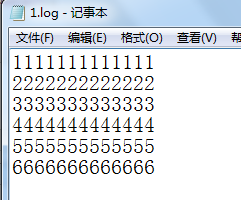
1.log的内容
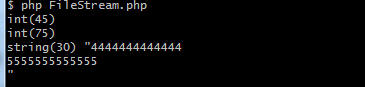
2.获取部分结果
[PHP] 使用ftell和fseek函数直接定位文件位置获取部分数据的更多相关文章
- php使用file函数、fseek函数读取大文件效率分析
php读取大文件可以使用file函数和fseek函数,但是二者之间效率可能存在差异,本文章向大家介绍php file函数与fseek函数实现大文件读取效率对比分析,需要的朋友可以参考一下. 1. 直接 ...
- Eclipse 进入代码定位文件位置
- shell 字符串中定位字符位置 获取字符位置
linux shell 字符串操作(长度,查找,替换)详解 该博文中描述的如下两个字符串操作, ${string:position} #在$string中, 从位置$position开始提取子串 ${ ...
- 文件操作:fseek函数和ftell函数
1.fseek函数: int fseek(FILE * _File, long _Offset, int _Origin); 函数设置文件指针stream的位置.如果执行成功,stream将指向以fr ...
- 如何通过ftell和fseek来获取文件大小
#include <stdio.h> int main () { FILE * pFile=NULL; long size; pFile = fopen ("myfile.txt ...
- PHP fseek() 函数
定义和用法 fseek() 函数在打开的文件中定位. 该函数把文件指针从当前位置向前或向后移动到新的位置,新位置从文件头开始以字节数度量. 如果成功该函数返回 0,如果失败则返回 -1.请注意,移动到 ...
- C中的fseek函数使用
函数名:fseek函数 头文件:#include<stdio.h> 功能:把与fp有关的文件位置指针放到一个指定位置. 格式: int fseek(FILE *stream, long ...
- PHP移动文件指针ftell()、fseek()、rewind()总结
在对文件进行读写过程中,有时需要在文件中跳转.同不同位置读取,以及将数据写入到不同的位置.例如,使用文件模拟数据库保存数据,就需要移动文件指针.指针的位置是以从文件头开始的字节数度量的,默认以不同模式 ...
- strtok()函数、fseek()函数、fwrite()函数、fread()函数的使用
在电子词典这个项目过程中遇到了几个主要的问题,第一个是怎么解决把翻译分开这个.第二个事情就是怎么把结构体写到文件中.这两个问题,一个是关于字符串的操作一个是关于文件的操作. strtok函数 char ...
随机推荐
- 2019 Multi-University Training Contest 1 String(序列自动机+贪心)
题意 链接:https://vjudge.net/problem/HDU-6586 给你一个字符串和k,还有每个字符出现次数的限制,求一个长度为k的字典序最小的满足限制的子序列. 思路 先构造出序列自 ...
- Html学习之十一(CSS选择器的应用一)
<!doctype html> <html> <head> <meta charset="utf-8"> <title> ...
- thinkphp的运行
打开cmd切换到www目录下运行think E:\wamp64\www>php think run ThinkPHP Development server is started On <h ...
- FT_Get_Var error on comiling
[Julian@julian-linux-t450 gtk]$ gcc `pkg-config --cflags gtk+-.` -o exam00 exam00.c `pkg-config --li ...
- A1101 Quick Sort (25 分)
一.技术总结 这里的一个关键就是理解调换位置排序是时,如果是元主,那么它要确保的条件就只有两个一个是,自己的位置不变,还有就是前面的元素不能有比自己大的. 二.参考代码 #include<ios ...
- 在Azure DevOps Server中运行基于Spring Boot和Consul的微服务项目单元测试
1 概述 谈到微服务架构体系,绕不开服务发现这个功能.服务发现机制是简化微服务配置.实现容灾.水平扩缩容.提高运维效率的重要方式.在服务发现工具中,Consul在部署和使用方面与容器结合的天衣无缝,成 ...
- sqlplus简单使用
登录 C:\Users\inmeditation>sqlplus 请输入用户名: scott 输入口令: 查看当前行长 SQL> show linesize; linesize 80 查看 ...
- 【前端知识体系-NodeJS相关】NodeJS高频前端面试题整理
1. 为什么JavaScript是单线程? 防止DOM渲染冲突的问题: Html5中的Web Worker可以实现多线程 2.什么是任务队列? 任务队列"是一个先进先出的数据结构,排在前面的 ...
- 【MySQL】MMM和MHA高可用架构
用途 对MySQL主从复制集群的Master的健康监控. 当Master宕机后把写VIP迁移到新Master. 重新配置集群中的其他Slave从新Master同步 MMM架构 主服务器发生故障时, 1 ...
- etcd 开启auth认证
一.概述 1.etcd的v2和v3的认证有些不同,需要分别设置2.Etcd通过用户(user)-角色(role)-权限的方式来控制访问,用户关联角色,角色拥有权限,从而用户也就拥有了相应的权限3.Et ...