
[PHP] 使用ftell和fseek函数直接定位文件位置获取部分数据
对于大文件只获取部分数据很有用
1.使用ftell函数可以获取当前指针的字节位置
2.使用fseek函数可以直接定位到指定的位置
3.读取指定字节的数据就可以部分获取文件内容了
<?php

class FileStream

{

    private $fp = null;

    private $mode = 'r';

    private $context = null;

    private $readonly = false;

    private $writeonly = false;

    private $appendMode = false;

    public function __construct($file, $mode = 'r', $context = null)

    {

        $mode = trim($mode);

        if (isset($mode[0])) {

            $this->mode = strtolower($mode);

        }

        if ($context) {

            $this->context = $context;

            $this->fp = fopen($file, $mode, false, $this->context);

        } else {

            $this->fp = fopen($file, $mode);

        }

        if (!$this->fp) {

            throw new Exception('can not open ' . $file);

        }

        if ($this->mode == 'r') {

            $this->readonly = true;

        } elseif ($this->mode == 'w') {

            $this->writeonly = true;

        } elseif ($this->mode[0] == 'a') {

            $this->appendMode = true;

        }

    }

    public function __destruct()

    {

        $this->close();

    }

    public function close()

    {

        if (!$this->fp) {

            fclose($this->fp);

            $this->fp = null;

        }

    }

    public function read($size)

    {

        if ($this->writeonly) {

            throw new Exception('write only');

        }

        if (!$this->fp) {

            throw new Exception('stream already closed');

        }

        $buf = fread($this->fp, $size);

        if ($buf === false) {

            throw new Exception('read failed');

        }

        return $buf;

    }

    public function readLine()

    {

        if ($this->writeonly) {

            throw new Exception('write only');

        }

        if (!$this->fp) {

            throw new Exception('stream already closed');

        }

        return fgets($this->fp);

    }

    public function readAll()

    {

        if ($this->writeonly) {

            throw new Exception('write only');

        }

        if (!$this->fp) {

            throw new Exception('stream already closed');

        }

        $buf = '';

        while (true) {

            $s = fread($this->fp, 8192);

            if ($s === false) {

                throw new Exception('read failed');

            }

            if (!isset($s[0])) {

                break;

            }

            $buf .= $s;

        }

        return $buf;

    }

    public function write($data)

    {

        if ($this->readonly) {

            throw new Exception('read only');

        }

        if (!$this->fp) {

            throw new Exception('stream already closed');

        }

        if (fwrite($this->fp, $data) === false) {

            throw new Exception('write failed');

        }

    }

    public function tell()

    {

        if ($this->appendMode) {

            throw new Exception('tell can not work on appendmode');

        }

        if (!$this->fp) {

            throw new Exception('stream already closed');

        }

        $p = ftell($this->fp);

        if ($p === false) {

            throw new Exception('tell failed');

        }

        return $p;

    }

    public function seek($position)

    {

        if ($this->appendMode) {

            throw new Exception('seek can not work on seekmode');

        }

        if (!$this->fp) {

            throw new Exception('stream already closed');

        }

        if (fseek($this->fp, $position) !== 0) {

            throw new Exception('seek failed');

        }

    }

}

$stream=new FileStream("1.log");

$start=0;

$end=0;

//获取开始和结束的字节位置

while($ln=$stream->readLine()){

    if($ln=="3333333333333\r\n"){

        $start=$stream->tell();

    }

    if($ln=="5555555555555\r\n"){

       $end=$stream->tell();

    }

}

var_dump($start,$end);

//直接定位到开始的字节位置

$stream->seek($start);

//读取指定字节数的数据

$res=$stream->read($end - $start);

var_dump($res);
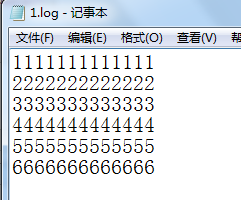
1.log的内容
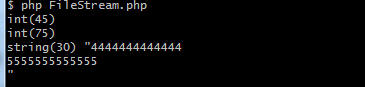
2.获取部分结果
[PHP] 使用ftell和fseek函数直接定位文件位置获取部分数据的更多相关文章
- php使用file函数、fseek函数读取大文件效率分析
php读取大文件可以使用file函数和fseek函数,但是二者之间效率可能存在差异,本文章向大家介绍php file函数与fseek函数实现大文件读取效率对比分析,需要的朋友可以参考一下. 1. 直接 ...
- Eclipse 进入代码定位文件位置
- shell 字符串中定位字符位置 获取字符位置
linux shell 字符串操作(长度,查找,替换)详解 该博文中描述的如下两个字符串操作, ${string:position} #在$string中, 从位置$position开始提取子串 ${ ...
- 文件操作:fseek函数和ftell函数
1.fseek函数: int fseek(FILE * _File, long _Offset, int _Origin); 函数设置文件指针stream的位置.如果执行成功,stream将指向以fr ...
- 如何通过ftell和fseek来获取文件大小
#include <stdio.h> int main () { FILE * pFile=NULL; long size; pFile = fopen ("myfile.txt ...
- PHP fseek() 函数
定义和用法 fseek() 函数在打开的文件中定位. 该函数把文件指针从当前位置向前或向后移动到新的位置,新位置从文件头开始以字节数度量. 如果成功该函数返回 0,如果失败则返回 -1.请注意,移动到 ...
- C中的fseek函数使用
函数名:fseek函数 头文件:#include<stdio.h> 功能:把与fp有关的文件位置指针放到一个指定位置. 格式: int fseek(FILE *stream, long ...
- PHP移动文件指针ftell()、fseek()、rewind()总结
在对文件进行读写过程中,有时需要在文件中跳转.同不同位置读取,以及将数据写入到不同的位置.例如,使用文件模拟数据库保存数据,就需要移动文件指针.指针的位置是以从文件头开始的字节数度量的,默认以不同模式 ...
- strtok()函数、fseek()函数、fwrite()函数、fread()函数的使用
在电子词典这个项目过程中遇到了几个主要的问题,第一个是怎么解决把翻译分开这个.第二个事情就是怎么把结构体写到文件中.这两个问题,一个是关于字符串的操作一个是关于文件的操作. strtok函数 char ...
随机推荐
- JSON理解(一篇就够了)
可以看看视频讲解,视频几十分钟就结束了 JSON 1.什么是json 其实是一种数据格式的规范,与开发的语言无关,轻量级的数据格式 全称JavaScript Object Notation 2.优点: ...
- python 连接oracle -- sqlalchemy及cx_Oracle的使用详解
python连接oracle -- sqlalchemy import cx_Oracle as orcl import pandas as pd from sqlalchemy import cre ...
- Loadrunner Controller运行不了,提示cannot create Vusers
执行场景时显示: Loadrunner Controller cannot create Vusers.Ensure that your load generators are available a ...
- react细节
1.在函数式组件中使用 类型和默认值 function App({ name }) { return ( <div> <h1>{name}</h1> </di ...
- gradle是什么
Gradle是JVM生态下又一款开源的自动化构建工具,以基于Groovy的DSL描述构建过程,在结合了ant和maven的优点的基础上,提供了更为简洁,灵活和高效的build体验. Task代表了构建 ...
- Paper | Xception: Deep Learning with Depthwise Separable Convolutions
目录 故事 Inception结构和思想 更进一步,以及现有的深度可分离卷积 Xception结构 实验 这篇论文写得很好.只要你知道卷积操作或公式,哪怕没看过Inception,也能看懂. 核心贡献 ...
- RSA加密与解密
/// <summary> /// RSA 公钥加密 /// </summary> /// <param name="content">要加密的 ...
- 网络流 之 dinic 算法
网络流指的是:网络流(network-flows)是一种类比水流的解决问题方法.(类似于水管群,有一个源点(水无限多),和一个汇点,最大流就代表这个点水管群(边集)每秒最大能送道汇点的水量) 这个怎么 ...
- 使用OpenSSL证书操作详解
一.OpenSSL简介 OpenSSL支持多种秘钥算法,包括RSA.DSA.ECDSA,RSA使用比较普遍.官网地址:https://www.openssl.org/,一般CeontOS系统都装有Op ...
- 物联网架构成长之路(34)-物联网数据可视化grafana展示
一.前言 前面介绍了利用后台业务服务器监听EMQ的Topic,作为EMQ的一个客户端方式来保存数据.然后将数据保存到时序数据库InfluxDB中.本小节就简单介绍一下如何安装和使用,及如何利用Graf ...