
IDEA使用maven搭建spring项目
spring框架
Spring框架是由于软件开发的复杂性而创建的。Spring使用的是基本的JavaBean来完成以前只可能由EJB完成的事情。然而,Spring的用途不仅仅限于服务器端的开发。从简单性、可测试性和松耦合性角度而言,绝大部分Java应用都可以从Spring中受益。
◆目的:解决企业应用开发的复杂性
◆功能:使用基本的JavaBean代替EJB,并提供了更多的企业应用功能
◆范围:任何Java应用
Spring是一个轻量级控制反转(IoC)和面向切面(AOP)的容器框架。
优点
◆JAVA EE应该更加容易使用。
◆面向对象的设计比任何实现技术(比如JAVA EE)都重要。
◆面向接口编程,而不是针对类编程。Spring将使用接口的复杂度降低到零。(面向接口编程有哪些复杂度?)
◆代码应该易于测试。Spring框架会帮助你,使代码的测试更加简单。
◆JavaBean提供了应用程序配置的最好方法。
◆在Java中,已检查异常(Checked exception)被过度使用。框架不应该迫使你捕获不能恢复的异常。
IDEA使用maven搭建spring项目
idea建立spring项目相当方便 , 可以自动生成spring配置文件 , 和自动导入Spring所需jar包.
File—>new—>project—>Maven
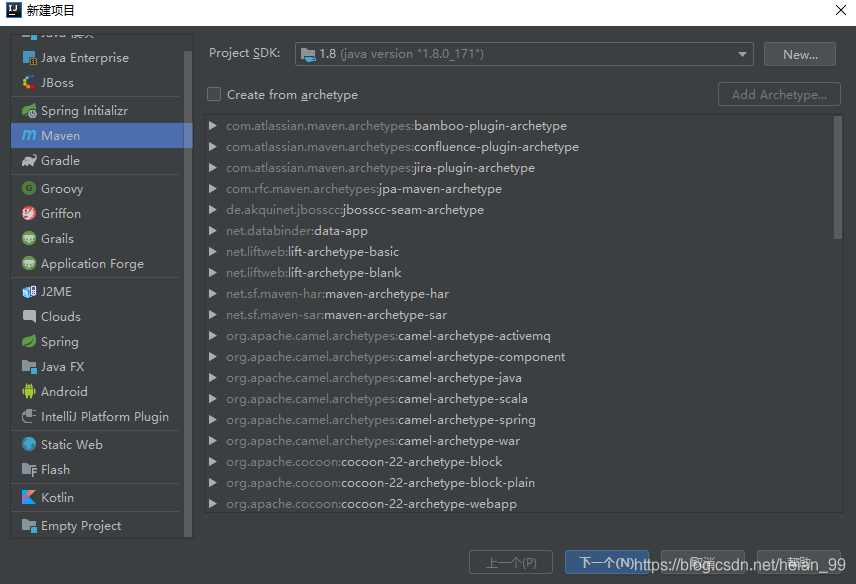
选择本地的jdk,下一步

可以根据自己需求填写(没有什么限制)

选择项目存储的位置,在点击完成就可以。此时一个Maven已经建立成功。
下面,根据自己的需求添加spring依赖和jar包
在pom.xml的文件下添加依赖
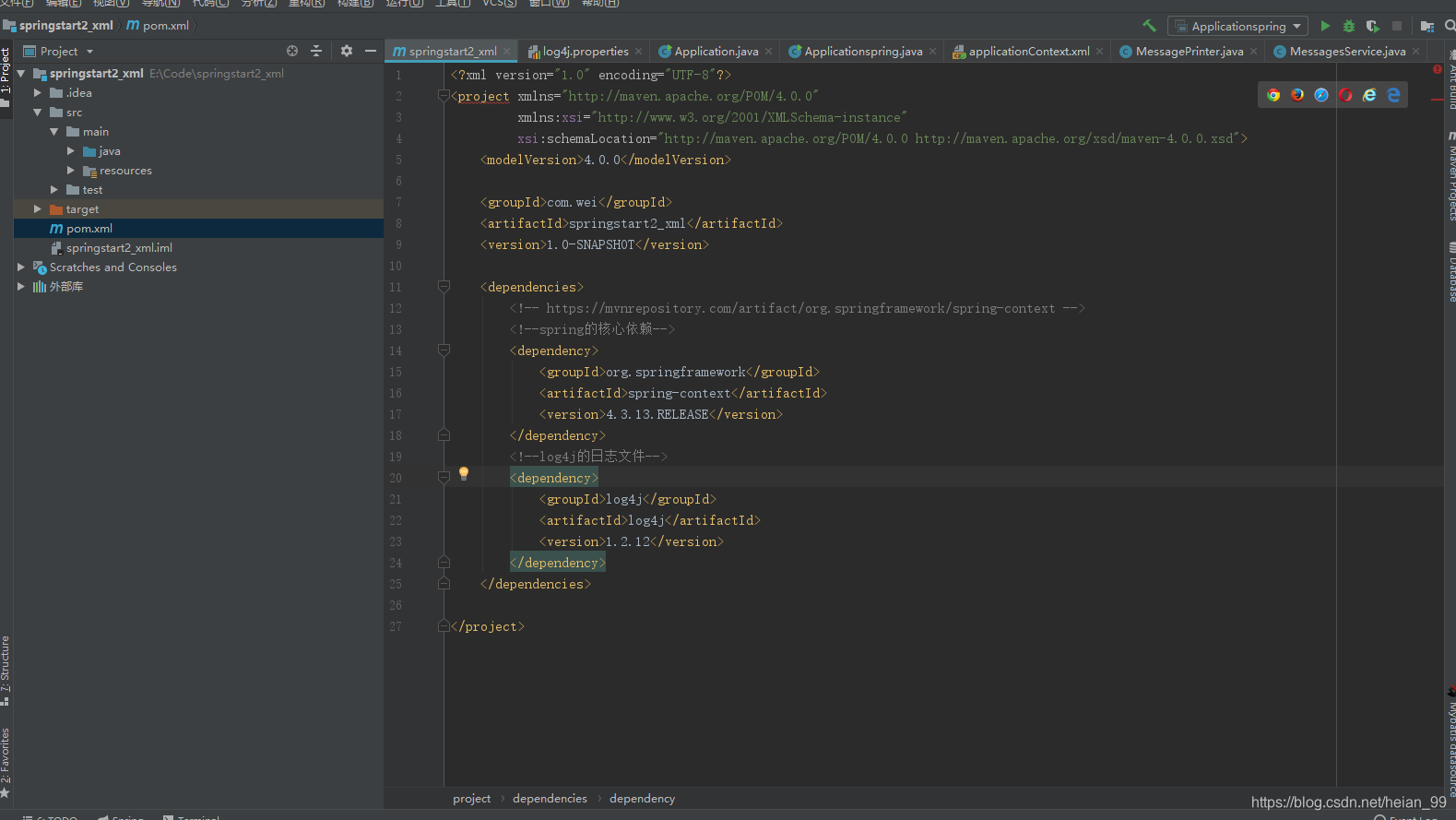
    <dependencies>

        <!-- https://mvnrepository.com/artifact/org.springframework/spring-context -->

        <!--spring的核心依赖-->

        <dependency>

            <groupId>org.springframework</groupId>

            <artifactId>spring-context</artifactId>

            <version>4.3.13.RELEASE</version>

        </dependency>

        <!--log4j的日志文件-->

        <dependency>

            <groupId>log4j</groupId>

            <artifactId>log4j</artifactId>

            <version>1.2.12</version>

        </dependency>

    </dependencies>
加入这段代码,idea的右下角会出现让你导包的选项,你可以点击第一个,导入jar包
好的,现在spring的核心包已经导入,下面开始练习。
整体项目结果图

首先,建两个类
MessagesService :消息
MessagePrinter : 打印机
就是使用打印机打印消息,就这么简单。
也就是要MessagePrinter这个类调用MessagesService 类来输出消息。
MessagesService
package hello;

/**

 * 打印

 */

public class MessagesService {

//    无参构造函数

    public MessagesService() {

        super();

        System.out.println("MessageService..");

    }

    public String getMessage(){

      return "Hello Word";

    }

}
MessagePrinter
package hello;

/**

 * 打印机

 */

public class MessagePrinter {

    /**

     * 无参构造函数

     */

    public MessagePrinter() {

        super();

        System.out.println("MessagePinter..");

    }

    /**

     * 建立和MessageService的关联关系

     */

    private MessagesService service;

    /**

     * 设置service的值

     * @param service

     */

    public void setService(MessagesService service) {

        this.service = service;

    }

    public void printMessage(){

        System.out.println(this.service.getMessage());

    }

}
(1)使用传统的调用方法
创建Application类。
Application
package hello;

public class Application {

    public static void main(String[] args) {

        System.out.println("appliction");

        //创建打印机对象

        MessagePrinter printer=new MessagePrinter();

        //创建消息服务对象

        MessagesService service=new MessagesService();

        //设置打印机对象的service属性

        printer.setService(service);

        printer.printMessage();

    }

}
点击绿色图标,点击第一个运行
运行结构

已经成功运行,并输出。
(2)spring的方法来进行调用
在resources下建立applicationContext.xml配置文件
applicationContext.xml
<?xml version="1.0" encoding="UTF-8"?>

<beans xmlns="http://www.springframework.org/schema/beans"

       xmlns:xsi="http://www.w3.org/2001/XMLSchema-instance"

       xsi:schemaLocation="http://www.springframework.org/schema/beans

                        http://www.springframework.org/schema/beans/spring-beans.xsd">

    <bean id="service" class="hello.MessagesService"></bean>

    <bean id="printer" class="hello.MessagePrinter">

        <property name="service" ref="service"></property>

    </bean>

</beans>
在java的hello下创建Applicationspring类
Applicationspring
package hello;

import org.springframework.context.ApplicationContext;

import org.springframework.context.support.ClassPathXmlApplicationContext;

public class Applicationspring {

    public static void main(String[] args) {

        System.out.println("applictionspring");

        //初始化spring容器

        ApplicationContext context;

        context = new ClassPathXmlApplicationContext("applicationContext.xml");

        //从容器中获取MessagePrinter对象

        MessagePrinter printer=context.getBean(MessagePrinter.class);

        printer.printMessage();

    }

}
点击运行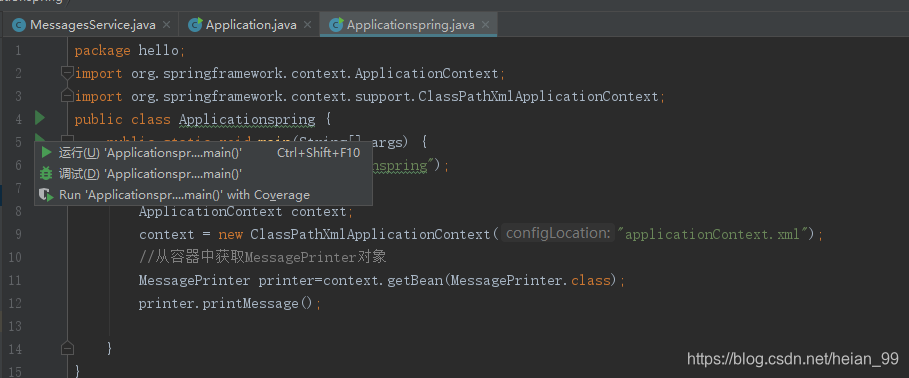
结果

(3)添加log4j.properties日志
log4j.properties
log4j.rootCategory=INFO, stdout

log4j.appender.stdout=org.apache.log4j.ConsoleAppender

log4j.appender.stdout.layout=org.apache.log4j.PatternLayout

log4j.appender.stdout.layout.ConversionPattern=%d{ABSOLUTE} %5p %t %c{2}:%L - %m%n

log4j.category.org.springframework.beans.factory=DEBUG
再次运行,会出现各种相关的日志

IDEA使用maven搭建spring项目的更多相关文章
- Maven 搭建spring boot多模块项目(附源码),亲测可以,感谢原创
原创地址:https://segmentfault.com/a/1190000005020589 我的DEMO码云地址,持续添加新功能: https://gitee.com/itbase/Spring ...
- Myeclipse下使用Maven搭建spring boot项目
开发环境:Myeclipse2017.JDK1.6.Tomcat 8.0.Myeclipse下使用Maven搭建spring boot项目,详细过程如下: 1. New -> Project.. ...
- Maven 搭建spring boot多模块项目
Maven 搭建spring boot多模块项目 备注:所有项目都在idea中创建 1.idea创建maven项目 1-1: 删除src,target目录,只保留pom.xml 1-2: 根目录pom ...
- 利用Intellij+MAVEN搭建Spring+Mybatis+MySql+SpringMVC项目详解
http://blog.csdn.net/noaman_wgs/article/details/53893948 利用Intellij+MAVEN搭建Spring+Mybatis+MySql+Spri ...
- Maven搭建Spring Security3.2项目详解
本来是打算在上一篇SpringMVC+Hibernate上写的,结果发现上面那篇 一起整合的,结果发现上一篇内容实在是太长了,就另起一篇,这篇主要是采用 Maven搭建Spring+SpringMVC ...
- Maven 搭建 SSM 项目 (oracle)
简单谈一下maven搭建 ssm 项目 (使用数据库oracle,比 mysql 难,所以这里谈一下) 在创建maven 的web项目时,常常会缺了main/java , main/test 两个文件 ...
- 【maven】 在 MyEcplise上使用maven搭建Web项目
二.在My Ecplise上使用Maven搭建Web项目 1.新建一个maven项目 2.create一个简单的骨架 3.就像在ecplise中一样设置项目的以下配置 4.新创建的项目结构如下 ...
- 如何使用maven搭建web项目
博客园注册了有二十多天了,还没有写过博客,今天就发一篇,也便于后面查找笔记. 我个人已经做了几年的java web开发了,由于所在的公司是业务型公司,用的都是一些老旧的稳定技术,很少接触到稍微新点的内 ...
- Spring入门(四):使用Maven管理Spring项目
让我们先回顾下本系列的前3篇博客: Spring入门(一):创建Spring项目 Spring入门(二):自动化装配bean Spring入门(三):通过JavaConfig装配bean 1.为什么要 ...
随机推荐
- Mybatis逆向工程中的 mybatis-generator:generate 代码生成器的使用
使用逆向工程可以根据数据库的表名字生成pojo层(实体类),mapper层(dao层,直接与底层的XML中映射相关),XML(映射执SQL语句) 下面请看具体生成步骤 1. 点击generatorCo ...
- golang中的struct标签tag
这个以前用beego时涉及过,时间久了,就忘了. 现在k8s里的controller,一样用了这个语法, 再拾起来吧. http://www.01happy.com/golang-struct-tag ...
- 2017年蓝桥杯B组C/C++决赛题解
2017年蓝桥杯B组C/C++决赛题目(不含答案) 1.36进制 ok 求36进制,类比二进制转10进制,36^3 + 36^2 + 36^1 + 36^0 2.磁砖样式 ok dfs搜索 我自己写的 ...
- day82_10_31celery的使用
1.缓存 当一些数据需要固定地且频繁访问数据库时,需要使用到接口缓存. 以轮播图为例,每个用户都会访问首页,首页的轮播图长时间不会改变,所以可以使用cache,将固定数据保存到缓存中(redis),第 ...
- jQuery核心(一)
API文档:http://jquery.cuishifeng.cn/ 一. jQuery.extend(object) 用于扩展jQuery对象本身.用来在jQuery命名空间上增加新函数. jQue ...
- 读取本地文件转化成MultipartFile
介绍 现在有个上传文件功能,需要将文件上传到oss上,但是文件有点多,于是使用接口进行上传.但是需要上传文件转换为MultipartFile类型文件进行上传. 主要代码 添加pom文件 <dep ...
- Angular 4.x NgClass ngStyle 指令用法
<some-element [ngClass]="'first second'">...</some-element> <some-element [ ...
- Python进阶-XV 类和对象的命名空间 组合
一.类和对象命名空间 1.类中可以定义两种属性 静态属性和动态属性 class Course: language = 'Chinese' # 静态属性 def __init__(self, name, ...
- 水平划分table
大概10年前,接到的任务是要解决一个AuditTrail表的写入性能. performance test的时候,一晚上这个表可以长1百万行,在SQLServer归档到本地文件以后再去删除这1百万条记录 ...
- 再谈Token认证,如何快速方便获取用户信息
前面我写了一篇<Token认证,如何快速方便获取用户信息>的文章,引起了各位读者的积极参与,除了文章中我提出的三种方式,各位读者大佬们也贡献了其他多种实现方式. 今天决定基于大家提供的思路 ...