
docker安装Mysql8.0并挂载外部配置和数据
环境
CentOS Linux release 7.7.1908 (Core)
拉取Mysql8.0 镜像
docker pull mysql:8.0.18
创建挂载目录
mkdir -p /home/app/mysql/conf

mkdir -p /home/app/mysql/data

mkdir -p /home/app/mysql/logs
放入my.cnf
vi /home/app/mysql/conf/my.cnf
把下面配置复制到文件中
# Copyright (c) 2017, Oracle and/or its affiliates. All rights reserved.

#

# This program is free software; you can redistribute it and/or modify

# it under the terms of the GNU General Public License as published by

# the Free Software Foundation; version 2 of the License.

#

# This program is distributed in the hope that it will be useful,

# but WITHOUT ANY WARRANTY; without even the implied warranty of

# MERCHANTABILITY or FITNESS FOR A PARTICULAR PURPOSE.  See the

# GNU General Public License for more details.

#

# You should have received a copy of the GNU General Public License

# along with this program; if not, write to the Free Software

# Foundation, Inc., 51 Franklin St, Fifth Floor, Boston, MA  02110-1301 USA

#

# The MySQL  Server configuration file.

#

# For explanations see

# http://dev.mysql.com/doc/mysql/en/server-system-variables.html

[mysqld]

pid-file        = /var/run/mysqld/mysqld.pid

socket          = /var/run/mysqld/mysqld.sock

datadir         = /var/lib/mysql

secure-file-priv= NULL

# Disabling symbolic-links is recommended to prevent assorted security risks

symbolic-links=0

# Custom config should go here

!includedir /etc/mysql/conf.d/
创建启动容器
docker run --restart=always -d -v /home/app/mysql/conf.d/my.cnf:/etc/mysql/my.cnf -v /home/app/mysql/logs:/logs -v /home/app/mysql/data/mysql:/var/lib/mysql -p 3306:3306 --name mysql -e MYSQL_ROOT_PASSWORD=123456 mysql:8.0.18
参数解释
--restart=always                                            -> 开机启动容器,容器异常自动重启

-d                                                          -> 以守护进程的方式启动容器

-v /home/app/mysql/conf.d/my.cnf:/etc/mysql/my.cnf          -> 映射配置文件

-v /home/app/mysql/logs:/logs                               -> 映射日志

-v /home/app/mysql/data/mysql:/var/lib/mysql                -> 映射数据

-p 3306:3306                                                -> 绑定宿主机端口

--name mysql                                                -> 指定容器名称

-e MYSQL_ROOT_PASSWORD=123456                               -> 写入配置root密码
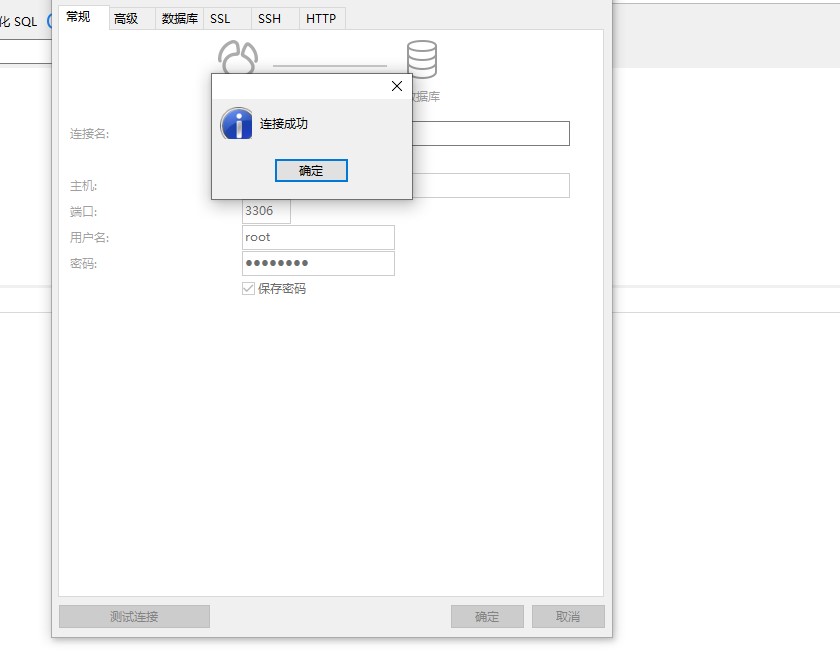
最终结果
docker安装Mysql8.0并挂载外部配置和数据的更多相关文章
- docker安装MySQL8,目录挂载、配置用户名密码、忽略表名大小写、连接数、特殊字符、时区
原文:docker安装MySQL8,目录挂载.配置用户名密码.忽略表名大小写.连接数.特殊字符.时区 一.环境配置 1.系统:centos7.3 2.docker版本:Docker version 1 ...
- 【Docker】:使用docker安装redis,挂载外部配置和数据
普通安装 1.拉取镜像,redis:4.0 docker pull redis:4.0 2.创建redis容器名"redistest1",并开启持久化 docker run -d ...
- 使用Docker安装mysql,挂载外部配置和数据
.挂载外部配置和数据安装 mkdir /opt mkdir /opt/mysql mkdir /opt/mysql/conf.d mkdir /opt/mysql/data/ 创建my.cnf配置文件 ...
- 【Docker】:使用docker安装mysql,挂载外部配置和数据
普通安装 1.下载镜像,mysql 5.7 docker pull mysql:5.7 2.创建mysql容器,并后台启动 docker run -d -p 3306:3306 -e MYSQL_US ...
- docker安装redis 5.0.7并挂载外部配置和数据
环境 CentOS Linux release 7.7.1908 (Core) 拉取redis 5.0.7 镜像 docker pull redis:5.0.7 创建挂载目录 mkdir -p /ho ...
- Docker安装MySQL8.0
环境 CentOS 7.5 Docker 1.13.1 MySQL 8.0.16 安装 拉取镜像 默认拉取最新版本的镜像 $ docker pull mysql 如果要指定版本,使用下面的命令 $ d ...
- Docker 安装mysql8.0
1. 下载Mysql的Docker镜像: $ docker search mysql (搜索mysql镜像) $ docker pull mysql (下载mysql镜像,默认最新版本) 2. 运行镜 ...
- Docker部署Mysql8.0.20并配置主从复制
1. Linux安装Mysql8.0.20并配置主从复制(一主一从,双主双从) Linux安装Mysql8.0.20并配置主从复制(一主一从,双主双从) 2. 前提准备 # 创建主从数据库文件夹 ...
- Linux安装Mysql8.0.20并配置主从复制(一主一从,双主双从)
1. 主从复制解释 将主数据库的增删改查等操作记录到二进制日志文件中,从库接收主库日志文件,根据最后一次更新的起始位置,同步复制到从数据库中,使得主从数据库保持一致. 2. 主从复制的作用 高可用 ...
随机推荐
- Java学习笔记(面向对象下)
面向对象(下) 类的继承 类的继承是指在一个现有类的基础上去构建一个新的类,构建出来的新类称为子类,现有类称为父类,子类会自动拥有父类所有可继承的属性和方法.(用extends关键字) //定义A ...
- 回文自动机pam
目的:类似回文Trie树+ac自动机,可以用来统计一些其他的回文串相关的量 复杂度:O(nlogn) https://blog.csdn.net/Lolierl/article/details/999 ...
- Python3 函数小练习
函数小练习 第一题 现有文件info.txt, 其内容如下: alpha male 18 1000 bravo male 28 2000 charlie female 38 3000 delta fe ...
- kubernetes-单机实验(入门)
一.安装kubernetes 实验环境: centos7.0(建议使用7.5版本) 实验机器IP:192.168.1.4 安装方式:yum安装 需求环境:Tomcat+Mysql 1:关闭防火 ...
- Rabbitmq-单机安装
Rabbitmq介绍 官网地址:https://www.rabbitmq.com RabbitMQ是一款在全球范围内使用非常广泛的开源消息队列中间件.它轻量级.易部署.并支持多种协议.它基于Erl ...
- js中promise解决callback回调地狱以及使用async+await异步处理的方法
1.callback回调地狱 function ajax(fn) { setTimeout(()=> { console.log('你好') fn() }, 1000) } ajax(() =& ...
- Mysql数据库的主从与主主
前言: 首先,我们得知道我们为什么要做数据库的主从与主主,而后,再讨论他们的优劣与特点:为什么要做主从呢?因为Mysql数据库没有增量备份的机制,当数据量太大的时候备份是个难以解决的问题.但是mysq ...
- Java实现微信小程序支付(完整版)
在开发微信小程序支付的功能前,我们先熟悉下微信小程序支付的业务流程图: 不熟悉流程的建议还是仔细阅读微信官方的开发者文档. 一,准备工作 事先需要申请企业版小程序,并开通“微信支付”(即商户功能).并 ...
- 使用docker运行dotnetcore站点
使用docker运行netcore站点 1.新建一.netcore测试站点,dotnet publish 发布到publish目录下 2.编写Dockerfile文件 3.打包上传到centos服务器 ...
- 渗透测试初学者的靶场实战 3--墨者学院SQL注入—宽字节盲注
墨者SQL注入-MYSQL数据库实战环境 实践步骤 1. 决断注入点 输入单引号,提示错误信息: 输入and 1=1 返回页面正常: 输入 and 1=2 返回正常 输入-1,返回异常: 2. 带入s ...