
使用AspectCore实现AOP模式的Redis缓存
这次的目标是实现通过标注Attribute实现缓存的功能,精简代码,减少缓存的代码侵入业务代码。
缓存内容即为Service查询汇总的内容,不做其他高大上的功能,提升短时间多次查询的响应速度,适当减轻数据库压力。
在做之前,也去看了EasyCaching的源码,这次的想法也是源于这里,AOP的方式让代码减少耦合,但是缓存策略有限。经过考虑决定,自己实现类似功能,在之后的应用中也方便对缓存策略的扩展。
本文内容也许有点不严谨的地方,仅供参考。同样欢迎各位路过的大佬提出建议。
在项目中加入AspectCore
之前有做AspectCore的总结,相关内容就不再赘述了。
在项目中加入Stackexchange.Redis
在stackexchange.Redis和CSRedis中纠结了很久,也没有一个特别的有优势,最终选择了stackexchange.Redis,没有理由。至于连接超时的问题,可以用异步解决。
- 安装Stackexchange.Redis
Install-Package StackExchange.Redis -Version 2.0.601
- 在appsettings.json配置Redis连接信息
{

	"Redis": {

		"Default": {

			"Connection": "127.0.0.1:6379",

			"InstanceName": "RedisCache:",

			"DefaultDB": 0

		}

	}

}
- RedisClient
用于连接Redis服务器,包括创建连接,获取数据库等操作
public class RedisClient : IDisposable

{

	private string _connectionString;

	private string _instanceName;

	private int _defaultDB;

	private ConcurrentDictionary<string, ConnectionMultiplexer> _connections;

	public RedisClient(string connectionString, string instanceName, int defaultDB = 0)

	{

		_connectionString = connectionString;

		_instanceName = instanceName;

		_defaultDB = defaultDB;

		_connections = new ConcurrentDictionary<string, ConnectionMultiplexer>();

	}

	private ConnectionMultiplexer GetConnect()

	{

		return _connections.GetOrAdd(_instanceName, p => ConnectionMultiplexer.Connect(_connectionString));

	}

	public IDatabase GetDatabase()

	{

		return GetConnect().GetDatabase(_defaultDB);

	}

	public IServer GetServer(string configName = null, int endPointsIndex = 0)

	{

		var confOption = ConfigurationOptions.Parse(_connectionString);

		return GetConnect().GetServer(confOption.EndPoints[endPointsIndex]);

	}

	public ISubscriber GetSubscriber(string configName = null)

	{

		return GetConnect().GetSubscriber();

	}

	public void Dispose()

	{

		if (_connections != null && _connections.Count > 0)

		{

			foreach (var item in _connections.Values)

			{

				item.Close();

			}

		}

	}

}
- 注册服务
Redis是单线程的服务,多几个RedisClient的实例也是无济于事,所以依赖注入就采用singleton的方式。
public static class RedisExtensions

{

	public static void ConfigRedis(this IServiceCollection services, IConfiguration configuration)

	{

		var section = configuration.GetSection("Redis:Default");

		string _connectionString = section.GetSection("Connection").Value;

		string _instanceName = section.GetSection("InstanceName").Value;

		int _defaultDB = int.Parse(section.GetSection("DefaultDB").Value ?? "0");

		services.AddSingleton(new RedisClient(_connectionString, _instanceName, _defaultDB));

	}

}

public class Startup

{

	public void ConfigureServices(IServiceCollection services)

	{

		services.ConfigRedis(Configuration);

	}

}
- KeyGenerator
创建一个缓存Key的生成器,以Attribute中的CacheKeyPrefix作为前缀,之后可以扩展批量删除的功能。被拦截方法的方法名和入参也同样作为key的一部分,保证Key值不重复。
public static class KeyGenerator

{

	public static string GetCacheKey(MethodInfo methodInfo, object[] args, string prefix)

	{

		StringBuilder cacheKey = new StringBuilder();

		cacheKey.Append($"{prefix}_");

		cacheKey.Append(methodInfo.DeclaringType.Name).Append($"_{methodInfo.Name}");

		foreach (var item in args)

		{

			cacheKey.Append($"_{item}");

		}

		return cacheKey.ToString();

	}

	public static string GetCacheKeyPrefix(MethodInfo methodInfo, string prefix)

	{

		StringBuilder cacheKey = new StringBuilder();

		cacheKey.Append(prefix);

        cacheKey.Append($"_{methodInfo.DeclaringType.Name}").Append($"_{methodInfo.Name}");

		return cacheKey.ToString();

	}

}
写一套缓存拦截器
- CacheAbleAttribute
Attribute中保存缓存的策略信息,包括过期时间,Key值前缀等信息,在使用缓存时可以对这些选项值进行配置。
public class CacheAbleAttribute : Attribute

{

	/// <summary>

	/// 过期时间(秒)

	/// </summary>

	public int Expiration { get; set; } = 300;

	/// <summary>

	/// Key值前缀

	/// </summary>

	public string CacheKeyPrefix { get; set; } = string.Empty;

	/// <summary>

	/// 是否高可用(异常时执行原方法)

	/// </summary>

	public bool IsHighAvailability { get; set; } = true;

	/// <summary>

	/// 只允许一个线程更新缓存(带锁)

	/// </summary>

	public bool OnceUpdate { get; set; } = false;

}
- CacheAbleInterceptor
接下来就是重头戏,拦截器中的逻辑就相对于缓存的相关策略,不用的策略可以分成不同的拦截器。
这里的逻辑参考了EasyCaching的源码,并加入了Redis分布式锁的应用。
public class CacheAbleInterceptor : AbstractInterceptor

{

	[FromContainer]

	private RedisClient RedisClient { get; set; }

	private IDatabase Database;

	private static readonly ConcurrentDictionary<Type, MethodInfo> TypeofTaskResultMethod = new ConcurrentDictionary<Type, MethodInfo>();

	public async override Task Invoke(AspectContext context, AspectDelegate next)

	{

		CacheAbleAttribute attribute = context.GetAttribute<CacheAbleAttribute>();

		if (attribute == null)

		{

			await context.Invoke(next);

			return;

		}

		try

		{

			Database = RedisClient.GetDatabase();

			string cacheKey = KeyGenerator.GetCacheKey(context.ServiceMethod, context.Parameters, attribute.CacheKeyPrefix);

			string cacheValue = await GetCacheAsync(cacheKey);

			Type returnType = context.GetReturnType();

			if (string.IsNullOrWhiteSpace(cacheValue))

			{

				if (attribute.OnceUpdate)

				{

					string lockKey = $"Lock_{cacheKey}";

					RedisValue token = Environment.MachineName;

					if (await Database.LockTakeAsync(lockKey, token, TimeSpan.FromSeconds(10)))

					{

						try

						{

							var result = await RunAndGetReturn(context, next);

							await SetCache(cacheKey, result, attribute.Expiration);

							return;

						}

						finally

						{

							await Database.LockReleaseAsync(lockKey, token);

						}

					}

					else

					{

						for (int i = 0; i < 5; i++)

						{

							Thread.Sleep(i * 100 + 500);

							cacheValue = await GetCacheAsync(cacheKey);

							if (!string.IsNullOrWhiteSpace(cacheValue))

							{

								break;

							}

						}

						if (string.IsNullOrWhiteSpace(cacheValue))

						{

							var defaultValue = CreateDefaultResult(returnType);

							context.ReturnValue = ResultFactory(defaultValue, returnType, context.IsAsync());

							return;

						}

					}

				}

				else

				{

					var result = await RunAndGetReturn(context, next);

					await SetCache(cacheKey, result, attribute.Expiration);

					return;

				}

			}

			var objValue = await DeserializeCache(cacheKey, cacheValue, returnType);

			//缓存值不可用

			if (objValue == null)

			{

				await context.Invoke(next);

				return;

			}

				context.ReturnValue = ResultFactory(objValue, returnType, context.IsAsync());

		}

		catch (Exception)

		{

			if (context.ReturnValue == null)

			{

				await context.Invoke(next);

			}

		}

	}

	private async Task<string> GetCacheAsync(string cacheKey)

	{

		string cacheValue = null;

		try

		{

			cacheValue = await Database.StringGetAsync(cacheKey);

		}

		catch (Exception)

		{

			return null;

		}

		return cacheValue;

	}

	private async Task<object> RunAndGetReturn(AspectContext context, AspectDelegate next)

	{

		await context.Invoke(next);

		return context.IsAsync()

		? await context.UnwrapAsyncReturnValue()

		: context.ReturnValue;

	}

	private async Task SetCache(string cacheKey, object cacheValue, int expiration)

	{

		string jsonValue = JsonConvert.SerializeObject(cacheValue);

		await Database.StringSetAsync(cacheKey, jsonValue, TimeSpan.FromSeconds(expiration));

	}

	private async Task Remove(string cacheKey)

	{

		await Database.KeyDeleteAsync(cacheKey);

	}

	private async Task<object> DeserializeCache(string cacheKey, string cacheValue, Type returnType)

	{

		try

		{

			return JsonConvert.DeserializeObject(cacheValue, returnType);

		}

		catch (Exception)

		{

			await Remove(cacheKey);

			return null;

		}

	}

	private object CreateDefaultResult(Type returnType)

	{

		return Activator.CreateInstance(returnType);

	}

	private object ResultFactory(object result, Type returnType, bool isAsync)

	{

		if (isAsync)

		{

			return TypeofTaskResultMethod

				.GetOrAdd(returnType, t => typeof(Task)

				.GetMethods()

				.First(p => p.Name == "FromResult" && p.ContainsGenericParameters)

				.MakeGenericMethod(returnType))

				.Invoke(null, new object[] { result });

		}

		else

		{

			return result;

		}

	}

}
- 注册拦截器
在AspectCore中注册CacheAbleInterceptor拦截器,这里直接注册了用于测试的DemoService,
在正式项目中,打算用反射注册需要用到缓存的Service或者Method。
public static class AspectCoreExtensions

{

	public static void ConfigAspectCore(this IServiceCollection services)

	{

		services.ConfigureDynamicProxy(config =>

		{

			config.Interceptors.AddTyped<CacheAbleInterceptor>(Predicates.Implement(typeof(DemoService)));

		});

		services.BuildAspectInjectorProvider();

	}

}
测试缓存功能
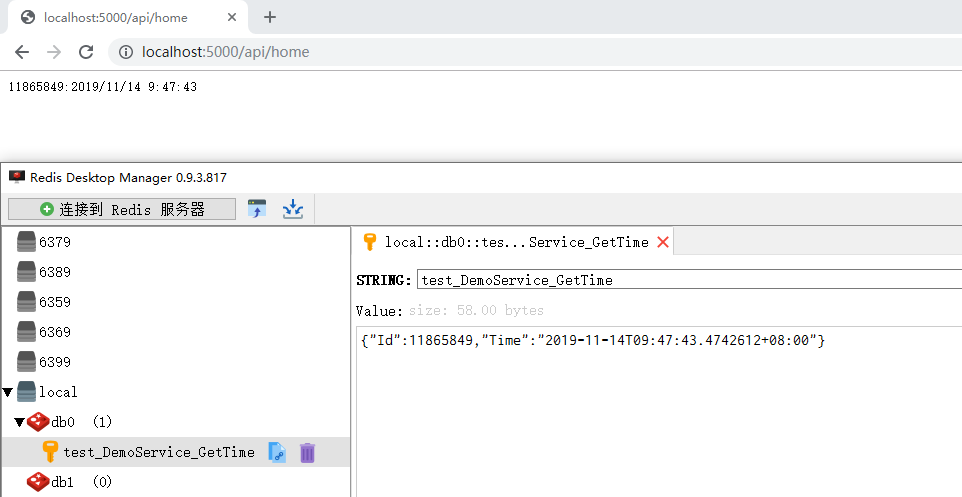
- 在需要缓存的接口/方法上标注Attribute
[CacheAble(CacheKeyPrefix = "test", Expiration = 30, OnceUpdate = true)]

public virtual DateTimeModel GetTime()

{

    return new DateTimeModel

	{

	    Id = GetHashCode(),

		Time = DateTime.Now

    };

}
- 测试结果截图
请求接口,返回时间,并将返回结果缓存到Redis中,保留300秒后过期。
相关链接
使用AspectCore实现AOP模式的Redis缓存的更多相关文章
- 今日份学习: Spring中使用AOP并实现redis缓存?
笔记 在Spring中如何使用AOP? Spring是如何切换JDK动态代理和CGLIB的? spring.aop.proxy-target-class=true (在下方第二个链接中,原生doc中提 ...
- 聊聊在AOP模式下的缓存方案
面向方法的数据集缓存 使用了autofac做为ioc容器,使用Autofac.Extras.DynamicProxy2作为方法拦截器,缓存面向方法,直接在方法上添加CachingAttribute特性 ...
- ssm+redis 如何更简洁的利用自定义注解+AOP实现redis缓存
基于 ssm + maven + redis 使用自定义注解 利用aop基于AspectJ方式 实现redis缓存 如何能更简洁的利用aop实现redis缓存,话不多说,上demo 需求: 数据查询时 ...
- spring aop搭建redis缓存
SpringAOP与Redis搭建缓存 近期项目查询数据库太慢,持久层也没有开启二级缓存,现希望采用Redis作为缓存.为了不改写原来代码,在此采用AOP+Redis实现. 目前由于项目需要,只需要做 ...
- 十二:SpringBoot-基于Cache注解模式,管理Redis缓存
SpringBoot-基于Cache注解模式,管理Redis缓存 1.Cache缓存简介 2.核心API说明 3.SpringBoot整合Cache 3.1 核心依赖 3.2 Cache缓存配置 3. ...
- 第04项目:淘淘商城(SpringMVC+Spring+Mybatis)【第七天】(redis缓存)
https://pan.baidu.com/s/1bptYGAb#list/path=%2F&parentPath=%2Fsharelink389619878-229862621083040 ...
- 缓存工厂之Redis缓存
这几天没有按照计划分享技术博文,主要是去医院了,这里一想到在医院经历的种种,我真的有话要说:医院里的医务人员曾经被吹捧为美丽+和蔼+可亲的天使,在经受5天左右相互接触后不得不让感慨:遇见的有些人员在挂 ...
- Windows Azure Redis 缓存服务
8月20日,Windows Azure (中国版)开始提供Redis缓存服务,比较国际版的Microsoft Azure晚了差不多一年的时间.说实话,微软真不应该将这个重要的功能delay这么长时间, ...
- memcache/redis 缓存学习笔记
0.redis和memcache的区别 a.redis可以存储除了string之外的对象,如list,hash等 b.服务器宕机以后,redis会把内存的数据持久化到磁盘上,而memcache则不会 ...
随机推荐
- C#测试对比不同类型的方法调用的性能
一. 测试方法调用形式 1. 实例方法调用 2. 静态方法调用 3. 实例方法反射调用 4. 委托方法的Invoke调用 5. 委托方法的DynamicInvoke调用 6.委托方法的BeginInv ...
- 5-网宿CDN客户端推流NGB
网宿NGB调度系统(类似httpdns原理)从服务端分发给客户端推流IP,实现基于APP realip精准调度模式. 参考官网介绍:https://www.wangsu.com/content/det ...
- FileFilter(),文件过滤器操作
package seday03; import java.io.File;import java.io.FileFilter; /*** listFiles的重载方法允许我们传入一个文件过滤器:Fil ...
- Vuex基本使用的总结--转载
在 Vue 的单页面应用中使用,需要使用Vue.use(Vuex)调用插件.使用非常简单,只需要将其注入到Vue根实例中. import Vuex from 'vuex' Vue.use(Vuex) ...
- npm ERR! code Z_BUF_ERROR
最新学习egg,在npm install egg --save 步骤中总是报错如下: npm ERR! code Z_BUF_ERROR npm ERR! errno -5 npm ERR! zlib ...
- 高版本 MySQL 导出的脚本到低版本 MySQL 中执行时报错
导入 MySQL 脚本时报错:[ERR] 1273 - Unknown collation: 'utf8mb4_0900_ai_ci'低版本还不支持 utfmb4 这个字符集 解决方法:将 sql 脚 ...
- 利用Fiddler模拟通过Dynamics 365的OAuth 2 Client Credentials认证后调用Web API
微软动态CRM专家罗勇 ,回复337或者20190521可方便获取本文,同时可以在第一间得到我发布的最新博文信息,follow me. 配置Dynamics 365 & PowerApps 支 ...
- Socket简单实现ssh笔记
Scoket概念: socket本质上就是在2台网络互通的电脑之间,架设一个通道,两台电脑通过这个通道来实现数据的互相传递. 我们知道网络 通信 都 是基于 ip+port 方能定位到目标的具体机器上 ...
- 靠谱的CSS样式
0. 引言 记录一些用到的CSS样式,只要可以使用CSS3的地方都可以使用. 1. CSS样式 flex布局:引用 阮一峰的网络日志http://www.ruanyifeng.com/blog/201 ...
- python如何拼接时间戳到写入的文件名中
问题描述: 记录一下拼接文件名时间戳的过程,回顾下可能的问题所在,希望能帮到同样碰到这类问题的兄dei. 进行单元测试时,最后使用HTMLTestRunner生成的HTML分析报告,需要添加一个时间戳 ...