
flink window实例分析
window是处理数据的核心。按需选择你需要的窗口类型后,它会将传入的原始数据流切分成多个buckets,所有计算都在window中进行。
flink本身提供的实例程序TopSpeedWindowing.java
import org.apache.flink.api.common.functions.RichMapFunction;

import org.apache.flink.api.java.tuple.Tuple4;

import org.apache.flink.api.java.utils.ParameterTool;

import org.apache.flink.streaming.api.TimeCharacteristic;

import org.apache.flink.streaming.api.datastream.DataStream;

import org.apache.flink.streaming.api.environment.StreamExecutionEnvironment;

import org.apache.flink.streaming.api.functions.source.SourceFunction;

import org.apache.flink.streaming.api.functions.timestamps.AscendingTimestampExtractor;

import org.apache.flink.streaming.api.functions.windowing.delta.DeltaFunction;

import org.apache.flink.streaming.api.windowing.assigners.GlobalWindows;

import org.apache.flink.streaming.api.windowing.evictors.TimeEvictor;

import org.apache.flink.streaming.api.windowing.time.Time;

import org.apache.flink.streaming.api.windowing.triggers.DeltaTrigger;

import java.util.Arrays;

import java.util.Random;

import java.util.concurrent.TimeUnit;

/**

 * An example of grouped stream windowing where different eviction and trigger

 * policies can be used. A source fetches events from cars every 100 msec

 * containing their id, their current speed (kmh), overall elapsed distance (m)

 * and a timestamp. The streaming example triggers the top speed of each car

 * every x meters elapsed for the last y seconds.

 */

public class TopSpeedWindowing {

    // *************************************************************************

    // PROGRAM

    // *************************************************************************

    public static void main(String[] args) throws Exception {

        final ParameterTool params = ParameterTool.fromArgs(args);

        final StreamExecutionEnvironment env = StreamExecutionEnvironment.getExecutionEnvironment();

        env.setStreamTimeCharacteristic(TimeCharacteristic.EventTime);

        env.getConfig().setGlobalJobParameters(params);

        @SuppressWarnings({"rawtypes", "serial"})

        DataStream<Tuple4<Integer, Integer, Double, Long>> carData;

        if (params.has("input")) {

            carData = env.readTextFile(params.get("input")).map(new ParseCarData());

        } else {

            System.out.println("Executing TopSpeedWindowing example with default input data set.");

            System.out.println("Use --input to specify file input.");

            carData = env.addSource(CarSource.create(2));

        }

        int evictionSec = 10;

        double triggerMeters = 50;

        DataStream<Tuple4<Integer, Integer, Double, Long>> topSpeeds = carData

                .assignTimestampsAndWatermarks(new CarTimestamp()) //1

                .keyBy(0)

                .window(GlobalWindows.create()) //2

                .evictor(TimeEvictor.of(Time.of(evictionSec, TimeUnit.SECONDS))) //3

                .trigger(DeltaTrigger.of(triggerMeters,

                        new DeltaFunction<Tuple4<Integer, Integer, Double, Long>>() {//4

                            private static final long serialVersionUID = 1L;

                            @Override

                            public double getDelta(

                                    Tuple4<Integer, Integer, Double, Long> oldDataPoint,

                                    Tuple4<Integer, Integer, Double, Long> newDataPoint) {

                                return newDataPoint.f2 - oldDataPoint.f2;

                            }

                        }, carData.getType().createSerializer(env.getConfig())))//4

                .maxBy(1);

        if (params.has("output")) {

            topSpeeds.writeAsText(params.get("output"));

        } else {

            System.out.println("Printing result to stdout. Use --output to specify output path.");

            topSpeeds.print();

        }

        env.execute("CarTopSpeedWindowingExample");

    }

    // *************************************************************************

    // USER FUNCTIONS

    // *************************************************************************

    private static class CarSource implements SourceFunction<Tuple4<Integer, Integer, Double, Long>> {

        private static final long serialVersionUID = 1L;

        private Integer[] speeds;

        private Double[] distances;

        private Random rand = new Random();

        private volatile boolean isRunning = true;

        private CarSource(int numOfCars) {

            speeds = new Integer[numOfCars];

            distances = new Double[numOfCars];

            Arrays.fill(speeds, 50);

            Arrays.fill(distances, 0d);

        }

        public static CarSource create(int cars) {

            return new CarSource(cars);

        }

        @Override

        public void run(SourceContext<Tuple4<Integer, Integer, Double, Long>> ctx) throws Exception {

            while (isRunning) {

                Thread.sleep(100);

                for (int carId = 0; carId < speeds.length; carId++) {

                    if (rand.nextBoolean()) {

                        speeds[carId] = Math.min(100, speeds[carId] + 5);

                    } else {

                        speeds[carId] = Math.max(0, speeds[carId] - 5);

                    }

                    distances[carId] += speeds[carId] / 3.6d;

                    Tuple4<Integer, Integer, Double, Long> record = new Tuple4<>(carId,

                            speeds[carId], distances[carId], System.currentTimeMillis());

                    ctx.collect(record);

                }

            }

        }

        @Override

        public void cancel() {

            isRunning = false;

        }

    }

    private static class ParseCarData extends RichMapFunction<String, Tuple4<Integer, Integer, Double, Long>> {

        private static final long serialVersionUID = 1L;

        @Override

        public Tuple4<Integer, Integer, Double, Long> map(String record) {

            String rawData = record.substring(1, record.length() - 1);

            String[] data = rawData.split(",");

            return new Tuple4<>(Integer.valueOf(data[0]), Integer.valueOf(data[1]), Double.valueOf(data[2]), Long.valueOf(data[3]));

        }

    }

    private static class CarTimestamp extends AscendingTimestampExtractor<Tuple4<Integer, Integer, Double, Long>> {

        private static final long serialVersionUID = 1L;

        @Override

        public long extractAscendingTimestamp(Tuple4<Integer, Integer, Double, Long> element) {

            return element.f3;

        }

    }

}
其中,
1. 定义时间戳,上篇文章<flink中的时间戳如何使用?---Watermark使用及原理>上进行了介绍,本篇不做赘述。
2.窗口类型,Windows Assigner定义如何将数据流分配到一个或者多个窗口;其层次结构如下:

evictor:用于数据剔除,其层次结构如下:
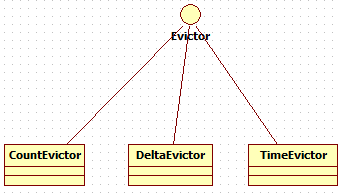
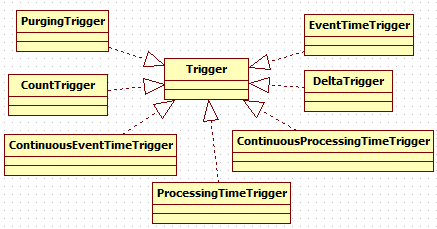
3. trigger:窗口触发器,其层次结构如下:
4. Window function定义窗口内数据的计算逻辑,其层次结构如下:

参考资料
【1】https://www.jianshu.com/p/5302b48ca19b
flink window实例分析的更多相关文章
- Camera图像处理原理及实例分析-重要图像概念
Camera图像处理原理及实例分析 作者:刘旭晖 colorant@163.com 转载请注明出处 BLOG:http://blog.csdn.net/colorant/ 主页:http://rg ...
- 一些有用的javascript实例分析(三)
原文:一些有用的javascript实例分析(三) 10 输入两个数字,比较大小 window.onload = function () { var aInput = document.getElem ...
- 一些有用的javascript实例分析(一)
原文:一些有用的javascript实例分析(一) 本文以http://fgm.cc/learn/链接的实例索引为基础,可参见其实际效果.分析和整理了一些有用的javascript实例,相信对一些初学 ...
- 一些有用的javascript实例分析(二)
原文:一些有用的javascript实例分析(二) 5 求出数组中所有数字的和 window.onload = function () { var oBtn = document.getElement ...
- Camera图像处理原理及实例分析
Camera图像处理原理及实例分析 作者:刘旭晖 colorant@163.com 转载请注明出处 BLOG:http://blog.csdn.net/colorant/ 主页:http://rg ...
- Watchdog问题实例分析
1.日志获取 Watchdog相关的问题甚至需要以下所有的日志: logcat 通过adb logcat命令输出Android的一些当前运行日志,可以通过logcat的 -b 参数指定要输出的日志缓冲 ...
- RPC原理及RPC实例分析
在学校期间大家都写过不少程序,比如写个hello world服务类,然后本地调用下,如下所示.这些程序的特点是服务消费方和服务提供方是本地调用关系. 1 2 3 4 5 6 public class ...
- java基础学习05(面向对象基础01--类实例分析)
面向对象基础01(类实例分析) 实现的目标 1.如何分析一个类(类的基本分析思路) 分析的思路 1.根据要求写出类所包含的属性2.所有的属性都必须进行封装(private)3.封装之后的属性通过set ...
- (转)实例分析:MySQL优化经验
[IT专家网独家]同时在线访问量继续增大,对于1G内存的服务器明显感觉到吃力,严重时甚至每天都会死机,或者时不时的服务器卡一下,这个问题曾经困扰了我半个多月.MySQL使用是很具伸缩性的算法,因此你通 ...
随机推荐
- WPF获取某控件的位置,也就是偏移量
原文:WPF获取某控件的位置,也就是偏移量 此段示例在MSDN中可见.XAML代码如下: <Window xmlns="http://schemas.microsoft.com/win ...
- delphi 获取大于2G的物理内存大小
一般情况下,我们是用GlobalMemoryStatus 来获取物理内存大小的 但该API在物理内存大小超过2G的时候,返回值均为2GB.因此,没有办法获取真实的物理内存大小,所以需要对此进行改进. ...
- 搭建svn服务器&服务器客户端使用笔记
参考借鉴文章:http://www.cnblogs.com/vijayfly/p/5711962.html 之前尝试着用git管理公司代码,但被一个问题困惑了很久无法解决,那就是git该如何只pull ...
- Visual studio 创建通用项目失败vstemplate
Visual studio 创建项目失败 提示 the vstemplate file references the wizard class 'Microsoft.VisualStudio.WinR ...
- Android零基础入门第86节:探究Fragment生命周期
一个Activity可以同时组合多个Fragment,一个Fragment也可被多个Activity 复用.Fragment可以响应自己的输入事件,并拥有自己的生命周期,但它们的生命周期直接被其所属的 ...
- Collection was modified; enumeration operation may not execute.的异常处理
Collection was modified; enumeration operation may not execute.的异常处理 在运行程序时遇到这样一段异常,仔细检查后发现是使用Foreac ...
- iOS密码框实现(二)取消确定按钮
由于将确定按钮去掉了,所以需要重新修改下代码,当输入第四个数字时,自动进入房间. iOS 密码框效果图: 实现方式: 首先声明一个block初始化方法,因为这只是个框框,并不需要处理网 ...
- Codility---Dominator
Task description A zero-indexed array A consisting of N integers is given. The dominator of array A ...
- C语言实现常用数据结构——队列
#include<stdio.h> #include<stdlib.h> #define MAX_SIZE 10 /* 用一个动态数组来实现队列 */ typedef stru ...
- lock和synchronized如何选择?
1.lock是一个接口,而synchronized是java关键字,synchronized是内置的语言实现. 2.synchronized在发生异常时,会自动释放线程占有的锁,因此不会导致死锁,而l ...