
自定义MVC二
1. 什么是MVC
MVC全名是Model View Controller,是模型(model)-视图(view)-控制器(controller)的缩写,
它是一种软件设计典范,用一种业务逻辑、数据、界面显示分离的方法组织代码
我们需要导入四个包
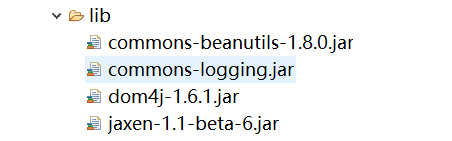
还有5个工具类
ActionModel
package com.zjj.beike;

import java.io.Serializable;

import java.util.HashMap;

import java.util.Map;

/**

 * 用来描述action标签

 * @author Administrator

 *

 */

public class ActionModel implements Serializable{

    private static final long serialVersionUID = 6145949994701469663L;

    private Map<String, ForwardModel> forwardModels = new HashMap<String, ForwardModel>();

    private String path;

    private String type;

    public String getPath() {

        return path;

    }

    public void setPath(String path) {

        this.path = path;

    }

    public String getType() {

        return type;

    }

    public void setType(String type) {

        this.type = type;

    }

    public void put(ForwardModel forwardModel){

        forwardModels.put(forwardModel.getName(), forwardModel);

    }

    public ForwardModel get(String name){

        return forwardModels.get(name);

    }

}
ConfigModel
package com.zjj.beike;

import java.io.Serializable;

import java.util.HashMap;

import java.util.Map;

/**

 * 用来描述config标签

 * @author Administrator

 *

 */

public class ConfigModel implements Serializable{

    private static final long serialVersionUID = -2334963138078250952L;

    private Map<String, ActionModel> actionModels = new HashMap<String, ActionModel>();

    public void put(ActionModel actionModel){

        actionModels.put(actionModel.getPath(), actionModel);

    }

    public ActionModel get(String name){

        return actionModels.get(name);

    }

}
ConfigModelFactory
package com.zjj.beike;

import java.io.InputStream;

import java.util.List;

import org.dom4j.Document;

import org.dom4j.Element;

import org.dom4j.io.SAXReader;

public class ConfigModelFactory {

    private ConfigModelFactory() {

    }

    private static ConfigModel configModel = null;

    public static ConfigModel newInstance() throws Exception {

        return newInstance("config.xml");

    }

    /**

     * 工厂模式创建config建模对象

     *

     * @param path

     * @return

     * @throws Exception

     */

    public static ConfigModel newInstance(String path) throws Exception {

        if (null != configModel) {

            return configModel;

        }

        ConfigModel configModel = new ConfigModel();

        InputStream is = ConfigModelFactory.class.getResourceAsStream(path);

        SAXReader saxReader = new SAXReader();

        Document doc = saxReader.read(is);

        List<Element> actionEleList = doc.selectNodes("/config/action");

        ActionModel actionModel = null;

        ForwardModel forwardModel = null;

        for (Element actionEle : actionEleList) {

             actionModel = new ActionModel();

            actionModel.setPath(actionEle.attributeValue("path"));

            actionModel.setType(actionEle.attributeValue("type"));

            List<Element> forwordEleList = actionEle.selectNodes("forward");

            for (Element forwordEle : forwordEleList) {

                forwardModel = new ForwardModel();

                forwardModel.setName(forwordEle.attributeValue("name"));

                forwardModel.setPath(forwordEle.attributeValue("path"));

                forwardModel.setRedirect(forwordEle.attributeValue("redirect"));

                actionModel.put(forwardModel);

            }

            configModel.put(actionModel);

        }

        return configModel;

    }

    public static void main(String[] args) {

        try {

            ConfigModel configModel = ConfigModelFactory.newInstance();

            ActionModel actionModel = configModel.get("/loginAction");

            ForwardModel forwardModel = actionModel.get("failed");

            System.out.println(actionModel.getType());

            System.out.println(forwardModel.getPath());

        } catch (Exception e) {

            e.printStackTrace();

        }

    }

}
ForwardModel
package com.zjj.beike;

import java.io.Serializable;

/**

 * 用来描述forward标签

 * @author Administrator

 *

 */

public class ForwardModel implements Serializable {

    private static final long serialVersionUID = -8587690587750366756L;

    private String name;

    private String path;

    private String redirect;

    public String getName() {

        return name;

    }

    public void setName(String name) {

        this.name = name;

    }

    public String getPath() {

        return path;

    }

    public void setPath(String path) {

        this.path = path;

    }

    public String getRedirect() {

        return redirect;

    }

    public void setRedirect(String redirect) {

        this.redirect = redirect;

    }

}
mvc.xml
<?xml version="1.0" encoding="UTF-8"?>

    <!--

        config标签:可以包含0~N个action标签

    -->

<config>

    <!--

        action标签:可以饱含0~N个forward标签

        path:以/开头的字符串,并且值必须唯一 非空

        type:字符串,非空

    -->

    <action path="/Cal" type="com.web.AddCalAction">

        <forward name="res" path="/res.jsp" redirect="false" />

    </action>

</config>
下面来看下我们的中央控制器
private static final long serialVersionUID = 1L;

    //private Map<String , IAction> actionMap = new HashMap<>();

    //在configModel对象包含了所有的子控制信息

    private ConfigModel configModel;

    public void init() {

    //    actionMap.put("/addCal", new AddCalAction());

        try {

            String xmlPath=this.getInitParameter("xmlPath");

            if(xmlPath==null|| "".equals(xmlPath)) {

                configModel=ConfigModelFactory.newInstance();

            }else {

                configModel=ConfigModelFactory.newInstance(xmlPath);

            }

         } catch (Exception e) {

            // TODO Auto-generated catch block

            e.printStackTrace();

        }

    }

    @Override

    protected void doGet(HttpServletRequest req, HttpServletResponse resp) throws ServletException, IOException {

        doPost(req, resp);

    }

    @Override

    protected void doPost(HttpServletRequest request, HttpServletResponse response) throws ServletException, IOException {

        init();

        String url= request.getRequestURI();

//        /***/addCal.action

        url = url.substring(url.lastIndexOf("/"), url.lastIndexOf("."));

//        IAction action = actionMap.get(url);

        ActionModel actionModel = configModel.get(url);

//        if(actionModel ==null) {

//        throw    new RuntimeException("你没有配置action标签,找不到对应的子控制器处理浏览器发送的请求");

//        }

     try {

        Action action=(Action) Class.forName(actionModel.getType()).newInstance();

        //action就是com.zking.web.CalAction

        if(action instanceof ModelDrivern) {

            ModelDrivern modelDrivern=(ModelDrivern)action;

            //此时的model的所有属性值都是null的

            Object model = modelDrivern.getModel();

            BeanUtils.populate(model, request.getParameterMap());

        }

        //返回码

        String code = action.execute(request, response);

        ForwardModel forwardModel = actionModel.get(code);

       if(forwardModel!=null) {

           String jspPath = forwardModel.getPath();

          if("false".equals(forwardModel.getRedirect())) {

              //做转发的处理

              request.getRequestDispatcher(jspPath).forward(request, response);

          }

          else {

              response.sendRedirect(request.getContextPath()+jspPath);

          }

       }

     } catch (Exception e) {

        // TODO Auto-generated catch block

        e.printStackTrace();

    }

//        try {

//            action.execute(req, resp);

//        } catch (Exception e) {

//            // TODO Auto-generated catch block

//            e.printStackTrace();

//        }

    }
以及我们的xml的配置
<?xml version="1.0" encoding="UTF-8"?>

<web-app xmlns:xsi="http://www.w3.org/2001/XMLSchema-instance" xmlns="http://xmlns.jcp.org/xml/ns/javaee" xsi:schemaLocation="http://xmlns.jcp.org/xml/ns/javaee http://xmlns.jcp.org/xml/ns/javaee/web-app_3_1.xsd" id="WebApp_ID" version="3.1">

  <display-name>MVC</display-name>

  <servlet>

  <servlet-name>DispatcherServlet</servlet-name>

  <servlet-class>com.framework.DispatcherServlet</servlet-class>

  <init-param>

  <param-name>xmlPath</param-name>

  <param-value>/mvc.xml</param-value>

  </init-param>

  </servlet>

  <servlet-mapping>

  <servlet-name>DispatcherServlet</servlet-name>

  <url-pattern>*.action</url-pattern>

  </servlet-mapping>

</web-app>
还有一个子控制器
作用:用来直接处理浏览器发送过来的请求。
public interface Action {

 String execute(HttpServletRequest request, HttpServletResponse response) throws ServletException, IOException, Exception;

}
现在再来看下增强版的
原来的子控制器只能处理一个用户请求
作用:将一组相关的操作放到一个Action中
public class ActionSupport implements Action{

    @Override

    public final String execute(HttpServletRequest request, HttpServletResponse response)

            throws ServletException, IOException, Exception {

     String menthodName=request.getParameter("menthodName");

     //this值的是CalAction它的一个类实例

     String code=null;

     Method m=this.getClass().getDeclaredMethod(menthodName,HttpServletRequest.class,HttpServletResponse.class);

     m.setAccessible(true);

     code = (String) m.invoke(this,request,response);

        return code;

    }

}
利用ModelDrivern接口对Java对象进行赋值(反射读写属性)
public interface ModelDrivern<T> {

  T getModel();

}
接下来就是实现业务逻辑的类CalAction
public class CalAction extends ActionSupport implements ModelDrivern<Cal>{

   private Cal cal=new Cal();

    public String add(HttpServletRequest request, HttpServletResponse response) throws Exception, Exception {

        request.setAttribute("res", cal.getNum1()+cal.getNum2());

        return "res";

    }

    public String reduce(HttpServletRequest request, HttpServletResponse response) throws Exception, Exception {

        request.setAttribute("res", cal.getNum1()-cal.getNum2());

        return "res";

    }

    public String ride(HttpServletRequest request, HttpServletResponse response) throws Exception, Exception {

        request.setAttribute("res", cal.getNum1()*cal.getNum2());

        return "res";

    }

    public String except(HttpServletRequest request, HttpServletResponse response) throws Exception, Exception {

        request.setAttribute("res", cal.getNum1()/cal.getNum2());

        return "res";

    }

    @Override

    public Cal getModel() {

        // TODO Auto-generated method stub

        return cal;

    }

}
最后就是JSP页面了
<%@ page language="java" contentType="text/html; charset=UTF-8"

    pageEncoding="UTF-8"%>

<!DOCTYPE html PUBLIC "-//W3C//DTD HTML 4.01 Transitional//EN" "http://www.w3.org/TR/html4/loose.dtd">

<html>

<head>

<meta http-equiv="Content-Type" content="text/html; charset=UTF-8">

<title>Insert title here</title>

<script type="text/javascript">

function doSub(num){

    if(num == ){

        calForm.action="${pageContext.request.contextPath}/Cal.action?menthodName=add";

    }

    else if(num==){

        calForm.action="${pageContext.request.contextPath}/Cal.action?menthodName=reduce";

    }

    else if(num==){

        calForm.action="${pageContext.request.contextPath}/Cal.action?menthodName=ride";

    }

    else if(num==){

        calForm.action="${pageContext.request.contextPath}/Cal.action?menthodName=except";

    }

    calForm.submit();

}

</script>

</head>

<body>

<form name="calForm" method="post" action="">

num1:<input type="text" name="num1" ><br>

num2:<input type="text" name="num2" ><br>

<button onclick="doSub(1)">+</button>

<button onclick="doSub(2)">-</button>

<button onclick="doSub(3)">*</button>

<button onclick="doSub(4)">/</button>

</form>

</body>

</html>
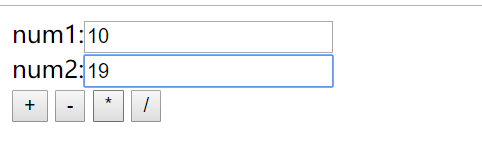
我选乘把
结果

自定义MVC二的更多相关文章
- 七天学会ASP.NET MVC (二)——ASP.NET MVC 数据传递
通过第一天的学习之后,我们相信您已经对MVC有一些基本了解. 本节所讲的内容是在上节的基础之上,因此需要确保您是否掌握了上一节的内容.本章的目标是在今天学习结束时利用最佳实践解决方案创建一个小型的MV ...
- Struts2 自定义MVC框架
一.Model1与Model2: Model1:就是一种纯jsp开发技术,将业务逻辑代码和视图渲染代码杂糅在一起. Model2:Model2是在Model1的基础上,将业务逻辑的代码分离开来,单独形 ...
- Java Web自定义MVC框架详解 (转)
转自:http://blog.csdn.net/jackfrued/article/details/42774459 最近给学生讲Java Web,希望他们能够在学完这部分内容后自己实现一个MVC框架 ...
- 七天学会ASP.NET MVC (二)——ASP.NET MVC 数据传递 【转】
http://www.cnblogs.com/powertoolsteam/p/MVC_two.html 通过第一天的学习之后,我们相信您已经对MVC有一些基本了解. 本节所讲的内容是在上节的基础之上 ...
- 自定义MVC框架
我们在学习自定义MVC框架的时候常常会听到Model1 ,Model2和MVC.那么什么是Model1 什么是Model2什么又是MVC呢? 什么是Model1? Model1就是一种纯jsp开发技术 ...
- struts2自定义MVC框架
自定义MVC:(首先了解Model1和Model2的概念) Model1与Model2: Model1:就是一种纯jsp开发技术,将业务逻辑代码和视图渲染代码杂糅在一起. Model2:Model2是 ...
- 如何自定义MVC控件?
今天公司要写学习总结,想着想着还是先写一篇关于MVC内部什么东东的博客整理整理再发表吧,一举两得. 之前写过了路由.过滤器等.今天就研究一下怎么自定义MVC控件吧. 本人技术小菜,不喜勿喷.....( ...
- 第一章 自定义MVC框架
第一章 自定义MVC框架1.1 MVC模式设计 组成:Model:模型,用于数据和业务的处理 View :视图,用于数据的显示 Controller:控制器 ...
- ASP.NET Core中使用自定义MVC过滤器属性的依赖注入
除了将自己的中间件添加到ASP.NET MVC Core应用程序管道之外,您还可以使用自定义MVC过滤器属性来控制响应,并有选择地将它们应用于整个控制器或控制器操作. ASP.NET Core中常用的 ...
随机推荐
- 【Java基础】Java中的反射机制
一.反射的理解 (1)正射 在理解反射这个概念之前,我们先来理解Java中的“正射”. 我们在编写代码时,当需要使用到某一个类的时候,必定先会去了解这是一个什么类,是用来做什么的,有怎么样的功能. 之 ...
- 来个ADG switch over
怕以后忘了,做个试验记录一下,这个switch比较常规1]主--备库先查一遍,如下的话就可以开始了两者当前序列一致角色状态如下--主库SQL> archive log list;数据库日志模式 ...
- acwing 2 零一背包问题
地址 https://www.acwing.com/problem/content/description/2/ 题目描述有 N 件物品和一个容量是 V 的背包.每件物品只能使用一次. 第 i 件物品 ...
- Leetcode 90. 子集 II
地址 https://leetcode-cn.com/problems/subsets-ii/ 给定一个可能包含重复元素的整数数组 nums,返回该数组所有可能的子集(幂集). 说明:解集不能包含重 ...
- 不用输入ssh -i命令行即可携带pem文件快速登录的方法
如果要登录的服务器只允许pem认证 每次输入ssh -i xxxx.pem 用户@ip 地址 就很烦 这里有个一劳永逸的方法: 进入到自己的用户目录,例如/home/me 把pem文件放在当前目录 ...
- 基于SincNet的原始波形说话人识别
speaker recognition from raw waveform with SincNet Mirco Ravanelli, Yoshua Bengio 作为一种可行的替代i-vector的 ...
- C#开发BIMFACE系列28 服务端API之获取模型数据13:获取三维视点或二维视图列表
系列目录 [已更新最新开发文章,点击查看详细] 本篇主要介绍如何获取一个模型中包含的三维视点或二维视图列表. 请求地址:GET https://api.bimface.com/data/v2/ ...
- ASP.NET Core 模型验证的一个小小坑
今天在我们的一个项目中遇到一个 asp.net core 模型验证(model validation)的小问题.当模型属性的类型是 bool ,而提交上来的该属性值是 null ,asp.net co ...
- 详解JAVA8函数式接口{全}
1: 函数式接口 1.1 概念 1.2 格式 1.3@FunctionalInterface注解 1.4 调用自定义函数接口 2:函数式编程 2.1:lambda的延迟执行 2.2 使用Lambda作 ...
- pytest框架之fixture前置和后置
一.conftest.py 定义公共的fixture,多个测试类中都可以调用 pytest提供了conftest.py文件,可以将fixture定义在此文件中 运行测试用例时,不需要去导入这个文件,会 ...