
mybatis 源码分析(三)Executor 详解
本文将主要介绍 Executor 的整体结构和各子类的功能,并对比效率;
一、Executor 主体结构
1. 类结构
executor 的类结构如图所示:
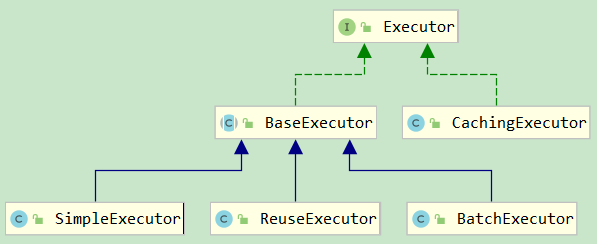
其各自的功能:
- BaseExecutor:基础执行器,封装了子类的公共方法,包括一级缓存、延迟加载、回滚、关闭等功能;
- SimpleExecutor:简单执行器,每执行一条 sql,都会打开一个 Statement,执行完成后关闭;
- ReuseExecutor:重用执行器,相较于 SimpleExecutor 多了 Statement 的缓存功能,其内部维护一个
Map<String, Statement>,每次编译完成的 Statement 都会进行缓存,不会关闭; - BatchExecutor:批量执行器,基于 JDBC 的
addBatch、executeBatch功能,并且在当前 sql 和上一条 sql 完全一样的时候,重用 Statement,在调用doFlushStatements的时候,将数据刷新到数据库; - CachingExecutor:缓存执行器,装饰器模式,在开启二级缓存的时候。会在上面三种执行器的外面包上 CachingExecutor;
2. Executor 的生命周期
初始化:
// DefaultSqlSessionFactory

private SqlSession openSessionFromDataSource(ExecutorType execType, TransactionIsolationLevel level, boolean autoCommit) {

  Transaction tx = null;

  try {

    final Environment environment = configuration.getEnvironment();

    final TransactionFactory transactionFactory = getTransactionFactoryFromEnvironment(environment);

    tx = transactionFactory.newTransaction(environment.getDataSource(), level, autoCommit);

    final Executor executor = configuration.newExecutor(tx, execType);

    return new DefaultSqlSession(configuration, executor, autoCommit);

  } catch (Exception e) {

    closeTransaction(tx); // may have fetched a connection so lets call close()

    throw ExceptionFactory.wrapException("Error opening session.  Cause: " + e, e);

  } finally {

    ErrorContext.instance().reset();

  }

}
关闭:
public void close() {

  try {

    executor.close(isCommitOrRollbackRequired(false));

    dirty = false;

  } finally {

    ErrorContext.instance().reset();

  }

}
所以 Executor 的生命周期和 SqlSession 是一样的,之所以要明确的指出这一点是因为 Executor 中包含了缓存的处理,并且因为 SqlSession 是线程不安全的,所以在使用 Executor 一级缓存的时候,就很容易发生脏读;后面还会通过具体示例演示;
3. query 方法
@Override

public <E> List<E> query(MappedStatement ms, Object parameter, RowBounds rowBounds, ResultHandler resultHandler) throws SQLException {

  BoundSql boundSql = ms.getBoundSql(parameter);   //获取绑定的sql

  CacheKey key = createCacheKey(ms, parameter, rowBounds, boundSql);  // hash(mappedStementId + offset + limit + sql + queryParams + environment)

  return query(ms, parameter, rowBounds, resultHandler, key, boundSql);

}

@SuppressWarnings("unchecked")

@Override

public <E> List<E> query(MappedStatement ms, Object parameter, RowBounds rowBounds, ResultHandler resultHandler, CacheKey key, BoundSql boundSql) throws SQLException {

  ErrorContext.instance().resource(ms.getResource()).activity("executing a query").object(ms.getId());

  if (closed) { throw new ExecutorException("Executor was closed."); }

  // 查询的时候一般不清楚缓存,但是可以通过 xml配置或者注解强制清除,queryStack == 0 是为了防止递归调用

  if (queryStack == 0 && ms.isFlushCacheRequired()) { clearLocalCache(); }

  List<E> list;

  try {

    queryStack++;

    // 首先查看一级缓存

    list = resultHandler == null ? (List<E>) localCache.getObject(key) : null;

    if (list != null) {

      handleLocallyCachedOutputParameters(ms, key, parameter, boundSql);

    } else {

      // 没有查到的时候直接到数据库查找

      list = queryFromDatabase(ms, parameter, rowBounds, resultHandler, key, boundSql);

    }

  } finally {

    queryStack--;

  }

  if (queryStack == 0) {

    // 延迟加载队列

    for (DeferredLoad deferredLoad : deferredLoads) {

      deferredLoad.load();

    }

    deferredLoads.clear();

    if (configuration.getLocalCacheScope() == LocalCacheScope.STATEMENT) {

  	  // 一级缓存本身不能关闭,但是可以设置作用范围 STATEMENT,每次都清除缓存

      clearLocalCache();

    }

  }

  return list;

}
4. update 方法
@Override

public int update(MappedStatement ms, Object parameter) throws SQLException {

  ErrorContext.instance().resource(ms.getResource()).activity("executing an update").object(ms.getId());

  if (closed) {

    throw new ExecutorException("Executor was closed.");

  }

  // update|insert|delete 方法首先会清除一级缓存

  clearLocalCache();

  return doUpdate(ms, parameter);

}
5. 模版方法
protected abstract int doUpdate(MappedStatement ms, Object parameter)

    throws SQLException;

protected abstract List<BatchResult> doFlushStatements(boolean isRollback)

    throws SQLException;

//query-->queryFromDatabase-->doQuery

protected abstract <E> List<E> doQuery(MappedStatement ms, Object parameter, RowBounds rowBounds, ResultHandler resultHandler, BoundSql boundSql)

    throws SQLException;
这里就是一个典型的模版模式了,子类都会实现自己模版方法;
二、BaseExecutor 子类
1. SimpleExecutor
@Override

public int doUpdate(MappedStatement ms, Object parameter) throws SQLException {

  Statement stmt = null;

  try {

    Configuration configuration = ms.getConfiguration();

    StatementHandler handler = configuration.newStatementHandler(this, ms, parameter, RowBounds.DEFAULT, null, null);

    stmt = prepareStatement(handler, ms.getStatementLog());

    return handler.update(stmt);

  } finally {

    closeStatement(stmt);

  }

}

@Override

public <E> List<E> doQuery(MappedStatement ms, Object parameter, RowBounds rowBounds, ResultHandler resultHandler, BoundSql boundSql) throws SQLException {

  Statement stmt = null;

  try {

    Configuration configuration = ms.getConfiguration();

    StatementHandler handler = configuration.newStatementHandler(wrapper, ms, parameter, rowBounds, resultHandler, boundSql);

    stmt = prepareStatement(handler, ms.getStatementLog());

    return handler.<E>query(stmt, resultHandler);

  } finally {

    closeStatement(stmt);

  }

}
从上面的代码也可以看到 SimpleExecutor 非常的简单,每次打开一个 Statement,使用完成以后关闭;
2. ReuseExecutor
private final Map<String, Statement> statementMap = new HashMap<String, Statement>();  // Statement 缓存

private Statement prepareStatement(StatementHandler handler, Log statementLog) throws SQLException {

  Statement stmt;

  BoundSql boundSql = handler.getBoundSql(); // 获取绑定的sql

  String sql = boundSql.getSql();

  if (hasStatementFor(sql)) { // 如果缓存中已经有了,直接得到Statement

    stmt = getStatement(sql);

  } else { // 如果缓存没有,就编译一个然后加入缓存

    Connection connection = getConnection(statementLog);

    stmt = handler.prepare(connection);

    putStatement(sql, stmt);

  }

  handler.parameterize(stmt);

  return stmt;

}
ReuseExecutor 就比 SimpleExecutor 多了一个 Statement 的缓存功能,其他的都是一样的;
3. BatchExecutor
首先需要明确一点 BachExecutor 是基于 JDBC 的 addBatch、executeBatch 功能的执行器,所以 BachExecutor 只能用于更新(insert|delete|update),不能用于查询(select),下面是一个 JDBC 的小 demo:
String url = "jdbc:mysql://localhost:3306/mybatis?serverTimezone=GMT";

String sql = "INSERT INTO user(username,password,address) VALUES (?,?,?)";

Class.forName("com.mysql.jdbc.Driver");

Connection conn = DriverManager.getConnection(url, "root", "root");

PreparedStatement stmt = conn.prepareStatement(sql);

for (int i = 0; i < 4000; i++) {

    stmt.setString(1, "test" + i);

    stmt.setString(2, "123456");

    stmt.setString(3, "test");

    stmt.addBatch();

}

stmt.executeBatch();
下面从源码来看一下 mybatis 是如何实现的:
private final List<Statement> statementList = new ArrayList<Statement>();        // 待处理的 Statement

private final List<BatchResult> batchResultList = new ArrayList<BatchResult>();  // 对应的结果集

private String currentSql;                                                       // 上一次执行 sql

private MappedStatement currentStatement;                                        // 上次执行的 MappedStatement

@Override

public int doUpdate(MappedStatement ms, Object parameterObject) throws SQLException {

  final Configuration configuration = ms.getConfiguration();

  final StatementHandler handler = configuration.newStatementHandler(this, ms, parameterObject, RowBounds.DEFAULT, null, null);

  final BoundSql boundSql = handler.getBoundSql();

  final String sql = boundSql.getSql();  // 本次执行的 sql

  final Statement stmt;

  // 当本次执行的 sql 和 MappedStatement 与上次的相同时,直接复用上一次的 Statement

  if (sql.equals(currentSql) && ms.equals(currentStatement)) {

    int last = statementList.size() - 1;

    stmt = statementList.get(last);

    BatchResult batchResult = batchResultList.get(last);

    batchResult.addParameterObject(parameterObject);

  } else {

    // 不同时,新建 Statement,并加入缓存

    Connection connection = getConnection(ms.getStatementLog());

    stmt = handler.prepare(connection);

    currentSql = sql;

    currentStatement = ms;

    statementList.add(stmt);

    batchResultList.add(new BatchResult(ms, sql, parameterObject));

  }

  handler.parameterize(stmt);

  handler.batch(stmt);  // 添加批处理任务

  return BATCH_UPDATE_RETURN_VALUE;  // 注意这里返回的不再是更新的行数,而是一个常量

}
BatchExecutor 的批处理添加过程相当于添加了一个没有返回值的异步任务,那么在什么时候执行异步任务,将数据更新到数据库呢,答案是处理 update 的任何操作,包括 select、commit、close等任何操作,具体执行的方法就是 doFlushStatements;此外需要注意的是 Batch 方式插入使用 useGeneratedKeys 获取主键,在提交完任务之后,并不能马上取到,因为此时 sql 语句还在缓存中没有真正执行,当执行完 Flush 之后,会通过回调的方式反射设置主键;
三、效率对比
几种执行器效率对比
| batch | Reuser | simple | foreach | foreach100 | |
|---|---|---|---|---|---|
| 100 | 369 | 148 | 151 | 68 | 70 |
| 1000 | 485 | 735 | 911 | 679 | 148 |
| 10000 | 2745 | 4064 | 4666 | 38607 | 1002 |
| 50000 | 8838 | 17788 | 19907 | 796444 | 3703 |
从上面的结果对比可以看到:
- 整体而言 reuser 比 simple 多了缓存功能,所以无论批处理的大小,其效率都要高一些;
- 此外在批处理量小的时候使用 foreach,效果还是可以的,但是当批量交大时,sql 编译的时间就大大增加了,当 foreach 固定批大小 + reuser 时,每次的 Statement 就可以重用,从表中也可以看到效率也时最高的;
- batch 的优点则是所有的更新语句都能用;
- 所以在配置的时候建议默认使用 reuser,而使用 foreach 和 batch 需要根据具体场景分析,如果更新比较多的时候,可以在批量更新的时候单独指定 ExecutorType.BATCH,如果批量插入很多的时候,可以固定批大小;
mybatis 源码分析(三)Executor 详解的更多相关文章
- 【集合框架】JDK1.8源码分析之ArrayList详解(一)
[集合框架]JDK1.8源码分析之ArrayList详解(一) 一. 从ArrayList字表面推测 ArrayList类的命名是由Array和List单词组合而成,Array的中文意思是数组,Lis ...
- nginx源码分析线程池详解
nginx源码分析线程池详解 一.前言 nginx是采用多进程模型,master和worker之间主要通过pipe管道的方式进行通信,多进程的优势就在于各个进程互不影响.但是经常会有人问道,n ...
- vuex 源码分析(六) 辅助函数 详解
对于state.getter.mutation.action来说,如果每次使用的时候都用this.$store.state.this.$store.getter等引用,会比较麻烦,代码也重复和冗余,我 ...
- vuex 源码分析(五) action 详解
action类似于mutation,不同的是Action提交的是mutation,而不是直接变更状态,而且action里可以包含任意异步操作,每个mutation的参数1是一个对象,可以包含如下六个属 ...
- Golang源码分析之目录详解
开源项目「go home」聚焦Go语言技术栈与面试题,以协助Gopher登上更大的舞台,欢迎go home~ 导读 学习Go语言源码的第一步就是了解先了解它的目录结构,你对它的源码目录了解多少呢? 目 ...
- Tomcat源码分析 | 一文详解生命周期机制Lifecycle
目录 什么是Lifecycle? Lifecycle方法 LifecycleBase 增加.删除和获取监听器 init() start() stop() destroy() 模板方法 总结 前言 To ...
- Java 容器源码分析之集合类详解
集合类说明及区别 Collection ├List │├LinkedList │├ArrayList │└Vector │ └Stack └Set Map ├Hashtable ├HashMap └W ...
- Cloudera Impala源码分析: SimpleScheduler调度策略详解包括作用、接口及实现等
问题导读:1.Scheduler任务中Distributed Plan.Scan Range是什么?2.Scheduler基本接口有哪些?3.QuerySchedule这个类如何理解?4.Simple ...
- 精尽MyBatis源码分析 - MyBatis 的 SQL 执行过程(一)之 Executor
该系列文档是本人在学习 Mybatis 的源码过程中总结下来的,可能对读者不太友好,请结合我的源码注释(Mybatis源码分析 GitHub 地址.Mybatis-Spring 源码分析 GitHub ...
- 精尽MyBatis源码分析 - SQL执行过程(三)之 ResultSetHandler
该系列文档是本人在学习 Mybatis 的源码过程中总结下来的,可能对读者不太友好,请结合我的源码注释(Mybatis源码分析 GitHub 地址.Mybatis-Spring 源码分析 GitHub ...
随机推荐
- C语言入门9-1-分类函数
分类函数 ASCII字符可以分为英文字母.数字.控制字符.空白字符.大小写字母以及标点符号,分类是指对字符进行属性判定,判断字符属于哪些范畴,这些属性的判定在程序中非常常见,尤其是通信协议的字符处理部 ...
- 【HDOJ】1062 Text Reverse
Ignatius likes to write words in reverse way. Given a single line of text which is written by Ignati ...
- bugku安卓First_Mobile wp
1 打开题目,下载apk 2 将下载好的apk拖进android killer中,提示文件名过长,随便更改一下文件名即可 3 查看入口文件源码(点击android killer工具栏咖啡杯图标) 4 ...
- 一文了解有趣的位运算(&、|、^、~、>>、<<)
1.位运算概述 从现代计算机中所有的数据二进制的形式存储在设备中.即0.1两种状态,计算机对二进制数据进行的运算(+.-.*./)都是叫位运算,即将符号位共同参与运算的运算. 口说无凭,举一个简单的例 ...
- Git初步配置 ubuntu服务器 windows客户端 虚拟机
最近自己配置了一下Git,虽然网上相关的内容满天飞(ps:大多都差不多,很多都是直接转载,说的也比较乱),但是我还是碰到了很多问题,这里我就把我配置的步骤分享一下,遇到的问题也说一下,新手之间相互学习 ...
- stack函数怎么用嘞?↓↓↓
c++ stl栈stack的头文件书写格式为: #include 实例化形式如下: stack StackName; 其中成员函数如下: 1.检验堆栈是否为空 empty() 堆栈为空则返回真 形式如 ...
- web设计之无懈可击
无懈可击的web设计旨在尽可能地考虑页面元素在各个情况下都能够呈现最好的效果. 1. 思路总览 2. 灵活的文字 3. 可伸缩的导航栏 4. 可扩展的行 5. 自由的框式组件 6. 图片/标题/说明文 ...
- python模块知识二 random -- 随机模块、序列化 、os模块、sys -- 系统模块
4.random -- 随机模块 a-z:97 ~ 122 A-Z :65 ~ 90 import random #浮点数 print(random.random())#0~1,不可指定 print( ...
- Split函数的使用
Split函数,用来返回一个下标从零开始的一维数组,如下举例说明 1.split(' '),''号中间是空格 def break_words(stuff): """ ...
- 阿里技术面全A,终面却被产品经理拉下马。。。
大纲: 一.投递简历 二.准备面试 三.技术一面 四.健身房里的技术二面 五.产品经理的死亡三面 六.总结 一.投递简历 找内推.大公司投简历尽量找内推,无论是校招还是社招.校招可以去牛客网或知乎找, ...