
由于Microsoft\VisualStudio\14.0\Designer\ShadowCache导致的一个异常问题
本文引用了一个DynamicDataDisplay和DynamicControl两个类库,本来使用的时候都时正常的,愉快的运行着。
DynamicDataDisplay:这是一个用于动态数据可视化的WPF和Silverlight控件库。它具有高效的绑定机制和实时交互能力,能够绘制数百万个数据点。当前版本允许灵活绘制线/标记图。
DynamicControl:对DynamicDataDisplay的扩展,可以使用MVVM模式。
最近要更新一些功能需求,重新编译了项目,在使用 Automatic Versions可以自动更新软件的版本,这次编译后,运行软件发现一个巨大的问题,就是:软件只要点击曲线界面就会崩溃,查找了一天的原因也没有找到具体的解决方案。
打开wpf界面时出现如下错误:不同引用情况出现以下两个错误问题之一
  在 System.Reflection.RuntimeAssembly._nLoad(AssemblyName fileName, String codeBase, Evidence assemblySecurity, RuntimeAssembly locationHint, StackCrawlMark& stackMark, IntPtr pPrivHostBinder, Boolean throwOnFileNotFound, Boolean forIntrospection, Boolean suppressSecurityChecks)

   在 System.Reflection.RuntimeAssembly.nLoad(AssemblyName fileName, String codeBase, Evidence assemblySecurity, RuntimeAssembly locationHint, StackCrawlMark& stackMark, IntPtr pPrivHostBinder, Boolean throwOnFileNotFound, Boolean forIntrospection, Boolean suppressSecurityChecks)

   在 System.Reflection.RuntimeAssembly.InternalLoadAssemblyName(AssemblyName assemblyRef, Evidence assemblySecurity, RuntimeAssembly reqAssembly, StackCrawlMark& stackMark, IntPtr pPrivHostBinder, Boolean throwOnFileNotFound, Boolean forIntrospection, Boolean suppressSecurityChecks)

   在 System.Reflection.Assembly.Load(AssemblyName assemblyRef)

   在 System.Windows.Navigation.BaseUriHelper.GetLoadedAssembly(String assemblyName, String assemblyVersion, String assemblyKey)

   在 MS.Internal.AppModel.ResourceContainer.GetResourceManagerWrapper(Uri uri, String& partName, Boolean& isContentFile)

   在 MS.Internal.AppModel.ResourceContainer.GetPartCore(Uri uri)

   在 System.IO.Packaging.Package.GetPartHelper(Uri partUri)

   在 System.IO.Packaging.Package.GetPart(Uri partUri)

   在 System.Windows.Application.GetResourceOrContentPart(Uri uri)

   在 System.Windows.Application.LoadComponent(Object component, Uri resourceLocator)

   在 Microsoft.Research.DynamicDataDisplay.Legend.InitializeComponent()

   在 Microsoft.Research.DynamicDataDisplay.Legend..ctor()

   在 Microsoft.Research.DynamicDataDisplay.ChartPlotter..ctor()

   在 Dynamic.Control.DynamicChart..ctor()
XamlParseException: 对类型“Dynamic.Control.DynamicChart”的构造函数执行符合指定的绑定约束的调用时引发了异常。

StackTrace:

在 System.Windows.FrameworkTemplate.LoadTemplateXaml(XamlReader templateReader, XamlObjectWriter currentWriter)

   在 System.Windows.FrameworkTemplate.LoadTemplateXaml(XamlObjectWriter objectWriter)

   在 System.Windows.FrameworkTemplate.LoadOptimizedTemplateContent(DependencyObject container, IComponentConnector componentConnector, IStyleConnector styleConnector, List` affectedChildren, UncommonField` templatedNonFeChildrenField)

   在 System.Windows.FrameworkTemplate.LoadContent(DependencyObject container, List` affectedChildren)

   在 System.Windows.StyleHelper.ApplyTemplateContent(UncommonField` dataField, DependencyObject container, FrameworkElementFactory templateRoot, Int32 lastChildIndex, HybridDictionary childIndexFromChildID, FrameworkTemplate frameworkTemplate)

   在 System.Windows.FrameworkTemplate.ApplyTemplateContent(UncommonField` templateDataField, FrameworkElement container)

   在 System.Windows.FrameworkElement.ApplyTemplate()

   在 System.Windows.FrameworkElement.MeasureCore(Size availableSize)

   在 System.Windows.UIElement.Measure(Size availableSize)

   在 System.Windows.Controls.StackPanel.StackMeasureHelper(IStackMeasure measureElement, IStackMeasureScrollData scrollData, Size constraint)

   在 System.Windows.Controls.StackPanel.MeasureOverride(Size constraint)

   在 System.Windows.FrameworkElement.MeasureCore(Size availableSize)

   在 System.Windows.UIElement.Measure(Size availableSize)

   在 System.Windows.ContextLayoutManager.UpdateLayout()

   在 System.Windows.UIElement.UpdateLayout()

InvalidCastException: [A]Microsoft.Research.DynamicDataDisplay.Charts.StackCanvas cannot be cast to [B]Microsoft.Research.DynamicDataDisplay.Charts.StackCanvas. Type A originates from 'DynamicDataDisplay, Version=2019.3.613.0, Culture=neutral, PublicKeyToken=5b7d744a7263923f' in the context 'LoadNeither' at location 'C:\Users\Administrator\AppData\Local\Microsoft\VisualStudio\14.0\Designer\ShadowCache\feehbzhp.joh\1uhu1oiz.a1d\DynamicDataDisplay.dll'. Type B originates from 'DynamicDataDisplay, Version=1908.232.13.0, Culture=neutral, PublicKeyToken=5b7d744a7263923f' in the context 'LoadNeither' at location 'C:\Users\Administrator\AppData\Local\Microsoft\VisualStudio\14.0\Designer\ShadowCache\kaq53nrp.yhz\dwylm05j.yyi\DynamicDataDisplay.dll'.

在 Microsoft.Research.DynamicDataDisplay.Charts.AxisControl`.UpdateUIResources()

   在 Microsoft.Research.DynamicDataDisplay.Charts.AxisControl`..ctor()

   在 Microsoft.Research.DynamicDataDisplay.Charts.NumericAxisControl..ctor()

   在 Microsoft.Research.DynamicDataDisplay.Charts.NumericAxis..ctor()

   在 Microsoft.Research.DynamicDataDisplay.ChartPlotter..ctor()

   在 Dynamic.Control.DynamicChart..ctor()
在目录:C:\Users\Administrator\AppData\Local\Microsoft\VisualStudio\14.0\Designer\ShadowCache中发现有缓存,直接将其删除,用其他项目编译一个可用的DynamicDataDisplay类库,直接在本项目中引用类库,重新打开解决方案即可解决问题


此时,出现了久违的设计界面如下:
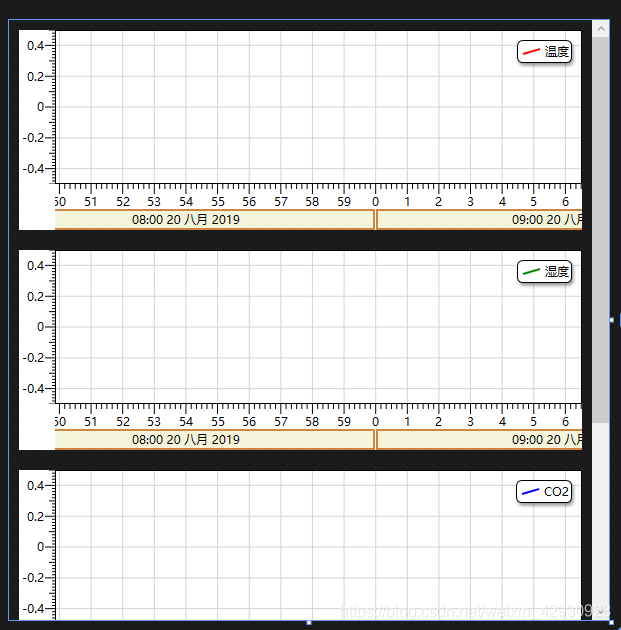
到此,问题完美解决!
由于Microsoft\VisualStudio\14.0\Designer\ShadowCache导致的一个异常问题的更多相关文章
- 未找到导入的项目“C:\Program Files (x86)\MSBuild\Microsoft\VisualStudio\v14.0\DotNet\Microsoft.DotNet.Props”
未找到导入的项目“C:\Program Files (x86)\MSBuild\Microsoft\VisualStudio\v14.0\DotNet\Microsoft.DotNet.Props” ...
- error MSB4019: 未找到导入的项目“C:\Program Files (x86)\MSBuild\Microsoft\VisualStudio\v11.0\WebApplications\Microsoft.WebApplication.targets”
error MSB4019: 未找到导入的项目“C:\Program Files (x86)\MSBuild\Microsoft\VisualStudio\v11.0\WebApplications\ ...
- [Bug] 未找到导入的项目“C:\Program Files (x86)\MSBuild\Microsoft\VisualStudio\v11.0\WebApplications\Microsoft.WebApplication.targets”
This is very easy to do. Open your build definition and go to the "Process" page. Then und ...
- 未能正确加载“Microsoft.VisualStudio.Editor.Implementation.EditorPackage”包。
最近在升级 Visual Studio 2015 Update 3 的过程中,等了很长时间都没一点进展,于是就强行终止了升级程序,但VS也因此出了问题. 后来经过修复,不行,卸载再重装,仍然提示这个错 ...
- VS 2013 未找到与约束contractname Microsoft.VisualStudio.Utilities.IContentTypeRegistryService...匹配的导出[vs故障]【转】
未找到与约束 contractname Microsoft.VisualStudio.Utilities.IContentTypeRegistryService RequiredTypeIdentit ...
- 未找到与约束contractname Microsoft.VisualStudio.Utilities.IContentTypeRegistryService...匹配的导出
***以下操作后一定要重启VS,重启VS,重启VS重要的事情说三遍*** //************************************************************* ...
- [转]VS 2013 未找到与约束contractname Microsoft.VisualStudio.Utilities.IContentTypeRegistryService...匹配的导出
前几天,将Visual studio 2013 update 3 升级到了update 5.打开原来的解决方案,出现了 未找到与约束 contractname Microsoft.VisualStud ...
- [开发笔记]-未找到与约束ContractName Microsoft.VisualStudio.Text.ITextDocumentFactoryService...匹配的导出【转载自:酷小孩】
原文地址:http://www.cnblogs.com/babycool/p/3199158.html 今天打算用VisualStudio2012做一个js效果页面测试的时候,打开VS2012新建项目 ...
- 未能正确加载“Microsoft.VisualStudio.Editor.Implementation.EditorPackage”
VS2012启动/加载项目出问题 未能正确加载“Microsoft.VisualStudio.Editor.Implementation.EditorPackage, Microsoft.Visual ...
随机推荐
- spring mvc 拦截器的使用
Spring MVC 拦截器的使用 拦截器简介 Spring MVC 中的拦截器(Interceptor)类似于 Servler 中的过滤器(Filter).用于对处理器进行预处理和后处理.常用于日志 ...
- [leetcode]python 448. Find All Numbers Disappeared in an Array
Given an array of integers where 1 ≤ a[i] ≤ n (n = size of array), some elements appear twice and ot ...
- 从0系统学Android-2.4隐式Intent
本系列文章,参考<第一行代码>,作为个人笔记 更多内容:更多精品文章分类 使用隐式 Intent 相对于显示 Intent ,隐式 Intent 比较含蓄.这种方式不明确指出我们想要启动哪 ...
- Pytest进阶之参数化
前言 unittest单元测试框架使用DDT进行数据驱动测试,那么身为功能更加强大且更加灵活的Pytest框架怎么可能没有数据驱动的概念呢?其实Pytest是使用@pytest.mark.parame ...
- spark 源码分析之十九 -- Stage的提交
引言 上篇 spark 源码分析之十九 -- DAG的生成和Stage的划分 中,主要介绍了下图中的前两个阶段DAG的构建和Stage的划分. 本篇文章主要剖析,Stage是如何提交的. rdd的依赖 ...
- web设计_1_思路总览
核心思想:结构和样式分离 HTML与CSS 只有充分将页面核心内容和外观设计相分离而获得的灵活性,才能顺利构建出能够满足每个web用户需要的最佳设计方案. 核心要求:灵活性 适应不同的浏览器,适应各种 ...
- shiro解析ini文件
来吧,看看shiro是怎么解析ini文件的,这里假设ini文件在classpath下,名字叫做shiro.ini Factory<org.apache.shiro.mgt.SecurityMan ...
- 基于简单DUT的UVM验证平台的搭建(一)
最近一个月在实习公司做回归测试,对公司的UVM平台用的比较熟练,就想着自己做一个DUT,然后搭建一个UVM验证平台. 首先,DUT是一个简单的32位的加法器,代码如下:alu.v module add ...
- 【Java】You have an error in your SQL syntax ...
详情如下: You have an error in your SQL syntax; check the manual that corresponds to your MySQL server v ...
- 【iOS】“找不到使用指定主机名的服务器”
今天用 Application Loader 提交 APP 的时,遇到了这个奇葩的问题,如下图: 后来换个网络解决了……我也不知道什么原因,就这么奇葩的弄好了……