
ReactNative: 使用Touchable触摸类组件
一、简介
在应用程序中,最灵魂的功能就是交互。通过给应用程序的组件添加事件来实现交互,进而提高用户体验。然而,ReactNative并不能像Web开发那样可以给大多数的标签元素绑定click事件,例如div、button、input等等,但是RN除了可以通过Text的onPress完成事件外,还是额外提供了4个组件来解决这个问题。这4个组件统称为“Touchable类组件”,也即触摸类组件,使用它们就可以像Text组件那样通过onPress使得其他任意组件都可以被点击。分别是TouchableHighlight、TouchableOpacity、TouchableWithoutFeedback、TouchableNativeFeedback。(注意:TouchableNativeFeedback用于安卓,此处不做解释)
二、区别
这三个组件都能实现触摸点击,进而完成事件交互,但是产生的交互过渡效果是有区别的,具体如下:

三、详请
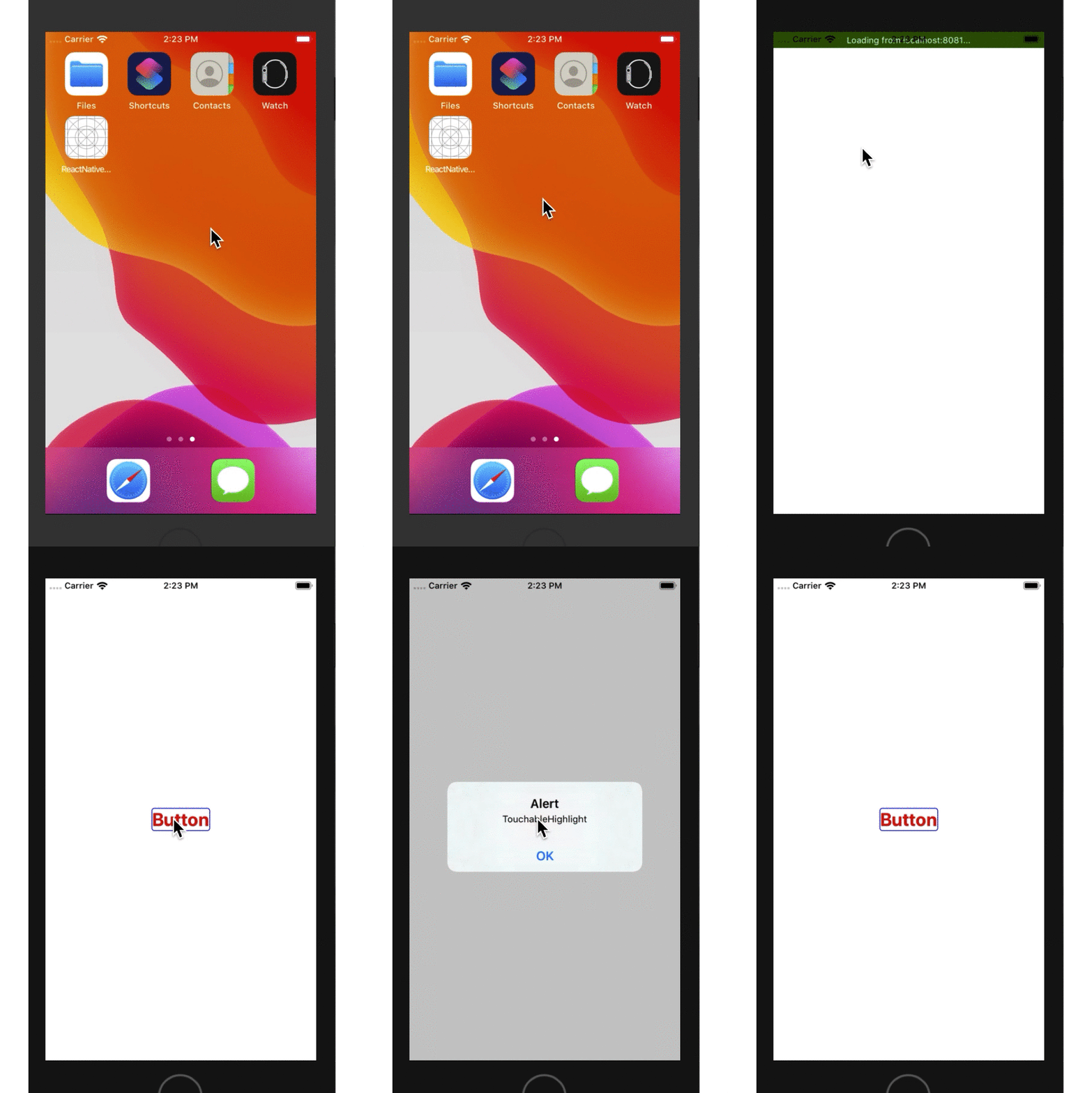
1、TouchableHighlight,它拥有明显视觉交互效果,这种效果能够很友善地告知用户当前点击事件被触发了,从而避免重复点击。它的主要属性和事件如下:
//触摸时透明度的设置

avtiveOpacity

//隐藏背景阴影时触发该事件

onHideUnderlay

//出现背景阴影时触发该事件

onShowUnderlay

//点击时背景阴影效果的背景颜色

underlayColor
使用效果如下:点击时背景颜色发生改变,有比较明显的交互提示
/**

 * Sample React Native App

 * https://github.com/facebook/react-native

 * @flow

 */

import React, { Component } from 'react';

import {

  AppRegistry,

  StyleSheet,

  View,

  Text,

  TouchableHighlight

} from 'react-native';

export default class ReactNativeDemo extends Component {

  render() {

    return (

        <View style={style.flex}>

            <View style={style.touch}>

                <TouchableHighlight

                    activeOpacity={0.5}

                    underlayColor={'#E1F6FF'}

                    onPress={() => alert("TouchableHighlight")}

                    onHideUnderlay={() => console.log("--onHideUnderlay--")}

                    onShowUnderlay={() => console.log("--onShowUnderlay--")}

                >

                         <Text style={style.font}>Button</Text>

                </TouchableHighlight>

            </View>

        </View>

    );

  }

}

const style = StyleSheet.create({

    flex: {

        flex: 1,

        justifyContent: 'center',

        alignItems: 'center'

    },

    touch:{

        borderColor:'blue',

        borderWidth: 1,

        borderRadius: 4,

        justifyContent: 'center',

        alignItems: 'center'

    },

    font:{

        fontSize: 25,

        fontWeight: 'bold',

        color:'red'

    }

});

AppRegistry.registerComponent('ReactNativeDemo', () => ReactNativeDemo);
-- ::02.747 [info][tid:com.facebook.react.JavaScript] --onShowUnderlay--

-- ::04.767 [info][tid:com.facebook.react.JavaScript] --onHideUnderlay--

-- ::04.768 [info][tid:com.facebook.react.JavaScript] --onShowUnderlay--

-- ::04.869 [info][tid:com.facebook.react.JavaScript] --onHideUnderlay--
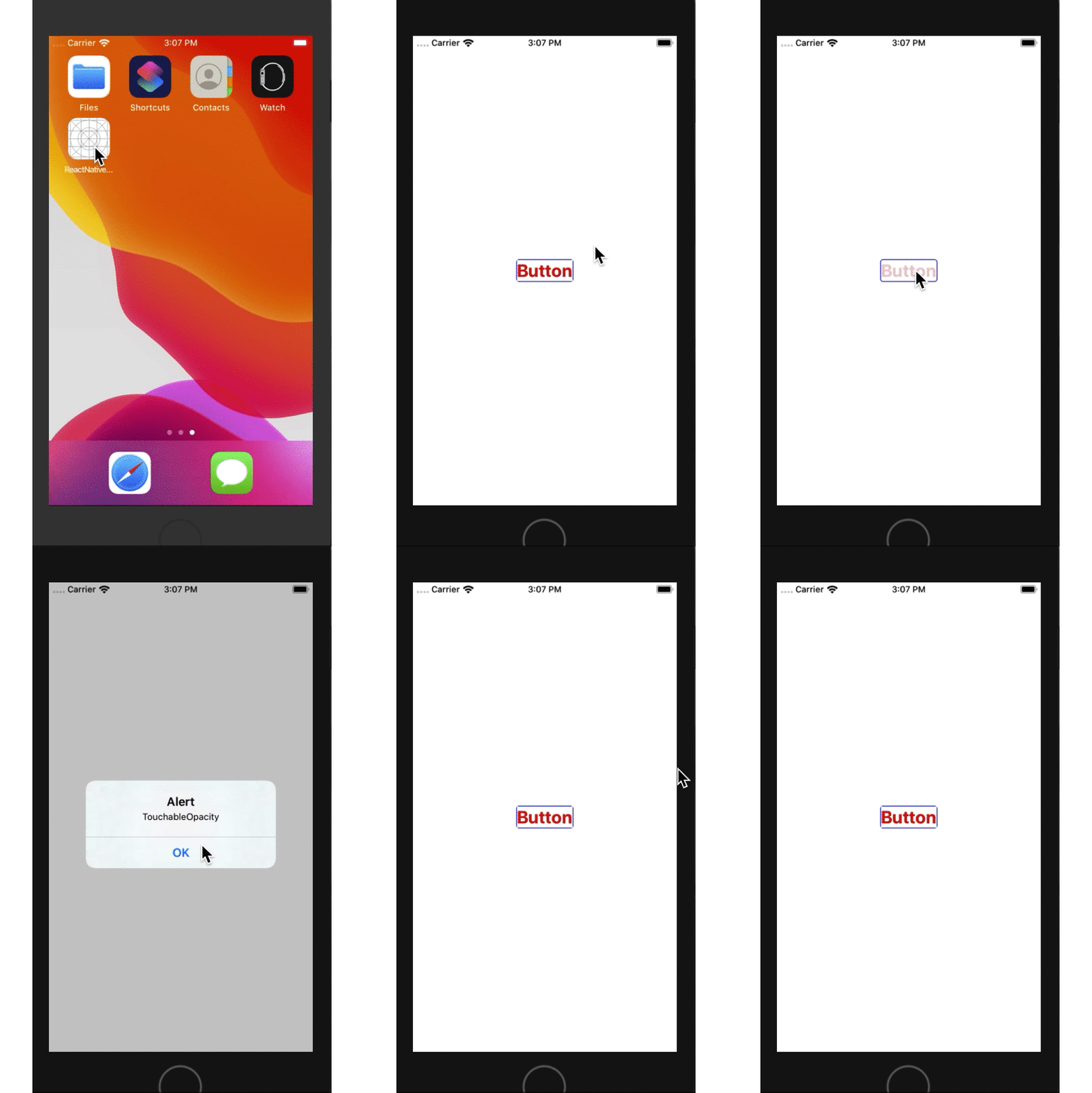
2、TouchableOpacity,它也能给出交互提示,不过它不能设置背景色,只能设置通过透明度,反而更加方便。它仅有一个属性。
//触摸时透明度的设置

avtiveOpacity
使用效果如下:点击时透明度发生改变,也有较明显的交互提示
/**

 * Sample React Native App

 * https://github.com/facebook/react-native

 * @flow

 */

import React, { Component } from 'react';

import {

  AppRegistry,

  StyleSheet,

  View,

  Text,

  TouchableOpacity

} from 'react-native';

export default class ReactNativeDemo extends Component {

  render() {

    return (

        <View style={style.flex}>

            <View style={style.touch}>

                <TouchableOpacity

                    activeOpacity={0.2}

                    onPress={() => alert("TouchableOpacity")}

                >

                         <Text style={style.font}>Button</Text>

                </TouchableOpacity>

            </View>

        </View>

    );

  }

}

const style = StyleSheet.create({

    flex: {

        flex: 1,

        justifyContent: 'center',

        alignItems: 'center'

    },

    touch:{

        borderColor:'blue',

        borderWidth: 1,

        borderRadius: 4,

        justifyContent: 'center',

        alignItems: 'center'

    },

    font:{

        fontSize: 25,

        fontWeight: 'bold',

        color:'red'

    }

});

AppRegistry.registerComponent('ReactNativeDemo', () => ReactNativeDemo);
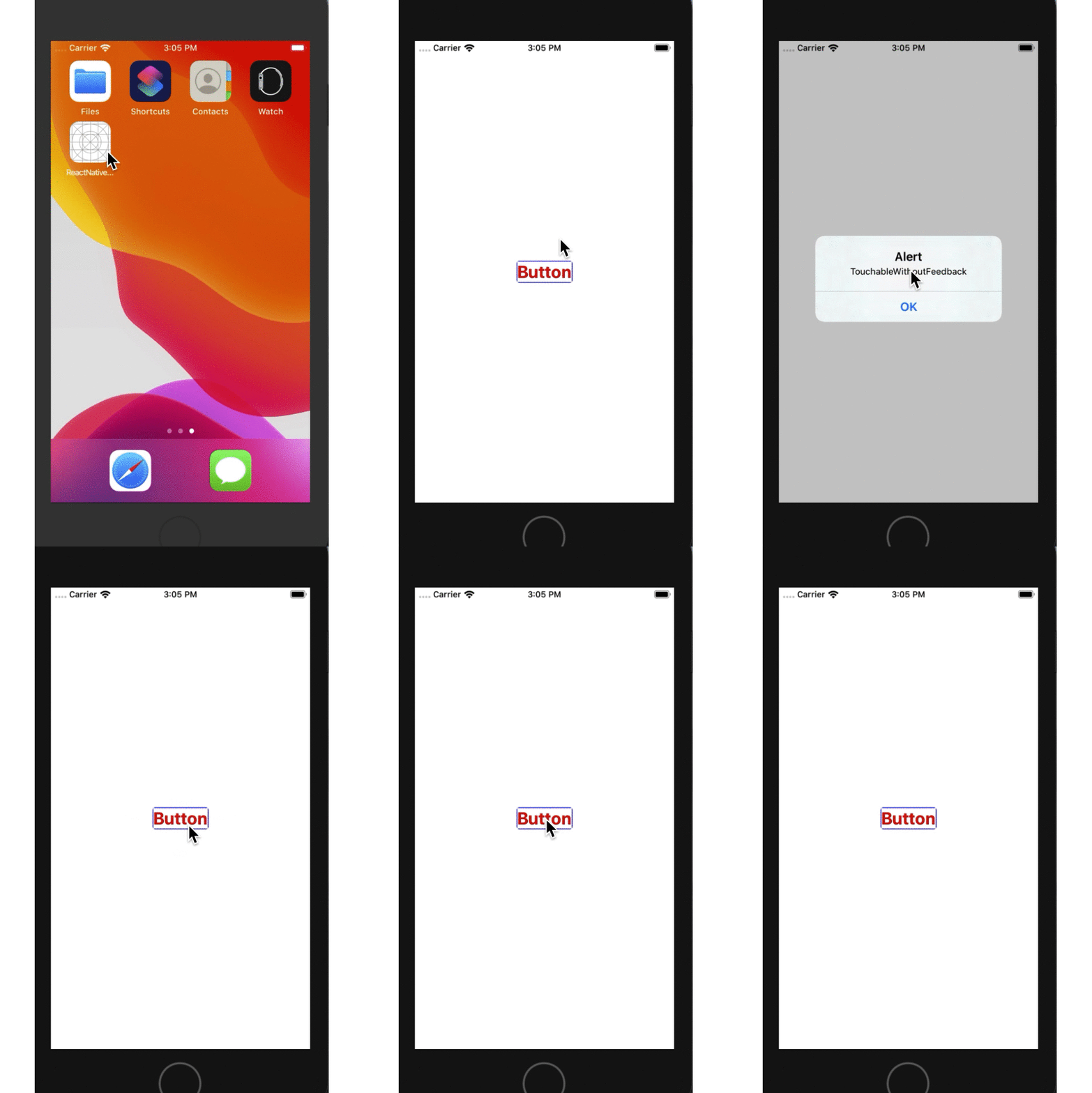
3、TouchableWithoutFeedback,使用它绑定事件,不会有明显的交互提示,就跟Web交互一样,而不是Native交互,除非特殊情况,不推荐使用。它不能直接嵌套子组件Text组件,必须先隔一个父组件,否则自身事件属性不能触发,它支持三个自身属性事件如下:
//长按事件

onLongPress

//触摸进入事件

onPressIn

//触摸释放事件

onPressOut
使用效果如下:发现交互时无任何明显提示,长按打印日至
/**

 * Sample React Native App

 * https://github.com/facebook/react-native

 * @flow

 */

import React, { Component } from 'react';

import {

  AppRegistry,

  StyleSheet,

  View,

  Text,

    TouchableWithoutFeedback

} from 'react-native';

export default class ReactNativeDemo extends Component {

  render() {

    return (

        <View style={style.flex}>

            <View style={style.touch}>

                <TouchableWithoutFeedback

                    onPress={() => alert("TouchableWithoutFeedback")}

                    onLongPress={() => console.log("--onLongPress--")}

                    onPressIn={() => console.log("--onPressIn--")}

                    onPressOut={() => console.log("--onPressOut--")}

                >

                    <View><Text style={style.font}>Button</Text></View> /*Text嵌套在View组件中,然后在嵌套到该触摸类组件中*/

                </TouchableWithoutFeedback>

            </View>

        </View>

    );

  }

}

const style = StyleSheet.create({

    flex: {

        flex: 1,

        justifyContent: 'center',

        alignItems: 'center'

    },

    touch:{

        borderColor:'blue',

        borderWidth: 1,

        borderRadius: 4,

        justifyContent: 'center',

        alignItems: 'center'

    },

    font:{

        fontSize: 25,

        fontWeight: 'bold',

        color:'red'

    }

});

AppRegistry.registerComponent('ReactNativeDemo', () => ReactNativeDemo);
-- ::48.796 [info][tid:com.facebook.react.JavaScript] --onPressIn--

-- ::49.301 [info][tid:com.facebook.react.JavaScript] --onLongPress--

-- ::50.465 [info][tid:com.facebook.react.JavaScript] --onPressOut--

-- ::52.096 [info][tid:com.facebook.react.JavaScript] --onPressIn--

-- ::52.100 [info][tid:com.facebook.react.JavaScript] --onPressOut--
ReactNative: 使用Touchable触摸类组件的更多相关文章
- cocos2d-x 源代码分析 : control 源代码分析 ( 控制类组件 controlButton)
源代码版本号来自3.1rc 转载请注明 cocos2d-x源代码分析总文件夹 http://blog.csdn.net/u011225840/article/details/31743129 1.继承 ...
- ReactNative: 使用AppReistry注册类
一.简介 每一个应用程序的运行都有一个入口文件或者入口函数,例如iOS中的使用UIApplicationMain类完成入口函数的实现,在React-Native中,AppRegistry类就肩负着这个 ...
- ReactNative Android之原生UI组件动态addView不显示问题解决
ReactNative Android之原生UI组件动态addView不显示问题解决 版权声明:本文为博主原创文章,未经博主允许不得转载. 转载请表明出处:http://www.cnblogs.com ...
- 同学帮帮移动 H5 弹出层类组件:txbb-pop
Txbb.Pop 同学帮帮弹出层类组件,简洁.无依赖,使用 CSS3 实现动画效果. 为什么要再造一遍轮子 弹出层是常见的业务场景,而且弹出层的业务场景很简单,没必要使用大而全的库,并且,我们经常会有 ...
- React - 组件:类组件
目录: 1. 类组件有自己的状态 2. 继承React.Component-会有生命周期和this 3. 内部需要一个render函数(类组件会默认调用render方法,但不会默认添加,需要手动填写r ...
- vue-property-decorator和typescript结合构建的class类组件,父组件触发子组件方法的方式
vue-property-decorator和typescript结合构建的class类组件,父组件触发子组件方法的方式 class类组件示例 Father类组件 <template> & ...
- DRF-视图类组件
补充 GET books-------->查看数据--------------------> 返回所有数据列表 :[{},{},{}] POST books-------->添加数 ...
- 类组件(Class component)和函数式组件(Functional component)之间有何不同
类组件不仅允许你使用更多额外的功能,如组件自身的状态和生命周期钩子,也能使组件直接访问 store 并维持状态当组件仅是接收 props,并将组件自身渲染到页面时,该组件就是一个 ‘无状态组件(sta ...
- 你真的会用Flutter日期类组件吗
Flutter系统提供了一些日期选择类组件,比如DayPicker.MonthPicker.YearPicker.showDatePicker.CupertinoDatePicker等,其中前4个为M ...
随机推荐
- Day 05 作业
目录 作业 输入姑娘的年龄后,进行以下判断: 复习while循环,打印1-100之间的奇数和 复习while循环,猜年龄游戏升级版,有以下三点要求: 作业 输入姑娘的年龄后,进行以下判断: 如果姑娘小 ...
- 《JavaScript 模式》知识点小抄本(上)
介绍 最近开始给自己每周订个学习任务,学习结果反馈为一篇文章的输出,做好学习记录. 这一周(02.25-03.03)我定的目标是<JavaScript 模式>的第七章学习一遍,学习结果的反 ...
- 大数据学习笔记——Hadoop编程之SequenceFile
SequenceFile(Hadoop序列文件)基础知识与应用 上篇编程实战系列中本人介绍了基本的使用HDFS进行文件读写的方法,这一篇将承接上篇重点整理一下SequenceFile的相关知识及应用 ...
- Leetcode 42 接雨水 双指针
地址 https://leetcode-cn.com/problems/trapping-rain-water/ 给定 n 个非负整数表示每个宽度为 1 的柱子的高度图,计算按此排列的柱子,下雨之后能 ...
- Educational Codeforces Round 78 (Rated for Div. 2)
A题 给出n对串,求s1,是否为s2一段连续子串的重排,串长度只有100,从第一个字符开始枚举,sort之后比较一遍就可以了: char s1[200],s2[200],s3[200]; int ma ...
- [FPGA] Verilog 燃气灶控制器的设计与实现
燃气灶控制器的设计与实现 一.引述 本次实验所用可编程器件型号为MAXII EPM1270T144C5(其引脚表见本人另一博文:可编程实验板EPM1270T144C5使用说明),通过可编程实验板实现一 ...
- SpringBoot微服务电商项目开发实战 --- api接口安全算法、AOP切面及防SQL注入实现
上一篇主要讲了整个项目的子模块及第三方依赖的版本号统一管理维护,数据库对接及缓存(Redis)接入,今天我来说说过滤器配置及拦截设置.接口安全处理.AOP切面实现等.作为电商项目,不仅要求考虑高并发带 ...
- c++-重载等号,数组,指针,字符串类
重载 重载=操作符 1先释放旧对象资源 2用一个对象=给另外一个对象 3函数返回值当左值 返回一个引用 4 数组类 Array& operator=(Array& a1); 5 字符串 ...
- 6.1 自定义abp拦截器示例
一个简单.基于AbpInterceptor的拦截器示例: using Microsoft.Extensions.DependencyInjection; using System; using Sys ...
- RAID磁盘阵列介绍
磁盘阵列 RAID介绍 一.简介: 磁盘阵列(Redundant Arrays of Independent Drives,RAID),有“独立磁盘构成的具有冗余能力的阵列”之意. 最初是由加利福尼亚 ...