
Android PopupWindow增加半透明蒙层
先看效果图:
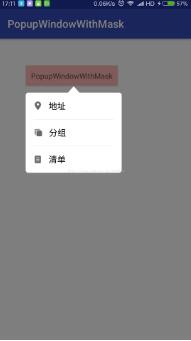
BasePopupWindowWithMask.class
 package com.example.popupwindowwithmask;

 import android.content.Context;

 import android.graphics.PixelFormat;

 import android.graphics.drawable.ColorDrawable;

 import android.os.IBinder;

 import android.view.KeyEvent;

 import android.view.View;

 import android.view.WindowManager;

 import android.widget.PopupWindow;

 /**

  * Created by kk on 2017/7/22.

  */

 public abstract class BasePopupWindowWithMask extends PopupWindow {

  protected Context context;

  private WindowManager windowManager;

  private View maskView;

  public BasePopupWindowWithMask(Context context) {

   super(context);

   this.context = context;

   windowManager = (WindowManager) context.getSystemService(Context.WINDOW_SERVICE);

   setContentView(initContentView());

   setHeight(initHeight());

   setWidth(initWidth());

   setOutsideTouchable(true);

   setFocusable(true);

   setTouchable(true);

   setBackgroundDrawable(new ColorDrawable());

  }

  protected abstract View initContentView();

  protected abstract int initHeight();

  protected abstract int initWidth();

  @Override

  public void showAsDropDown(View anchor) {

   addMask(anchor.getWindowToken());

   super.showAsDropDown(anchor);

  }

  private void addMask(IBinder token) {

   WindowManager.LayoutParams wl = new WindowManager.LayoutParams();

   wl.width = WindowManager.LayoutParams.MATCH_PARENT;

   wl.height = WindowManager.LayoutParams.MATCH_PARENT;

   wl.format = PixelFormat.TRANSLUCENT;//不设置这个弹出框的透明遮罩显示为黑色

   wl.type = WindowManager.LayoutParams.TYPE_APPLICATION_PANEL;//该Type描述的是形成的窗口的层级关系

   wl.token = token;//获取当前Activity中的View中的token,来依附Activity

   maskView = new View(context);

   maskView.setBackgroundColor(0x7f000000);

   maskView.setFitsSystemWindows(false);

   maskView.setOnKeyListener(new View.OnKeyListener() {

    @Override

    public boolean onKey(View v, int keyCode, KeyEvent event) {

     if (keyCode == KeyEvent.KEYCODE_BACK) {

      removeMask();

      return true;

     }

     return false;

    }

   });

   /**

    * 通过WindowManager的addView方法创建View,产生出来的View根据WindowManager.LayoutParams属性不同,效果也就不同了。

    * 比如创建系统顶级窗口,实现悬浮窗口效果!

    */

   windowManager.addView(maskView, wl);

  }

  private void removeMask() {

   if (null != maskView) {

    windowManager.removeViewImmediate(maskView);

    maskView = null;

   }

  }

  @Override

  public void dismiss() {

   removeMask();

   super.dismiss();

  }

 }
TestPopupWindow.class
 package com.example.popupwindowwithmask;

 import android.content.Context;

 import android.view.LayoutInflater;

 import android.view.View;

 import android.view.WindowManager;

 /**

  * Created by kk on 2017/7/22.

  */

 public class TestPopupWindow extends BasePopupWindowWithMask {

  private int[] mIds;

  private View contentView;

  private OnItemClickListener listener;

  public interface OnItemClickListener {

   void OnItemClick(View v);

  }

  public void setOnItemClickListener(OnItemClickListener listener) {

   this.listener = listener;

  }

  public TestPopupWindow(Context context, int[] mIds) {

   super(context);

   this.mIds = mIds;

   initListener();

  }

  @Override

  protected View initContentView() {

   contentView = LayoutInflater.from(context).inflate(R.layout.pop_layout, null, false);

   return contentView;

  }

  private void initListener() {

   for (int i = ; i < mIds.length; i++) {

    contentView.findViewById(mIds[i]).setOnClickListener(new View.OnClickListener() {

     @Override

     public void onClick(View v) {

      if (null != listener) {

       listener.OnItemClick(v);

      }

      dismiss();

     }

    });

   }

  }

  @Override

  protected int initHeight() {

   return WindowManager.LayoutParams.WRAP_CONTENT;

  }

  @Override

  protected int initWidth() {

   return (int) (0.5 * UIUtils.getScreenWidth(context));

  }

 }

 MainActivity.class

 ?

 package com.example.popupwindowwithmask;

 import android.os.Bundle;

 import android.support.v7.app.AppCompatActivity;

 import android.view.View;

 import android.widget.TextView;

 import android.widget.Toast;

 public class MainActivity extends AppCompatActivity {

  private TextView textView;

  @Override

  protected void onCreate(Bundle savedInstanceState) {

   super.onCreate(savedInstanceState);

   setContentView(R.layout.activity_main);

   textView = (TextView) findViewById(R.id.tv_popup);

   final TestPopupWindow testPopupWindow = new TestPopupWindow(this, new int[]{R.id.pop_location, R.id.pop_group, R.id.pop_list});

   textView.setOnClickListener(new View.OnClickListener() {

    @Override

    public void onClick(View v) {

     testPopupWindow.showAsDropDown(textView);

    }

   });

   testPopupWindow.setOnItemClickListener(new TestPopupWindow.OnItemClickListener() {

    @Override

    public void OnItemClick(View v) {

     switch (v.getId()) {

      case R.id.pop_location:

       Toast.makeText(MainActivity.this, "地址", Toast.LENGTH_SHORT).show();

       break;

      case R.id.pop_group:

       Toast.makeText(MainActivity.this, "分组", Toast.LENGTH_SHORT).show();

       break;

      case R.id.pop_list:

       Toast.makeText(MainActivity.this, "清单", Toast.LENGTH_SHORT).show();

       break;

     }

    }

   });

  }

 }
pop_layout.xml
 <?xml version="1.0" encoding="utf-8"?>

 <RelativeLayout xmlns:android="http://schemas.android.com/apk/res/android"

  android:layout_width="wrap_content"

  android:layout_height="wrap_content">

  <RelativeLayout

   android:layout_width="wrap_content"

   android:layout_height="wrap_content">

   <RelativeLayout

    android:id="@+id/rl_indicator"

    android:layout_width="match_parent"

    android:layout_height="wrap_content"

    android:gravity="center_horizontal">

    <ImageView

     android:layout_width="wrap_content"

     android:layout_height="12dp"

     android:scaleType="fitCenter"

     android:src="@drawable/filter_arrow_up" />

   </RelativeLayout>

   <LinearLayout

    android:layout_width="wrap_content"

    android:layout_height="150dp"

    android:layout_below="@+id/rl_indicator"

    android:background="@drawable/pop_background"

    android:gravity="center_horizontal"

    android:orientation="vertical"

    android:paddingLeft="15dp"

    android:paddingRight="15dp">

    <TextView

     android:id="@+id/pop_location"

     android:layout_width="match_parent"

     android:layout_height="0dp"

     android:layout_weight=""

     android:drawableLeft="@mipmap/fault_equipment_location_icon"

     android:drawablePadding="12dp"

     android:gravity="center_vertical"

     android:text="地址"

     android:textColor="#000"

     android:textSize="16sp" />

    <View

     android:layout_width="match_parent"

     android:layout_height="0.3dp"

     android:background="#D2D2D2" />

    <TextView

     android:id="@+id/pop_group"

     android:layout_width="match_parent"

     android:layout_height="0dp"

     android:layout_weight=""

     android:drawableLeft="@mipmap/fault_equipment_grouping_icon"

     android:drawablePadding="12dp"

     android:gravity="center_vertical"

     android:text="分组"

     android:textColor="#000"

     android:textSize="16sp" />

    <View

     android:layout_width="match_parent"

     android:layout_height="0.3dp"

     android:background="#D2D2D2" />

    <TextView

     android:id="@+id/pop_list"

     android:layout_width="match_parent"

     android:layout_height="0dp"

     android:layout_weight=""

     android:drawableLeft="@mipmap/fault_equipment_list_icon"

     android:drawablePadding="12dp"

     android:gravity="center_vertical"

     android:text="清单"

     android:textColor="#000"

     android:textSize="16sp" />

   </LinearLayout>

  </RelativeLayout>

 </RelativeLayout>
pop_background.xml
 <?xml version="1.0" encoding="utf-8"?>

 <shape xmlns:android="http://schemas.android.com/apk/res/android">

  <solid android:color="#ffffff" />

  <corners

   android:radius="5dp" />

 </shape>
UIUtils.class
 package com.example.popupwindowwithmask;

 import android.content.Context;

 /**

  * Created by kk on 2017/7/22.

  */

 public class UIUtils {

  /**

   * 获得屏幕宽度

   *

   * @param context

   * @return

   */

  public static int getScreenWidth(Context context) {

   return context.getResources().getDisplayMetrics().widthPixels;

  }

  /**

   * 获得屏幕高度

   *

   * @param context

   * @return

   */

  public static int getScreenHeight(Context context) {

   return context.getResources().getDisplayMetrics().heightPixels;

  }

 }
https://github.com/ganchuanpu/AndroidPopupWindowWithMask.git
Android PopupWindow增加半透明蒙层的更多相关文章
- iOS开发之实现半透明蒙层背景效果[用于下拉菜单页和分享页]
郝萌主倾心贡献.尊重作者的劳动成果,请勿转载. 假设文章对您有所帮助.欢迎给作者捐赠.支持郝萌主,捐赠数额任意.重在心意^_^ 我要捐赠: 点击捐赠 Cocos2d-X源代码下载:点我传送 游戏官方下 ...
- 在Ubuntu上为Android系统的Application Frameworks层增加硬件访问服务(老罗学习笔记5)
在数字科技日新月异的今天,软件和硬件的完美结合,造就了智能移动设备的流行.今天大家对iOS和Android系统的趋之若鹜,一定程度上是由于这两个系统上有着丰富多彩的各种应用软件.因此,软件和硬件的关系 ...
- 在Ubuntu上为Android系统的Application Frameworks层增加硬件访问服务
文章转载至CSDN社区罗升阳的安卓之旅,原文地址:http://blog.csdn.net/luoshengyang/article/details/6578352 在数字科技日新月异的今天,软件和硬 ...
- 为Android系统的Application Frameworks层增加硬件访问服务
在数字科技日新月异的今天,软件和硬件的完美结合,造就了智能移动设备的流行.今天大家对iOS和Android系统的趋之若鹜,一定程度上是由于这两 个系统上有着丰富多彩的各种应用软件.因此,软件和硬件的关 ...
- 在Ubuntu上为Android系统的Application Frameworks层增加硬件访问服务【转】
本文转载自:http://blog.csdn.net/luoshengyang/article/details/6578352 在数字科技日新月异的今天,软件和硬件的完美结合,造就了智能移动设备的流行 ...
- Android开发如何定制framework层服务
刚刚跨完年,新年第一篇文章,那么今天将对Android开发framework中间层的服务定制使用作个总结.首先我们先导入Android平台源码framework层的代码到开发工具eclipse中,代码 ...
- C# Winform 实现自定义半透明遮罩层介绍
在网页中通过div+css实现半透明效果不难,今天我们看看一种在winfrom中实现的方法: 效果图如下,正常时: 显示遮罩层时: 自定义遮罩层控件的源码如下: View Row Code 1 usi ...
- web页面弹出遮罩层,通过js或css禁止蒙层底部页面跟随滚动
场景概述 弹窗是一种常见的交互方式,而蒙层是弹窗必不可少的元素,用于隔断页面与弹窗区块,暂时阻断页面的交互.但是,在蒙层元素中滑动的时候,滑到内容的尽头时,再继续滑动,蒙层底部的页面会开始滚动,显然这 ...
- Android PopupWindow Dialog 关于 is your activity running 崩溃详解
Android PopupWindow Dialog 关于 is your activity running 崩溃详解 [TOC] 起因 对于 PopupWindow Dialog 需要 Activi ...
随机推荐
- milvus安装及其使用教程
milvus 简介 milvus是干什么的?通俗的讲,milvus可以让你在海量向量库中快速检索到和目标向量最相似的若干个向量,这里相似度量标准可以是内积或者欧式距离等.借用官方的话说就是: Milv ...
- go proxy athens 部署到k8s
目录 go proxy athens 部署到k8s 一.athens简介 二.部署 1.创建 PersistentVolume 2.创建service 3.创建deployment 4.ci/cd中使 ...
- jQuery中的属性选择器
先看代码,后面详细解释: <!DOCTYPE html> <html> <head> <meta charset="utf-8"> ...
- python实现十大核心算法(桶排没实例)
# author:sevenduke # 2019-06-11 # 一.交换排序 # 排序算法的温故:冒泡排序 def dubblesort(arr): for i in range(0, len(a ...
- dubbo服务治理框架
Dubbo的概述 1.1. Dubbo的背景 随着互联网的发展,网站应用的规模不断扩大,常规的垂直应用架构已无法应对,分布式服务架构以及流动计算架构势在必行,亟需一个治理系统确保架构有条不紊的演进. ...
- 第六章 jQuery选择器
jQuery选择器概述: 选择器jQuery基础,在jQuery中,对事件处理,遍历DOM和Ajax操作都依赖于选择器. 什么是jQuery选择器: jQuery选择器拥有良好的浏览器兼容性,不用使用 ...
- POJ3261 Milks patterns(后缀数组)
Farmer John has noticed that the quality of milk given by his cows varies from day to day. On furthe ...
- 一位资深程序员面试Python工程师的岗位心得和历程【新手必须】
前言本文的文字及图片来源于网络,仅供学习.交流使用,不具有任何商业用途,版权归原作者所有,如有问题请及时联系我们以作处理.作者:程序员阿牛说一些面试的心得体会: 1.简历制作我做了两份简历,用两个手机 ...
- Socket无法通过防火墙的问题
无论是配好端口还是例外的应用程序都不行 更改本地终结点为 socket.Bind()); IPAddress.Any 不要使用127.0.0.1 不要使用127.0.0.1 不要使用127.0.0.1
- 虚拟链路(virtual-link)
第四部分,虚拟链路配置.我们都知道,在ospf多区域中,所有与主干区域(ospf0)相连接的其他区域可以相互学系路由信息,但是,如果是非主干区域和非主干区域相连,就不能相互学习路由信息,这时候,我们可 ...