
C#使用SOAP调用Web Service
using System.IO;
using System.Net;
using System.Text;
namespace ConsoleApplication1
{
class Program
{
static void Main(string[] args)
{
//构造soap请求信息
StringBuilder soap = new StringBuilder();
soap.Append("<?xml version=\"1.0\" encoding=\"utf-8\"?>");
soap.Append("<soap:Envelope xmlns:soap=\"http://schemas.xmlsoap.org/soap/envelope/\" xmlns:xsd=\"http://www.w3.org/2001/XMLSchema\" xmlns:xsi=\"http://www.w3.org/2001/XMLSchema-instance\">");
soap.Append("<soap:Body>");
soap.Append("<getWeather xmlns=\"http://WebXml.com.cn/\">");
soap.Append("<theCityCode>2210</theCityCode>");
soap.Append("<theUserID></theUserID>");
soap.Append("</getWeather>");
soap.Append("</soap:Body>");
soap.Append("</soap:Envelope>");
//发起请求
Uri uri = new Uri("http://www.webxml.com.cn/WebServices/WeatherWS.asmx");
WebRequest webRequest = WebRequest.Create(uri);
webRequest.ContentType = "text/xml; charset=utf-8";
webRequest.Method = "POST";
using (Stream requestStream = webRequest.GetRequestStream())
{
byte[] paramBytes = Encoding.UTF8.GetBytes(soap.ToString());
requestStream.Write(paramBytes, 0, paramBytes.Length);
}
//响应
WebResponse webResponse = webRequest.GetResponse();
using (StreamReader myStreamReader = new StreamReader(webResponse.GetResponseStream(), Encoding.UTF8))
{
Console.WriteLine(myStreamReader.ReadToEnd());
}
Console.ReadKey();
}
}
}
返回结果:
感冒指数:将有一次强降温过程,且空气湿度较大,极易发生感冒,请特别注意增加衣服保暖防寒。
晨练指数:有阵雨,较不宜晨练,若坚持室外锻炼,请携带雨具。建议年老体弱人群适当减少晨练时间。
洗车指数:不宜洗车,未来24小时内有雨,如果在此期间洗车,雨水和路上的泥水可能会再次弄脏您的爱车。
晾晒指数:偶尔的降雨可能会淋湿晾晒的衣物,不太适宜晾晒。请随时注意天气变化。
旅游指数:有阵雨,温度适宜,在细雨中游玩别有一番情调,可不要错过机会呦!但记得出门要携带雨具。
路况指数:有小雨,路面潮湿,车辆易打滑,请小心驾驶。
舒适度指数:白天不太热也不太冷,风力不大,相信您在这样的天气条件下,应会感到比较清爽和舒适。</string><string>1月21日 阵雨转小雨</string><string>12℃/19℃</string><string>无持续风向微风</string><string>3.gif</string><string>7.gif</string><string>1月22日 小雨</string><string>9℃/14℃</string><string>无持续风向微风</string><string>7.gif</string><string>7.gif</string><string>1月23日 小雨</string><string>8℃/12℃</string><string>无持续风向微风</string><string>7.gif</string><string>7.gif</string><string>1月24日 阴</string><string>12℃/17℃</string><string>无持续风向微风</string><string>2.gif</string><string>2.gif</string><string>1月25日 多云</string><string>13℃/18℃</string><string>无持续风向微风</string><string>1.gif</string><string>1.gif</string></getWeatherResult></getWeatherResponse></soap:Body></soap:Envelope>
ASP版
Dim xmlHttp,soap
soap = soap & "<?xml version=""1.0"" encoding=""utf-8""?>"
soap = soap & "<soap:Envelope xmlns:soap=""http://schemas.xmlsoap.org/soap/envelope/"" xmlns:xsd=""http://www.w3.org/2001/XMLSchema"" xmlns:xsi=""http://www.w3.org/2001/XMLSchema-instance"">"
soap = soap & "<soap:Body>"
soap = soap & "<getWeather xmlns=""http://WebXml.com.cn/"">"
soap = soap & "<theCityCode>2210</theCityCode>"
soap = soap & "<theUserID></theUserID>"
soap = soap & "</getWeather>"
soap = soap & "</soap:Body>"
soap = soap & "</soap:Envelope>"
Set xmlHttp = CreateObject("MSXML2.XMLHTTP")
xmlHttp.Open "post","http://www.webxml.com.cn/WebServices/WeatherWS.asmx",false
xmlHttp.SetRequestHeader "Content-Type","text/xml; charset=utf-8"
'曾见过Java的ws要求一定要有SOAPAction,否则报错no SOAPAction header!
xmlHttp.SetRequestHeader "SOAPAction","http://WebXml.com.cn/getWeather"
xmlHttp.Send(soap)
If xmlHttp.Status = 200 Then
Response.Write(xmlHttp.responseXML.xml)
End If
Set xmlHttp = Nothing
%>
带SoapHeader的Web Service调用
using System.IO;
using System.Net;
using System.Text;
namespace ConsoleApplication1
{
class Program
{
static void Main(string[] args)
{
//构造soap请求信息
StringBuilder soap = new StringBuilder();
soap.Append("<?xml version=\"1.0\" encoding=\"utf-8\"?>");
soap.Append("<soap:Envelope xmlns:soap=\"http://schemas.xmlsoap.org/soap/envelope/\" xmlns:xsd=\"http://www.w3.org/2001/XMLSchema\" xmlns:xsi=\"http://www.w3.org/2001/XMLSchema-instance\">");
soap.Append("<soap:Header>");
soap.Append("<MySoapHeader xmlns=\"http://www.mzwu.com/\" soap:mustUnderstand=\"1\">");//mustUnderstand=1,接收者必须能处理此SoapHeader信息,否则返回错误
soap.Append("<UserName>admin</UserName>");
soap.Append("<UserPass>admin888</UserPass>");
soap.Append("</MySoapHeader>");
soap.Append("</soap:Header>");
soap.Append("<soap:Body>");
soap.Append("<Hello xmlns=\"http://www.mzwu.com/\">");
soap.Append("<name>dnawo</name>");
soap.Append("</Hello>");
soap.Append("</soap:Body>");
soap.Append("</soap:Envelope>");
//发起请求
Uri uri = new Uri("http://localhost:39674/Service1.asmx");
WebRequest webRequest = WebRequest.Create(uri);
webRequest.ContentType = "text/xml; charset=utf-8";
webRequest.Method = "POST";
using (Stream requestStream = webRequest.GetRequestStream())
{
byte[] paramBytes = Encoding.UTF8.GetBytes(soap.ToString());
requestStream.Write(paramBytes, 0, paramBytes.Length);
}
//响应
WebResponse webResponse = webRequest.GetResponse();
using (StreamReader myStreamReader = new StreamReader(webResponse.GetResponseStream(), Encoding.UTF8))
{
Console.WriteLine(myStreamReader.ReadToEnd());
}
Console.ReadKey();
}
}
}
小技巧
在浏览器中查看Web Service时,有详细的SOAP请求和响应示例: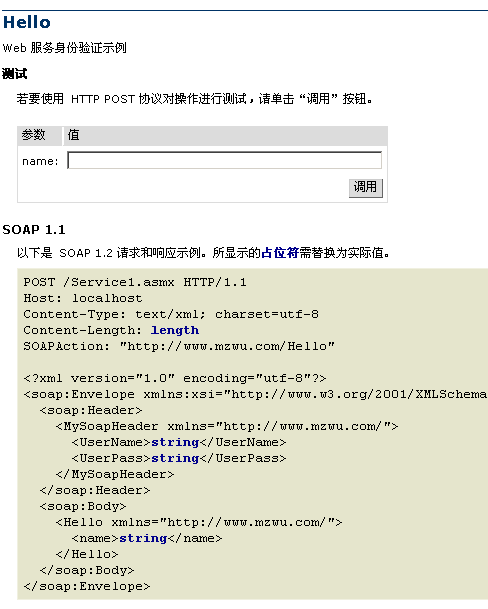
参考资料
·SOAP教程:http://www.w3school.com.cn/soap/index.asp
·简单对象访问协议:http://zh.wikipedia.org/zh-cn/SOAP
·SOAP调用Web Service:http://book.51cto.com/art/200906/129733.htm
·关于朗新WEBSERVER接口问题:http://fpcfjf.blog.163.com/blog/static/5546979320081069223827/
C#使用SOAP调用Web Service的更多相关文章
- SOAP调用Web Service
SOAP调用Web Service (示例位置:光盘\code\ch07\ WebAppClient\ JsService4.htm) <html xmlns="http://www. ...
- ORACLE存储过程调用Web Service
1. 概述 最近在ESB项目中,客户在各个系统之间的服务调用大多都是在oracle存储过程中进行的,本文就oracle存储过程调用web service来进行说明.其他主流数据库,比如mysql和sq ...
- C#开发和调用Web Service
http://blog.csdn.net/h0322/article/details/4776819 1.1.Web Service基本概念 Web Service也叫XML Web Service ...
- php5调用web service
工作中需要用php调用web service接口,对php不熟,上网搜搜,发现关于用php调用web service的文章也不多,不少还是php4里用nusoap这个模块调用的方法,其实php5里已经 ...
- 通过ksoap2-android来调用Web Service操作的实例
import java.io.IOException; import org.ksoap2.SoapEnvelope;import org.ksoap2.serialization.SoapObjec ...
- 使用Android应用调用Web Service
Java本身提供了丰富的Web Service支持,比如Sun公司指定的JAX-WS 2规范,还有Apache开源组织所提供的Axis1.Axis2.CXF等,这些技术不仅可以用于非常方便地对外提 ...
- 【转】基于CXF Java 搭建Web Service (Restful Web Service与基于SOAP的Web Service混合方案)
转载:http://www.cnblogs.com/windwithlife/archive/2013/03/03/2942157.html 一,选择一个合适的,Web开发环境: 我选择的是Eclip ...
- ASP.NET调用Web Service
1.1.Web Service基本概念 Web Service也叫XML Web Service WebService是一种可以接收从Internet或者Intranet上的其它系统中传递过来的请求, ...
- php5调用web service (笔者测试成功)
转自:http://www.cnblogs.com/smallmuda/archive/2010/10/12/1848700.html 感谢作者分享 工作中需要用php调用web service接口, ...
随机推荐
- 抽象工厂(Abstract Factory)模式
一.抽象工厂(Abstract Factory)模式 抽象工厂模式是所有形态的工厂模式中最为抽象和最具一般性的一种形态. 为了方便引进抽象工厂模式,引进一个新概念:产品族(Product Family ...
- 关于C#虚函数和构造函数的一点理解
虚函数感觉总是很神秘,在本质的原理上一直也没有弄得很透彻,今天又有一点的新的感悟,纪录下来,有时间的话可以去研究一下C++对象模型 using System; using System.Collect ...
- spring 中的<aop:advisor>和<aop:aspect>的区别
在AOP中有几个概念: — 方面(Aspect):一个关注点的模块化,这个关注点实现可能另外横切多个对象.事务管理是J2EE应用中一个很好的横切关注点例子.方面用Spring的Advisor或拦截器实 ...
- PHP生成订单号(产品号+年的后2位+月+日+订单号)
require '../common.inc.php'; /* * 产品号+年的后2位+月+日+订单数 * @param [Int] $prodcutId 产品号 * @param [Int] $tr ...
- easyui 汉化问题
遇到 easyui 需要汉化的 , 1: 找到 汉化文件 ,文件位于 插件的 locale 文件夹 内 easyui-lang-zh_CN.js 2: 将其 加载 与 easyui 之后 <s ...
- const用法
一.const作用 二.const用法 1.修饰一般常量 修饰符const可以用在类型说明符前,也可以用在类型说明符后. 例如: ; ; 2.修饰常数组 修饰符const可以用在类型说明符前,也 ...
- 洛谷 P1541 乌龟棋
题目背景 小明过生日的时候,爸爸送给他一副乌龟棋当作礼物. 题目描述 乌龟棋的棋盘是一行N个格子,每个格子上一个分数(非负整数).棋盘第1格是唯一的起点,第N格是终点,游戏要求玩家控制一个乌龟棋子从起 ...
- jquery upload
http://blueimp.github.io/jQuery-File-Upload/ https://github.com/blueimp/jQuery-File-Upload/wiki Back ...
- SendKeys总结
1.SendKeys中特殊字符的键代码BACKSPACE {BACKSPACE}.{BS} 或 {BKSP} BREAK {BREAK} CAPS LOCK {CAPSLOCK} DEL 或 DELE ...
- Spring中argNames的含义
最近学习Spring,一直不太明白Srping的切面编程中的的argNames的含义,经过学习研究后,终于明白,分享一下 先看一个例子: 需要监控的类: package bean; public cl ...