
跟我学android-常用控件之EditText
EditText 是TextView的直接子类,它与TextView的区别在于,EditText可以接受用户输入。
下面通过一个实例来说明EditText的用法
实例:sina 微博的登录界面(注意,由于 我们还没有接触 按钮 和图片的控件,所以 按钮盒图片的地方 我们使用TextView 做)
首先看sina 微博登录页面的效果图
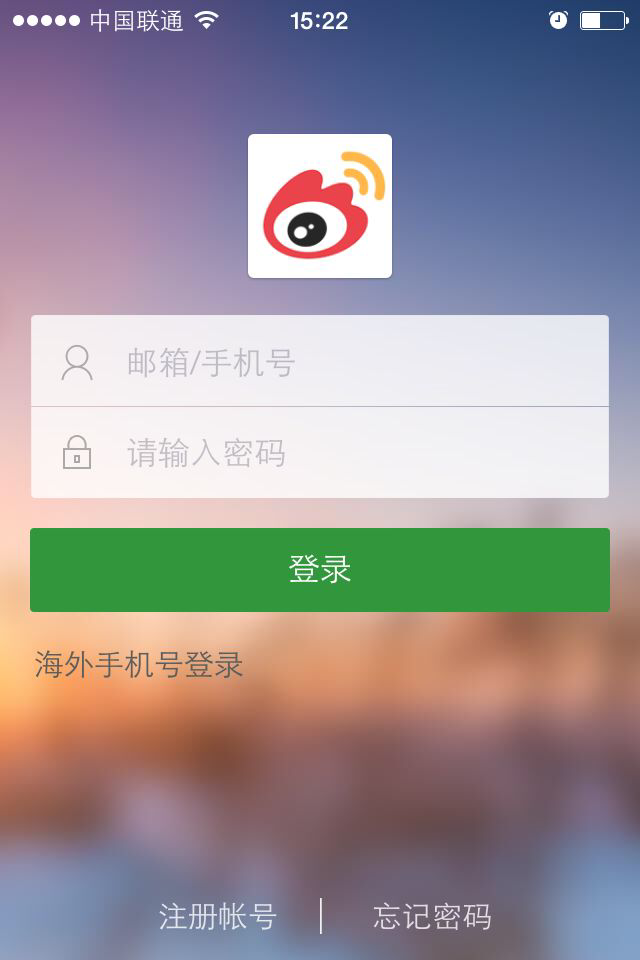
由于该截图是我从iphone上截取下来的,sina 微博android版本的背景不是这张,所以 我更换了背景图
代码如下
 <?xml version="1.0" encoding="utf-8"?>

 <LinearLayout xmlns:android="http://schemas.android.com/apk/res/android"

     android:layout_width="match_parent"

     android:layout_height="match_parent"

     android:background="@drawable/login_wallpaper1"

     android:orientation="vertical" >

     <!-- 用户头像 -->

     <TextView

         android:layout_width="wrap_content"

         android:layout_height="wrap_content"

         android:layout_gravity="center_horizontal"

         android:layout_marginBottom="10dp"

         android:layout_marginTop="20dp"

         android:background="@drawable/login_profile_default" />

     <!-- 用户名和密码输入框,使用嵌套布局 -->

     <LinearLayout

         android:layout_width="match_parent"

         android:layout_height="wrap_content"

         android:layout_margin="10dp"

         android:background="@drawable/fast_select_merchant_input_bg"

         android:orientation="vertical" >

         <EditText

             android:id="@+id/et_user"

             android:layout_width="match_parent"

             android:layout_height="wrap_content"

             android:background="@null"

             android:drawableLeft="@drawable/login_user"

             android:drawablePadding="15dp"

             android:hint="邮箱/手机号"

             android:padding="10dp" />

         <!-- 分割线 -->

         <View

             android:layout_width="match_parent"

             android:layout_height="1dp"

             android:background="@android:color/darker_gray" />

         <EditText

             android:id="@+id/et_pwd"

             android:layout_width="match_parent"

             android:layout_height="wrap_content"

             android:background="@null"

             android:drawableLeft="@drawable/login_key"

             android:drawablePadding="15dp"

             android:hint="请输入密码"

             android:inputType="textPassword"

             android:padding="10dp" />

     </LinearLayout>

     <!-- 模拟登录按钮 -->

     <TextView

         android:layout_width="match_parent"

         android:layout_height="wrap_content"

         android:layout_margin="10dp"

         android:background="#006400"

         android:gravity="center"

         android:padding="10dp"

         android:text="登录"

         android:textColor="#F8F8FF"

         android:textSize="30sp" />

 </LinearLayout>
布局是可以嵌套布局的,在这个登录页面中 我的输入框部分采取的是 嵌套一个 线性布局。
大家可以预览一下效果。
跟我学android-常用控件之EditText的更多相关文章
- Android常用控件及对应Robotium API
最近发现Android控件不熟悉,看Robotium的API都费劲. 常用Android控件: 控件类型 描述 相关类 Button 按钮,可以被用户按下或点击,以执行⼀个动作 Button Text ...
- 常用的基本控件 android常用控件
1.TextView:(文本框):不能编辑 android:textColor="@color/tv_show_color" 字体颜色 android:textSize ...
- Android常用控件
Android 中使用各种控件(View) DatePicker - 日期选择控件 TimePicker - 时间选择控件 ToggleButton - 双状态按钮控件 EditText - 可编辑 ...
- Android常用控件之GridView使用BaseAdapter
我们可以为GridView添加自定义的Adapter,首先看下用自定义Adapter的显示效果 在布局文件main.xml文件中定义一个GridView控件 <RelativeLayout xm ...
- 一步一步学android之控件篇——ScrollView
一个手机的屏幕大小是有限的,那么我要显示的东西显示不下怎么办?这就会使用到ScrollView来进行滚动显示,他的定义如下: 可以看到ScrollView是继承于FrameLayout的,所以Scro ...
- Android常用控件之RatingBar的使用
RatingBar控件比较常见就是用来做评分控件,先上图看看什么是RatingBar 在布局文件中声明 <?xml version="1.0" encoding=" ...
- android常用控件的使用方法
引言 xml很强大 TextView <TextView android:id="@+id/text_view" android:layout_width="mat ...
- Android常用控件之FragmentTabHost的使用
最近在学TabHost时发现TabActivity在API level 13以后不用了,所以就去寻找它的替换类,找到FragmentActivity,可以把每个Fragment作为子tab添加到Fra ...
- 一步一步学android之控件篇——ListView基本使用
ListView组件在应用程序中可以说是不可或缺的一部分,ListView主要是显示列表数据,同时可以滚动查看,这篇博客主要是对ListView的基本用法进行说明,后面会依次对ListView点击动态 ...
随机推荐
- linux下so动态库一些不为人知的秘密(转)
linux 下有动态库和静态库,动态库以.so为扩展名,静态库以.a为扩展名.二者都使用广泛.本文主要讲动态库方面知识.基本上每一个linux 程序都至少会有一个动态库,查看某个程序使用了那些动态库, ...
- 关于type check的定义
Concept: Type Checking There is no static type checking in Scheme; type checking is done at run time ...
- weblogic启动报错之未修改hosts产生错误
报错如下: Enter username to boot WebLogic server:weblogic Enter password to boot WebLogic server: <Ju ...
- 嵌入式ARM-Linux开发工具下载地址合集
insight gdb http://ftp.twaren.net/Unix/Sourceware/ 说明:GDB可视化调试工具 http://gro.clinux.org/frs/?group_i ...
- 字符串(后缀自动机):NOI 2016 优秀的拆分
[问题描述] 如果一个字符串可以被拆分为 AABB 的形式,其中 A 和 B 是任意非空字符串, 则我们称该字符串的这种拆分是优秀的. 例如,对于字符串 aabaabaa,如果令 A = aab, B ...
- IIS6.0部署asp.net网站步骤图解
IIS 发布步骤 1, 程序->运行->输入inetmgr,打开IIS管理器; 2, 展开左侧树形目录->右击“网站”->新建->网站,打开网站创建向导; 3, 点击“下 ...
- H-Index ——Leetcode
Given an array of citations (each citation is a non-negative integer) of a researcher, write a funct ...
- 高效算法——B 抄书 copying books,uva714
Time Limit:3000MS Memory Limit:0KB 64bit IO Format:%lld & %llu Submit Status Description ...
- Cstyle的UEFI导读之SEC第一篇 Reset Vector
最近小看了一下SEC部分的code,现在来做个总结.所谓SEC就是CPU刚刚完成硬件初始化的是时候执行的和CPU体系架构息息相关的代码.主要是为后续CPU以及Chipset初始化代码所需的必备 ...
- Java中基本数据类型和包装器类型的关系
在程序设计中经常用到一系列的数据类型,在Java中也一样包含八中数据类型,这八种数据类型又各自对应一种包装器类型.如下表: 基本类型 包装器类型 boolean Boolean char Charac ...