
C#使用DataSet类、DataTable类、DataRow类、OleDbConnection类、OleDbDataAdapter类编写简单数据库应用
//注意:请使用VS2010打开以下的源代码。

//源代码地址:http://pan.baidu.com/s/1j9WVR

using System;

using System.Collections.Generic;

using System.ComponentModel;

using System.Data;

using System.Data.OleDb;

using System.Drawing;

using System.Linq;

using System.Text;

using System.Windows.Forms;

namespace WindowsFormsApplication22

{

    public partial class Form1 : Form

    {

        public Form1()

        {

            InitializeComponent();

        }

        OleDbConnection connection;

        OleDbDataAdapter command;

        DataSet dataSet;

        DataTable table;

        OleDbCommandBuilder builder;

        private void Form1_Load(object sender, EventArgs e)

        {

            //增加年龄数据(1~100)

            List<string> AgeList = new List<string>();

            for (int i = ; i < ; i++)

            {

                AgeList.Add((i + ).ToString());

            }

            string [] AgeArray = AgeList.ToArray();

            comboBox1.Items.AddRange(AgeArray);

            comboBox1.Text = "";

            //查找数据库

            connection = new OleDbConnection("Provider=Microsoft.Jet.OLEDB.4.0;Data Source=Info.mdb;");

            command = new OleDbDataAdapter("Select * From Information", connection);

            dataSet = new DataSet("Info");

            command.Fill(dataSet, "Information");

            builder = new OleDbCommandBuilder(command);

            //显示数据库

            table = dataSet.Tables["Information"];

            dataGridView1.DataSource = table;

        }

        private void textBox1_TextChanged(object sender, EventArgs e)

        {

            char[] tempChars = textBox1.Text.Trim().ToArray();

            List<char> validChars= new List<char>();

            for (int i=;i<tempChars.Length;i++)

            {

                if(!char.IsNumber(tempChars[i]))

                {

                    tempChars=validChars.ToArray();

                    textBox1.Text = new string(tempChars);

                    textBox1.SelectionStart = textBox1.Text.Length;

                    break;

                }

                else

                {

                    validChars.Add(tempChars[i]);

                }

            }

        }

        private void button1_Click(object sender, EventArgs e)

        {

            try

            {

                if (textBox1.Text.Trim() == "")

                {

                    throw new Exception("身份识别码不能空!");

                }

                else if(textBox1.Text.Trim().Length<)

                {

                    throw new Exception("身份识别码不能小于6位!");

                }

                //检查是否有身份识别码重复的

                for (int i = ; i < table.Rows.Count; i++)

                {

                    if ((string)table.Rows[i]["ID"] == textBox1.Text.Trim())

                    {

                        throw new Exception("已经存在" + textBox1.Text.Trim() + ",请勿重复添加!");

                    }

                }

                //添加操作

                DataRow row = table.NewRow();

                row["ID"] = textBox1.Text.Trim();

                row["Name"] = textBox2.Text.Trim();

                row["Age"] = comboBox1.Text;

                if (radioButton1.Checked == true)

                {

                    row["Gender"] = "男";

                }

                else

                {

                    row["Gender"] = "女";

                }

                table.Rows.Add(row);

                command.Update(dataSet, "Information");

                dataGridView1.DataSource = table;

            }

            catch (Exception ex)

            {

                MessageBox.Show(ex.Message, "错误", MessageBoxButtons.OK, MessageBoxIcon.Error);

            }

        }

        private void button3_Click(object sender, EventArgs e)

        {

            try

            {

                //删除操作

                if (dataGridView1.CurrentCell == null)

                {

                    throw new Exception("无任何内容可删!");

                }

                if (dataGridView1.CurrentCell.RowIndex != -)

                {

                    table.Rows[dataGridView1.CurrentCell.RowIndex].Delete();

                }

                else

                {

                    throw new Exception("未在表格内选择任一个单元格!");

                }

                command.Update(dataSet, "Information");

                dataGridView1.DataSource = table;

            }

            catch (Exception ex)

            {

                MessageBox.Show(ex.Message, "错误", MessageBoxButtons.OK, MessageBoxIcon.Error);

            }

        }

        private void dataGridView1_CellClick(object sender, DataGridViewCellEventArgs e)

        {

            //表格上的内容填至相应的文本框等控件

            textBox1.Text =(string) dataGridView1.Rows[dataGridView1.CurrentCell.RowIndex].Cells["ID"].Value;

            textBox2.Text = (string)dataGridView1.Rows[dataGridView1.CurrentCell.RowIndex].Cells["Name"].Value;

            comboBox1.Text=(dataGridView1.Rows[dataGridView1.CurrentCell.RowIndex].Cells["Age"].Value).ToString();

            if ((string)dataGridView1.Rows[dataGridView1.CurrentCell.RowIndex].Cells["Gender"].Value == "男")

            {

                radioButton1.Checked = true;

            }

            else

            {

                radioButton2.Checked = true;

            }

        }

        private void textBox1_MouseClick(object sender, MouseEventArgs e)

        {

            textBox1.SelectAll();

        }

        private void textBox2_MouseClick(object sender, MouseEventArgs e)

        {

            textBox2.SelectAll();

        }

    }

}
运行结果: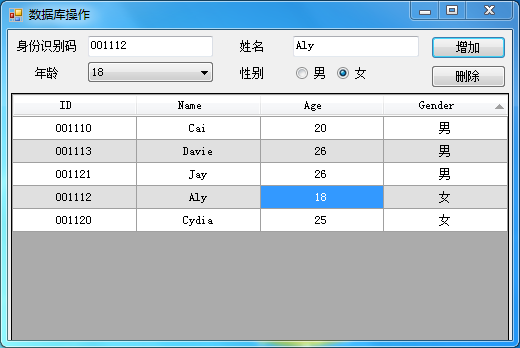
C#使用DataSet类、DataTable类、DataRow类、OleDbConnection类、OleDbDataAdapter类编写简单数据库应用的更多相关文章
- DataSet、DataTable、DataRow 复制
DataSet.DataTable.DataRow 复制 DataSet 对象是支持 ADO.NET的断开式.分布式数据方案的核心对象 ,用途非常广泛.我们很多时候需要使用其中的数据,比如取得一个Da ...
- 转:DataSet、DataTable、DataRow、DataColumn区别及使用实例
DataSet 表示数据在内存中的缓存. 属性 Tables 获取包含在 DataSet 中的表的集合. ds.Tables["sjxx"] DataTable 表示内存中数据的 ...
- DataSet、DataTable、DataRow、DataColumn区别及使用实例
DataSet 表示数据在内存中的缓存. 属性 Tables 获取包含在 DataSet 中的表的集合. ds.Tables["sjxx"] DataTable 表示内存中数据的 ...
- ADO.NET中DataSet、DataTable、DataRow的数据复制方法
DataSet 对象是支持 ADO.NET的断开式.分布式数据方案的核心对象 ,用途非常广泛.我们很多时候需要使用其中的数据,比如取得一个DataTable的数据或者复制另一个DataTabe中的数据 ...
- DataSet、DataTable、DataRow的数据复制方法
DataSet 对象是支持 ADO.NET的断开式.分布式数据方案的核心对象 ,用途非常广泛.我们很多时候需要使用其中的数据,比如取得一个DataTable的数据或者复制另一个DataTabe中的数据 ...
- 实际运用中DataSet、DataTable、DataRow点滴
DataSet.DataTable都自带有序列化标记,但是DataRow没有, 所以如果是在CS程序中,Release版本程序DataTable才是最小的数据传输单元,如果使用DataRow则会报[未 ...
- DataSet ,DataTable,DataRow 之间的关系与使用
关系 DataSet 包含多个DataTable,DataTable包含多行DataRow. 使用情况: 有时候GridView等控件需要将数据源动态绑定到DataSet中:将多个DataSe ...
- DataSet、DataTable、DataRow区别
DataSet 表示数据在内存中的缓存. 属性 Tables 获取包含在 DataSet 中的表的集合. ds.Tables["sjxx"] DataTable 表示内存中数据 ...
- DataSet 和 DataTable 以及 DataRow
向DataSet中添加DataTable 会提示datatable已属于另一个dataset 本来的想法是每次都new一个DataTable,但是还是会报错 百度了一下,发现可以调用DataTable ...
随机推荐
- Win8.1 64bit安装Genymotion模拟器
其实安装并不复杂,只要环境正常,此事并不难.但估计最坏的情况都被我撞上了,才折腾了差不多一天的 那我有哪些环境不正常呢? 破解了系统主题 Device Install Service服务未启动 下面来 ...
- webapp开发——‘手机屏幕分辨率’与‘浏览器分辨率’不要混淆
关于webApp响应式设计遇到的问题,分享给大家,最近在做一个手机webApp,因为我手机是”米3“,屏幕截图大小是1080宽,所以css样式用@media screen and(min-width: ...
- ipython与python的区别
http://mba.shengwushibie.com/itbook/BookChapter.asp?id=8745 http://www.cnblogs.com/yangze/archive/20 ...
- iOS证书详解--再转
一.成员介绍1. Certification(证书)证书是对电脑开发资格的认证,每个开发者帐号有一套,分为两种:1) Developer Certification(开发证书)安装在电脑上 ...
- JQuery重要知识点
jQuery基本选择器----包括ID选择器,标签选择器,类选择器,通配选择器和组选择器5种 a. ID选择器: $("#id") b. 标签选择器:$("element ...
- Ubuntu下安装和配置Apache2
http://www.blogjava.net/duanzhimin528/archive/2010/03/05/314564.html 在Ubuntu中安装apache 安装指令:sudo apt- ...
- Fastreport怎么样在同一页上下部分打印相同内容
使用FastReport遇到个难题,不知道怎么解决 分组打印之后,需要同一页上下部分打印相同内容,就是一式两份的联单打印. 例如: 送货单 ********** A 这里上半页,地区分组之后的内容 * ...
- Linux SendMail 使用外部SMTP服务发送邮件
这个今天刚好用到,就测试了一下.OK了..因为,PYTHON模块是可以,但SHELL脚本用SHELL发,还是合拍点.. http://my.oschina.net/duangr/blog/183162 ...
- 这十大MCU厂商瓜分着中国市场
MCU(Micro Control Unit)中文名称为微控制单元,又称单片微型计算机(Single Chip Microcomputer)或者单片机,是指随着大规模集成电路的出现及其发展,将计算机的 ...
- 给java中的System.getProperty添加新的key value对
由于系统被格了,所以,现在的java项目配置不对,代码里面的配置类调用了一个System.getProperty("env")发现找不到该变量的值,以前一直能找到的. 其实就是以前 ...