
[收藏转贴]WCFRESTFul服务搭建及实现增删改查
RESTful Wcf是一种基于Http协议的服务架构风格, RESTful 的服务通常是架构层面上的考虑。 因为它天生就具有很好的跨平台跨语言的集成能力,几乎所有的语言和网络平台都支持 HTTP 请求,无需去实现复杂的客户端代理,无需使用复杂的数据通讯方式既可以将我们的服务暴露给任何需要的人,无论他使用 VB、Ruby、JavaScript,甚至是 HTML FORM,或者直接在浏览器地址栏输入
WCF 中通过 WebGetAttribute、WebInvokeAttribute (GET/PUT/POST/DELETE)、UriTemplate 定义 REST 的服务的调用方式, 通过 WebMessageFormat (Xml/Json) 定义消息传递的格式。
RESTful的几点好处(引用博文):
1、简单的数据通讯方式,基于HTTP协议。避免了使用复杂的数据通讯方式。
2、避免了复杂的客户端代理。
3、直接通过URI资源定向即可把服务暴露给调用者。
下面就通过一个简单的列子一步一步实现WCFRESTFul
1、 新建如下项目

2、 项目文件介绍
(1) IService1.cs 定义服务契约,在接口方法中定义RestFul请求规则。
(2) Service1.svc 实现IService1.cs定义的服务契约。
(3) People.cs 数据契约,定义的实体对象
(4) Global.asax 全局资源文件中定义注册路由
(5) Web.config 配置WCF服务。
3、 IService1.cs接口定义三个方法,包含GET和POST请求

using System;

using System.Collections.Generic;

using System.Linq;

using System.Runtime.Serialization;

using System.ServiceModel;

using System.ServiceModel.Web;

using System.Text;

namespace WcfRestFulService

{

    // NOTE: You can use the "Rename" command on the "Refactor" menu to change the interface name "IService1" in both code and config file together.

    [ServiceContract(Name="user")]

    public interface IService1

    {

        [OperationContract]

        [WebInvoke(UriTemplate = "get/{value}",  Method = "GET", ResponseFormat = WebMessageFormat.Json, RequestFormat = WebMessageFormat.Json, BodyStyle = WebMessageBodyStyle.Bare)]

        string GetData(string value);

        [OperationContract]

        [WebInvoke(UriTemplate = "add", Method = "POST", ResponseFormat = WebMessageFormat.Json, RequestFormat = WebMessageFormat.Json, BodyStyle = WebMessageBodyStyle.Bare)]

        string addPeople(People p);

        [OperationContract]

        [WebInvoke(UriTemplate = "GetList/{value}", Method = "GET", ResponseFormat = WebMessageFormat.Json, RequestFormat = WebMessageFormat.Json, BodyStyle = WebMessageBodyStyle.Bare)]

        List<People> GetList(string value);

    }

}
注意:通过WebInvoke属性的Method值说明该请求的类型,UriTemplate值说明url路由。接口中[ServiceContract(Name="user")]的定义,我们的URL路径中将会用到user
4、 Service1.svc实现契约
using System;

using System.Collections.Generic;

using System.Linq;

using System.Runtime.Serialization;

using System.ServiceModel;

using System.ServiceModel.Web;

using System.Text;

using System.ServiceModel.Activation;

namespace WcfRestFulService

{

    // NOTE: You can use the "Rename" command on the "Refactor" menu to change the class name "Service1" in code, svc and config file together.

     [AspNetCompatibilityRequirements(

        RequirementsMode = AspNetCompatibilityRequirementsMode.Allowed)]

    public class Service1 : IService1

    {

        public string GetData(string value)

        {

            return string.Format("You entered: {0}", value);

        }

        public string addPeople(People p)

         {

             if (p == null)

             {

                 return "People is Null";

             }

             return p.Name;

         }

        public List<People> GetList(string value)

        {

            return new List<People> { new People(){Id=,Name="eric"}};

        }

    }

}
注意:[AspNetCompatibilityRequirements( RequirementsMode = AspNetCompatibilityRequirementsMode.Allowed)]的定义跟我们在webconfig中的一个配置相关,我们 在下文中详细介绍。
5、 Global全局资源文件,注册服务的路由:
using System;

using System.Collections.Generic;

using System.Linq;

using System.Web;

using System.Web.Security;

using System.Web.SessionState;

using System.Web.Routing;

using System.ServiceModel.Activation;

namespace WcfRestFulService

{

    public class Global : System.Web.HttpApplication

    {

        protected void Application_Start(object sender, EventArgs e)

        {

            RegistrRoutes();

        }

        private void RegistrRoutes()

        {

            //说明:ServiceRoute需要引用 System.ServiceModel.Activation.dll

            RouteTable.Routes.Add(new ServiceRoute("user", new WebServiceHostFactory(), typeof(Service1)));

        }

    }

}
6、 Web.config配置文件
<?xml version="1.0"?>

<configuration>

  <system.web>

    <compilation debug="true" targetFramework="4.0" />

  </system.web>

  <system.serviceModel>

    <behaviors>

      <serviceBehaviors>

        <behavior name="defaultResultBehavior">

          <!-- To avoid disclosing metadata information, set the value below to false and remove the metadata endpoint above before deployment -->

          <serviceMetadata httpGetEnabled="true"/>

          <!-- To receive exception details in faults for debugging purposes, set the value below to true.  Set to false before deployment to avoid disclosing exception information -->

          <serviceDebug includeExceptionDetailInFaults="false"/>

          <dataContractSerializer maxItemsInObjectGraph="6553500"/>

        </behavior>

      </serviceBehaviors>

      <endpointBehaviors>

        <behavior name="defaultRestEndpointBehavior">

          <webHttp helpEnabled="true" automaticFormatSelectionEnabled="true" />

          <dataContractSerializer maxItemsInObjectGraph="6553500"/>

        </behavior>

        </endpointBehaviors>

    </behaviors>

    <services>

      <service name="WcfRestFulService.Service1" behaviorConfiguration="defaultResultBehavior">

        <endpoint binding="webHttpBinding" contract="WcfRestFulService.IService1" behaviorConfiguration="defaultRestEndpointBehavior"></endpoint>

      </service>

    </services>

    <serviceHostingEnvironment multipleSiteBindingsEnabled="true" aspNetCompatibilityEnabled="true" />

  </system.serviceModel>

 <system.webServer>

    <modules runAllManagedModulesForAllRequests="true"/>

  </system.webServer>

</configuration>
说明:在配置文件中我们看<serviceHostingEnvironment multipleSiteBindingsEnabled="true" aspNetCompatibilityEnabled="true" />节点,如果使aspNetCompatibilityEnabled="true"必须在Service1.svc声明 [AspNetCompatibilityRequirements(RequirementsMode = AspNetCompatibilityRequirementsMode.Allowed)],其中RequirementsMode的值也可以为 AspNetCompatibilityRequirementsMode. Required
至此我们的WCFRESFul搭建成功,运行服务看效果。
1、 http://localhost:9315/Service1.svc(传统的页面,是不是很熟悉)
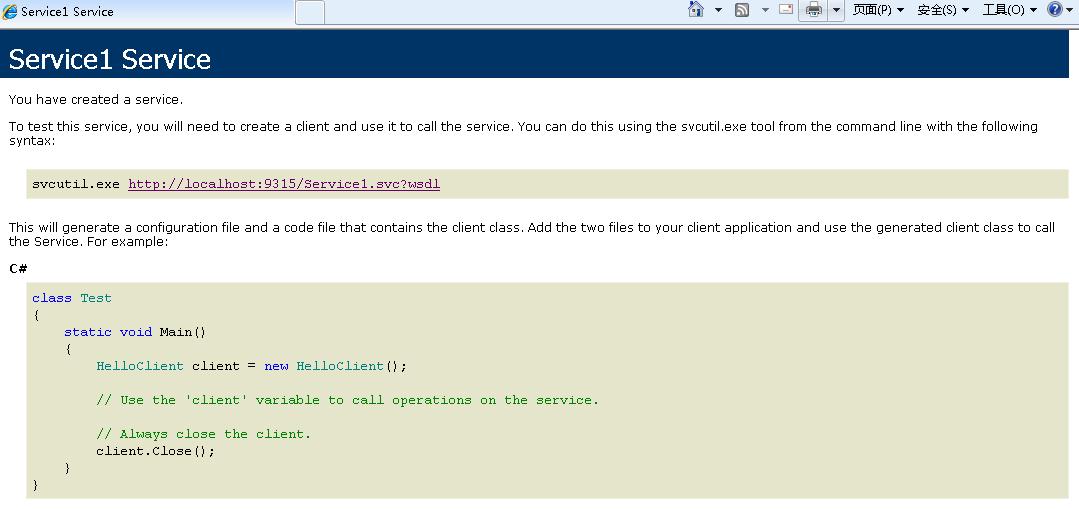
2、http://localhost:9315/user/help(RESTFul的风格,是不是眼前一亮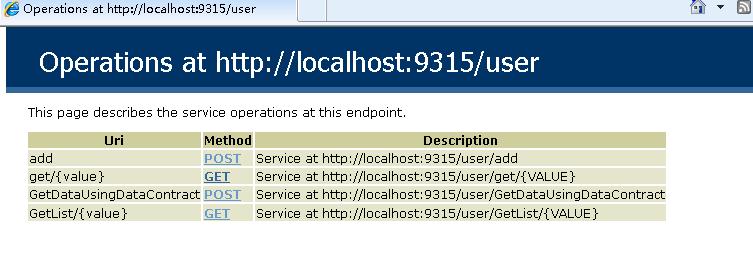
3、 通过RESTFul风格调用服务
(1)、http://localhost:9315/user/get/1调用服务string GetData(string value),参数值为1
(2)、http://localhost:9315/user/add 调用string addPeople(People p)服务
下面我们开始创建一个简答的ajax调用列子测试一下WC FRESTFul服务
注意:如果你是用VS自带的IIS调试,WCF RESTFul生成的URL与调用WCF服务的URL端口号要保持一致,要不然用ajax调用浏览器会认为跨域。 比如:http://localhost:9315/user/get/1 和 http://localhost:9315/Default.aspx,
我是采用win7系统的IIS 7调试的。
服务地址配置为:http://localhost/wfcrestful/user/help
调用服务的Web页面的地址为:http://localhost/restfulTest/WebForm1.aspx
调用服务string GetData(string value)
$.get("http://localhost/wfcrestful/user/get/1", function (json) { alert(json) });
调用服务:string addPeople(People p)
$.ajax({

            "url": "http://localhost/wfcrestful/user/add",

            "type": "POST",

            "contentType": "application/json",

            "dataType": "json",

            "data": '{\"Id\":1,\"Name\":\"我是输入的内容\"}',

            "success": function (returnValue) {

            alert(returnValue);

            }

            });
调用服务GetList(string value)
$.get("http://localhost/wfcrestful/user/GetList/22", function (json) {

                alert(json[0].Name);

            })
至此整个DEMO已经完成,请点击下载源码。
PS:WCF RESTFul已经是过时的技术了,有兴趣的童鞋们可以研究一下 MVC WebApi
文中有些的不对的地方欢迎大家指正。
[收藏转贴]WCFRESTFul服务搭建及实现增删改查的更多相关文章
- WCFRESTFul服务搭建及实现增删改查
WCFRESTFul服务搭建及实现增删改查 RESTful Wcf是一种基于Http协议的服务架构风格, RESTful 的服务通常是架构层面上的考虑. 因为它天生就具有很好的跨平台跨语言的集成能力 ...
- 基于SSM搭建网站实现增删改查
网站源码地址:https://github.com/MyCreazy/BasicOperateWebSite.git 使用maven搭建网站的时候,记得选用war包格式,有时候maven包没有引用进来 ...
- 使用 Spring Boot 搭建一套增删改查(无多余代码)
前言 这是我学习 Spring Boot 的第三篇文章,终于可以见到效果了.错过的同学可以看看之前的文章 我们为什么要学习 Spring Boot Spring Boot 入门详细分析 在入门的基础上 ...
- Arcgis api for js实现服务端地图的增删改查
< !DOCTYPE html > <html xmlns = "http://www.w3.org/1999/xhtml" > <head > ...
- 使用IDEA搭建SpringBoot进行增删改查
功能环境:java1.8以上 .IntellJIDEA First: 创建项目,请根据项目图一步一步完成建立. 二.配置数据库 三.创建实体对象建表或对应存在表,根据需要加入相应注解 四.创建应用 ...
- 基于SpringBoot开发一个Restful服务,实现增删改查功能
前言 在去年的时候,在各种渠道中略微的了解了SpringBoot,在开发web项目的时候是如何的方便.快捷.但是当时并没有认真的去学习下,毕竟感觉自己在Struts和SpringMVC都用得不太熟练. ...
- IDEA搭建SSM实现登录、注册,数据增删改查功能
本博文的源代码:百度云盘/java/java实例/SSM实例/SSM实现登录注册,增删改查/IDEA搭建SSM实现登录,注册,增删改查功能.zip 搭建空的Maven项目 使用Intellij id ...
- 在ASP.NET MVC4中实现同页面增删改查,无弹出框01,Repository的搭建
通常,在同一个页面上实现增删改查,会通过弹出框实现异步的添加和修改,这很好.但有些时候,是不希望在页面上弹出框的,我们可能会想到Knockoutjs,它能以MVVM模式实现同一个页面上的增删改查,再辅 ...
- node-express项目的搭建并通过mongoose操作MongoDB实现增删改查分页排序(四)
最近写了一个用node来操作MongoDB完成增.删.改.查.排序.分页功能的示例,并且已经放在了服务器上地址:http://39.105.32.180:3333. Mongoose是在node.js ...
随机推荐
- ZooKeeper应用场景
一.数据发布与订阅(配置中心) 发布与订阅模型,即所谓的配置中心,顾名思义就是发布者将数据发布到ZK节点上,供订阅者动态获取数据,实现配置信息的集中式管理和动态更新.例如全局的配置信息,服务式服务框架 ...
- C++学习(二)
九.3.内联1)编译器用函数的二进制代码替换函数调用语句,减少函数调用的时间开销.这种优化策略成为内联.2)频繁调用的简单函数适合内联,而稀少调用的复杂函数不适合内联.3)递归函数无法内联.4)通过i ...
- Working with BeforeProperties and AfterProperties on SPItemEventReceiver
As many of you know, event receivers are a great way to hook into various SharePoint events. These ...
- MySQL的链接,查看数据库,使用数据库,查看表
MySQL的链接,查看数据库,使用数据库,查看表 mysql> show databases; +--------------------+ | Database | +------------ ...
- js知识
行为=事件+由该事件触发的动作 常用事件:onXxx onLoad 打开网页事件 onUnLoad 关闭事件 onClick 单击事件 onChange ...
- Installation error INSTALL_FAILED_VERSION_DOWNGRADE错误
最近折腾了一下Robotium自动化测试框架,发现问题还挺多,刚刚解决了一个问题,总算是把环境搞定了,可是一运行测试用例,发现又报Installation error INSTALL_FAILED_V ...
- iOS-事务相关
事务管理 事务(Transaction):1.构成单一逻辑工作单元的操作集合DBMS中的用户程序DBMS外的可执行程序对数据库的读/写操作序列2.读从数据库中读取数据,首先从磁盘中读到内存(Buffe ...
- Cogs 1298.通讯问题
1298.通讯问题 ★ 输入文件:jdltt.in 输出文件:jdltt.out 简单对比 时间限制:1 s 内存限制:128 MB [题目描述] 一个篮球队有n个篮球队员,每个队员都有联系方式(如电 ...
- OpenCV(7)-图像直方图
直方图定义可参考这里.图像的直方图用来表示图像像素的统计信息,它统计了图像每一个通道(如果是多通道)中,每个像素的个数(比例). 计算直方图 OpenCV提供了直接计算直方图的函数 void calc ...
- 【BZOJ3270】【高斯消元】博物馆
Description 有一天Petya和他的朋友Vasya在进行他们众多旅行中的一次旅行,他们决定去参观一座城堡博物馆.这座博物馆有着特别的样式.它包含由m条走廊连接的n间房间,并且满足可以从任何一 ...