
[收藏转贴]WCFRESTFul服务搭建及实现增删改查
RESTful Wcf是一种基于Http协议的服务架构风格, RESTful 的服务通常是架构层面上的考虑。 因为它天生就具有很好的跨平台跨语言的集成能力,几乎所有的语言和网络平台都支持 HTTP 请求,无需去实现复杂的客户端代理,无需使用复杂的数据通讯方式既可以将我们的服务暴露给任何需要的人,无论他使用 VB、Ruby、JavaScript,甚至是 HTML FORM,或者直接在浏览器地址栏输入
WCF 中通过 WebGetAttribute、WebInvokeAttribute (GET/PUT/POST/DELETE)、UriTemplate 定义 REST 的服务的调用方式, 通过 WebMessageFormat (Xml/Json) 定义消息传递的格式。
RESTful的几点好处(引用博文):
1、简单的数据通讯方式,基于HTTP协议。避免了使用复杂的数据通讯方式。
2、避免了复杂的客户端代理。
3、直接通过URI资源定向即可把服务暴露给调用者。
下面就通过一个简单的列子一步一步实现WCFRESTFul
1、 新建如下项目

2、 项目文件介绍
(1) IService1.cs 定义服务契约,在接口方法中定义RestFul请求规则。
(2) Service1.svc 实现IService1.cs定义的服务契约。
(3) People.cs 数据契约,定义的实体对象
(4) Global.asax 全局资源文件中定义注册路由
(5) Web.config 配置WCF服务。
3、 IService1.cs接口定义三个方法,包含GET和POST请求

using System;

using System.Collections.Generic;

using System.Linq;

using System.Runtime.Serialization;

using System.ServiceModel;

using System.ServiceModel.Web;

using System.Text;

namespace WcfRestFulService

{

    // NOTE: You can use the "Rename" command on the "Refactor" menu to change the interface name "IService1" in both code and config file together.

    [ServiceContract(Name="user")]

    public interface IService1

    {

        [OperationContract]

        [WebInvoke(UriTemplate = "get/{value}",  Method = "GET", ResponseFormat = WebMessageFormat.Json, RequestFormat = WebMessageFormat.Json, BodyStyle = WebMessageBodyStyle.Bare)]

        string GetData(string value);

        [OperationContract]

        [WebInvoke(UriTemplate = "add", Method = "POST", ResponseFormat = WebMessageFormat.Json, RequestFormat = WebMessageFormat.Json, BodyStyle = WebMessageBodyStyle.Bare)]

        string addPeople(People p);

        [OperationContract]

        [WebInvoke(UriTemplate = "GetList/{value}", Method = "GET", ResponseFormat = WebMessageFormat.Json, RequestFormat = WebMessageFormat.Json, BodyStyle = WebMessageBodyStyle.Bare)]

        List<People> GetList(string value);

    }

}
注意:通过WebInvoke属性的Method值说明该请求的类型,UriTemplate值说明url路由。接口中[ServiceContract(Name="user")]的定义,我们的URL路径中将会用到user
4、 Service1.svc实现契约
using System;

using System.Collections.Generic;

using System.Linq;

using System.Runtime.Serialization;

using System.ServiceModel;

using System.ServiceModel.Web;

using System.Text;

using System.ServiceModel.Activation;

namespace WcfRestFulService

{

    // NOTE: You can use the "Rename" command on the "Refactor" menu to change the class name "Service1" in code, svc and config file together.

     [AspNetCompatibilityRequirements(

        RequirementsMode = AspNetCompatibilityRequirementsMode.Allowed)]

    public class Service1 : IService1

    {

        public string GetData(string value)

        {

            return string.Format("You entered: {0}", value);

        }

        public string addPeople(People p)

         {

             if (p == null)

             {

                 return "People is Null";

             }

             return p.Name;

         }

        public List<People> GetList(string value)

        {

            return new List<People> { new People(){Id=,Name="eric"}};

        }

    }

}
注意:[AspNetCompatibilityRequirements( RequirementsMode = AspNetCompatibilityRequirementsMode.Allowed)]的定义跟我们在webconfig中的一个配置相关,我们 在下文中详细介绍。
5、 Global全局资源文件,注册服务的路由:
using System;

using System.Collections.Generic;

using System.Linq;

using System.Web;

using System.Web.Security;

using System.Web.SessionState;

using System.Web.Routing;

using System.ServiceModel.Activation;

namespace WcfRestFulService

{

    public class Global : System.Web.HttpApplication

    {

        protected void Application_Start(object sender, EventArgs e)

        {

            RegistrRoutes();

        }

        private void RegistrRoutes()

        {

            //说明:ServiceRoute需要引用 System.ServiceModel.Activation.dll

            RouteTable.Routes.Add(new ServiceRoute("user", new WebServiceHostFactory(), typeof(Service1)));

        }

    }

}
6、 Web.config配置文件
<?xml version="1.0"?>

<configuration>

  <system.web>

    <compilation debug="true" targetFramework="4.0" />

  </system.web>

  <system.serviceModel>

    <behaviors>

      <serviceBehaviors>

        <behavior name="defaultResultBehavior">

          <!-- To avoid disclosing metadata information, set the value below to false and remove the metadata endpoint above before deployment -->

          <serviceMetadata httpGetEnabled="true"/>

          <!-- To receive exception details in faults for debugging purposes, set the value below to true.  Set to false before deployment to avoid disclosing exception information -->

          <serviceDebug includeExceptionDetailInFaults="false"/>

          <dataContractSerializer maxItemsInObjectGraph="6553500"/>

        </behavior>

      </serviceBehaviors>

      <endpointBehaviors>

        <behavior name="defaultRestEndpointBehavior">

          <webHttp helpEnabled="true" automaticFormatSelectionEnabled="true" />

          <dataContractSerializer maxItemsInObjectGraph="6553500"/>

        </behavior>

        </endpointBehaviors>

    </behaviors>

    <services>

      <service name="WcfRestFulService.Service1" behaviorConfiguration="defaultResultBehavior">

        <endpoint binding="webHttpBinding" contract="WcfRestFulService.IService1" behaviorConfiguration="defaultRestEndpointBehavior"></endpoint>

      </service>

    </services>

    <serviceHostingEnvironment multipleSiteBindingsEnabled="true" aspNetCompatibilityEnabled="true" />

  </system.serviceModel>

 <system.webServer>

    <modules runAllManagedModulesForAllRequests="true"/>

  </system.webServer>

</configuration>
说明:在配置文件中我们看<serviceHostingEnvironment multipleSiteBindingsEnabled="true" aspNetCompatibilityEnabled="true" />节点,如果使aspNetCompatibilityEnabled="true"必须在Service1.svc声明 [AspNetCompatibilityRequirements(RequirementsMode = AspNetCompatibilityRequirementsMode.Allowed)],其中RequirementsMode的值也可以为 AspNetCompatibilityRequirementsMode. Required
至此我们的WCFRESFul搭建成功,运行服务看效果。
1、 http://localhost:9315/Service1.svc(传统的页面,是不是很熟悉)
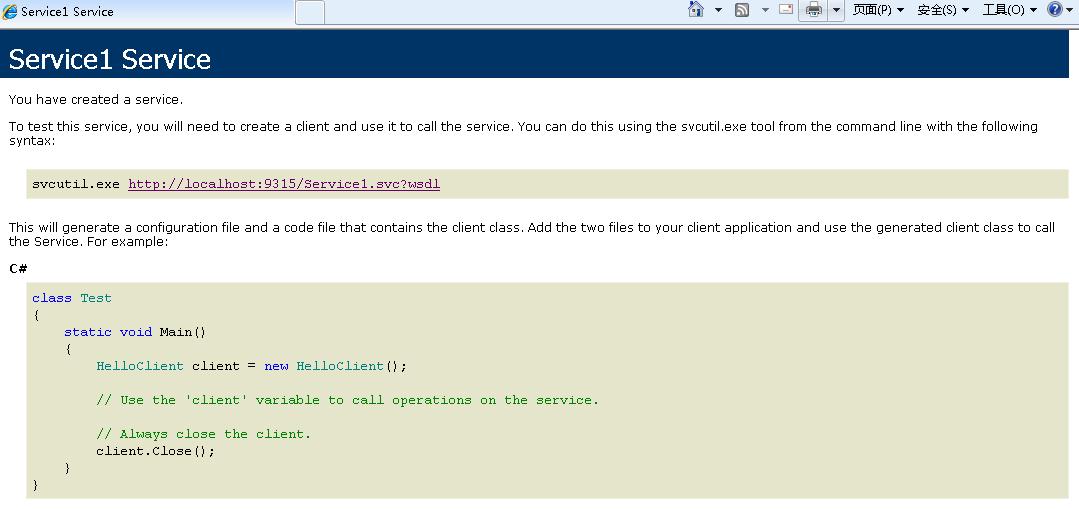
2、http://localhost:9315/user/help(RESTFul的风格,是不是眼前一亮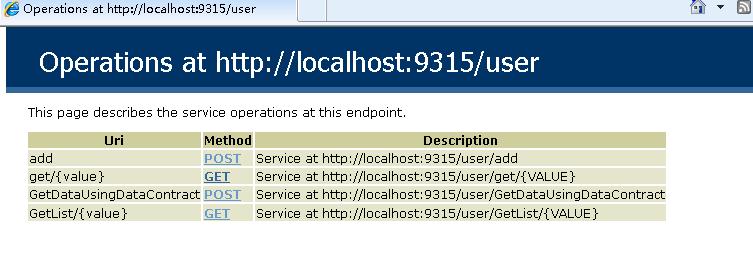
3、 通过RESTFul风格调用服务
(1)、http://localhost:9315/user/get/1调用服务string GetData(string value),参数值为1
(2)、http://localhost:9315/user/add 调用string addPeople(People p)服务
下面我们开始创建一个简答的ajax调用列子测试一下WC FRESTFul服务
注意:如果你是用VS自带的IIS调试,WCF RESTFul生成的URL与调用WCF服务的URL端口号要保持一致,要不然用ajax调用浏览器会认为跨域。 比如:http://localhost:9315/user/get/1 和 http://localhost:9315/Default.aspx,
我是采用win7系统的IIS 7调试的。
服务地址配置为:http://localhost/wfcrestful/user/help
调用服务的Web页面的地址为:http://localhost/restfulTest/WebForm1.aspx
调用服务string GetData(string value)
$.get("http://localhost/wfcrestful/user/get/1", function (json) { alert(json) });
调用服务:string addPeople(People p)
$.ajax({

            "url": "http://localhost/wfcrestful/user/add",

            "type": "POST",

            "contentType": "application/json",

            "dataType": "json",

            "data": '{\"Id\":1,\"Name\":\"我是输入的内容\"}',

            "success": function (returnValue) {

            alert(returnValue);

            }

            });
调用服务GetList(string value)
$.get("http://localhost/wfcrestful/user/GetList/22", function (json) {

                alert(json[0].Name);

            })
至此整个DEMO已经完成,请点击下载源码。
PS:WCF RESTFul已经是过时的技术了,有兴趣的童鞋们可以研究一下 MVC WebApi
文中有些的不对的地方欢迎大家指正。
[收藏转贴]WCFRESTFul服务搭建及实现增删改查的更多相关文章
- WCFRESTFul服务搭建及实现增删改查
WCFRESTFul服务搭建及实现增删改查 RESTful Wcf是一种基于Http协议的服务架构风格, RESTful 的服务通常是架构层面上的考虑. 因为它天生就具有很好的跨平台跨语言的集成能力 ...
- 基于SSM搭建网站实现增删改查
网站源码地址:https://github.com/MyCreazy/BasicOperateWebSite.git 使用maven搭建网站的时候,记得选用war包格式,有时候maven包没有引用进来 ...
- 使用 Spring Boot 搭建一套增删改查(无多余代码)
前言 这是我学习 Spring Boot 的第三篇文章,终于可以见到效果了.错过的同学可以看看之前的文章 我们为什么要学习 Spring Boot Spring Boot 入门详细分析 在入门的基础上 ...
- Arcgis api for js实现服务端地图的增删改查
< !DOCTYPE html > <html xmlns = "http://www.w3.org/1999/xhtml" > <head > ...
- 使用IDEA搭建SpringBoot进行增删改查
功能环境:java1.8以上 .IntellJIDEA First: 创建项目,请根据项目图一步一步完成建立. 二.配置数据库 三.创建实体对象建表或对应存在表,根据需要加入相应注解 四.创建应用 ...
- 基于SpringBoot开发一个Restful服务,实现增删改查功能
前言 在去年的时候,在各种渠道中略微的了解了SpringBoot,在开发web项目的时候是如何的方便.快捷.但是当时并没有认真的去学习下,毕竟感觉自己在Struts和SpringMVC都用得不太熟练. ...
- IDEA搭建SSM实现登录、注册,数据增删改查功能
本博文的源代码:百度云盘/java/java实例/SSM实例/SSM实现登录注册,增删改查/IDEA搭建SSM实现登录,注册,增删改查功能.zip 搭建空的Maven项目 使用Intellij id ...
- 在ASP.NET MVC4中实现同页面增删改查,无弹出框01,Repository的搭建
通常,在同一个页面上实现增删改查,会通过弹出框实现异步的添加和修改,这很好.但有些时候,是不希望在页面上弹出框的,我们可能会想到Knockoutjs,它能以MVVM模式实现同一个页面上的增删改查,再辅 ...
- node-express项目的搭建并通过mongoose操作MongoDB实现增删改查分页排序(四)
最近写了一个用node来操作MongoDB完成增.删.改.查.排序.分页功能的示例,并且已经放在了服务器上地址:http://39.105.32.180:3333. Mongoose是在node.js ...
随机推荐
- JVM工作原理和特点
操作系统装入JVM,是通过jdk中的java.exe来完成,通过以下4个步骤: 1. 创建JVM装载环境和配置: JVM装入系统,JVM提供的方式是操作系统的动态链接文件.文件就是一个装入路径的问题, ...
- 深入Windows窗体原理及控件重绘技巧
之前有学MFC的同学告诉我觉得Windows的控件重绘难以理解,就算重绘成功了还是有些地方不明白,我觉得可能很多人都有这样的问题,在这里我从Windows窗体的最基本原理来讲解,如果你有类似的疑惑希望 ...
- SQLServe错误整理
1. sql拒绝访问?提示SQL Serve不存在或访问被拒绝 (SQL Server does not exist or access denied.) (A) 1:你如果是独立上网的请把21端口打 ...
- Yii框架页面运行流程
Yii框架页面运行流程 CComponent | CModel | CActiveRecord.CFormModel(所有模型的父类) | 表名.php(模型) | 入口文件------------- ...
- U3D 2D游戏之黑暗纪元 2D游戏基础入门开发全(1)
第一个U3D 2D游戏的例子,全部自己编写,算是入门用,这里记录一下. 1.首先游戏把层次布置好,这里分为 背景层,游戏层,UI层 背景层 (Background-1):就是单纯的背景显示作用. 游戏 ...
- Unity3D 关于运动模型
首先,要让一个物体在3D世界里面运动起来. 要在一个具有碰撞器的面和一个具有碰撞器的体. 要具有碰撞器属性,不然其他物体会穿过的. 默认的碰撞器是一个具有阻碍效果的,如果让碰撞器具有了一个触发器属性I ...
- Click ListView Item跳转Activity
今天学习了ListView点击Item跳转,修改上一篇代码bindData方法 lv.setOnItemClickListener(new OnItemClickListener() { public ...
- 20151221jquery学习笔记--验证插件
验证插件(validate.js),是一款验证常规表单数据合法性的插件.使用它,极大的解放了在表单上繁杂的验证过程,并且错误提示显示的完善也增加了用户体验.一. 使用 validate.js 插件官网 ...
- ACM——线性表操作
线性表操作 时间限制(普通/Java):1000MS/3000MS 运行内存限制:65536KByte总提交:2795 测试通过:589 描述 线性表是n个元素 ...
- 常见错误总结_1_对java类进行修改后,无法按修改的类型加载
1.这是因为没有run的原因,对类进行修改一定要run一遍 2.至于要不要重新tomcat部署,取决于你是修改了变量还是方法,拿不定的时候都重新加载一遍看看.