
bootstrap学习--模态弹出框modals轮子
1.点击按钮型
<link rel="stylesheet" href="lib/bootstrap/css/bootstrap.min.css">(本地文件)
...
<button class="btn btn-primary" type="button">点击我</button>
<div class="modal" id="mymodal">
<div class="modal-dialog">
<div class="modal-content">
<div class="modal-header">
<button type="button" class="close" data-dismiss="modal"><span aria-hidden="true">×</span><span class="sr-only">Close</span></button>
<h4 class="modal-title">模态弹出窗标题</h4>
</div>
<div class="modal-body">
<p>模态弹出窗主体内容</p>
</div>
<div class="modal-footer">
<button type="button" class="btn btn-default" data-dismiss="modal">关闭</button>
<button type="button" class="btn btn-primary">保存</button>
</div>
</div><!-- /.modal-content -->
</div><!-- /.modal-dialog -->
</div><!-- /.modal --> <script src="http://libs.baidu.com/jquery/1.9.0/jquery.js"></script>
<script src="http://cdn.bootcss.com/bootstrap/2.3.1/js/bootstrap-transition.js"></script>
<script src="http://cdn.bootcss.com/bootstrap/2.3.1/js/bootstrap-modal.js"></script>
<script>
$(function(){
$(".btn").click(function(){
$("#mymodal").modal("toggle");
});
});
</script>
效果如下:
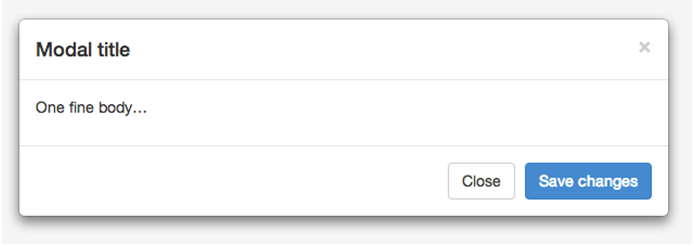
2.登入注册型
<link rel="stylesheet" href="lib/bootstrap/css/bootstrap.min.css">
...
<a href="" data-toggle="modal" data-target="#login-modal">登录/注册</a>
...
<!--bootstrap弹出层-->
<div class="modal fade" id="login-modal" tabindex="-1" data-backdrop="trun">
<div class="modal-dialog">
<div class="modal-content">
<div class="modal-header">
<button class="close" data-dismiss="modal">×</button>
<h4>用户登录</h4> </div>
<div class="modal-body">
<p>
登入/注册界面
</p> </div>
<div class="modal-footer">
<button class="btn btn-primary">登录</button>
</div>
</div>
</div>
</div>
<script src="lib/jquery-2.1.1.min.js"></script>
<script src="lib/bootstrap/js/bootstrap.min.js"></script>
<script src="lib/holder.js"></script> <script type="text/javascript">
$(function(){
$('#login-modal').modal({
show: false, });
});
$('#login-modal').on('show.bs.modal',function(){
console.log('显示对话框');
})
$('#login-modal').on('shown.bs.modal',function(){
console.log('对话框已经显示了');
}) $('#login-modal').on('hide.bs.modal',function(){
console.log('隐藏对话框');
})
$('#login-modal').on('hidden.bs.modal',function(){
console.log('对话框已隐藏');
})
</script>

bootstrap学习--模态弹出框modals轮子的更多相关文章
- 玩转Bootstrap(JS插件篇)-第1章 模态弹出框 :1-3 模态弹出框
模态弹出框(Modals) 这一小节我们先来讲解一个“模态弹出框”,插件的源文件:modal.js. 右侧代码编辑器(30行)就是单独引入 bootstrap 中发布出的“modal.js”文件. 样 ...
- Bootstrap模态弹出框
前面的话 在 Bootstrap 框架中把模态弹出框统一称为 Modal.这种弹出框效果在大多数 Web 网站的交互中都可见.比如点击一个按钮弹出一个框,弹出的框可能是一段文件描述,也可能带有按钮操作 ...
- 玩转Bootstrap(JS插件篇)-第1章 模态弹出框 :1-4 模态弹出框--结构分析
模态弹出框--结构分析 Bootstrap框架中的模态弹出框,分别运用了“modal”.“modal-dialog”和“modal-content”样式,而弹出窗真正的内容都放置在“modal-con ...
- bootstrap中的modal 模态弹出框不能放在 form_for里面,一弹出modal会自动submit掉form
bootstrap中的modal 模态弹出框不能放在 form_for里面,一弹出modal会自动submit掉form
- Selenium2学习-040-JavaScript弹出框(alert、confirm、prompt)操作演示实例
弹出框是网页自动化测试常见得操作页面元素之一,常见的JavaScript弹出框有如下三种: 1.alert(message):方法用于显示带有一条指定消息和一个 OK 按钮的警告框.DemoAlert ...
- UIPresentationController - iOS自定义模态弹出框
参考: https://developer.apple.com/library/archive/featuredarticles/ViewControllerPGforiPhoneOS/Definin ...
- 玩转Bootstrap(JS插件篇)-第1章 模态弹出框 :1-2 动画过渡
动画过渡(Transitions) 这一小节我们先来讲“动画过渡(Transitions)”这个插件的使用,源文件:transition.js Bootstrap框架默认给各个组件提供了基本动画的过渡 ...
- 玩转Bootstrap(JS插件篇)-第1章 模态弹出框 :1-1导入JavaScript插件
导入JavaScript插件 Bootstrap除了包含丰富的Web组件之外,如前面介绍的下拉菜单.按钮组.导航.分页等.他还包括一些JavaScript的插件. Bootstrap的JavaScri ...
- 控制非模态弹出框(showModelessDialog)唯一且随父页面关闭
网站开发中,常常会遇到需要弹出窗体的情况,一般弹出框有模态和非模态两种,如下: 模态:window.showModalDialog() 非模态:window.showModelessDialog() ...
随机推荐
- c++异常安全和copy and swap策略
异常安全有两个目标: 不泄露任何资源.这个通过RAII可以做到. 不破坏数据结构.这是下文要讨论的事情 异常安全有三个级别: 基本安全:异常发生后对象和数据结构还有合法状态.实现简单,应该作为最低要求 ...
- 《University Calculus》-chape10-向量与空间几何学-向量夹角
点积.向量夹角: 无论对于空间向量还是平面向量,我们所熟知的是:给出任意两个向量,我们都能够根据公式计算它们的夹角,但是这个夹角必须是将两个向量的起点重合后所夹成的小于等于π的角,可是,这是为什么呢? ...
- Java编程-基本语句
一个基本的输出语句: package Hello; import java.util.Scanner; public class Hello { public static void main(Str ...
- lightoj 1037 状态压缩
题目链接:http://lightoj.com/volume_showproblem.php?problem=1037 #include<cstdio> #include<cstri ...
- 用bootstrap结合php搭建MIS系统框架【转载】
bootstrap目前比较火,抽空简单了解一下 官方介绍:Bootstrap, from Twitter基于HTML,CSS,JAVASCRIPT的简洁灵活的流行前端框架及交互组件集 http://t ...
- 如何将ER图转换成关系模式集
在ER图中,主要是实体类型和联系类型. 1.实体类型的转换 (“——”表示对应关系) 实体类型——关系模式 实体的属性——关系模式的属性 实体标识符——关系模式的键 2.联系的转换 一元联系较简单,三 ...
- 关于GCC的理解——On the understanding of the GCC
GCC 有超过100个的编译选项可用. 这些选项中的许多你可能永远都不会用到, 但一些主要的选项将会频繁用到. 很多的 GCC 选项包括一个以上的字符. 因此你必须为每个选项指定各自的连字符, 并且就 ...
- Emoji表情处理
//php对于 Emoji表情的处理 //当接收内容需要转换时: //preg_replace_callback('/[\xf0-\xf7].{3}/','cal_fun', $str) functi ...
- xslt语法之---position()函数
最近在学习使用XSLT,很好很强大的样式表语言.使用到了position()函数特此记录一下. position()函数--返回节点位置 语法:position() 参数:无 返回值:整数 用途:该函 ...
- Java基础知识强化之集合框架笔记38:Set集合之Set集合概述和特点
1. Set集合概述和特点 Collection |--List 有序(存储顺序和取出顺序一致),可重复 |--Se ...