
《深入剖析Tomcat》阅读(一)
第一章 一个简单的Web服务器
该应用程序仅接受位于指定目录的静态资源的请求,如HTML文件和图像文件。它也可以将传入的HTTP请求字节流显示到控制台上。但是,它并不发送任何头信息到浏览器,如日期或者cookies等。
应用程序的入口在HttpServer的静态main方法中,main()方法会创建一个HttpServer实例。然后,调用其await()方法,顾名思义,await()方法就是在指定端口上等待HTTP请求,对其进行处理,然后发送响应信息回客户端,在接受到关闭命令之前,它会保持等待状态。
HttpServer.java
package com.simpleHttpServer;

import java.net.Socket;

import java.net.ServerSocket;

import java.net.InetAddress;

import java.io.InputStream;

import java.io.OutputStream;

import java.io.IOException;

import java.io.File;

public class HttpServer

{

	public static final String WEB_ROOT = System.getProperty("user.dir") + File.separator + "webroot";

	// 关闭HttpServer命令

	private static final String SHUTDOWN_COMMAND = "/SHUTDOWN";

	// 是否收到关闭HttpServer命令

	private boolean shutdown = false;

	public static void main(String[] args)

	{

		HttpServer server = new HttpServer();

		server.await();

	}

	public void await()

	{

		ServerSocket serverSocket = null;

		int port = 8080;

		try

		{

			serverSocket = new ServerSocket(port, 1, InetAddress.getByName("127.0.0.1"));

		} catch (IOException e)

		{

			e.printStackTrace();

			System.exit(1);

		}

		// 循环等待Http请求

		while (!shutdown)

		{

			Socket socket = null;

			InputStream input = null;

			OutputStream output = null;

			try

			{

				socket = serverSocket.accept();

				input = socket.getInputStream();

				output = socket.getOutputStream();

				// 创建一个Request对象并解析

				Request request = new Request(input);

				request.parse();

				// 创建一个Response对象

				Response response = new Response(output);

				response.setRequest(request);

				response.sendStaticResource();

				// 关闭socket

				socket.close();

				// 检查是否是关闭命令

				shutdown = request.getUri().equals(SHUTDOWN_COMMAND);

			} catch (Exception e)

			{

				e.printStackTrace();

				continue;

			}

		}

	}

}
Request.java
package com.simpleHttpServer;

import java.io.InputStream;

import java.io.IOException;

public class Request

{

	private InputStream input;

	private String uri;

	public Request(InputStream input)

	{

		this.input = input;

	}

	public void parse()

	{

		StringBuffer request = new StringBuffer(2048);

		int i;

		byte[] buffer = new byte[2048];

		try

		{

			i = input.read(buffer);

		} catch (IOException e)

		{

			e.printStackTrace();

			i = -1;

		}

		for (int j = 0; j < i; j++)

		{

			request.append((char) buffer[j]);

		}

		System.out.print(request.toString());

		uri = parseUri(request.toString());

	}

	private String parseUri(String requestString)

	{

		int index1, index2;

		index1 = requestString.indexOf(' ');

		if (index1 != -1)

		{

			index2 = requestString.indexOf(' ', index1 + 1);

			if (index2 > index1)

				return requestString.substring(index1 + 1, index2);

		}

		return null;

	}

	public String getUri()

	{

		return uri;

	}

}
Response.java
package com.simpleHttpServer;

import java.io.OutputStream;

import java.io.IOException;

import java.io.FileInputStream;

import java.io.File;

public class Response

{

	private static final int BUFFER_SIZE = 1024;

	Request request;

	OutputStream output;

	public Response(OutputStream output)

	{

		this.output = output;

	}

	public void setRequest(Request request)

	{

		this.request = request;

	}

	public void sendStaticResource() throws IOException

	{

		byte[] bytes = new byte[BUFFER_SIZE];

		FileInputStream fis = null;

		try

		{

			File file = new File(HttpServer.WEB_ROOT, request.getUri());

			if (file.exists())

			{

				fis = new FileInputStream(file);

				int ch = fis.read(bytes, 0, BUFFER_SIZE);

				while (ch != -1)

				{

					output.write(bytes, 0, ch);

					ch = fis.read(bytes, 0, BUFFER_SIZE);

				}

			} else

			{

				String errorMessage = "HTTP/1.1 404 File Not Found\r\n" + "Content-Type: text/html\r\n" + "Content-Length: 23\r\n" + "\r\n" + "<h1>File Not Found</h1>";

				output.write(errorMessage.getBytes());

			}

		} catch (Exception e)

		{

			System.out.println(e.toString());

		} finally

		{

			if (fis != null)

				fis.close();

		}

	}

}
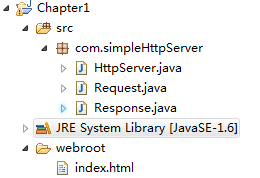
(1)System.getProperty("user.dir")是取得当前工作目录
HttpServer中定义的public static final String WEB_ROOT 即 工作目录/webroot
(2) 在创建TCP服务端监听的时候
try

   {

	serverSocket = new ServerSocket(port, 1, InetAddress.getByName("127.0.0.1"));

   } catch (IOException e)

   {

	 e.printStackTrace();

	 System.exit(1);

   }
程序主动捕获了IOException,深入ServerSocket源码可以看到:
public ServerSocket(int port, int backlog, InetAddress bindAddr) throws IOException {

        setImpl();

        if (port < 0 || port > 0xFFFF)

            throw new IllegalArgumentException(

                       "Port value out of range: " + port);

        if (backlog < 1)

          backlog = 50;

        try {

            bind(new InetSocketAddress(bindAddr, port), backlog);

        } catch(SecurityException e) {

            close();

            throw e;

        } catch(IOException e) {

            close();

            throw e;

        }

    }
在创建ServerSocket对象(开启TCP服务端监听)的时候可能抛出三种异常
(1) new IllegalArgumentException 在要监听的TCP端口范围不在正确范围0-65535之间,就抛出参数异常 改异常时候RuntimeException 不用显式在方法后throws以及方法调用处try catch
(2) SecurityException 也是一个RuntimeException 异常触发条件, 如果安全管理器存在并且其 checkListen 方法不允许进行该操作。
(3) IOException 是非运行时异常 如果打开套接字时发生 I/O 错误。
简要介绍下ServerSocket:
把服务器套接字绑定到特定的端口号,这样远程客户端才能定位TCP服务,如果传递进来的值为零(zero),就使用任何空闲的端口--但是客户端可能没办法访问该服务,除非用什么方式通知了客户端端口号是多少,为队列分配足够的空间以支 持特定数量的客户端套接字。在ServerSocket(int port, int numberOfClients)构造函数的重载版本 中,加入了InetAddress参数,在多地址计算机上,它允许服务器套接字绑定到某个特定的IP地址。例如,某台计算机可能有两块网 卡,或者使用虚拟IP地址把它配置成像几台计算机一样工作的时候。如果地址的值为空(null),服务 器套接字将在所有的本地地址上接受请求。在默认情况下,队列的大小设置为50,但是也提供了备用的构造函数,它允许修改这个设置。如果端口已经被绑定了,或者安全性约束条件(例如安全性规则或知名端口上的操作系统约束条件)阻挡了访问,就会产生异常。
(3) 程序创建File对象,调用了构造函数,java.io.File类中不常用的一个构造方法
根据 parent 路径名字符串和 child 路径名字符串创建一个新 File 实例。

如果 parent 为 null,则创建一个新的 File 实例,这与调用以给定 child 路径名字符串作为参数的单参数 File 构造方法效果一样。

否则,parent 路径名字符串用于表示目录,child 路径名字符串用于表示目录或文件。如果 child 路径名字符串是绝对路径名,

则用与系统有关的方式将它转换为一个相对路径名。如果 parent 是空字符串,则通过将 child 转换为抽象路径名,

并根据与系统有关的默认目录解析结果来创建新的 File 实例。否则,将每个路径名字符串转换为一个抽象路径名,并根据父抽象路径名解析子抽象路径名。

参数:

parent - 父路径名字符串

child - 子路径名字符串

抛出:

NullPointerException - 如果 child 为 null
 public File(String parent, String child) {

        if (child == null) {

            throw new NullPointerException();

        }

        if (parent != null) {

            if (parent.equals("")) {

                this.path = fs.resolve(fs.getDefaultParent(),

                                       fs.normalize(child));

            } else {

                this.path = fs.resolve(fs.normalize(parent),

                                       fs.normalize(child));

            }

        } else {

            this.path = fs.normalize(child);

        }

        this.prefixLength = fs.prefixLength(this.path);

    }
《深入剖析Tomcat》阅读(一)的更多相关文章
- 深入剖析tomcat 笔记——第8章 载入器
深入剖析tomcat 笔记 目录:
- 深入剖析Tomcat会话机制
1缓存机制 Tomcat默认将Session保存到内存中.但同时,Tomcat也提供了PersistentManager配合不同的Store实现的方式,使Session可以被保存到不同地方(Datab ...
- 深入剖析TOMCAT
理解tomcat之搭建简易http服务器 做过java web的同学都对tomcat非常熟悉.我们在使用tomcat带来的便利的同时,是否想过tomcat是如何工作的呢?tomcat本质是一个http ...
- 《深入剖析Tomcat》源码
<深入剖析Tomcat>翻译自<How Tomcat Works> 可以到官网下载:https://brainysoftware.com/download 官网下载比较慢,我就 ...
- 《深入剖析Tomcat》阅读(三)
这里要介绍下Tomcat的一个重要设计方法,Catalina设计方式. Servlet容器是一个复杂系统,但是,它有三个基本任务,对每个请求,servlet容器会为其完成以下三个操作: 1.创建一个R ...
- 《深入剖析Tomcat》阅读(二)
Tomcat是基于Sun公司标准的开源Servlet容器. Servlet是什么? Servlet(Server Applet),全称Java Servlet,未有中文译文.是用Java编写的服务器端 ...
- How tomcat works(深入剖析tomcat)阅读笔记1-4章
How tomcat works chapter 1 简单的web服务器 这一张的主要内容就是实现一个简单的静态资源服务器,socket编程,利用java提供的socket和serverSocket编 ...
- 《深入剖析Tomcat》读书笔记(一)
一.Tomcat Tomcat,全名Apache Tomcat,最初是由Sun发起,后来捐赠给ASF,是Apache Jakarta下的一个子项目.Tomcat是对Servlet API定义的容器的一 ...
- How tomcat works(深入剖析tomcat)servlet容器
How tomcat works (5)servlet容器阅读笔记 第四章阅读了tomcat默认连接器的实现,当时connector中的使用的容器是自定义的容器,也是非常之简单奥,一个人就干完了所有的 ...
随机推荐
- 在地图上添加POI
使用Tangram的Marker, 可以在地图上做各种标记, 效果图: Tangram是通过Marker在地图上添加标记的,Marker分Point, Polyline和Polygon三种, 分别对应 ...
- Flume 入门--几种不同的Sources
1.flume概念 flume是分布式的,可靠的,高可用的,用于对不同来源的大量的日志数据进行有效收集.聚集和移动,并以集中式的数据存储的系统. flume目前是apache的一个顶级项目. flum ...
- 无法打开SQL Server的连接
机房收费系统重构版的登陆敲了好几天了,总算把登陆窗口敲完了,代码调试的差点儿相同了,问题就处在数据库了. SQL Server配置管理里的SQL Server服务都启动了,可是还是报这个 ...
- 使用GridView自带分页的代码
关于GridView分页页码的讨论 在GridView中实现分页的效果方法非常easy,仅仅须要在"GridView任务"对话框中进行设置就能够了.在"GridView任 ...
- 使用Parse内付费服务出现的Error Domain=Parse Code=146 "The operation couldn’t be completed. (Parse error 146.)
因为开发一个应用有个内付费去广告功能,介于苹果官方提供的方法没用过,感觉有些复杂,于是选用了第三方组件Parse来解决这个问题,简单易操作: Parse简化苹果官方内付费问题,使用方法分厂简单只有两个 ...
- javamail发送邮件的简单实例(转)
今天学习了一下JavaMail,javamail发送邮件确实是一个比较麻烦的问题.为了以后使用方便,自己写了段代码,打成jar包,以方便以后使用.呵呵 注意:要先导入javamail的mail.jar ...
- Linux下Wireshark普通用户不能获取网络接口问题
Linux下Wireshark普通用户不能获取网络接口问题 1.安装setcap, setcap 是libcap2-bin包的一部分,一般来说,这个包默认会已经装好. sudo apt-get ins ...
- NDK开发之字符串操作
在JNI中,Java字符串被当作一个引用来处理.这些引用类型并不像原生C字符串一样可以直接使用,JNI提供了Java字符串与C字符串之间转换的必要函数,因为Java字符串对象是不可变的(如果对这里有异 ...
- Android 5.0 新特性
Material Design Material Design简介 Material Design是谷歌新的设计语言,谷歌希望寄由此来统一各种平台上的用户体验,Material Design的特点是干 ...
- 使用graphics2D给图片上画字符
//读取图片BufferedImage frontImage = ImageIO.read(new File(eCardXMLConfigManager.geteCardXMLConfigManage ...