
EF6调用存储过程,返回多个结果集处理
链接:http://www.codeproject.com/Articles/675933/Returning-Multiple-Result-Sets-from-an-Entity-Fram
案例:下载
Create Visual Studio Project with Entity Data Model
Details to create an entity database-first app project are described in the MSDN tutorial. Follow the steps for building the app except using the sample database described above, the StoreDBModel for the model name, and the StoreDBEntities for the database connection string name.
Add Stored Procedures into the Entity Data Model
<FunctionImport Name="GetAllCategorisAndProducts" ReturnType="Collection(StoreDBModel.Category_SprocResult)" />

<FunctionImport Name="GetProductsCM" ReturnType="Collection(StoreDBModel.Product_SprocResult)" />
Change the code in the first FunctionImport node as shown below. This is actually to merge the second return type into the first FunctionImport node. The Type attribute in the second ReturnType node can easily be copied from the second FunctionImport node. After the merging, just leave the second FunctionImportnode there as it will automatically be deleted when we do the clean-up from the Model Browser later.
<FunctionImport Name="GetAllCategorisAndProducts">

  <ReturnType Type="Collection(StoreDBModel.Category_SprocResult)" />

  <ReturnType Type="Collection(StoreDBModel.Product_SprocResult)" />

</FunctionImport>

<FunctionImport Name="GetProductCM"

     ReturnType="Collection(StoreDBModel.Product_SprocResult)" />
<FunctionImportMapping FunctionImportName="GetAllCategorisAndProducts"

         FunctionName="StoreDBModel.Store.GetAllCategorisAndProducts">

  <ResultMapping>

     <ComplexTypeMapping TypeName="StoreDBModel.Category_SprocResult">

        <ScalarProperty Name="CategoryID" ColumnName="CategoryID" />

        <ScalarProperty Name="CategoryName" ColumnName="CategoryName" />

        <ScalarProperty Name="ProductCount" ColumnName="ProductCount" />

     </ComplexTypeMapping>

  </ResultMapping>

</FunctionImportMapping>

<FunctionImportMapping FunctionImportName="GetProductCM" FunctionName="StoreDBModel.Store.GetProductCM">

  <ResultMapping>

     <ComplexTypeMapping TypeName="StoreDBModel.Product_SprocResult">

        <ScalarProperty Name="ProductID" ColumnName="ProductID" />

        <ScalarProperty Name="ProductName" ColumnName="ProductName" />

        <ScalarProperty Name="CategoryID" ColumnName="CategoryID" />

        <ScalarProperty Name="StatusCode" ColumnName="StatusCode" />

        <ScalarProperty Name="StatusDescription" ColumnName="StatusDescription" />

        <ScalarProperty Name="UnitPrice" ColumnName="UnitPrice" />

        <ScalarProperty Name="AuditTime" ColumnName="AuditTime" />

     </ComplexTypeMapping>

   </ResultMapping>

</FunctionImportMapping>
Add the ResultMapping node from the second FunctionImportMapping into the firstFunctionImportMapping. Leave the entire second FunctionImportMapping node there for now.
<FunctionImportMapping FunctionImportName="GetAllCategorisAndProducts"

           FunctionName="StoreDBModel.Store.GetAllCategorisAndProducts">

  <ResultMapping>

     <ComplexTypeMapping TypeName="StoreDBModel.Category_SprocResult">

        <ScalarProperty Name="CategoryID" ColumnName="CategoryID" />

        <ScalarProperty Name="CategoryName" ColumnName="CategoryName" />

        <ScalarProperty Name="ProductCount" ColumnName="ProductCount" />

     </ComplexTypeMapping>

  </ResultMapping>

  <ResultMapping>

     <ComplexTypeMapping TypeName="StoreDBModel.Product_SprocResult">

        <ScalarProperty Name="ProductID" ColumnName="ProductID" />

        <ScalarProperty Name="ProductName" ColumnName="ProductName" />

        <ScalarProperty Name="CategoryID" ColumnName="CategoryID" />

        <ScalarProperty Name="StatusCode" ColumnName="StatusCode" />

        <ScalarProperty Name="StatusDescription" ColumnName="StatusDescription" />

        <ScalarProperty Name="UnitPrice" ColumnName="UnitPrice" />

        <ScalarProperty Name="AuditTime" ColumnName="AuditTime" />

     </ComplexTypeMapping>

   </ResultMapping>

</FunctionImportMapping>

<FunctionImportMapping...>

    . . .

</FunctionImportMapping>

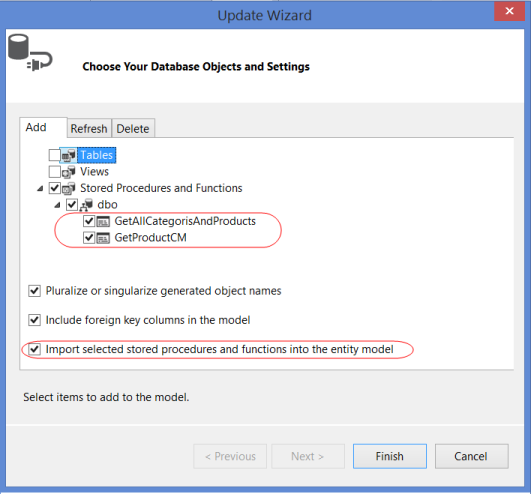
- Open the EF designer by clicking the StoreDBModel.edmx file on the Solution Explorer. Then right-click any blank area on the designer and select the Update Model from Database…. This will open the Update Wizard window.
- Select the two stored procedures from the Stored Procedures and Functions list in the Add tab. Make sure that the Import selected stored procedures and functions into the entity model is checked and then click the Finish button. This will automatically add the function import mappings and the complex types for the stored procedures.
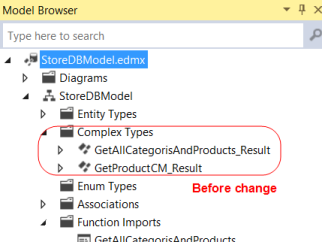
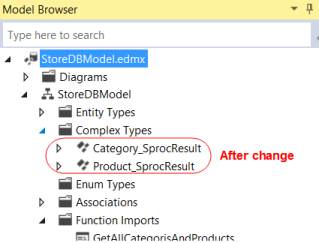
- Right-click any blank area on the EF designer and select the Model Browser. In the Model Browser, change the Complex Type name
GetAllCategorisAndProducts_ResulttoCategory_SprocResult, and theGetProductCM_ResulttoProduct_SprocResultas shown below. - Save the StoreDBModel.edmx file. The two complex type objects are created with the names we changed. Now we need to manually edit the XML content of the StoreDBModel.edmx file. Right-clicking the file, select the Open With…, and then XML (Text) Editor. Find the
FunctionImportnodes under theedmx:ConceptualModelsnode: - Find the
FunctionImportMappingnodes under theedmx:Mappings/../En<FunctionImportMappingnode. - Clean up dummy stored procedure settings by opening the Model Browser again. Delete the
GetProductCMin both Stored Procedures/Functions and Function Import lists. This will automatically delete all settings for theGetProductCMstored procedure mappings and also the method to call the dummy stored procedure in the StoreDBModel.Context.cs file. - Save the StoreDBModel.edmx file. All changes in settings and clean-up will then be in effect.
What Happen When Updating Model
Will the manual editing for returning multiple result sets from the stored procedure be overwritten when updating the model due to any database schema changes? Based on results of my tests using the Visual Studio 2013, all the editing changes were kept intact when adding entities or other stored procedures into, or deleting any items from, the model except for deleting or refreshing the edited stored procedure mappings.
When adding or changing the input/output parameters in the stored procedure, the updates will automatically be refreshed in the model if executing the Refresh tab from the Update Model from Database (Update Wizard) screen. For example, adding @as an input parameter to the stored procedure,Test nvarchar(50)GetAllCategorisAndProducts, in the database then refreshing the model will insert the Parameter node into the stored procedure’s FunctionImport node even though it was manually edited before.
<FunctionImport Name="GetAllCategorisAndProducts">

  <ReturnType Type="Collection(StoreDBModel.Category_SprocResult)" />

  <ReturnType Type="Collection(StoreDBModel.Product_SprocResult)" />

  <Parameter Name="Test" Mode="In" Type="String" />

</FunctionImport>
Automatic refreshing stored procedure complex type mappings due to changes in returning fields is not supported in any version of the EF, even for a stored procedure returning a single result set. We need to either re-add the stored procedure to the model after dropping the stored procedure and function import mappings from the model, or manually update the complex type using the Model Browser or the XML editor.
EF6调用存储过程,返回多个结果集处理的更多相关文章
- myabatis oracle 调用存储过程返回list结果集
Mapper.xml 配置 <resultMap type="emp" id="empMap"> <id property="emp ...
- PostgreSQL 调用存储过程返回结果集
创建返回结果集类型的存储过程: CREATE OR REPLACE FUNCTION public.f_get_member_info( id integer, productname charact ...
- jdbc调用存储过程获取多个结果集
jdbc调用存储过程获取多个结果集 2017年07月26日 21:20:22 Kenny-Liu 阅读数:1486 版权声明:本文为博主原创文章,未经博主允许不得转载. https://blog.cs ...
- Java 调用存储过程 返回结果集
这里使用Oracle数据库的thin连接. 下面是存储过程SQL 1 createorreplaceprocedure proc3(stid in student.stuid%type, stname ...
- mybatis 调用存储过程 返回游标 实例
存储过程示例: create or replace procedure Fsp_Plan_CheckPrj(v_grantno varchar2, v_deptcode number, v_curso ...
- sqlserver,获取调用存储过程返回数据的方法。
1,获取存储过程最后select返回的结果集.SELECT 数据集返回值. 因为select返回的结果是一个表.所以返回的结果需要用一个表接收.使用临时表接收. 被调用的存储过程最后是这样:返回了一个 ...
- 整理sqlserver 级联更新和删除 c#调用存储过程返回值
整理一下级联更新和删除 c#调用返回值 use master go IF exists(select 1 from sysdatabases where name='temp') BEGIN DROP ...
- java调用oracle存储过程返回多条结果集
oracle版本:11g oracle存储过程,使用游标的方式返回多行.多列数据集合: CREATE OR REPLACE PROCEDURE SP_DATA_TEST( /*P_ID IN INT, ...
- [转].net 调用oracle存储过程返回多个记录集
本文转自:http://www.netwinform.com/articleinfo.aspx?id=17 存储过程: CREATE OR REPLACE PROCEDURE p_query_cs ( ...
随机推荐
- jquery图片播放插件Fancybox(灯箱)
效果预览Demo源码下载 Fancybox的特点如下: 可以支持图片.html文本.flash动画.iframe以及ajax的支持 可以自定义播放器的CSS样式 可以以组的形式进行播放 如果将鼠标滚动 ...
- JVM内存模型及内存分配过程
一.JVM内存模型 JVM主要管理两种类型内存:堆(Heap)和非堆(Permanent区域). 1.Heap是运行时数据区域,所有类实例和数组的内存均从此处分配.Heap区分两大块,一块是 Youn ...
- STL find() ,还是挺重要的
template<class InputIterator, class T> InputIterator find (InputIterator first, InputIterator ...
- [转]"由于这台计算机没有远程桌面客户端访问许可证,远程会话被中断"的解决方案
先使用如下命令登录到服务器: mstsc /v:{服务器IP} /admin 然后再使用下列方法之一即可. 方法一: 1.单击“开始→运行”,输入“gpedit.msc”打开组策略编辑器窗口,依次定位 ...
- [转]ASP.NET MVC 入门8、ModelState与数据验证
ViewData有一个ModelState的属性,这是一个类型为ModelStateDictionary的ModelState类型的字典集合.在进行数据验证的时候这个属性是比较有用的.在使用Html. ...
- [TSOI2005]Exhibit
问题描述 博览馆正在展出由世上最佳的 M 位画家所画的图画. wangjy 想到博览馆去看这几位大师的作品. 可是,那里的博览馆有一个很奇怪的规定,就是在购买门票时必须说明两个数字, a 和 b ,代 ...
- 【原】Windows中使用Redis基本入门教程
Redis是c编写基于Unix平台开发的一种内存KV数据库,官网上并没有给出Window的安装包,但MS基于redis发布了Windows版本. 下载链接: https://github.com/MS ...
- C#学习:集合、迭代、泛型(1)
一.System.Collections名称空间下几个接口表征着集合的功能: 1.IEnumerable:表征着迭代功能 public interface IEnumerable { IEnumera ...
- CURL超时处理
一般会设置一个超时时间1S,就是说如果php那边在1S内没有返回给urlserver的话就忽略掉该请求,及不阻塞等待返回了,直接处理下面的操作. 现在php那边有时候会卡,这样一卡就无法再1S内返回消 ...
- 关于int **
例子1: int foo(int *array) { array = (); ; } //外头调用 int * uidArray = NULL; foo(uidArray): 这时候我想要在函数里给数 ...