
使用Azure Redis Cache
通过上一篇博客《Redis Cache 简介》我们已经简单了解了Azure Redis Cache,这里就不过多赘述了。
1、创建Redis Cache
创建Redis Cache之前,我们首先要登录到 Azure Portal上,点击 New, Data + Storage, Redis Cache。
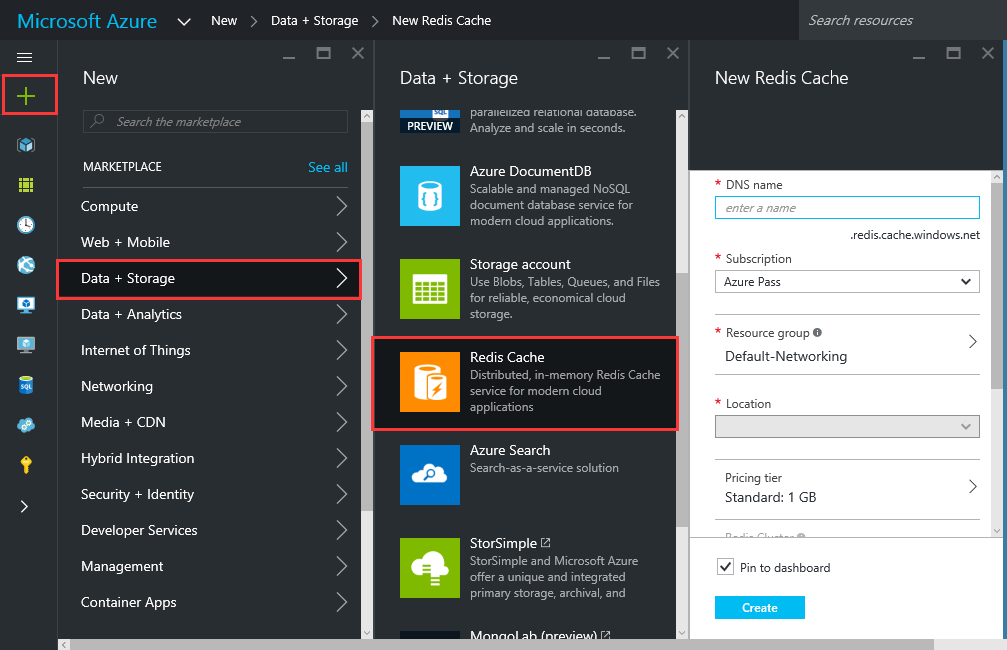
这里有一点需要说明一下,由于国内Azure目前不支持New Portal,因此国内的Azure订阅只能通过Powershell创建Redis Cache
#弹出界面输入用户名密码

Login-AzureRmAccount

#获取当前订阅名称

Get-AzureRmSubscription| Sort SubscriptionName|Select SubscriptionName

#选择当前订阅

Select-AzureRmSubscription -SubscriptionName  {SubscriptionName}

#在日本西部创建资源组

New-AzureRmResourceGroup -Name {ResourceGroupName} -Location "Japan West"

#在日本西部创建256MB的Redis Cache,服务级别为Basic

New-AzureRmRedisCache -ResourceGroupName {ResourceGroupName} -Name {RedisCacheName} -Location "Japan West" -Sku Basic -Size C0
#查看已经创建好的Redis Cache
Get-AzureRmRedisCache
2、使用Redis Cache
创建一个Web Application,打开NuGet控制台输入:Install-Package StackExchange.Redis或者Install-Package StackExchange.Redis.StrongName,添加对程序集的引用。
using System;

using System.Collections.Generic;

using System.Linq;

using System.Web;

using StackExchange.Redis;

using System.Net;

namespace AspNet5_Owin

{

    public class RedisManager

    {

        private static Lazy<ConnectionMultiplexer> lazyConnection = new Lazy<ConnectionMultiplexer>(() =>

        {

            ConfigurationOptions opt = new ConfigurationOptions

            {

                Ssl = true,

                AbortOnConnectFail = false,

                Password = "{Redis Cache Keys}"

            };

            opt.EndPoints.Add(new DnsEndPoint("{Host Name}", {Ssl Port}));

            return ConnectionMultiplexer.Connect(opt);

        });

        public static ConnectionMultiplexer Connection

        {

            get

            {

                return lazyConnection.Value;

            }

        }

        private static IDatabase cache = Connection.GetDatabase();

        public static void CacheSet(string key, string value)

        {

            cache.StringSet(key, value, TimeSpan.FromSeconds());

        }

        public static string CacheGet(string key)

        {

            return cache.StringGet(key);

        }

    }

}
将字符串添加到Redis Cache中并取回
//将字符串存储到Redis Cache中

RedisManager.CacheSet("name", "zhangsan");

//将字符串从Redis Cache中取回

string name = RedisManager.CacheGet("name");
将对象添加到Redis Cache中并取回
[Serializable]
class Employee

{

    public int Id { get; set; }

    public string Name { get; set; }

    public Employee(int EmployeeId, string Name)

    {

        this.Id = EmployeeId;

        this.Name = Name;

    }

}

RedisManager.CacheSet("employee", JsonConvert.SerializeObject(new Employee(, "Clayton Gragg")))

Employee employee = JsonConvert.DeserializeObject<Employee>(RedisManager.CacheGet("employee"))
使用Azure Redis Cache的更多相关文章
- Azure Redis Cache
将于 2014 年 9 月 1 日停止Azure Shared Cache服务,因此你需要在该日期前迁移到 Azure Redis Cache.Azure Redis Cache包含以下两个层级的产品 ...
- Azure Redis Cache (1) 入门
<Windows Azure Platform 系列文章目录> Microsoft Azure Redis Cache基于流行的开源Redis Cache. 1.功能 Redis 是一种高 ...
- Azure Redis Cache (2) 创建和使用Azure Redis Cache
<Windows Azure Platform 系列文章目录> 本文介绍的是国内由世纪互联运维的Azure China. 注意: 截至今日2015年10月7日,国内由世纪互联运维的Azur ...
- Azure Redis Cache (3) 创建和使用P级别的Redis Cache
<Windows Azure Platform 系列文章目录> 在笔者之前的文档里面已经说明了,Azure Redis Cache分为三个不同的级别: - 基本,Basic,不包含SLA ...
- Azure Redis Cache (4) 配置和管理Redis Cache
<Windows Azure Platform 系列文章目录> 我们在创建完Azure Redis Cache后,经常需要切换Redis Cache的服务级别,这里我简单介绍一下使用Azu ...
- Azure Redis Cache作为ASP.NET 缓存输出提供程序
前一篇文章<Azure Redis Cache作为ASP.NET Session状态提供程序 >我们已经知道如何将ASP.NET应用程序Session存储在Redis Cache中,这里我 ...
- Azure Redis Cache作为ASP.NET Session状态提供程序
从上一篇博客<使用Azure Redis Cache>我们已经可以创建并使用Redis Cache为我们服务了. 作为Web开发者,我们都知道Session状态默认是保存在内存中的,它的优 ...
- 利用Azure Redis Cache构建百万量级缓存读写
Redis是一个非常流行的基于内存的,低延迟,高吞吐量的key/value数据存储,被广泛用于数据库缓存,session的管理,热数据高速访问,甚至作为数据库方式提高应用程序可扩展性,吞吐量,和实施处 ...
- Azure Redis Cache (3) 在Windows 环境下使用Redis Benchmark
<Windows Azure Platform 系列文章目录> 熟悉Redis环境的读者都知道,我们可以在Linux环境里,使用Redis Benchmark,测试Redis的性能. ht ...
随机推荐
- 教你如何通过ICCID找回丢失的的iPhone
22日晚买了FACETIME,在某宝上买的.价格不贵,可以查到偷手机的人注册FT的号码,还可以查询手机被刷机和被维修的日期(这个很关键) 27日手机被刷机,遂买了某宝查询ICCID的服务,找到一串IC ...
- HDU-4515 小Q系列故事——世界上最遥远的距离
小Q系列故事——世界上最遥远的距离 Time Limit: 500/200 MS (Java/Others) Memory Limit: 65535/32768 K (Java/Others) ...
- [liu yanling]规范软件测试流程
测试计划 做任何事情都会有输入输出,对于测试过程我们可以把输入理解为测试计划.测试环境准备.测试工具的选择等等,输出可以理解为测试结果.测试用例设计即可以理解为以测试计划为输入的输出,也可以理解为以测 ...
- 在内部架设NuGet服务器
在公司内部有很多基础框架或者基础组件,甚至对于使用SOA架构的公司来说,会有大量的业务组件的契约程序集,对于这些框架或组件的引用管理有的人使用源代码管理工具,但是NuGet相比源代码管理工具更方便: ...
- HDU POJ 1015 Jury Compromise(陪审团的人选,DP)
题意: 在遥远的国家佛罗布尼亚,嫌犯是否有罪,须由陪审团决定.陪审团是由法官从公众中挑选的.先随机挑选n个人作为陪审团的候选人,然后再从这n个人中选m人组成陪审团.选m人的办法是:控方和辩方会根据对候 ...
- Already tried 0 time(s); retry policy is RetryUpToMaximumCountWithFixedSleep解决方法
14/03/26 23:10:04 INFO ipc.Client: Retrying connect to server: 0.0.0.0/0.0.0.0:10020. Already tried ...
- org.apache.hadoop.hbase.TableNotDisabledException 解决方法
Exception in thread "main" org.apache.hadoop.hbase.TableNotDisabledException: org.apache.h ...
- HDU-4415 Assassin’s Creed 贪心
题目链接:http://acm.hdu.edu.cn/showproblem.php?pid=4415 用贪心来解,开始分为两个集合的方法错了,没有考虑之间的相互影响,正确的姿势应该是这样的,分两种情 ...
- GiftWrapping算法解决二维凸包问题
一.问题描述 凸集(Convex Set): 任意两点的连线都在这个集合内的集合就是一个凸集. ⒈对于一个集合D,D中任意有限个点的线性组合的全体称为D的凸包. ...
- ios 免书籍入门站点
http://www.raywenderlich.com/tutorials http://www.raywenderlich.com/ios-tutorials http://web.stanfor ...