
CSS3过渡效果实现菜单划出效果
这是大体上的原理,当然案例比这个多
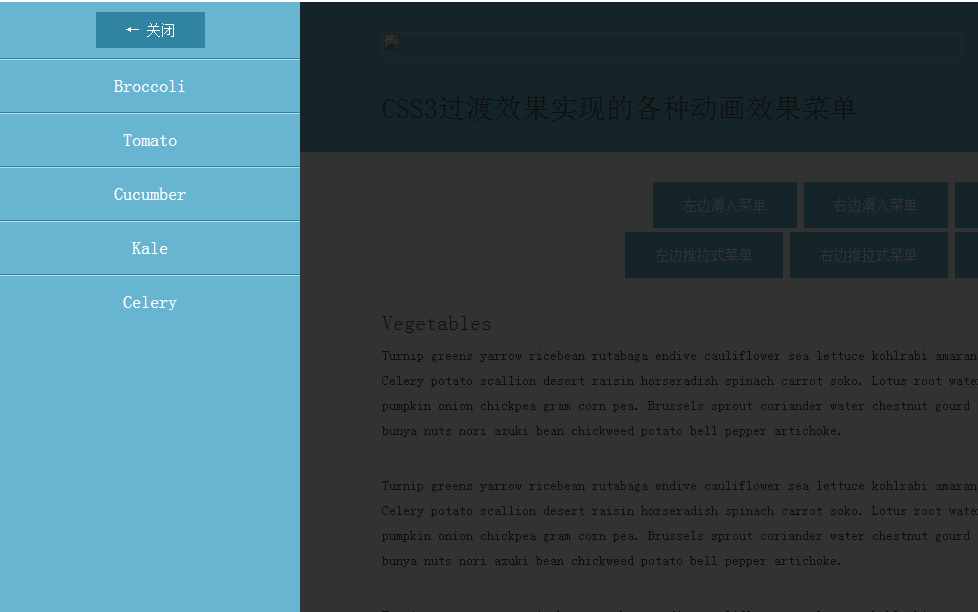
<!DOCTYPE html PUBLIC "-//W3C//DTD XHTML 1.0 Transitional//EN" "http://www.w3.org/TR/xhtml1/DTD/xhtml1-transitional.dtd">
<html xmlns="http://www.w3.org/1999/xhtml">
<head>
<meta http-equiv="Content-Type" content="text/html; charset=utf-8" />
<title>无标题文档</title><style>
body{
overflow:hidden;}
nav.menu {
position: fixed;
z-index: 20;
background-color: #67b5d1;
overflow: hidden;
-webkit-transition: all 0.3s;
-moz-transition: all 0.3s;
-ms-transition: all 0.3s;
-o-transition: all 0.3s;
transition: all 0.3s;
}nav.menu ul {
list-style-type: none;
margin: 0;
padding: 0;
}
nav.menu a {
font-weight: 300;
color: #fff;
}nav.slide-menu-left,
nav.slide-menu-right,
nav.push-menu-left,
nav.push-menu-right {
top: 0;
width: 300px;
height: 100%;
}nav.slide-menu-left,
nav.push-menu-left {
left: -300px
}body.sml-open nav.slide-menu-left,
body.pml-open nav.push-menu-left {
left: 0
}.mask {
position: fixed;
top: 0;
left: 0;
z-index: 15;
width: 100%;
height: 100%;
background: rgba(0, 0, 0, 0.8);
}
</style>
</head> <body><nav class="menu slide-menu-left">
<ul>
<li><button class="close-menu">← 关闭</button></li>
<li><a href="#">Broccoli</a></li>
<li><a href="#">Tomato</a></li>
<li><a href="#">Cucumber</a></li>
<li><a href="#">Kale</a></li>
<li><a href="#">Celery</a></li>
</ul>
</nav><!-- /slide menu left --><div id="wrapper"> <div class="info-bar">
<div class="container">
<a href="http://www.callmenick.com/?p=458" class="icon fa fa-home" data-title="Back To Tutorial"></a>
<a href="http://callmenick.com/tutorial-demos/image-caption-reveal-on-hover/" class="icon fa fa-arrow-left" data-title="Pevious Demo"></a>
<!-- <a href="" class="icon fa fa-arrow-right" data-title="Next Demo"></a> -->
<a href="http://callmenick.com/tutorial-demos/slide-push-menus/slide-push-menus.zip" class="icon fa fa-download" data-title="Download Source"></a>
<a href="http://www.callmenick.com/tutorials" class="icon fa fa-folder-open" data-title="Tutorial Archives"></a>
</div>
</div><!-- /.info-bar --> <header>
<div class="branding">
<div class="container clearfix">
<div class="logo">
<a href="http://www.callmenick.com">
<img src="img/logo.png" alt="Call Me Nick - Tutorials, Resources, & Articles for Web Design & Web Development" />
</a>
</div>
<div class="social">
<a href="https://www.facebook.com/callmenick1" target="_blank" class="fb">facebook</a>
<a href="https://twitter.com/nicksalloum_" target="_blank" class="twitter">twitter</a>
<a href="https://plus.google.com/115555859876227750152/" target="_blank" class="googleplus">google plus</a>
<a href="http://feeds.feedburner.com/callmenick_" target="_blank" class="rss">rss</a>
<a href="http://www.callmenick.com/subscribe/" class="email">email</a>
</div>
</div>
</div><!-- /.branding -->
<div class="site-title">
<div class="container">
<h1>CSS3过渡效果实现的各种动画效果菜单</h1>
</div>
</div>
</header> <div id="main">
<div class="container"> <div class="buttons">
<button class="nav-toggler toggle-slide-left">左边滑入菜单</button>
<button class="nav-toggler toggle-slide-right">右边滑入菜单</button>
<button class="nav-toggler toggle-slide-top">上边滑入菜单</button>
<button class="nav-toggler toggle-slide-bottom">下边滑入菜单</button><br>
<button class="nav-toggler toggle-push-left">左边推拉式菜单</button>
<button class="nav-toggler toggle-push-right">右边推拉式菜单</button>
<button class="nav-toggler toggle-push-top">上边推拉式菜单</button>
<button class="nav-toggler toggle-push-bottom">下边推拉式菜单</button>
</div><!-- /buttons --> <section class="content">
<h1>Vegetables</h1> <p>Turnip greens yarrow ricebean rutabaga endive cauliflower sea lettuce kohlrabi amaranth water spinach avocado daikon napa cabbage asparagus winter purslane kale. Celery potato scallion desert raisin horseradish spinach carrot soko. Lotus root water spinach fennel kombu maize bamboo shoot green bean swiss chard seakale pumpkin onion chickpea gram corn pea. Brussels sprout coriander water chestnut gourd swiss chard wakame kohlrabi beetroot carrot watercress. Corn amaranth salsify bunya nuts nori azuki bean chickweed potato bell pepper artichoke.</p> <p>Turnip greens yarrow ricebean rutabaga endive cauliflower sea lettuce kohlrabi amaranth water spinach avocado daikon napa cabbage asparagus winter purslane kale. Celery potato scallion desert raisin horseradish spinach carrot soko. Lotus root water spinach fennel kombu maize bamboo shoot green bean swiss chard seakale pumpkin onion chickpea gram corn pea. Brussels sprout coriander water chestnut gourd swiss chard wakame kohlrabi beetroot carrot watercress. Corn amaranth salsify bunya nuts nori azuki bean chickweed potato bell pepper artichoke.</p> <p>Turnip greens yarrow ricebean rutabaga endive cauliflower sea lettuce kohlrabi amaranth water spinach avocado daikon napa cabbage asparagus winter purslane kale. Celery potato scallion desert raisin horseradish spinach carrot soko. Lotus root water spinach fennel kombu maize bamboo shoot green bean swiss chard seakale pumpkin onion chickpea gram corn pea. Brussels sprout coriander water chestnut gourd swiss chard wakame kohlrabi beetroot carrot watercress. Corn amaranth salsify bunya nuts nori azuki bean chickweed potato bell pepper artichoke.</p> </section> </div>
</div><!-- #main --> <footer>
<div class="container">
<div class="clearfix">
<aside>
<ul>
<li><a href="http://www.callmenick.com/">Welcome</a></li>
<li><a href="http://www.callmenick.com/category/tutorials">Tutorials</a></li>
<li><a href="http://www.callmenick.com/category/snippets">Snippets</a></li>
<li><a href="http://www.callmenick.com/category/articles">Articles</a></li>
<li><a href="http://www.callmenick.com/category/resources">Resources</a></li>
</ul>
</aside>
<aside>
<ul>
<li><a href="http://www.callmenick.com/about">About</a></li>
<li><a href="http://www.callmenick.com/contact">Contact</a></li>
<li><a href="http://www.callmenick.com/subscribe">Subscribe</a></li>
</ul>
</aside>
<aside class="logo">
<a href="http://www.callmenick.com/">
<img src="img/logo.png" alt="Tutorials, Snippets, Resources, and Articles for Web Design and Web Development">
</a>
</aside>
</div>
<div class="copyright">
<span>
© 2014, Nick Salloum<br>
<a href="http://callmenick.com" target="_blank">callmenick.com</a>
</span>
</div>
</div>
</footer><!-- /footer --> </div><script>
(
function (window)
{
var mask = document.createElement("div");mask.className = "mask"; var cq=document.querySelector(".toggle-slide-left"); cq.addEventListener("click",function(){
document.body.className="sml-open";document.body.appendChild(mask);}) var cd=document.querySelector(".close-menu"); cd.addEventListener("click",function(){
document.body.className="";
document.body.removeChild(mask);}) mask.addEventListener( "click", function(){
document.body.className="";document.body.removeChild(mask);
})}
)( window ); </script> </body>
</html>
CSS3过渡效果实现菜单划出效果的更多相关文章
- Android 仿 新闻阅读器 菜单弹出效果(附源码DEMO)
这一系列博文都是:(android高仿系列)今日头条 --新闻阅读器 (一) 开发中碰到问题之后实现的,觉得可能有的开发者用的到或则希望独立成一个小功能DEMO,所以就放出来这么一个DEMO. 原本觉 ...
- 24个 HTML5 & CSS3 下拉菜单效果及制作教程
下拉菜单是一个很常见的效果,在网站设计中被广泛使用.通过使用下拉菜单,设计者不仅可以在网站设计中营造出色的视觉吸引力,但也可以为网站提供了一个有效的导航方案.使用 HTML5 和 CSS3 可以更容易 ...
- Android UI开发第二十七篇——实现左右划出菜单
年前就想写左右滑动菜单,苦于没有时间,一直拖到现在,这篇代码实现参考了网上流行的SlidingMenu,使用的FrameLayout布局,不是扩展的HorizontalScrollView. 程序中自 ...
- 奇妙的CSS3—导航栏下划线跟随效果
先来看一下效果: 1.基本效果就是这样的 ,鼠标悬停,下划线划入.鼠标离开,下划线划出 2.下划线的划入是有方向的,从左侧划入悬停,下划线由左向右伸长.从右侧划入,下划线由又往左伸长 实现思路 1.导 ...
- 10个优秀的 HTML5 & CSS3 下拉菜单制作教程
下拉菜单是一个很常见的效果,在网站设计中被广泛使用.通过使用下拉菜单,设计者不仅可以在网站设计中营造出色的视觉吸引力,但也可以为网站提供了一个有效的导航方案.使用 HTML5 和 CSS3 可以更容易 ...
- 11个优秀的HTML5 & CSS3下拉菜单制作教程
下拉菜单是一个很常见的效果,在网站设计中被广泛使用.通过使用下拉菜单,设计者不仅可以在网站设计中营造出色的视觉吸引力,但也可以为网站提供了一个有效的导航方案.使用HTML5和CSS3可以更容易创造视觉 ...
- 10个优秀的 HTML5 & CSS3 下拉菜单制作教程
下拉菜单是一个非经常见的效果.在站点设计中被广泛使用.通过使用下拉菜单.设计者不仅能够在站点设计中营造出色的视觉吸引力,但也能够为站点提供了一个有效的导航方案.使用 HTML5 和 CSS3 能够更e ...
- 纯CSS3向右循环闪过效果
<!DOCTYPE html> <html lang="en"> <head> <meta charset="utf-8&quo ...
- 美妙的 CSS3 动画!一组梦幻般的按钮效果
今天给大家带来的是五款梦幻般的动画按钮效果.下面是在线演示,把鼠标放在按钮上试试,有惊喜哦!CSS3 引入了众多供功能强大的新特性,让设计和开发人员能够轻松的创作出各种精美的界面效果. 温馨提示:为保 ...
随机推荐
- nosql学习一
1.NoSQL,泛指非关系型的数据库.随着互联网web2.0网站的兴起,传统的关系数据库在应付web2.0网站,特别是超大规模和高并发的SNS类型的web2.0纯动态网站已经显得力不从心,暴露了很多难 ...
- handler.post(r)同一个线程的疑惑
handler.post(r);是把r加到消息队列,但并未开辟新线程.等到消息被取出时才执行. package com.lei.handlethread; import android.os.Bund ...
- 【HDOJ】1717 小数化分数2
简单字符串处理. #include <cstdio> #include <cstring> #include <cmath> #include <ctype. ...
- ehci符合USB2.0,uhci,ohci,
uhci ohci ehci他们都是主机控制器的规格,OHCI主要为非PC系统上以及带有SiShe ALi芯片组的 PC主板上的USB芯片,UHCI大多为Intel和Via主板上的USB控制器 ...
- POJ2242 The Circumference of the Circle(几何)
题目链接. 题目大意: 给定三个点,即一个任意三角形,求外接圆的周长. 分析: 外接圆的半径可以通过公式求得(2*r = a/sinA = b/sinB = c/sinC),然后直接求周长. 注意: ...
- 【转】android去掉EditView的默认焦点问题
原文网址:http://www.111cn.net/sj/android/54680.htm 做一个输入框时发现android中EditView的默认焦点了,这种问题如果是在输入框还好,但在搜索页面或 ...
- 【动态规划】XMU 1030 苦恼的月下老人
题目链接: http://acm.xmu.edu.cn/JudgeOnline/problem.php?id=1030 题目大意: 给定两个字符串的长度和内容,求最长公共子序列. 题目思路: [动态规 ...
- 服务器端javascript——Rhino和Node
Node: Node是v8 javasript解析器的一个特别版本,侧重于异步I/O,网络和HTTP 入门见:http://www.cnblogs.com/wishyouhappy/p/3647037 ...
- yui--datatable 行添加格式
采用formatter YAHOO.widget.DataTable.Formatter.changeLight=function(elCell, oRecord, oColumn, oData){ ...
- HDU5032 -- Always Cook Mushroom 树状数组 14年北京网络赛
题意:1000*1000的格子, 坐标为(1, 1) ~ (1000, 1000), 常数 A, B, 点(x, y)权值为 (x + A) * (y + B), q次询问, 每次询问(0, 0) ...