
KubeSphere v4 安装指南
日前,KubeSphere v4 发布,相较于之前的版本,新版本在架构上有了颠覆性的变化。为了让社区的各位小伙伴能够丝滑的从旧版本过渡到新版本,我们特别推出本篇安装指南文章,以供参考。
关于 KubeSphere v4 的介绍,请阅读本文:KubeSphere v4 开源并发布全新可插拔架构 LuBan。
需要注意的是,目前不支持从 KubeSphere 3.4.1 版本直接升级到 v4 版本,需要先卸载原来的版本,再安装 v4 版本。
卸载 KubeSphere 3.4.1
注意:
- 本文仅适用于测试环境,请不要直接在生产环境操作。
- 如果需要在生产环境操作,请先在测试环境验证通过后再进行。
- 卸载为高风险操作,执行该操作前,请明确您知道自己将要做什么。
- 该操作会导致 KubeSphere 平台自身无法使用,但不会影响 KubeSphere 之外即 K8s 集群中运行的工作负载。
- 该操作会删除 KubeSphere 所有的组件及相关数据,您可以在此之前对数据进行备份。
- 您可以自主选择数据迁移工具,或等待社区的数据迁移方案,社区的迁移方案计划通过脚本帮助您备份平台账户、权限及相关的数据,在新版本安装好后,可将备份数据进行导入。
- 如果您期望全面的数据迁移和升级,我们建议您可以考虑 KubeSphere 企业版。
- 社区郑重提醒您,务必谨慎操作。
解绑集群
如果开启了多集群,请务必在卸载前将集群进行解绑。卸载 Host 集群前,请确保已经没有 Member 集群被当前集群纳管,且角色和账户等信息也会被删除。
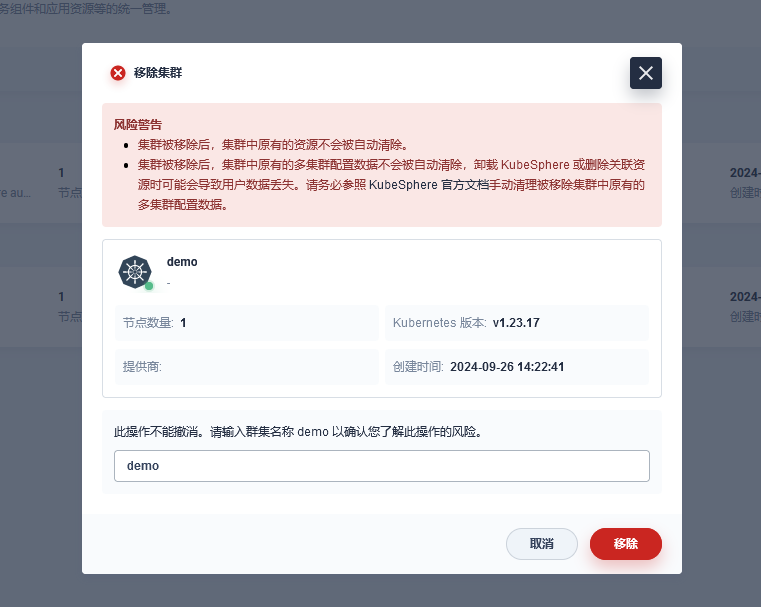
卸载 KubeSphere 3.4.1
针对待卸载集群执行该脚本。
注意:
- 执行该脚本前请确保当前集群已从 Host 集群中解绑。
- 请确认即将操作的集群是将要被卸载的集群。
- 执行该脚本后会将集群中的 Prometheus 以及 Elasticsearch 删除,存量监控和日志数据不会被保留。
- 执行该脚本后,集群中项目网关仍可继续使用,但纳管至 KubeSphere 4.1.2 后需将网关切换到新版本网关,切换过程存需删除老版本网关,切换为新版本网关。
卸载 DevOps 组件
helm del -n argocd devops

helm del -n kubesphere-devops-system devops
卸载 ServiceMesh 组件
kubectl -n istio-system delete jaeger jaeger

kubectl -n istio-system delete kiali kiali

helm del -n istio-system kiali-operator

helm del -n istio-system jaeger-operator

# 下载 istioctl

wget https://github.com/istio/istio/releases/download/1.15.6/istioctl-1.15.6-linux-amd64.tar.gz

tar -zxvf istioctl-1.15.6-linux-amd64.tar.gz

./istioctl uninstall --purge
卸载 ks-core、监控及日志相关组件
#!/bin/bash

############################################################################################################

# 该脚本用于卸载集群中的 KubeSphere v3.4.1

#

# 注意: 如果为多集群环境,执行该脚本前请确保当前集群已从 host 集群中解绑

############################################################################################################

set -x

# 清除集群所有 namespace 中的 workspace 标签

kubectl get ns -l kubesphere.io/workspace -o name | xargs -I {} bash -c "kubectl label {} kubesphere.io/workspace- && kubectl patch {} -p '{\"metadata\":{\"ownerReferences\":[]}}' --type=merge"

# # 清除集群所有 namespace 中的 kubefed 标签

kubectl get ns -l kubefed.io/managed -o name | xargs -I {} bash -c "kubectl label {} kubefed.io/managed- && kubectl patch {} -p '{\"metadata\":{\"ownerReferences\":[]}}' --type=merge"

# 清除集群中的 workspace 以及 workspacetemplate 资源

kubectl get workspacetemplate -A -o name | xargs -I {} kubectl patch {} -p '{"metadata":{"ownerReferences":[]}}' --type=merge

kubectl get workspace -A -o name | xargs -I {} kubectl patch {} -p '{"metadata":{"ownerReferences":[]}}' --type=merge

kubectl get workspacetemplate -A -o name | xargs -I {} kubectl delete {}

kubectl get workspace -A -o name | xargs -I {} kubectl delete {}

# 删除 clusterroles

delete_cluster_roles() {

  for role in `kubectl get clusterrole -l iam.kubesphere.io/role-template -o jsonpath="{.items[*].metadata.name}"`

  do

    kubectl delete clusterrole $role 2>/dev/null

  done

}

delete_cluster_roles

# 删除 clusterrolebindings

delete_cluster_role_bindings() {

  for rolebinding in `kubectl get clusterrolebindings -l iam.kubesphere.io/role-template -o jsonpath="{.items[*].metadata.name}"`

  do

    kubectl delete clusterrolebindings $rolebinding 2>/dev/null

  done

}

delete_cluster_role_bindings

# 删除 validatingwebhookconfigurations

for webhook in ks-events-admission-validate users.iam.kubesphere.io network.kubesphere.io validating-webhook-configuration resourcesquotas.quota.kubesphere.io

do

  kubectl delete validatingwebhookconfigurations.admissionregistration.k8s.io $webhook 2>/dev/null

done

# 删除 mutatingwebhookconfigurations

for webhook in ks-events-admission-mutate logsidecar-injector-admission-mutate mutating-webhook-configuration

do

  kubectl delete mutatingwebhookconfigurations.admissionregistration.k8s.io $webhook 2>/dev/null

done

# 删除 users

for user in `kubectl get users -o jsonpath="{.items[*].metadata.name}"`

do

  kubectl patch user $user -p '{"metadata":{"finalizers":null}}' --type=merge

done

kubectl delete users --all 2>/dev/null

# 删除 iam 资源

for resource_type in `echo globalrolebinding loginrecord rolebase workspacerole globalrole workspacerolebinding`; do

  for resource_name in `kubectl get ${resource_type}.iam.kubesphere.io -o jsonpath="{.items[*].metadata.name}"`; do

    kubectl patch ${resource_type}.iam.kubesphere.io ${resource_name} -p '{"metadata":{"finalizers":null}}' --type=merge

  done

  kubectl delete ${resource_type}.iam.kubesphere.io --all 2>/dev/null

done

# 卸载 ks-core

helm del -n kubesphere-system ks-core

helm del -n kubesphere-system ks-redis &> /dev/null || true

kubectl delete pvc -n kubesphere-system -l app=redis-ha --ignore-not-found || true

kubectl delete deploy -n kubesphere-system -l app.kubernetes.io/managed-by!=Helm --field-selector metadata.name=redis --ignore-not-found || true

kubectl delete svc -n kubesphere-system -l app.kubernetes.io/managed-by!=Helm --field-selector metadata.name=redis --ignore-not-found || true

kubectl delete secret -n kubesphere-system -l app.kubernetes.io/managed-by!=Helm --field-selector metadata.name=redis-secret --ignore-not-found || true

kubectl delete cm -n kubesphere-system -l app.kubernetes.io/managed-by!=Helm --field-selector metadata.name=redis-configmap --ignore-not-found || true

kubectl delete pvc -n kubesphere-system -l app.kubernetes.io/managed-by!=Helm --field-selector metadata.name=redis-pvc --ignore-not-found || true

kubectl delete deploy -n kubesphere-system --all --ignore-not-found

kubectl delete svc -n kubesphere-system --all --ignore-not-found

kubectl delete cm -n kubesphere-system --all --ignore-not-found

kubectl delete secret -n kubesphere-system --all --ignore-not-found

kubectl delete sa -n kubesphere-system --all --ignore-not-found

# 删除 Gateway 资源

for gateway in `kubectl -n kubesphere-controls-system get gateways.gateway.kubesphere.io -o jsonpath="{.items[*].metadata.name}"`

do

  kubectl -n kubesphere-controls-system patch gateways.gateway.kubesphere.io $gateway -p '{"metadata":{"finalizers":null}}' --type=merge

done

kubectl -n kubesphere-controls-system delete gateways.gateway.kubesphere.io --all 2>/dev/null

# 删除crd

kubectl delete crd globalrolebindings.iam.kubesphere.io

kubectl delete crd globalroles.iam.kubesphere.io

kubectl delete crd users.iam.kubesphere.io

kubectl delete crd workspacerolebindings.iam.kubesphere.io

kubectl delete crd workspaceroles.iam.kubesphere.io

kubectl delete crd workspaces.tenant.kubesphere.io

kubectl delete crd workspacetemplates.tenant.kubesphere.io

kubectl delete crd gateways.gateway.kubesphere.io

## 卸载 监控组件

# 删除 Prometheus/ALertmanager/ThanosRuler

kubectl -n kubesphere-monitoring-system delete Prometheus  k8s --ignore-not-found

kubectl -n kubesphere-monitoring-system delete secret additional-scrape-configs --ignore-not-found

kubectl -n kubesphere-monitoring-system delete serviceaccount prometheus-k8s --ignore-not-found

kubectl -n kubesphere-monitoring-system delete service prometheus-k8s --ignore-not-found

kubectl -n kubesphere-monitoring-system delete role prometheus-k8s-config --ignore-not-found

kubectl -n kubesphere-monitoring-system delete rolebinging prometheus-k8s-config --ignore-not-found

kubectl -n kubesphere-monitoring-system delete Alertmanager main --ignore-not-found

kubectl -n kubesphere-monitoring-system delete secret alertmanager-main --ignore-not-found

kubectl -n kubesphere-monitoring-system delete service alertmanager-main --ignore-not-found

kubectl -n kubesphere-monitoring-system delete ThanosRuler kubesphere --ignore-not-found

# 删除 ServiceMonitor/PrometheusRules

kubectl -n kubesphere-monitoring-system delete ServiceMonitor alertmanager coredns etcd ks-apiserver  kube-apiserver kube-controller-manager kube-proxy kube-scheduler kube-state-metrics kubelet node-exporter  prometheus prometheus-operator  s2i-operator  thanosruler --ignore-not-found

kubectl -n kubesphere-monitoring-system delete PrometheusRule kubesphere-rules prometheus-k8s-coredns-rules prometheus-k8s-etcd-rules prometheus-k8s-rules --ignore-not-found

# 删除 prometheus-operator

kubectl -n kubesphere-monitoring-system delete deployment prometheus-operator --ignore-not-found

kubectl -n kubesphere-monitoring-system delete service  prometheus-operator --ignore-not-found

kubectl -n kubesphere-monitoring-system delete serviceaccount prometheus-operator --ignore-not-found

# 删除 kube-state-metrics/node-exporter

kubectl -n kubesphere-monitoring-system delete deployment kube-state-metrics --ignore-not-found

kubectl -n kubesphere-monitoring-system delete service  kube-state-metrics --ignore-not-found

kubectl -n kubesphere-monitoring-system delete serviceaccount  kube-state-metrics --ignore-not-found

kubectl -n kubesphere-monitoring-system delete daemonset node-exporter --ignore-not-found

kubectl -n kubesphere-monitoring-system delete service node-exporter --ignore-not-found

kubectl -n kubesphere-monitoring-system delete serviceaccount node-exporter --ignore-not-found

# 删除 Clusterrole/ClusterRoleBinding

kubectl delete clusterrole kubesphere-prometheus-k8s kubesphere-kube-state-metrics kubesphere-node-exporter kubesphere-prometheus-operator

kubectl delete clusterrolebinding kubesphere-prometheus-k8s kubesphere-kube-state-metrics kubesphere-node-exporter kubesphere-prometheus-operator

# 删除 notification-manager

helm delete notification-manager -n kubesphere-monitoring-system

# 清理 kubesphere-monitoring-system

kubectl delete deploy -n kubesphere-monitoring-system --all --ignore-not-found

# 删除监控 crd

kubectl delete crd alertmanagerconfigs.monitoring.coreos.com

kubectl delete crd alertmanagers.monitoring.coreos.com

kubectl delete crd podmonitors.monitoring.coreos.com

kubectl delete crd probes.monitoring.coreos.com

kubectl delete crd prometheusagents.monitoring.coreos.com

kubectl delete crd prometheuses.monitoring.coreos.com

kubectl delete crd prometheusrules.monitoring.coreos.com

kubectl delete crd scrapeconfigs.monitoring.coreos.com

kubectl delete crd servicemonitors.monitoring.coreos.com

kubectl delete crd thanosrulers.monitoring.coreos.com

kubectl delete crd clusterdashboards.monitoring.kubesphere.io

kubectl delete crd dashboards.monitoring.kubesphere.io

# 删除 metrics-server

kubectl delete apiservice v1beta1.metrics.k8s.io

kubectl -n kube-system delete deploy metrics-server

kubectl -n kube-system delete service metrics-server

kubectl delete ClusterRoleBinding system:metrics-server

kubectl delete ClusterRoleBinding metrics-server:system:auth-delegator

kubectl -n kube-system delete RoleBinding  metrics-server-auth-reader

kubectl delete ClusterRole system:metrics-server

kubectl delete ClusterRole system:aggregated-metrics-reader

kubectl -n kube-system delete ServiceAccount ServiceAccount

## 卸载 日志组件

# 删除 fluent-bit

kubectl -n kubesphere-logging-system delete fluentbitconfigs fluent-bit-config --ignore-not-found

kubectl -n kubesphere-logging-system patch fluentbit fluent-bit -p '{"metadata":{"finalizers":null}}' --type=merge

kubectl -n kubesphere-logging-system delete fluentbit fluent-bit --ignore-not-found

# 删除 ks-logging

helm del -n kubesphere-logging-system logsidecar-injector &> /dev/null || true

# 删除 ks-events

helm del -n kubesphere-logging-system ks-events &> /dev/null || true

# 删除 kube-auditing

helm del -n kubesphere-logging-system kube-auditing &> /dev/null || true

# 删除 es

helm del -n kubesphere-logging-system elasticsearch-logging &> /dev/null || true

helm del -n kubesphere-logging-system elasticsearch-logging-curator &> /dev/null || true

# 删除 opensearch

helm del -n kubesphere-logging-system opensearch-master &> /dev/null || true

helm del -n kubesphere-logging-system opensearch-data &> /dev/null || true

helm del -n kubesphere-logging-system opensearch-logging-curator &> /dev/null || true

# 清理 kubesphere-logging-system

kubectl delete deploy -n kubesphere-logging-system --all --ignore-not-found
检查 Namespace 标签
确认所有 Namespace 不包含 kubesphere.io/workspace 标签。
kubectl get ns --show-labels
卸载 Kubefed(Host 集群)
helm del -n kube-federation-system kubefed
安装 KubeSphere 4.1.2
升级 Crd
# 下载 ks-core chart 包

helm fetch https://charts.kubesphere.io/main/ks-core-1.1.2.tgz --untar

# 更新 crds

kubectl apply -f ks-core/charts/ks-crds/crds/
Host 集群安装 ks-core
自 KubeSphere v4.1 开始,仅需在 Host 集群部署 ks-core 即可,Member 集群通过页面添加(切勿在 Member 集群再次部署 ks-core)。
# 该命令仅需在 host 集群上执行

# 如果访问 dockerhub 受限,在以下命令中添加

# --set global.imageRegistry=swr.cn-southwest-2.myhuaweicloud.com/ks

# --set extension.imageRegistry=swr.cn-southwest-2.myhuaweicloud.com/ks

helm upgrade --install -n kubesphere-system --create-namespace ks-core https://charts.kubesphere.io/main/ks-core-1.1.2.tgz --debug --wait
添加 Member 集群
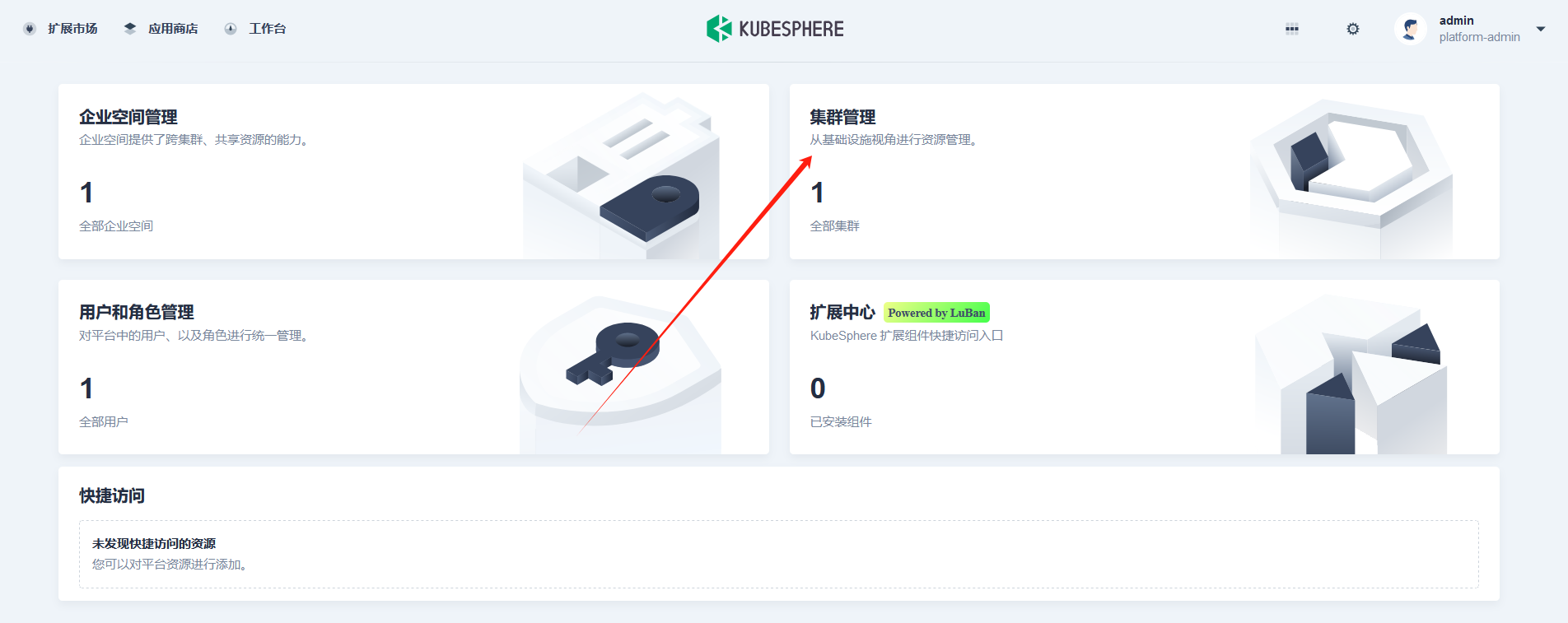
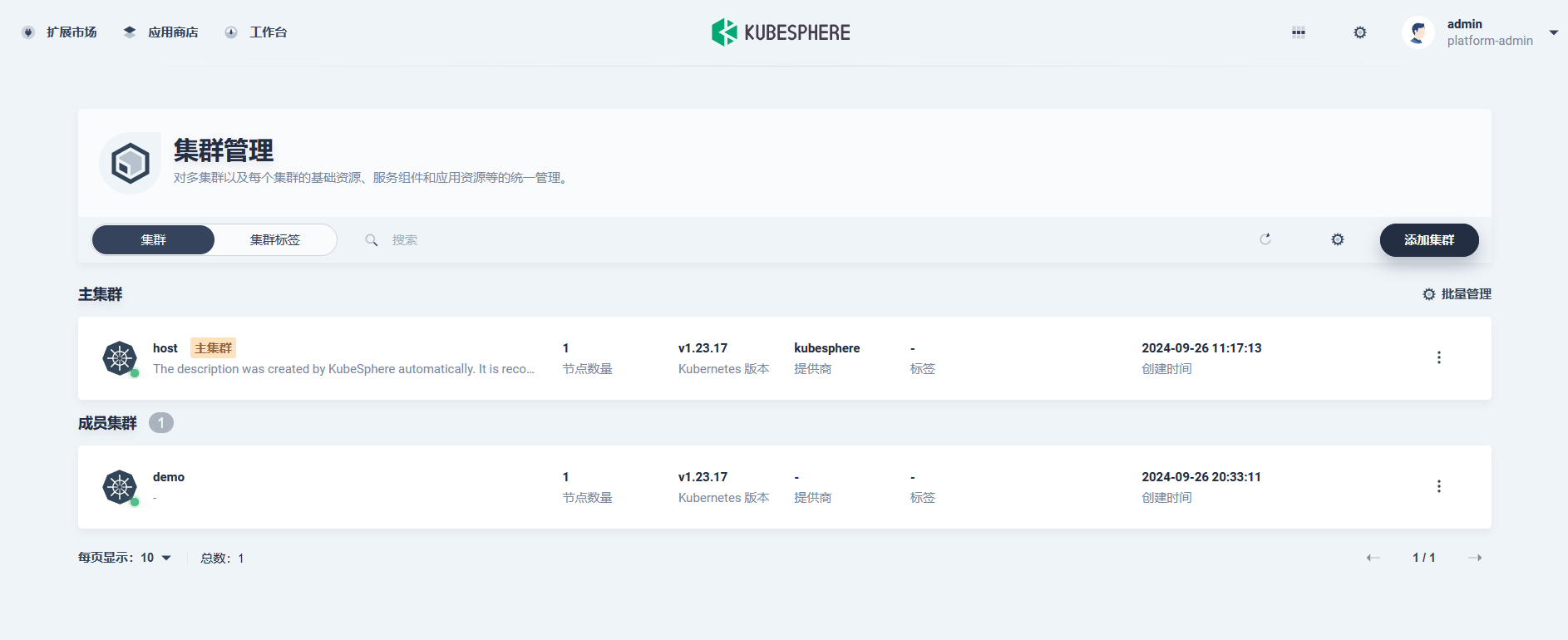
Host 集群部署好之后,进入工作台点击集群管理:
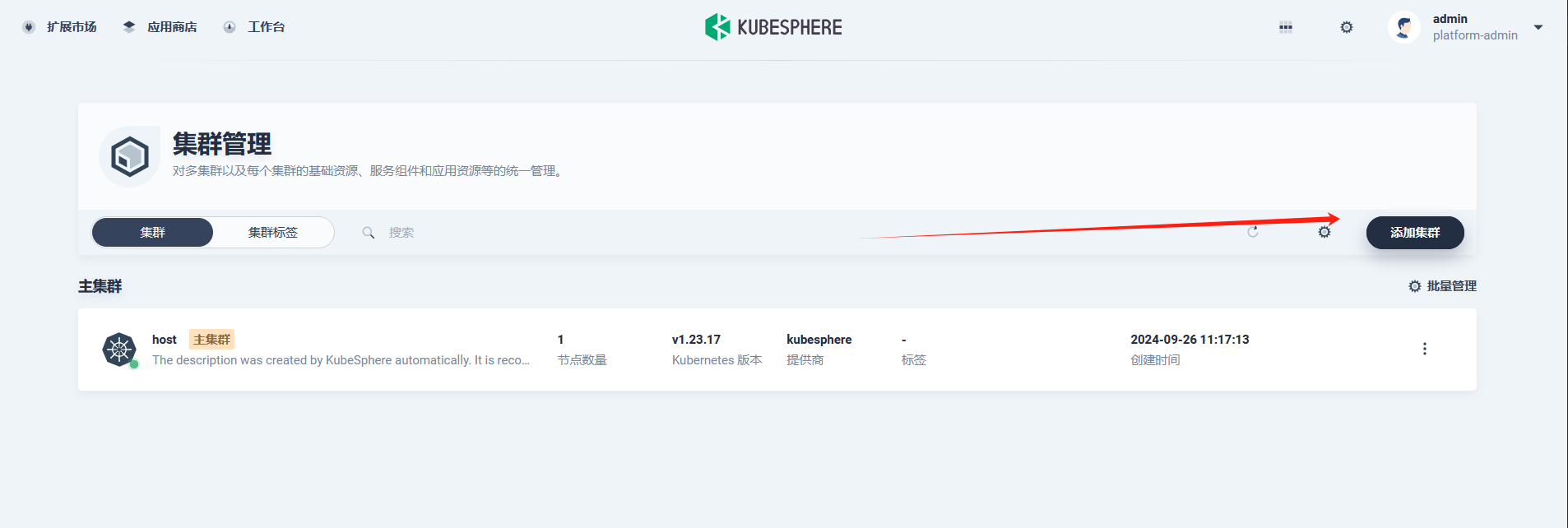
点击添加集群:
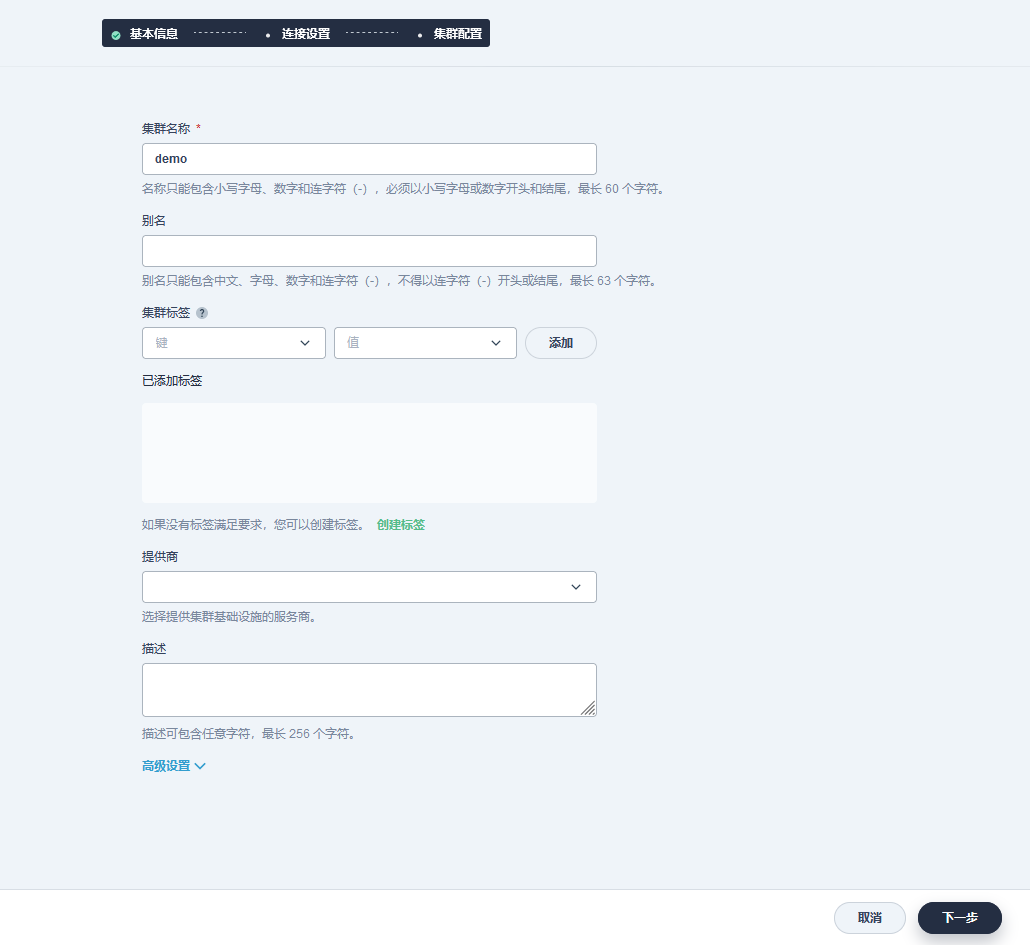
填写集群信息,并点击下一步:
填写 Member 集群 Kubeconfig:
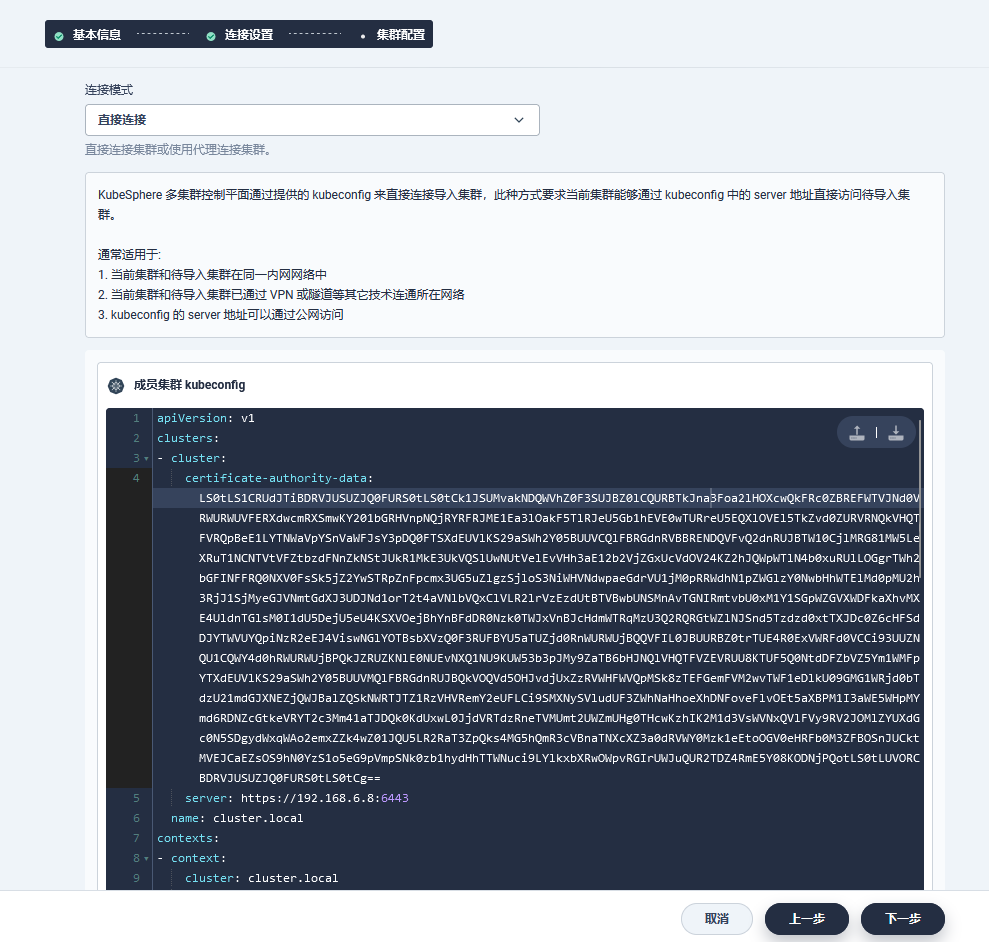
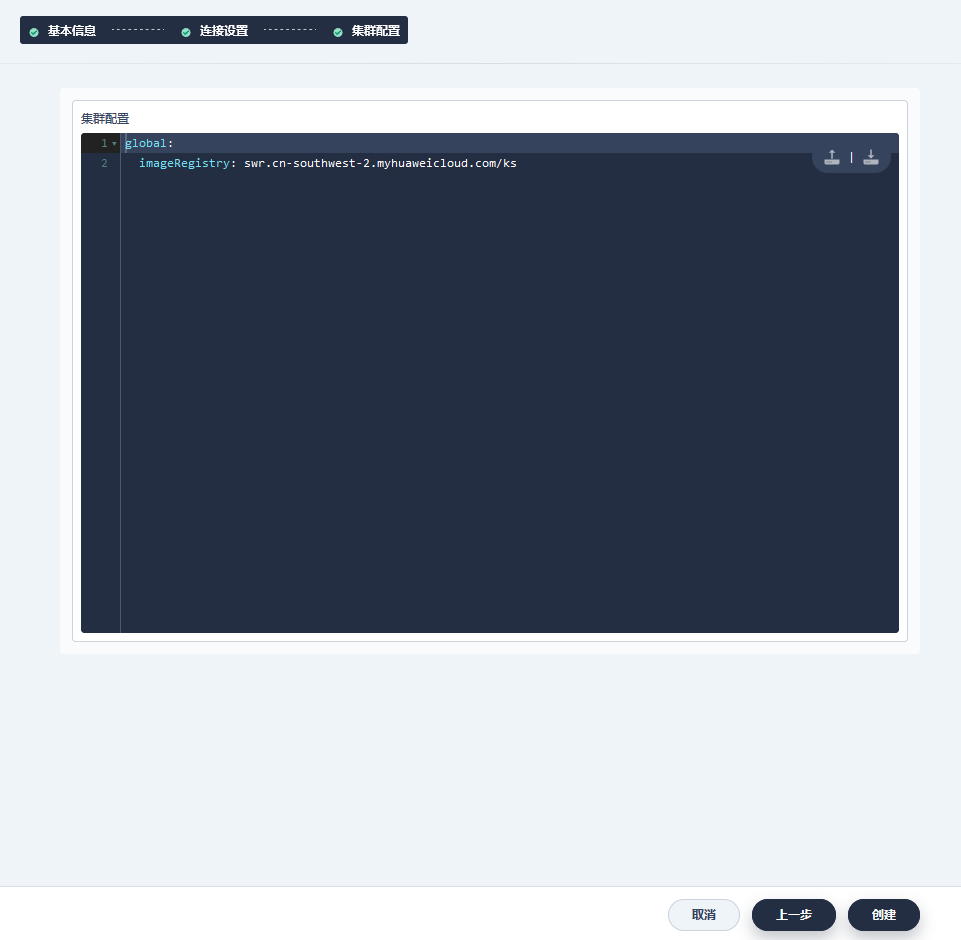
填写集群配置:
# 如果访问 dockerhub 受限,此处可填,如果能够正常访问 dockerhub,可跳过该步骤。

global:

  imageRegistry: swr.cn-southwest-2.myhuaweicloud.com/ks
点击创建后等待 Member 集群上的 ks-agent 创建成功。
Gateway 迁移
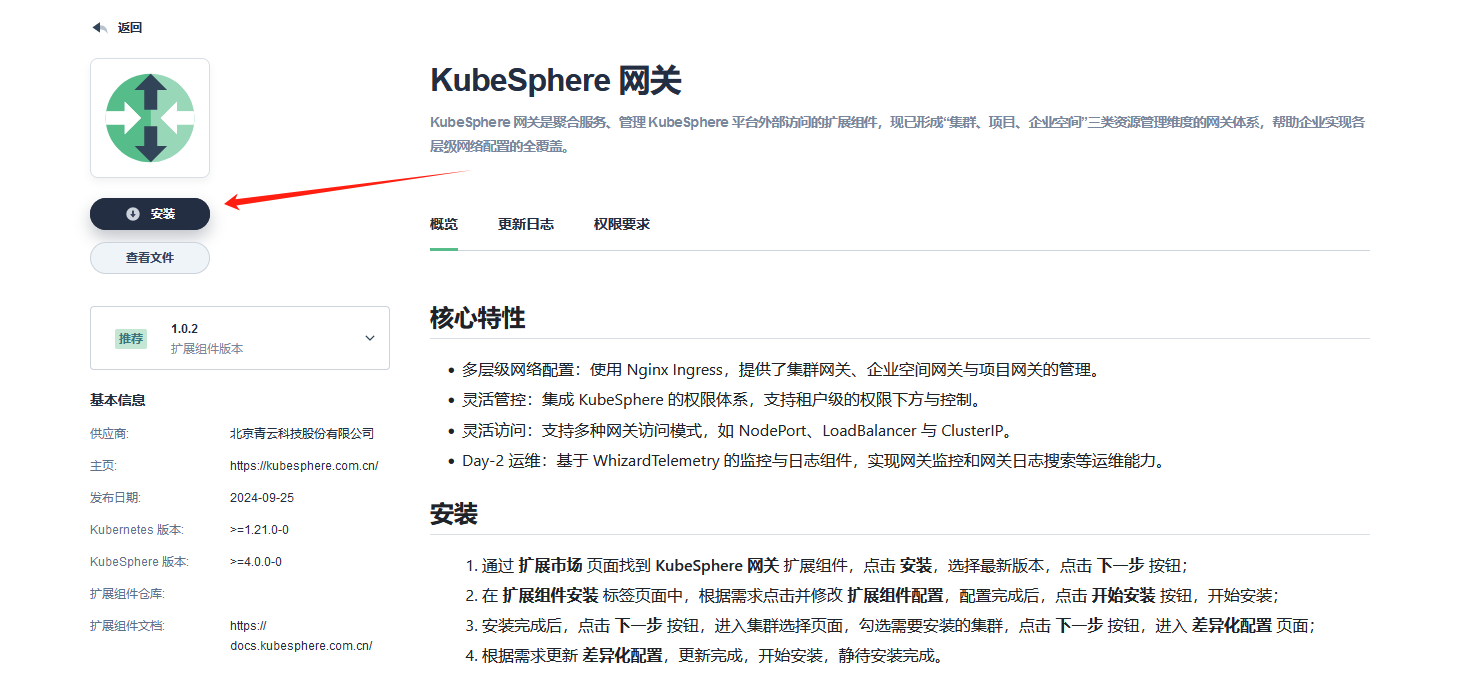
安装 Gateway 组件
安装 KubeSphere 网关扩展组件,并为需要使用网关的集群安装 Gateway 扩展组件 Agent。
将使用了项目网关的项目加入目标企业空间
执行卸载脚本时,会删除项目的企业空间关联关系,需将使用了项目网关的项目重新加入新的目标企业空间中。
迁移项目网关到新版本
注意:该步骤会导致项目网关中断,需提前考虑业务影响。
删除待迁移项目网关
如需保证访问端口不变,删除前务必记录对应网关的 Nodeport 信息或者 LoadBalancer 信息,以便在新创建网关时保留原有配置。
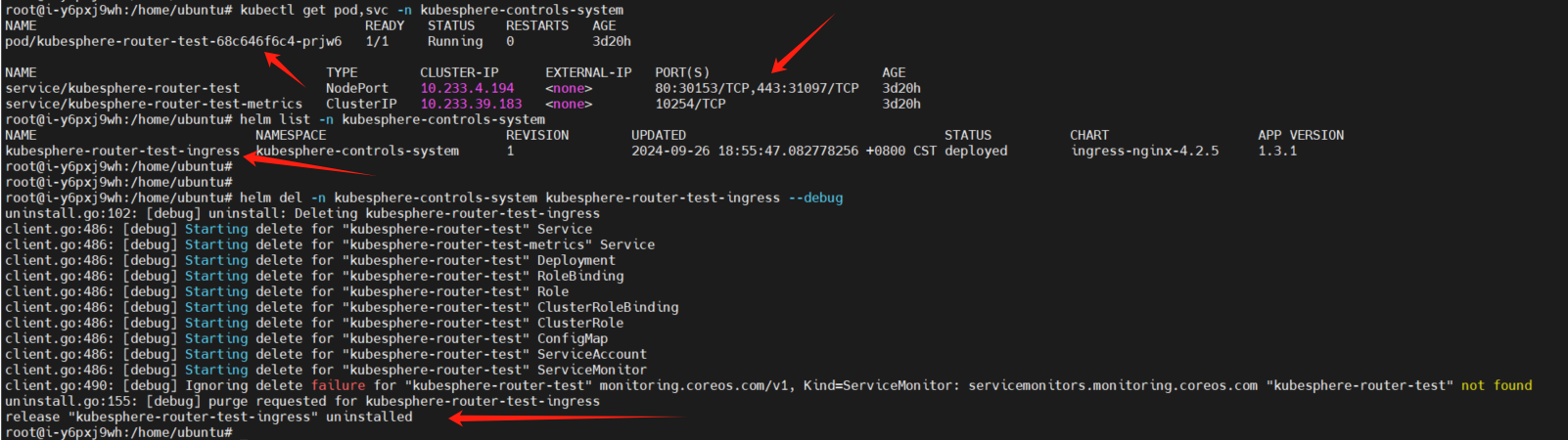
新建项目网关
通过企业空间进入到项目的项目设置中的网关设置。
以保留原有网关的 Nodeport 为例:
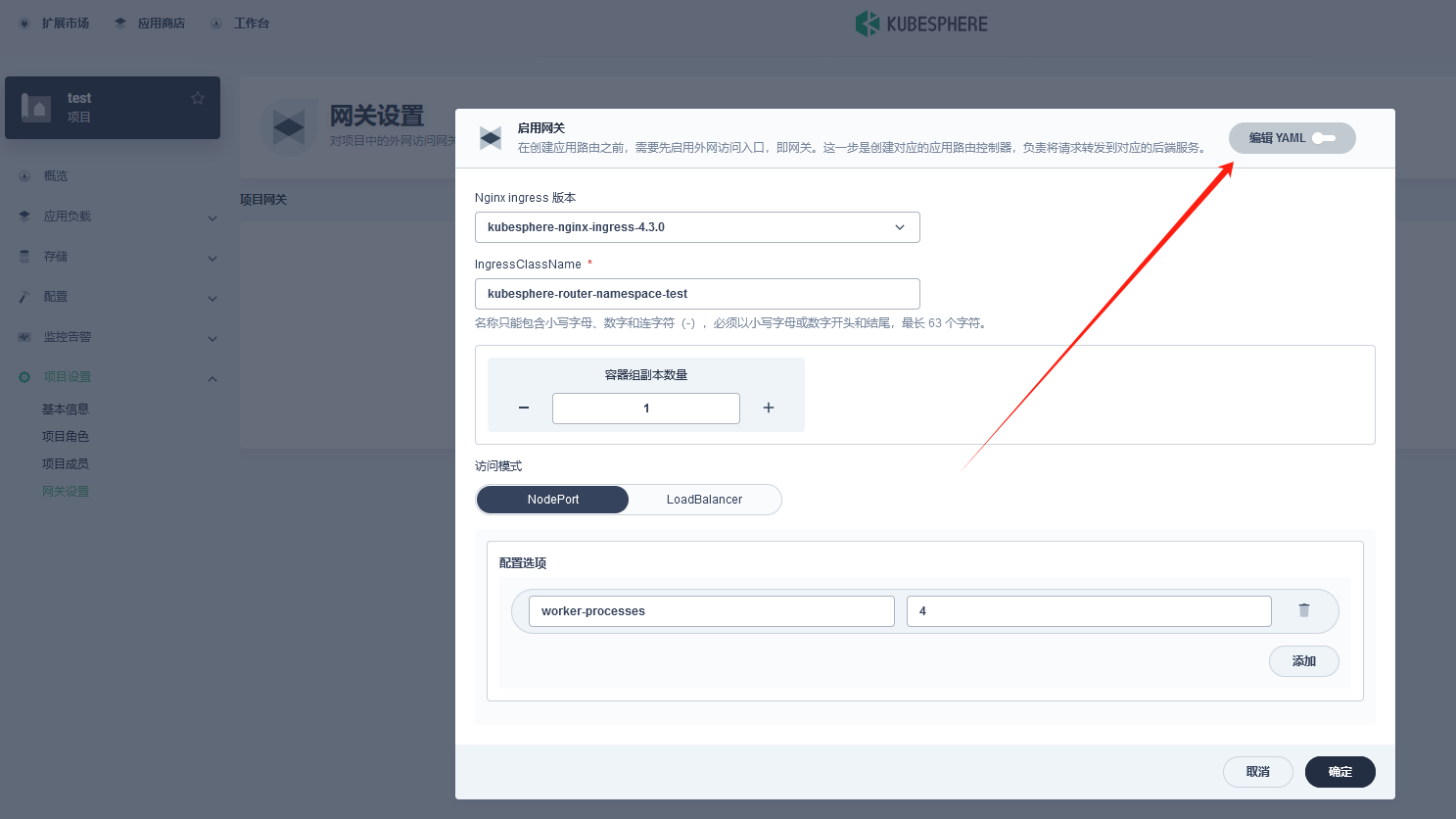
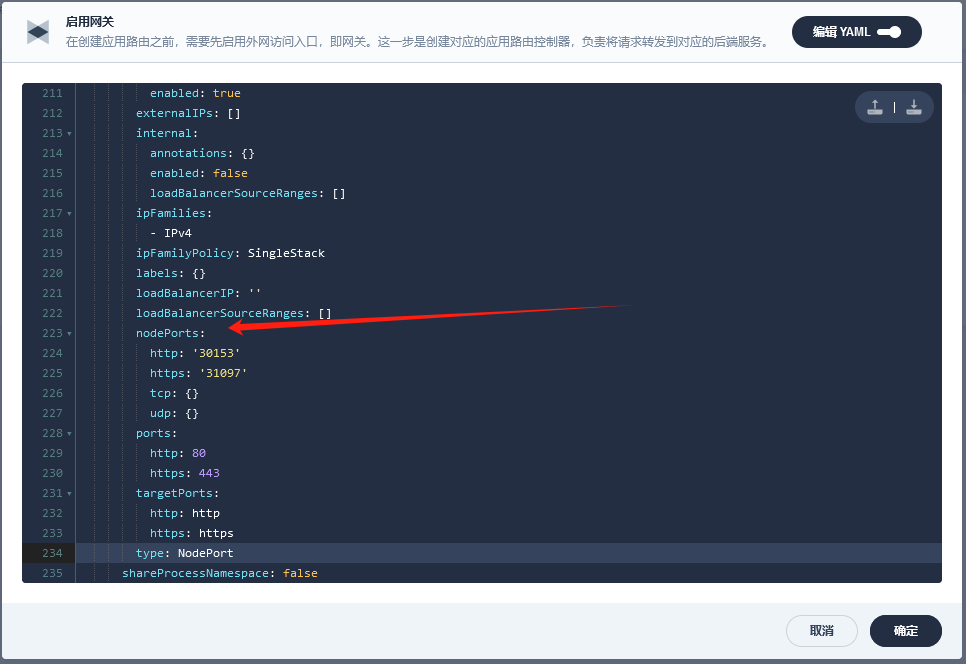
点击确定。
关联应用路由至新建网关
待新的项目网关创建成功后,在网关页面中点击管理->编辑,复制其中的 IngressClassName。
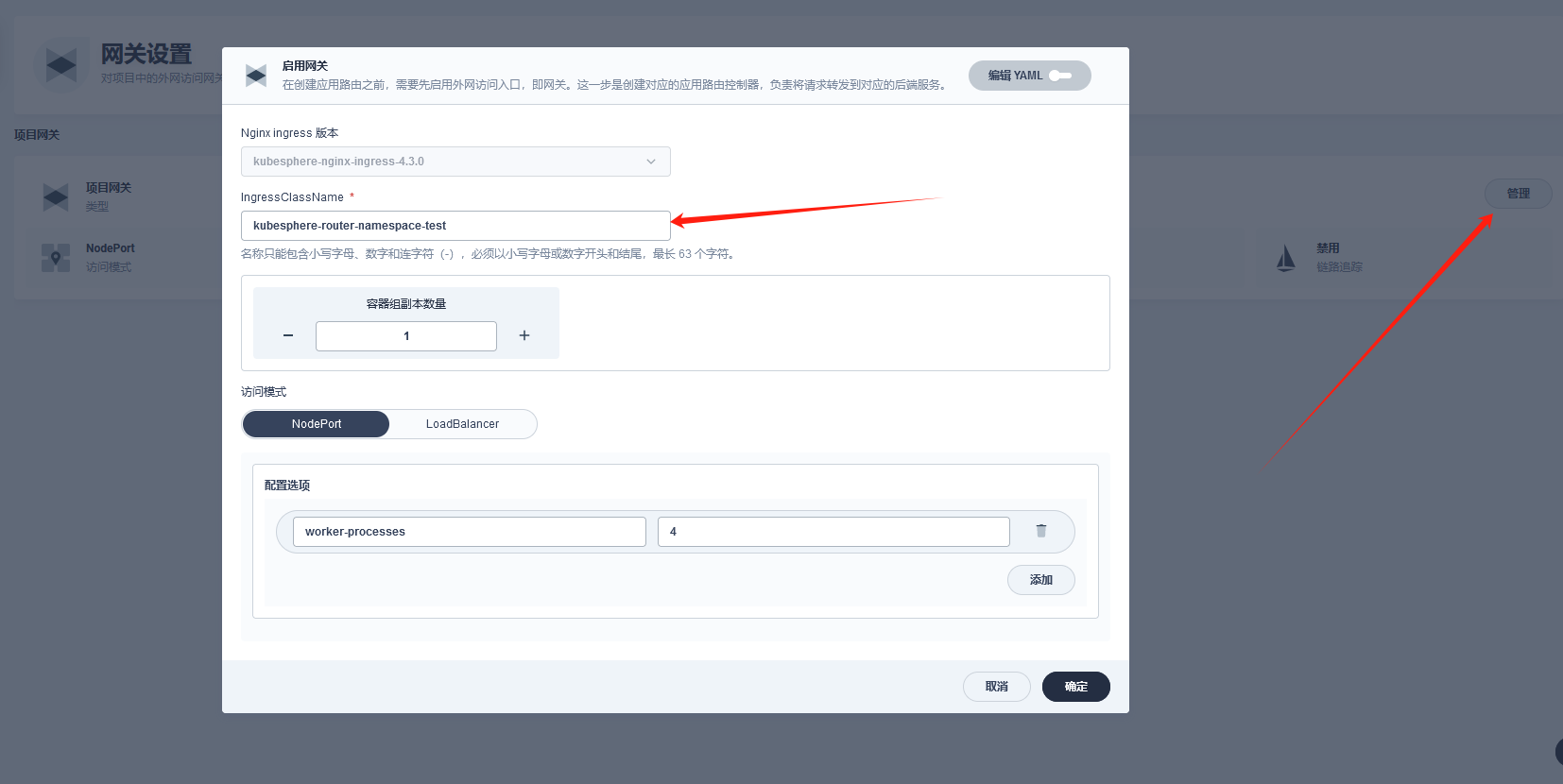
针对当前项目下的应用路由,点击编辑 YAML。
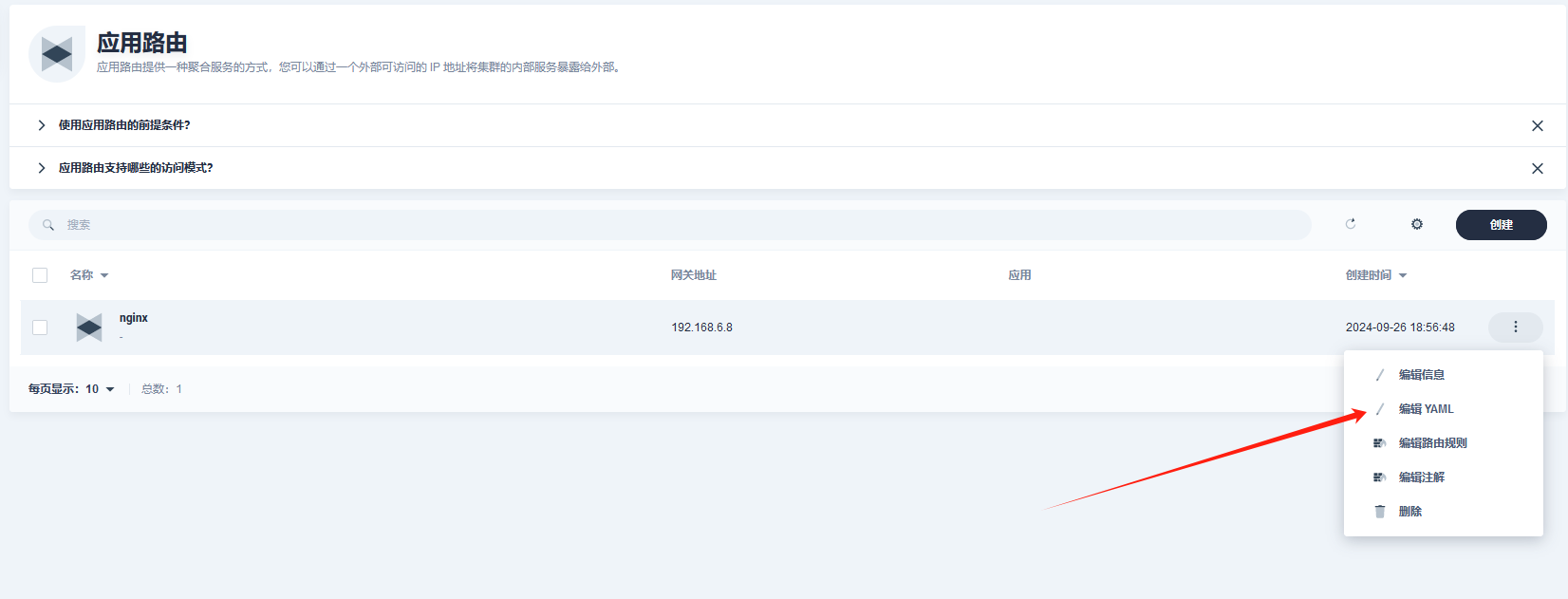
Spec 添加 ingressClassName: xxx,保存。

总结
以上就是 KubeSphere v4 安装的完整步骤,供大家参考。如果您在安装过程中出现问题,可去论坛搜索是否有解答,如没有,可在论坛提问: https://ask.kubesphere.io/forum/。
KubeSphere v4 征稿启事:诚邀体验并分享最佳实践!稿件被采纳者,将获得 T 恤、帆布袋等社区礼品,优秀作者更有机会赢取 CKA 代金券大奖。投稿请微信搜索“kubesphere”联系小助手小 kk。
关于 KubeSphere
KubeSphere (https://kubesphere.io)是在 Kubernetes 之上构建的开源容器平台,提供全栈的 IT 自动化运维的能力,简化企业的 DevOps 工作流。
KubeSphere 已被 Aqara 智能家居、本来生活、东方通信、微宏科技、东软、华云、新浪、三一重工、华夏银行、四川航空、国药集团、微众银行、紫金保险、去哪儿网、中通、中国人民银行、中国银行、中国人保寿险、中国太平保险、中国移动、中国联通、中国电信、天翼云、中移金科、Radore、ZaloPay 等海内外数万家企业采用。
KubeSphere 提供了开发者友好的向导式操作界面和丰富的企业级功能,包括 Kubernetes 多云与多集群管理、DevOps (CI/CD)、应用生命周期管理、边缘计算、微服务治理 (Service Mesh)、多租户管理、可观测性、存储与网络管理、GPU support 等功能,帮助企业快速构建一个强大和功能丰富的容器云平台。
GitHub:https://github.com/kubesphere
官网(中国站):https://kubesphere.io/zh
论坛:https://ask.kubesphere.io/forum/
微信群:请搜索添加群助手微信号 kubesphere
KubeSphere v4 安装指南的更多相关文章
- WebsitePanel(wsp)配置详解(安装指南)
WebsitePanel(wsp)配置详解(安装指南) 铁卫士原创 估计很多同学都还不知道WebsitePanel是什么东东吧,WebsitePanel简称wsp是微软旗下,开源免费的虚拟主机系统,我 ...
- Centos 7 搭建蓝鲸V4.1.16社区版
第一次搭建蓝鲸平台,参考了蓝鲸社区的官方搭建文档. 友情链接:蓝鲸智云社区版V4.1.16用户手册 搭建时遇到了不少的坑,这里做一个详细的安装梳理 主机硬件要求 官方的推荐如下: 在本地用VMware ...
- BootstrapVue 安装指南
BootstrapVue 是基于 Bootstrap v4 + Vue.js 的前端 UI 框架.BootstrapVue 作为学习 Vue.js 框架本身的入门框架,我认为是非常不错的.Bootst ...
- 4、kubesphere环境安装
安装步骤 选择4核8G(master).8核16G(node1).8核16G(node2) 三台机器,按量付费进行实验,CentOS7.9 安装Docker 安装Kubernetes 安装KubeSp ...
- 高性能 TCP/UDP/HTTP 通信框架 HP-Socket v4.1.1
HP-Socket 是一套通用的高性能 TCP/UDP/HTTP 通信框架,包含服务端组件.客户端组件和 Agent 组件,广泛适用于各种不同应用场景的 TCP/UDP/HTTP 通信系统,提供 C/ ...
- Atitit.每月数据采集与备份 v4
Atitit.每月数据采集与备份 v4 备份检查表 r12 00cate 00item im Inputmethod ok ok Log Log ok cyar Cyar log ... ok c ...
- 高性能 TCP/UDP/HTTP 通信框架 HP-Socket v4.1.2
HP-Socket 是一套通用的高性能 TCP/UDP/HTTP 通信框架,包含服务端组件.客户端组件和 Agent 组件,广泛适用于各种不同应用场景的 TCP/UDP/HTTP 通信系统,提供 C/ ...
- 高性能 TCP/UDP/HTTP 通信框架 HP-Socket v4.0.1
HP-Socket 是一套通用的高性能 TCP/UDP/HTTP 通信框架,包含服务端组件.客户端组件和 Agent 组件,广泛适用于各种不同应用场景的 TCP/UDP/HTTP 通信系统,提供 C/ ...
- FineUI(开源版)v4.2.2发布(8年125个版本,官网示例突破300个)!
开源版是 FineUI 的基石,从 2008 年至今已经持续发布了 120 多个版本,拥有会员 15,000 多位,捐赠会员达到 1,200 多位. FineUI(开源版)v4.2.2 是 8 年 ...
- 未能写入输出文件“c:\Windows\Microsoft.NET\Framework64\v4.0.30319\Temporary ASP.NET Files\root\106f9ae8\cc0e1
在本地开发环境没问题,但是发布到服务器出现:未能写入输出文件"c:\Windows\Microsoft.NET\Framework64\v4.0.30319\Temporary ASP.Ne ...
随机推荐
- C# Cefsharp 如何利用[Attribute]的把C#中的方法给到浏览器中调用
背景 "有没有遇见这样一个场景,需要注入到浏览器的类太多,又想统一管理且不遗漏,有没有什么好办法?""有有有,把头伸过来~" 解决办法 第一步:提供一个[Att ...
- 【牛客刷题】HJ8 合并表记录
题目链接 这题最开始的想法就是用一个map来解决问题: func main() { num := 0 fmt.Scan(&num) a := 0 b := 0 m := make(map[in ...
- Minnaert
Minnaert 假设气泡关闭时发生周期性膨胀和收缩,周围水也跟着振动,就嗷地一声叫了出来!设有个半径为 \(r\) 的泡形成后开始简谐振动,半径有 \[r=r_0+a\sin\frac{2\pi t ...
- B 端产品未来几年的发展趋势
在当今数字化高速发展的时代,B 端产品经理作为企业数字化转型的关键推动者,肩负着重大的责任.不仅要深入了解企业的业务需求,还要紧跟技术发展的步伐,为企业提供高效.创新的解决方案.那么,未来几年,B 端 ...
- 【Python自动化】之利用JS操作页面滚动条(新)
如何操作页面中的滚动条,有以下几个方法: 一.查找可见元素进行滚动页面(通用) 方法一: ①移动到元素element对象的"顶端",与当前窗口的"顶部"对齐(默 ...
- 一个操作系统的设计与实现——第19章 IA32-e模式
19.1 64位段描述符与GDT 在32位操作系统中,我们使用的是平坦模型而非分段模型,从而,段描述符的段基址和段限长均成了摆设.在64位模式下,就连CPU也淘汰了分段模型,转而固定使用平坦模型. 6 ...
- 如何排查线上w3wp.exe CPU高的问题,使用到了WinDbg、Visual studio来分析IIS进程池的.dmp文件
最近发现服务器上某个web站点老是CPU很高,该站点部署在IIS上,我IIS上有多个站点,每个站点一个进程池,每个进程池取名都是根据站点来取的,所以很容易看出哪个站点吃掉的CPU,该站点已运行十几年, ...
- 通过DashScope API调用将多种模态转换为向量
本文介绍如何通过模型服务灵积DashScope进行 多模态向量生成 ,并入库至向量检索服务DashVector中进行向量检索. 模型服务灵积DashScope,通过灵活.易用的模型API服务,让各种模 ...
- 爬虫案例2-爬取视频的三种方式之一:requests篇(1)
@ 目录 前言 爬虫步骤 确定网址,发送请求 获取响应数据 对响应数据进行解析 保存数据 完整源码 共勉 博客 前言 本文写了一个爬取视频的案例,使用requests库爬取了好看视频的视频,并进行保存 ...
- ToCom:一次训练随意使用,华为提出通用的ViT标记压缩器 | ECCV 2024
标记压缩通过减少冗余标记的数量(例如,修剪不重要的标记或合并相似的标记)来加快视觉变换器(ViTs)的训练和推理.然而,当这些方法应用于下游任务时,如果训练和推理阶段的压缩程度不匹配,会导致显著的性能 ...