
SpringBoot(八) - 统一数据返回,统一分页工具,统一异常处理 (生成随机数,正则校验)
1、统一数据返回
使用逆向工程来进行测试,实体,mapper等省略;
1.1 直接使用 RequestResoult
1.1.1 RequestResoult 请求结果返回实体
//统一返回 实体 类

@Data

public class RequestResult<T> {

    //状态码

    private String code;

    //状态说明,对code的说明

    private String msg;

    //接口数据

    private T data;

}
1.1.2 service层
1.1.2.1 接口
public interface EdocEntryService {

    //按摘要查询

    List<EdocEntry> getEdocEntriesBySummary(String summary);

}
1.1.2.2 实现类
注意记得在 主启动类中添加 mapper接口扫描注解 :@MapperScan("com.kgc.sbt.mapper")
@Service

public class EdocEntryServiceImpl implements EdocEntryService {

    @Autowired(required = false)

    private EdocEntryMapper edocEntryMapper;

    @Override

    public List<EdocEntry> getEdocEntriesBySummary(String summary) {

        //使用逆向工程,封装查询条件

        EdocEntryExample edocEntryExample = new EdocEntryExample();

        //排序条件

        edocEntryExample.setOrderByClause(" id desc ");

        //根据摘要 模糊查询

        edocEntryExample.createCriteria().andSummaryLike("%" + summary + "%");

        //调用持久层 查询数据

        return edocEntryMapper.selectByExample(edocEntryExample);

    }

}
1.1.3 测试请求
@Slf4j

@RestController

public class EdocEntryController {

    @Autowired

    private EdocEntryService edocEntrieService;

    //根据电子文档,查询文档列表,直接使用 RequestResult

    @GetMapping("/edocEntries")

    //指定请求返回类型 RequestResult<List<EdocEntry>>

	//public RequestResult<List<EdocEntry>> edocEntries(@RequestParam(required = false) String summary){

    //自适应请求返回类型 RequestResult<?>

    public RequestResult<?> edocEntries(@RequestParam(required = false) String summary){

        //调用业务接口,获取文档列表,进行统一返回

        //创建统一返回对象

        //每次都需要创建返回对象,代码冗余,不利于维护

        RequestResult<List<EdocEntry>> requestResult = new RequestResult<>();

        requestResult.setCode("200");

        requestResult.setMsg("success");

        List<EdocEntry> edocEntriesBySummary = edocEntrieService.getEdocEntriesBySummary(summary);

        log.info("{}",edocEntriesBySummary);

        requestResult.setData(edocEntriesBySummary);

        //接口统一返回查询结果

        return requestResult;

    }

}
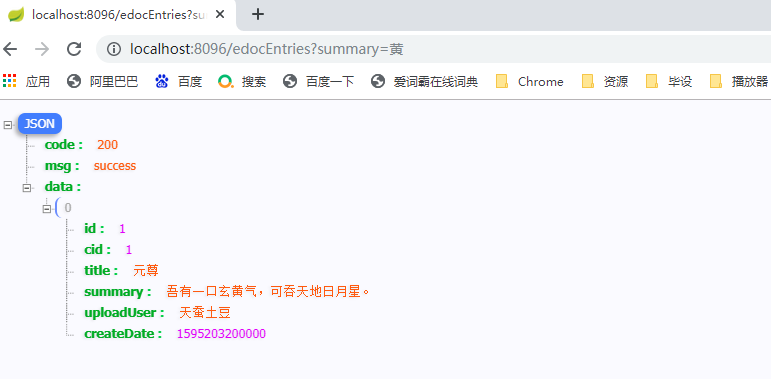
测试结果:
1.2 使用 ResultBuildUtil 结果对象构建工具
1.2.1 CommonConstant 常量类
//Description: 系统常量类,统一管理项目中所有的常量

public class CommonConstant {

    /*

     统一返回成功的状态码

     */

    public static final String UNIFY_RESULT_SUCCESS_CODE = "200";

    /*

     统一返回成功的信息

     */

    public static final String UNIFY_RESULT_SUCCESS_MSG = "SUCCESS";

    /*

   统一返回错误的状态码

   */

    public static final String UNIFY_RESULT_FAIL_CODE = "999";

    /*

     统一返回错误的信息

     */

    public static final String UNIFY_RESULT_FAIL_MSG = "FAIL";

    /*

        分页默认页吗

     */

    public static final int DEFAULT_INIT_PAGE_NO = 1;

    /*

        分页默认条数

     */

    public static final int DEFAULT_INIT_PAGE_SIZE = 3;

}
1.2.2 ResultBuildUtil结果对象构建工具列
//Description: 结果构建工具类

public class ResultBuildUtil {

    //构建成功返回,支持任意类型参数

    public static <T> RequestResult<T> success(T t) {

        //创建统一返回成功结果对象

        RequestResult<T> requestResult = new RequestResult<>();

        requestResult.setCode(CommonConstant.UNIFY_RESULT_SUCCESS_CODE);

        requestResult.setMsg(CommonConstant.UNIFY_RESULT_SUCCESS_MSG);

        requestResult.setData(t);

        return requestResult;

    }

    //构建成功返回,空参

    public static <T> RequestResult<T> success() {

        return success(null);

    }

    //构建 失败返回,支持任意类型参数,用户不便于归类的异常错误结果返回

    public static <T> RequestResult<T> fail(T t) {

        //创建统一返回失败结果对象

        RequestResult<T> requestResult = new RequestResult<>();

        requestResult.setCode(CommonConstant.UNIFY_RESULT_FAIL_CODE);

        requestResult.setMsg(CommonConstant.UNIFY_RESULT_FAIL_MSG);

        requestResult.setData(t);

        return requestResult;

    }

    //构建 失败返回,空参

    public static <T> RequestResult<T> fail() {

        //创建统一返回失败结果对象

        return fail(null);

    }

    //构建 失败返回,自定义错误码,和说明,支持任意类型参数

    public static <T> RequestResult<T> fail(String errCode,String errMsg,T t) {

        //创建统一返回失败结果对象

        RequestResult<T> requestResult = new RequestResult<>();

        requestResult.setCode(errCode);

        requestResult.setMsg(errMsg);

        requestResult.setData(t);

        return requestResult;

    }

    //构建 失败返回,自定义错误码,和说明,无参

    public static <T> RequestResult<T> fail(String errCode,String errMsg) {

        //创建统一返回 失败结果对象

        RequestResult<T> requestResult = new RequestResult<>();

        requestResult.setCode(errCode);

        requestResult.setMsg(errMsg);

        return requestResult;

    }

}
1.2.3 service层
service层不变;
1.2.4 请求测试
@Slf4j

@RestController

public class EdocEntryController {

    @Autowired

    private EdocEntryService edocEntrieService;

    //根据电子文档,查询文档列表, 使用结果构建工具

    @GetMapping("/edocEntries")

    public RequestResult<?> edocEntries(@RequestParam(required = false) String summary){

        //使用结果构建工具,返回成功的结果

        return ResultBuildUtil.success(edocEntrieService.getEdocEntriesBySummary(summary));

    }

}
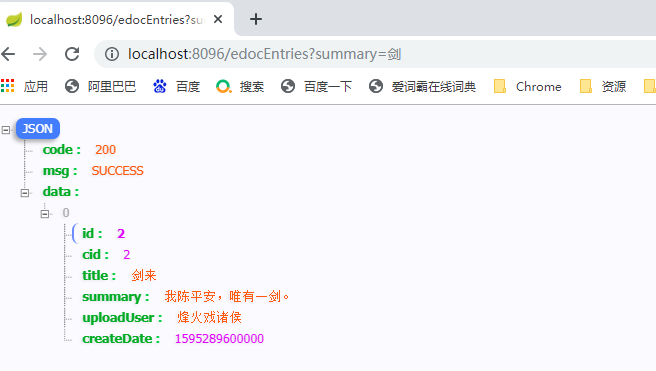
测试结果:
2、统一分页工具
2.1 PageSupport 统一分页工具类
// 分页 结果返回类

@Data

public class  PageSupport<T> {

    //当前页码

    private int pageNo;

    //页面条数

    private int pageSize;

   //总条数

    private int totalCount;

    //总页数

    private int totalPage;

    //分页数据

    private Collection<T> PageData;

    //当总条数确定时,总条数确定

    public void setTotalCount(int totalCount) {

        this.totalCount = totalCount;

        totalPage = totalCount % this.pageSize == 0

                ? totalCount / this.pageSize

                : totalCount / this.pageSize + 1;

    }

}
2.2 service 层
2.2.1 接口
public interface EdocEntryService {

    //条件分页查询

    PageSupport<EdocEntry> getEdocEntriesBySummary(String summary,Integer pageNo,Integer pageSize);

}
2.2.2 实现类
@Service

public class EdocEntryServiceImpl implements EdocEntryService {

    @Override

    public PageSupport<EdocEntry> getEdocEntriesBySummary(String summary, Integer pageNo, Integer pageSize) {

        //创建统一返回分页对象

        PageSupport<EdocEntry> pageSupport = new PageSupport<>();

        //设置分页参数

        pageSupport.setPageNo(pageNo < 1 ? CommonConstant.DEFAULT_INIT_PAGE_NO : pageNo);

        pageSupport.setPageSize(pageNo < 3 ? CommonConstant.DEFAULT_INIT_PAGE_SIZE : pageSize);

        //封装查询条件

        EdocEntryExample edocEntryExample = new EdocEntryExample();

        //排序条件

        edocEntryExample.setOrderByClause(" id desc ");

        //根据摘要 模糊查询

        edocEntryExample.createCriteria().andSummaryLike("%" + summary + "%");

        // 查询满足条件总条数

        pageSupport.setTotalCount((int) edocEntryMapper.countByExample(edocEntryExample));

        //增加分页参数

        edocEntryExample.setOffset((long)(pageSupport.getPageNo()-1)*pageSupport.getPageSize());

        edocEntryExample.setLimit(pageSupport.getPageSize());

        //增加分页数据

        pageSupport.setPageData(edocEntryMapper.selectByExample(edocEntryExample));

        //返回分页对象

        return pageSupport;

    }

}
2.3 commons-lang中 isEmpty 方法和idBlank区别
2.3.1 依赖
<!-- commons-lang start -->

<dependency>

    <groupId>commons-lang</groupId>

    <artifactId>commons-lang</artifactId>

    <version>2.6</version>

</dependency>

<!-- commons-lang end -->
2.3.2 isEmpty 方法和idBlank区别
isEmpty 和 isBlank ,isEmpty 方法和idBlank区别:只包含空格字符串判断,isEmpty是false,isBlank是true;
2.3.2.1 isEmpty
* <pre>

* StringUtils.isEmpty(null)      = true

* StringUtils.isEmpty("")        = true

* StringUtils.isEmpty(" ")       = false

* StringUtils.isEmpty("bob")     = false

* StringUtils.isEmpty("  bob  ") = false

* </pre>
2.3.2.2 isBlank
* <pre>

* StringUtils.isBlank(null)      = true

* StringUtils.isBlank("")        = true

* StringUtils.isBlank(" ")       = true

* StringUtils.isBlank("bob")     = false

* StringUtils.isBlank("  bob  ") = false

* </pre>
2.4 测试请求
//根据电子文档,查询文档列表

@GetMapping("/edocEntriesPage")

public RequestResult<?> edocEntriesPage(@RequestParam(value = "summary",required = false) String summary,

                                        @RequestParam(value = "pageNo",defaultValue = "1") Integer pageNo,

                                        @RequestParam(value = "pageSize",defaultValue = "3") Integer pageSize){

    if(StringUtils.isBlank(summary)){

        return ResultBuildUtil.fail();

    }

    //调用业务接口,获取文档列表,进行统一返回

    //使用结果构建工具,返回成功的结果

    return ResultBuildUtil.success(edocEntrieService.getEdocEntriesBySummary(summary,pageNo,pageSize));

}
测试结果:

2.5 commons-lang3 生成6位随机数
2.5.1 依赖
<!-- commons-lang3 start -->

<dependency>

    <groupId>org.apache.commons</groupId>

    <artifactId>commons-lang3</artifactId>

    <version>3.7</version>

</dependency>

<!-- commons-lang3 end -->
2.5.2 代码
String code = RandomStringUtils.randomNumeric(6);
2.6 Pattern.matches()正则匹配
import java.util.regex.Pattern;

//举例:

if(!Pattern.matches("1[3,5,7,8,9]\\d{9}",userTel)){

    //不匹配的情况

    log.warn("****** 手机号:{},格式非法 ******",userTel);

}
3、统一异常处理
3.1 EdocExceptionEnum 自定义异常枚举
//自定义异常枚举

public enum EdocExceptionEnum {

    /**

     * 参数为空

     */

    EDOC_REQUEST_PARAM_EMPTY("201", "参数为空"),

    /**

     * 参数为非法

     */

    EDOC_REQUEST_PARAM_ILLEGAL("202", "参数非法"),

    /**

     * 网络异常

     */

    EDOC_NETWORK_ERROR("301", "网络异常"),

    /**

     * 数据库异常

     */

    EDOC_DATABASE_ERROR("401", "数据库异常"),

    /**

     * 数据库异常

     */

    EDOC_SYSTEM_ERROR("501", "系统异常");

    /**

     * 异常码

     */

    private String errCode;

    /**

     * 异常说明

     */

    private String errMsg;

    /**

     * 提供带有两个参数的构造方法

     */

    EdocExceptionEnum(String errCode, String errMsg){

        this.errCode = errCode;

        this.errMsg = errMsg;

    }

    public String getErrCode() {

        return errCode;

    }

    public String getErrMsg() {

        return errMsg;

    }

}
3.2 EdocException 自定义异常类
public class EdocException extends RuntimeException{

    /*

        异常枚举类型全局私有属性

    */

    private EdocExceptionEnum edocExceptionEnum;

    //继承 RuntimeException  生成所有的构造方法

    public EdocException() {

    }

    public EdocException(String message) {

        super(message);

    }

    public EdocException(String message, Throwable cause) {

        super(message, cause);

    }

    public EdocException(Throwable cause) {

        super(cause);

    }

    public EdocException(String message, Throwable cause, boolean enableSuppression, boolean writableStackTrace) {

        super(message, cause, enableSuppression, writableStackTrace);

    }

    //自定义枚举异常构造函数

    public EdocException(EdocExceptionEnum edocExceptionEnum){

        this.edocExceptionEnum = edocExceptionEnum;

    }

    //获取枚举异常属性

    public EdocExceptionEnum getEdocExceptionEnum() {

        return edocExceptionEnum;

    }

}
3.3 EdocExceptionHandler 自定义异常统一处理类
//自定义异常统一处理类

@ControllerAdvice

public class EdocExceptionHandler {

    /**

     * @author : huayu

     * @date   : 19/10/2022

     * @param  : [edocException]

     * @return : requestResoult<?>

     * @description : 系统自定义异常处理,对系统中所有抛出自定义的异常,都会进行统一拦截处理,实现统一返回

     */

    @ExceptionHandler(EdocException.class)  //指定对该自定义异常类 进行处理

    @ResponseBody  //指定返回的数据 为 json类型

    public RequestResult<?> handleEdocException(EdocException edocException){

        //统一返回失败的结果(前提:抛出的必须是带枚举类型的异常)

        return ResultBuildUtil.fail(edocException.getEdocExceptionEnum().getErrCode(),edocException.getEdocExceptionEnum().getErrMsg());

    }

}
3.4 请求测试
@GetMapping("/edocEntriesPage")

public RequestResult<?> edocEntriesPage(@RequestParam(value = "summary",required = false) String summary,

                                        @RequestParam(value = "pageNo",defaultValue = "1") Integer pageNo,

                                        @RequestParam(value = "pageSize",defaultValue = "3") Integer pageSize){

	//判断 summary参数是否为空

    if(StringUtils.isBlank(summary)){

        //抛出自定义异常:使用异常枚举

        throw new EdocException(EdocExceptionEnum.EDOC_REQUEST_PARAM_EMPTY);

    }

    ////抛出自定义异常:使用异常枚举

    try {

        return ResultBuildUtil.success(edocEntrieService.getEdocEntriesBySummary(summary,pageNo,pageSize));

    } catch (Exception e) {

        //e.printStackTrace();

         //抛出自定义异常:使用异常枚举

        throw new EdocException(EdocExceptionEnum.EDOC_DATABASE_ERROR);

    }

}
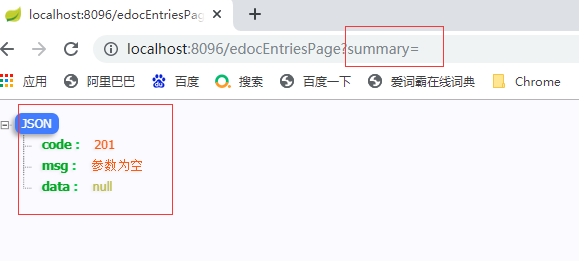
测试请求参数为空:
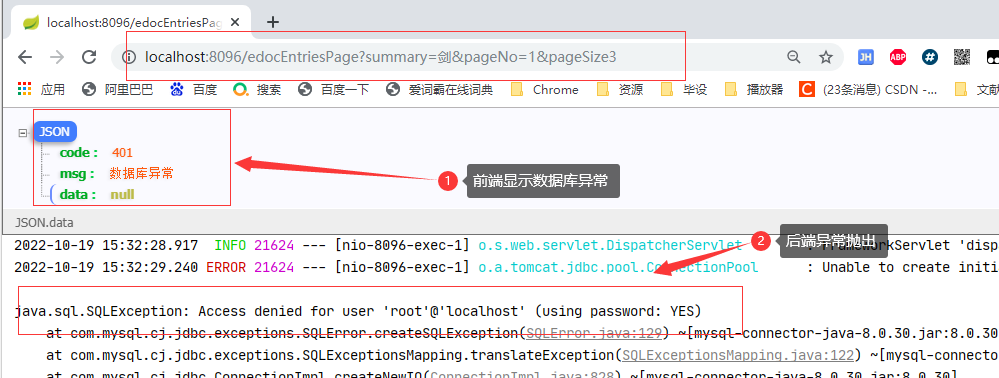
测试数据库密码错误:
SpringBoot(八) - 统一数据返回,统一分页工具,统一异常处理 (生成随机数,正则校验)的更多相关文章
- JAVA工具类--手机号生成与正则校验
package utils; import java.util.Random; import java.util.regex.Pattern; /** * Created with IntelliJ ...
- JAVA函数的返回值类型详解以及生成随机数的例题
函数的四要素:函数名.输入.输出(返回).加工. 函数分为两种:一种是有返回值得函数,一种是没有返回值的函数. 1. 定义:没有返回值的函数:(当我不需要函数的计算结果再拿出来进行运算的时候,我就不需 ...
- Js处理数据——前端分页工具
这几天有小伙伴讨论起了分页的相关问题,这里我也简单讲下前端如何简单便捷的利用Js(库)写出优雅,好用的分页工具. 分页是个很简单又超多接触的技术点,粗略来讲分如下两种: 真分页--每次根据页码.页大小 ...
- SpringBoot系列(十)优雅的处理统一异常处理与统一结果返回
SpringBoot系列(十)统一异常处理与统一结果返回 往期推荐 SpringBoot系列(一)idea新建Springboot项目 SpringBoot系列(二)入门知识 springBoot系列 ...
- SpringBoot统一处理返回结果和异常情况
如果文章有帮助到你,还请点个赞或留下评论 原因 在springboot项目里我们希望接口返回的数据包含至少三个属性: code:请求接口的返回码,成功或者异常等返回编码,例如定义请求成功. messa ...
- springboot实现定时任务,异步操作,统一结果返回,全局异常处理,拦截器及事务处理
本文是作者原创,版权归作者所有.若要转载,请注明出处. 本文都是springboot的常用和实用功能,话不多说开始吧 定时任务 1.启动类开启注解 @EnableScheduling //开启基于注解 ...
- SpringBoot 如何统一后端返回格式?老鸟们都是这样玩的!
大家好,我是飘渺. 今天我们来聊一聊在基于SpringBoot前后端分离开发模式下,如何友好的返回统一的标准格式以及如何优雅的处理全局异常. 首先我们来看看为什么要返回统一的标准格式? 为什么要对Sp ...
- 基于.NetCore开发博客项目 StarBlog - (24) 统一接口数据返回格式
前言 开发接口,是给客户端(Web前端.App)用的,前面说的RESTFul,是接口的规范,有了统一的接口风格,客户端开发人员在访问后端功能的时候能更快找到需要的接口,能写出可维护性更高的代码. 而接 ...
- springboot学习-jdbc操作数据库--yml注意事项--controller接受参数以及参数校验--异常统一管理以及aop的使用---整合mybatis---swagger2构建api文档---jpa访问数据库及page进行分页---整合redis---定时任务
springboot学习-jdbc操作数据库--yml注意事项--controller接受参数以及参数校验-- 异常统一管理以及aop的使用---整合mybatis---swagger2构建api文档 ...
- 统一返回对象封装和统一异常捕获封装springboot starter
好久没有更新文章了,高龄开发没什么技术,去了外包公司后没怎么更新文章了.今天分享下统一处理starter,相信开发web系统的时候都是会涉及到前后端的交互,而后端返回数据的时候一般都会统一封装一个返回 ...
随机推荐
- Python计算1到100偶数的加和
sum_value = 0 for i in range(1,101): if i % 2 == 1: continue sum_value += i print(sum_value) print(s ...
- 记录CentOS 部署 express 项目
第一步.安装 node.js1.在服务器上 /opt 下创建 node 文件夹,并进入该文件夹mkdir /opt/nodecd /opt/node 2.下载 node.js3.下载的 node.js ...
- 前端稳定性工具-Sentry
什么是Sentry? Sentry本质上是一个服务器端的应用程序,它接收来自客户端(如Web应用程序.移动应用程序或后端服务)的错误日志,然后对这些日志进行聚合.分析和可视化.它提供了详细的错误报告, ...
- ARC127D Sum of Min of Xor
ARC127D Sum of Min of Xor 性质分析加通用套路. 思路 首先我们把这题的 \(\min\) 给去掉,那么我们按位算贡献,可以求出和.这是这种式子的通用套路. 考虑加上 \(\m ...
- 利用AI运动识别插件,可以实现那些应用场景?
「Ai运动识别」小程序插件已经推出一年有余,迭代了近十几个版本,收获了各类应用场景的众多用户,今天我们就带您深度解析一下插件的各类可应用场景,帮助已集成开发者进行一步拓宽应用场景,帮助有需求的开发者快 ...
- RL 基础 | 如何复现 PPO,以及一些踩坑经历
最近在复现 PPO 跑 MiniGrid,记录一下- 这里跑的环境是 Empty-5x5 和 8x8,都是简单环境,主要验证 PPO 实现是否正确. 01 Proximal policy Optimi ...
- 【昌哥IT课堂】MySQL8.4.0新特性:FLUSH_PRIVILEGES动态权限细化与隔离[译]
介绍MySQL 支持 RELOAD 权限.现在,想象一个数据库用户被授予了 RELOAD 权限,这允许该用户在系统上执行 FLUSH PRIVILEGES 语句.假设该用户意外地执行了另一个强大的语句 ...
- element ui Tree树形控件获取未全选父节点和子节点id
Tree树形控件选中状态 在做分配权限的时候如图选择了父节点的某些子节点,现在父节点是半选中状态,使用this.$refs.tree.getCheckedKeys()只能拿到当前的子节点,子节点全选才 ...
- 如何使用建造者模式(Builder Pattern)创建不可变类
本文由 ImportNew - 唐小娟 翻译自 Journaldev.如需转载本文,请先参见文章末尾处的转载要求. ImportNew注:如果你也对Java技术翻译分享感兴趣,欢迎加入我们的 Java ...
- golang之热加载Fresh&air
Fresh 是一个命令行工具,每次保存Go或模版文件时,该工具都会生成或重新启动Web应用程序.Fresh将监视文件事件,并且每次创建/修改/删除文件时,Fresh都会生成并重新启动应用程序.如果go ...