
SpringBoot(八) - 统一数据返回,统一分页工具,统一异常处理 (生成随机数,正则校验)
1、统一数据返回
使用逆向工程来进行测试,实体,mapper等省略;
1.1 直接使用 RequestResoult
1.1.1 RequestResoult 请求结果返回实体
//统一返回 实体 类

@Data

public class RequestResult<T> {

    //状态码

    private String code;

    //状态说明,对code的说明

    private String msg;

    //接口数据

    private T data;

}
1.1.2 service层
1.1.2.1 接口
public interface EdocEntryService {

    //按摘要查询

    List<EdocEntry> getEdocEntriesBySummary(String summary);

}
1.1.2.2 实现类
注意记得在 主启动类中添加 mapper接口扫描注解 :@MapperScan("com.kgc.sbt.mapper")
@Service

public class EdocEntryServiceImpl implements EdocEntryService {

    @Autowired(required = false)

    private EdocEntryMapper edocEntryMapper;

    @Override

    public List<EdocEntry> getEdocEntriesBySummary(String summary) {

        //使用逆向工程,封装查询条件

        EdocEntryExample edocEntryExample = new EdocEntryExample();

        //排序条件

        edocEntryExample.setOrderByClause(" id desc ");

        //根据摘要 模糊查询

        edocEntryExample.createCriteria().andSummaryLike("%" + summary + "%");

        //调用持久层 查询数据

        return edocEntryMapper.selectByExample(edocEntryExample);

    }

}
1.1.3 测试请求
@Slf4j

@RestController

public class EdocEntryController {

    @Autowired

    private EdocEntryService edocEntrieService;

    //根据电子文档,查询文档列表,直接使用 RequestResult

    @GetMapping("/edocEntries")

    //指定请求返回类型 RequestResult<List<EdocEntry>>

	//public RequestResult<List<EdocEntry>> edocEntries(@RequestParam(required = false) String summary){

    //自适应请求返回类型 RequestResult<?>

    public RequestResult<?> edocEntries(@RequestParam(required = false) String summary){

        //调用业务接口,获取文档列表,进行统一返回

        //创建统一返回对象

        //每次都需要创建返回对象,代码冗余,不利于维护

        RequestResult<List<EdocEntry>> requestResult = new RequestResult<>();

        requestResult.setCode("200");

        requestResult.setMsg("success");

        List<EdocEntry> edocEntriesBySummary = edocEntrieService.getEdocEntriesBySummary(summary);

        log.info("{}",edocEntriesBySummary);

        requestResult.setData(edocEntriesBySummary);

        //接口统一返回查询结果

        return requestResult;

    }

}
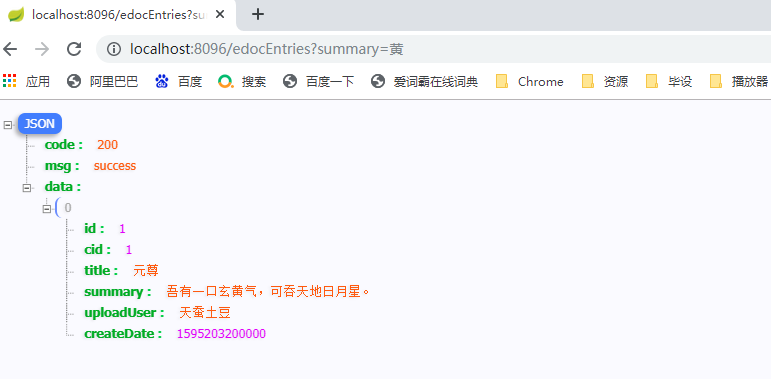
测试结果:
1.2 使用 ResultBuildUtil 结果对象构建工具
1.2.1 CommonConstant 常量类
//Description: 系统常量类,统一管理项目中所有的常量

public class CommonConstant {

    /*

     统一返回成功的状态码

     */

    public static final String UNIFY_RESULT_SUCCESS_CODE = "200";

    /*

     统一返回成功的信息

     */

    public static final String UNIFY_RESULT_SUCCESS_MSG = "SUCCESS";

    /*

   统一返回错误的状态码

   */

    public static final String UNIFY_RESULT_FAIL_CODE = "999";

    /*

     统一返回错误的信息

     */

    public static final String UNIFY_RESULT_FAIL_MSG = "FAIL";

    /*

        分页默认页吗

     */

    public static final int DEFAULT_INIT_PAGE_NO = 1;

    /*

        分页默认条数

     */

    public static final int DEFAULT_INIT_PAGE_SIZE = 3;

}
1.2.2 ResultBuildUtil结果对象构建工具列
//Description: 结果构建工具类

public class ResultBuildUtil {

    //构建成功返回,支持任意类型参数

    public static <T> RequestResult<T> success(T t) {

        //创建统一返回成功结果对象

        RequestResult<T> requestResult = new RequestResult<>();

        requestResult.setCode(CommonConstant.UNIFY_RESULT_SUCCESS_CODE);

        requestResult.setMsg(CommonConstant.UNIFY_RESULT_SUCCESS_MSG);

        requestResult.setData(t);

        return requestResult;

    }

    //构建成功返回,空参

    public static <T> RequestResult<T> success() {

        return success(null);

    }

    //构建 失败返回,支持任意类型参数,用户不便于归类的异常错误结果返回

    public static <T> RequestResult<T> fail(T t) {

        //创建统一返回失败结果对象

        RequestResult<T> requestResult = new RequestResult<>();

        requestResult.setCode(CommonConstant.UNIFY_RESULT_FAIL_CODE);

        requestResult.setMsg(CommonConstant.UNIFY_RESULT_FAIL_MSG);

        requestResult.setData(t);

        return requestResult;

    }

    //构建 失败返回,空参

    public static <T> RequestResult<T> fail() {

        //创建统一返回失败结果对象

        return fail(null);

    }

    //构建 失败返回,自定义错误码,和说明,支持任意类型参数

    public static <T> RequestResult<T> fail(String errCode,String errMsg,T t) {

        //创建统一返回失败结果对象

        RequestResult<T> requestResult = new RequestResult<>();

        requestResult.setCode(errCode);

        requestResult.setMsg(errMsg);

        requestResult.setData(t);

        return requestResult;

    }

    //构建 失败返回,自定义错误码,和说明,无参

    public static <T> RequestResult<T> fail(String errCode,String errMsg) {

        //创建统一返回 失败结果对象

        RequestResult<T> requestResult = new RequestResult<>();

        requestResult.setCode(errCode);

        requestResult.setMsg(errMsg);

        return requestResult;

    }

}
1.2.3 service层
service层不变;
1.2.4 请求测试
@Slf4j

@RestController

public class EdocEntryController {

    @Autowired

    private EdocEntryService edocEntrieService;

    //根据电子文档,查询文档列表, 使用结果构建工具

    @GetMapping("/edocEntries")

    public RequestResult<?> edocEntries(@RequestParam(required = false) String summary){

        //使用结果构建工具,返回成功的结果

        return ResultBuildUtil.success(edocEntrieService.getEdocEntriesBySummary(summary));

    }

}
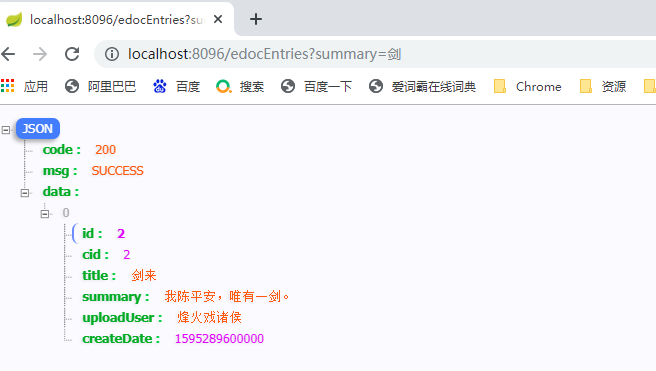
测试结果:
2、统一分页工具
2.1 PageSupport 统一分页工具类
// 分页 结果返回类

@Data

public class  PageSupport<T> {

    //当前页码

    private int pageNo;

    //页面条数

    private int pageSize;

   //总条数

    private int totalCount;

    //总页数

    private int totalPage;

    //分页数据

    private Collection<T> PageData;

    //当总条数确定时,总条数确定

    public void setTotalCount(int totalCount) {

        this.totalCount = totalCount;

        totalPage = totalCount % this.pageSize == 0

                ? totalCount / this.pageSize

                : totalCount / this.pageSize + 1;

    }

}
2.2 service 层
2.2.1 接口
public interface EdocEntryService {

    //条件分页查询

    PageSupport<EdocEntry> getEdocEntriesBySummary(String summary,Integer pageNo,Integer pageSize);

}
2.2.2 实现类
@Service

public class EdocEntryServiceImpl implements EdocEntryService {

    @Override

    public PageSupport<EdocEntry> getEdocEntriesBySummary(String summary, Integer pageNo, Integer pageSize) {

        //创建统一返回分页对象

        PageSupport<EdocEntry> pageSupport = new PageSupport<>();

        //设置分页参数

        pageSupport.setPageNo(pageNo < 1 ? CommonConstant.DEFAULT_INIT_PAGE_NO : pageNo);

        pageSupport.setPageSize(pageNo < 3 ? CommonConstant.DEFAULT_INIT_PAGE_SIZE : pageSize);

        //封装查询条件

        EdocEntryExample edocEntryExample = new EdocEntryExample();

        //排序条件

        edocEntryExample.setOrderByClause(" id desc ");

        //根据摘要 模糊查询

        edocEntryExample.createCriteria().andSummaryLike("%" + summary + "%");

        // 查询满足条件总条数

        pageSupport.setTotalCount((int) edocEntryMapper.countByExample(edocEntryExample));

        //增加分页参数

        edocEntryExample.setOffset((long)(pageSupport.getPageNo()-1)*pageSupport.getPageSize());

        edocEntryExample.setLimit(pageSupport.getPageSize());

        //增加分页数据

        pageSupport.setPageData(edocEntryMapper.selectByExample(edocEntryExample));

        //返回分页对象

        return pageSupport;

    }

}
2.3 commons-lang中 isEmpty 方法和idBlank区别
2.3.1 依赖
<!-- commons-lang start -->

<dependency>

    <groupId>commons-lang</groupId>

    <artifactId>commons-lang</artifactId>

    <version>2.6</version>

</dependency>

<!-- commons-lang end -->
2.3.2 isEmpty 方法和idBlank区别
isEmpty 和 isBlank ,isEmpty 方法和idBlank区别:只包含空格字符串判断,isEmpty是false,isBlank是true;
2.3.2.1 isEmpty
* <pre>

* StringUtils.isEmpty(null)      = true

* StringUtils.isEmpty("")        = true

* StringUtils.isEmpty(" ")       = false

* StringUtils.isEmpty("bob")     = false

* StringUtils.isEmpty("  bob  ") = false

* </pre>
2.3.2.2 isBlank
* <pre>

* StringUtils.isBlank(null)      = true

* StringUtils.isBlank("")        = true

* StringUtils.isBlank(" ")       = true

* StringUtils.isBlank("bob")     = false

* StringUtils.isBlank("  bob  ") = false

* </pre>
2.4 测试请求
//根据电子文档,查询文档列表

@GetMapping("/edocEntriesPage")

public RequestResult<?> edocEntriesPage(@RequestParam(value = "summary",required = false) String summary,

                                        @RequestParam(value = "pageNo",defaultValue = "1") Integer pageNo,

                                        @RequestParam(value = "pageSize",defaultValue = "3") Integer pageSize){

    if(StringUtils.isBlank(summary)){

        return ResultBuildUtil.fail();

    }

    //调用业务接口,获取文档列表,进行统一返回

    //使用结果构建工具,返回成功的结果

    return ResultBuildUtil.success(edocEntrieService.getEdocEntriesBySummary(summary,pageNo,pageSize));

}
测试结果:

2.5 commons-lang3 生成6位随机数
2.5.1 依赖
<!-- commons-lang3 start -->

<dependency>

    <groupId>org.apache.commons</groupId>

    <artifactId>commons-lang3</artifactId>

    <version>3.7</version>

</dependency>

<!-- commons-lang3 end -->
2.5.2 代码
String code = RandomStringUtils.randomNumeric(6);
2.6 Pattern.matches()正则匹配
import java.util.regex.Pattern;

//举例:

if(!Pattern.matches("1[3,5,7,8,9]\\d{9}",userTel)){

    //不匹配的情况

    log.warn("****** 手机号:{},格式非法 ******",userTel);

}
3、统一异常处理
3.1 EdocExceptionEnum 自定义异常枚举
//自定义异常枚举

public enum EdocExceptionEnum {

    /**

     * 参数为空

     */

    EDOC_REQUEST_PARAM_EMPTY("201", "参数为空"),

    /**

     * 参数为非法

     */

    EDOC_REQUEST_PARAM_ILLEGAL("202", "参数非法"),

    /**

     * 网络异常

     */

    EDOC_NETWORK_ERROR("301", "网络异常"),

    /**

     * 数据库异常

     */

    EDOC_DATABASE_ERROR("401", "数据库异常"),

    /**

     * 数据库异常

     */

    EDOC_SYSTEM_ERROR("501", "系统异常");

    /**

     * 异常码

     */

    private String errCode;

    /**

     * 异常说明

     */

    private String errMsg;

    /**

     * 提供带有两个参数的构造方法

     */

    EdocExceptionEnum(String errCode, String errMsg){

        this.errCode = errCode;

        this.errMsg = errMsg;

    }

    public String getErrCode() {

        return errCode;

    }

    public String getErrMsg() {

        return errMsg;

    }

}
3.2 EdocException 自定义异常类
public class EdocException extends RuntimeException{

    /*

        异常枚举类型全局私有属性

    */

    private EdocExceptionEnum edocExceptionEnum;

    //继承 RuntimeException  生成所有的构造方法

    public EdocException() {

    }

    public EdocException(String message) {

        super(message);

    }

    public EdocException(String message, Throwable cause) {

        super(message, cause);

    }

    public EdocException(Throwable cause) {

        super(cause);

    }

    public EdocException(String message, Throwable cause, boolean enableSuppression, boolean writableStackTrace) {

        super(message, cause, enableSuppression, writableStackTrace);

    }

    //自定义枚举异常构造函数

    public EdocException(EdocExceptionEnum edocExceptionEnum){

        this.edocExceptionEnum = edocExceptionEnum;

    }

    //获取枚举异常属性

    public EdocExceptionEnum getEdocExceptionEnum() {

        return edocExceptionEnum;

    }

}
3.3 EdocExceptionHandler 自定义异常统一处理类
//自定义异常统一处理类

@ControllerAdvice

public class EdocExceptionHandler {

    /**

     * @author : huayu

     * @date   : 19/10/2022

     * @param  : [edocException]

     * @return : requestResoult<?>

     * @description : 系统自定义异常处理,对系统中所有抛出自定义的异常,都会进行统一拦截处理,实现统一返回

     */

    @ExceptionHandler(EdocException.class)  //指定对该自定义异常类 进行处理

    @ResponseBody  //指定返回的数据 为 json类型

    public RequestResult<?> handleEdocException(EdocException edocException){

        //统一返回失败的结果(前提:抛出的必须是带枚举类型的异常)

        return ResultBuildUtil.fail(edocException.getEdocExceptionEnum().getErrCode(),edocException.getEdocExceptionEnum().getErrMsg());

    }

}
3.4 请求测试
@GetMapping("/edocEntriesPage")

public RequestResult<?> edocEntriesPage(@RequestParam(value = "summary",required = false) String summary,

                                        @RequestParam(value = "pageNo",defaultValue = "1") Integer pageNo,

                                        @RequestParam(value = "pageSize",defaultValue = "3") Integer pageSize){

	//判断 summary参数是否为空

    if(StringUtils.isBlank(summary)){

        //抛出自定义异常:使用异常枚举

        throw new EdocException(EdocExceptionEnum.EDOC_REQUEST_PARAM_EMPTY);

    }

    ////抛出自定义异常:使用异常枚举

    try {

        return ResultBuildUtil.success(edocEntrieService.getEdocEntriesBySummary(summary,pageNo,pageSize));

    } catch (Exception e) {

        //e.printStackTrace();

         //抛出自定义异常:使用异常枚举

        throw new EdocException(EdocExceptionEnum.EDOC_DATABASE_ERROR);

    }

}
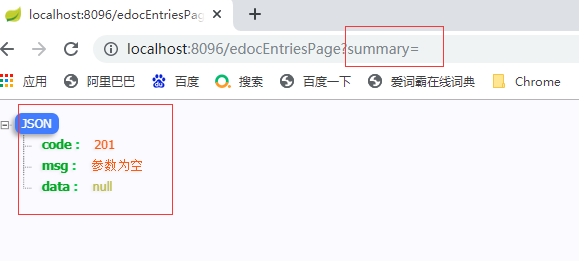
测试请求参数为空:
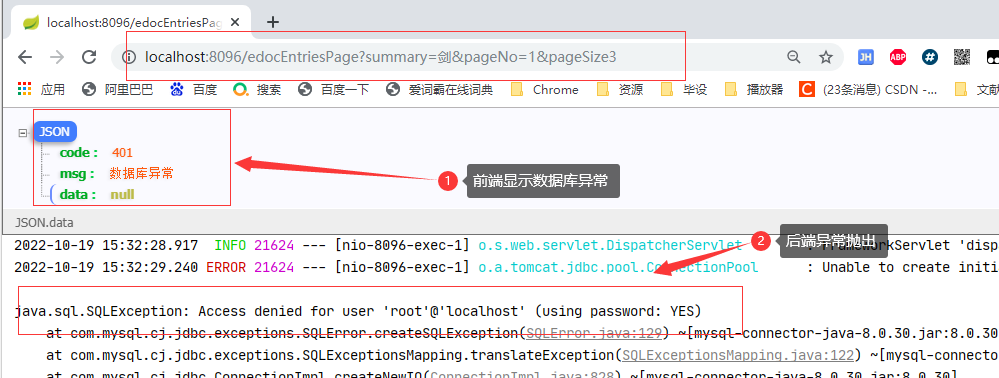
测试数据库密码错误:
SpringBoot(八) - 统一数据返回,统一分页工具,统一异常处理 (生成随机数,正则校验)的更多相关文章
- JAVA工具类--手机号生成与正则校验
package utils; import java.util.Random; import java.util.regex.Pattern; /** * Created with IntelliJ ...
- JAVA函数的返回值类型详解以及生成随机数的例题
函数的四要素:函数名.输入.输出(返回).加工. 函数分为两种:一种是有返回值得函数,一种是没有返回值的函数. 1. 定义:没有返回值的函数:(当我不需要函数的计算结果再拿出来进行运算的时候,我就不需 ...
- Js处理数据——前端分页工具
这几天有小伙伴讨论起了分页的相关问题,这里我也简单讲下前端如何简单便捷的利用Js(库)写出优雅,好用的分页工具. 分页是个很简单又超多接触的技术点,粗略来讲分如下两种: 真分页--每次根据页码.页大小 ...
- SpringBoot系列(十)优雅的处理统一异常处理与统一结果返回
SpringBoot系列(十)统一异常处理与统一结果返回 往期推荐 SpringBoot系列(一)idea新建Springboot项目 SpringBoot系列(二)入门知识 springBoot系列 ...
- SpringBoot统一处理返回结果和异常情况
如果文章有帮助到你,还请点个赞或留下评论 原因 在springboot项目里我们希望接口返回的数据包含至少三个属性: code:请求接口的返回码,成功或者异常等返回编码,例如定义请求成功. messa ...
- springboot实现定时任务,异步操作,统一结果返回,全局异常处理,拦截器及事务处理
本文是作者原创,版权归作者所有.若要转载,请注明出处. 本文都是springboot的常用和实用功能,话不多说开始吧 定时任务 1.启动类开启注解 @EnableScheduling //开启基于注解 ...
- SpringBoot 如何统一后端返回格式?老鸟们都是这样玩的!
大家好,我是飘渺. 今天我们来聊一聊在基于SpringBoot前后端分离开发模式下,如何友好的返回统一的标准格式以及如何优雅的处理全局异常. 首先我们来看看为什么要返回统一的标准格式? 为什么要对Sp ...
- 基于.NetCore开发博客项目 StarBlog - (24) 统一接口数据返回格式
前言 开发接口,是给客户端(Web前端.App)用的,前面说的RESTFul,是接口的规范,有了统一的接口风格,客户端开发人员在访问后端功能的时候能更快找到需要的接口,能写出可维护性更高的代码. 而接 ...
- springboot学习-jdbc操作数据库--yml注意事项--controller接受参数以及参数校验--异常统一管理以及aop的使用---整合mybatis---swagger2构建api文档---jpa访问数据库及page进行分页---整合redis---定时任务
springboot学习-jdbc操作数据库--yml注意事项--controller接受参数以及参数校验-- 异常统一管理以及aop的使用---整合mybatis---swagger2构建api文档 ...
- 统一返回对象封装和统一异常捕获封装springboot starter
好久没有更新文章了,高龄开发没什么技术,去了外包公司后没怎么更新文章了.今天分享下统一处理starter,相信开发web系统的时候都是会涉及到前后端的交互,而后端返回数据的时候一般都会统一封装一个返回 ...
随机推荐
- 矩阵怪 - 2024全新矩阵产品,一键分发抖音,快手,视频号,B站,小红书!
本方案面向谁,解决了什么问题 本方案主要面向C端客户,特别是那些在各大短视频平台(如小红书.抖音.视频号.快手.B站等)上进行内容创作和分发的个人用户.自由职业者.小型团队或企业.这些用户通常面临着在 ...
- 利用DbgHelp获取线程的栈回溯信息
当线程发生异常时,我们如果可以记录下来异常线程的堆栈信息,那么对于我们后续问题处理将会有极大的帮助.这里记录一个操作方法. 1 #include <iostream> 2 #include ...
- Reviewbot 开源 | 为什么我们要打造自己的代码审查服务?
Reviewbot 是七牛云开源的一个项目,旨在提供一个自托管的代码审查服务, 方便做 code review/静态检查, 以及自定义工程规范的落地. 静态检查不是个新鲜事. 我记得早在几年前,我们就 ...
- MYSQL SQL做题总结
一.关于join 1.内外左右连接 2.交叉联结(corss join) 使用交叉联结会将两个表中所有的数据两两组合.如下图,是对表"text"自身进行交叉联结的结果: 3.三表双 ...
- K8S1.16.4+kubeflow1.0安装
K8S1.16.4+kubeflow1.0安装文档 一.简介 本文档编写原因:之前kubeflow1.0安装手册出现较多不可控问题,计划重新安排一个能够完全离线安装的K8S和kubeflow环境. 备 ...
- 4、oracle进程讲解
进程结构 server process服务器进程 前台进程(foreground process):server process(服务器进程) 用户连接到数据库实例以后,暂时可以认为是:对每一个用户连 ...
- linux bash shell 中的单引号和双引号
摘抄自:ABS_CN 当要引用一个变量的值时,一般推荐使用双引号.使用双引号除了变量名[2]前缀($).后引符(`)和转义符(\)外,会使shell不再解释引号中其它所有的特殊字符.[3] 用双引号时 ...
- 深入理解ReferenceQueue GC finalize Reference
关于对象如何销毁以及finalize更详细的信息 目录 概述 1 先看一个对象finalize的顺序问题. 2 对象再生及finalize只能执行一次 3 SoftReference WeakRefe ...
- callable结合FutureTask的多线程使用(免打扰模式)
import java.util.concurrent.Callable; import java.util.concurrent.ExecutionException; import java.ut ...
- 《刚刚问世》系列初窥篇-Java+Playwright自动化测试-6- 元素基础定位方式-上篇 (详细教程)
1.简介 从这篇文章开始,就开始要介绍UI自动化核心的内容,也是最困难的部分了,就是:定位元素,并去对定位到的元素进行一系列相关的操作.想要对元素进行操作,第一步,也是最重要的一步,就是要找到这个元素 ...