
git将本地内容传送到远程仓库出现![rejected] master -> master (fetch first)错误
问题:使用git push -u 远程库名 master 命令将本地提交的内容传到git远程库时出现错误:
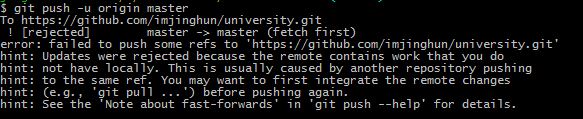
命令: git push -u origin master
出现错误:
To https://github.com/imjinghun/university.git
! [rejected] master -> master (fetch first)
error: failed to push some refs to 'https://github.com/imjinghun/university.git'
hint: Updates were rejected because the remote contains work that you do
hint: not have locally. This is usually caused by another repository pushing
hint: to the same ref. You may want to first integrate the remote changes
hint: (e.g., 'git pull ...') before pushing again.
hint: See the 'Note about fast-forwards' in 'git push --help' for details.
解决:使用 git push -f 命令重新传一遍就可以成功了
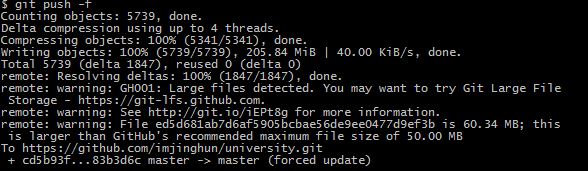
命令:git push -f
结果:
Counting objects: 5739, done.
Delta compression using up to 4 threads.
Compressing objects: 100% (5341/5341), done.
Writing objects: 100% (5739/5739), 205.84 MiB | 40.00 KiB/s, done.
Total 5739 (delta 1847), reused 0 (delta 0)
remote: Resolving deltas: 100% (1847/1847), done.
remote: warning: GH001: Large files detected. You may want to try Git Large File
Storage - https://git-lfs.github.com.
remote: warning: See http://git.io/iEPt8g for more information.
remote: warning: File ed5d681ab7d6af5905bcbae56de9ee0477d9ef3b is 60.34 MB;
this is larger than GitHub's recommended maximum file size of 50.00 MB
To https://github.com/imjinghun/university.git
+ cd5b93f...83b3d6c master -> master (forced update)
git将本地内容传送到远程仓库出现![rejected] master -> master (fetch first)错误的更多相关文章
- git 将本地项目关联到远程仓库
初始化 在本地需要关联到远程仓库的项目根目录下执行 git init 然后关联远程仓库 [project].你需要存在一个远程仓库,名字随意,然后执行下面的命令(去掉中括号)就可以关联到该仓库. gi ...
- 使用Git将本地文件提交到远程仓库
一 操作准备条件: git远程仓库已经建好了,本地文件已经存在了,现在要将本地代码推到git远程仓库保存. 解决办法如下: 1.(先进入项目文件夹)通过命令 git init 把这个目录变成git可以 ...
- 使用git把本地目录传到远程仓库
需求: 要把本地不为空的一个目录和远程现有的一个仓库关联 步骤如下: git init //生成.git目录 git add . //把当前目录里的文件加入到暂存区 git commit -m '上传 ...
- Git——如何将本地项目提交至远程仓库
参考文章:http://blog.csdn.net/dadaxiongdebaobao/article/details/52081826 git 将一个本地文件目录提交到远程仓库的步骤 参考文章: ...
- git从远程仓库拉取内容或向远程仓库上传内容
一.将本地文件上传到远程仓库步骤 git init git add . git commit -m "初始框架" git remote add origin https://git ...
- git本地项目连接私人远程仓库以及遇到的问题
一.引言 1.最开始的时候,我本地项目连接的是github远程仓库,现在要转到公司的私人远程仓库. 2.我和大家说两个事: (1)本地项目连接github远程仓库, (2)本地项目连接私人远程仓库, ...
- 【开发工具 - Git】之本地项目托管到远程仓库
这里所说的“本地项目托管到远程仓库”,说的是:例如,我们在本地有一个写了很长时间的项目,现在想要托管到GitHub或码云上进行版本控制. 这个过程大致需要以下几个步骤: (1)在本地初始化Git项目本 ...
- Git版本控制工具(三)----远程仓库GitHub的使用
[声明] 欢迎转载,但请保留文章原始出处→_→ 生命壹号:http://www.cnblogs.com/smyhvae/ 文章来源:http://www.cnblogs.com/smyhvae/p/4 ...
- Git命令的使用_操作远程仓库——详细教程3
本博文讲述将本地仓库提交到GIT@OSC(或者是GitHub),故而需要用户首先有一个GIT@OSC(或者是GitHub)帐号. 我的GIT@OSC帐号是:https://git.oschina.ne ...
随机推荐
- 初识github之注册和基本概念
通过大量的网络资源,我粗浅了解了GitHub是什么:一个开源的代码存储云平台,它的logo是一只 “章鱼猫(Octocat)”.那么开始学习GitHub第一部分——注册GitHub账号. 首先英文就让 ...
- jquery ajax 中各个事件执行顺序
jquery ajax 中各个事件执行顺序如下: 1.ajaxStart(全局事件) 2.beforeSend 3.ajaxSend(全局事件) 4.success 5.ajaxSuccess(全局事 ...
- Visual Studio快捷键查询
Ctrl+E,D —-格式化全部代码 Ctrl+E,F —-格式化选中的代码 CTRL + SHIFT + B生成解决方案 CTRL + F7 生成编译 CTRL + O 打开文件 CTRL ...
- 使用js Math.random()函数生成n到m间的随机数字
何使用js生成n到m间的随机数字,主要目的是为后期的js生成验证码做准备,Math.random()函数返回0和1之间的伪随机数 摘要: 本文讲解如何使用js生成n到m间的随机数字,主要目的是为后 ...
- sublime text3配置及相关小技巧
1.下载&安装: 官方地址:http://www.sublimetext.com/,sublime text3又更新了,支持不依赖插件进行侧边栏颜色的更改,同时自带的皮肤颜色也有四种,十分方便 ...
- 【转】Loadrunner 性能指标定位系统瓶颈
转至:http://www.51testing.com/html/63/n-1224463.html Loadrunner 性能指标定位系统瓶颈 判断CPU瓶颈 1, %processor time ...
- CSS选择符-----伪类选择符
Element:hover E:hover { sRules } 设置元素在其鼠标悬停时的样式 <!DOCTYPE html> <html> <head> < ...
- Linux 中常用的命令
Linux中的常用命令: 终端快捷键: Ctrl + a/Home 切换到命令行开始 Ctrl + e/End 切换到命令行末尾 Ctrl + l 清除屏幕内容,效果等同于clear Ctrl + u ...
- linux 虚拟机挂载光驱
step 1 step 2 step 3 挂载 root@vm-xiluhua /dev # mount cdrom /mnt mount: /dev/sr0 写保护,将以只读方式挂载 step 4 ...
- 转:C# 小数位数保留的方法集锦
转载自:http://www.jb51.net/article/17010.htm 1. System.Globalization.NumberFormatInfo provider = new Sy ...