
廖雪峰Java6IO编程-2input和output-1inputStream
1.InputStream
1.1InputStream是所有输入流的超类:
- int read()
* 读取下一个字节,并返回字节(0-255)
* 如果已读到末尾,返回-1
* read()方法是阻塞(blocking)的,必须等待read()方法返回才能执行下一行代码 - int read(byte[]):读取若干字节并填充到byte[]数组,返回读取的字节数
- int read(byte[], int off, int len):指定byte[]数组的偏移量和最大填充术数。
- void close():关闭输入流
- 使用try(resource)可以保证InputStream正确关闭
代码一,使用close关闭文件:如果运行时发生IO错误,文件不能正确关闭,资源不能得到及时的释放
public class Main {

    public static void main(String[] args) throws IOException {

        InputStream input = new FileInputStream("./src/main/java/com/testList/Person.txt");

        int n;

        while((n=input.read())!= -1){

            System.out.println(n);

        }

        input.close();

    }

}
代码二:
public class Main {

    public static void main(String[] args) throws IOException {

        InputStream input = null;

        try{

            input= new FileInputStream("./src/main/java/com/testList/Person.txt");

            int n;

            while((n=input.read())!= -1){

                System.out.println(n);

            }

        }finally {

            if (input != null) {

                input.close();

            }

        }

    }

}
代码三,使用try(resource)保证InputStream正确关闭,推荐
public class Main {

    public static void main(String[] args) throws IOException {

        try(InputStream input = new FileInputStream("./src/main/java/com/testList/Person.txt")){

            int n;

            while((n=input.read())!= -1){

                System.out.println(n);

            }

        }//自动关闭InputStream

    }

}
代码四,利用缓冲区一次读取多个字节
public class Main {

    public static void main(String[] args) throws IOException {

        try(InputStream input = new FileInputStream("./src/main/java/com/testList/Person.txt")){

            byte[] buffer = new byte[10];

            int n;

            while((n=input.read(buffer))!= -1){

                System.out.println(Arrays.toString(buffer));

            }

        }

    }

}
1.2常用InputStream
1.2.1 FileInputStream
FileInputStream是InputStream的实现类,可以从文件获取输入流。
    try(InputStream input = new FileInputStream("./src/main/java/com/testList/Person.txt")){

            byte[] buffer = new byte[10];

            int n;

            while((n=input.read(buffer))!= -1){

                System.out.println(Arrays.toString(buffer));

            }
1.2.2 ByteArrayInputStream
ByteArrayInputStream可以在内存中模拟一个InputStream。用的不多,可以测试的时候构造InputStream
public class Main {

    public static void main(String[] args) throws IOException {

        byte[] data = {-26, -103, -82, -23, -128, -102, -27, -83, -105, -25,-84, -90, -28, -72, -78, 10, 99, 111, 109, 46,116, 101, 115, 116, 76, 105, 115, 116, 46, 77,97, 105, 110, 64, 50, 98, 49, 57, 51, 102,50, 100, 10, 64, 50, 98, 49, 57, 51, 102};

        try(InputStream input = new ByteArrayInputStream(data)){

            byte[] buffer = new byte[10];

            int n;

            while((n=input.read(buffer))!= -1){

                System.out.println(Arrays.toString(buffer));

            }

        }

    }

}
1.3总结:
- InputStream定义了所有输入流的超类
- FileInputStream实现了文件输入
- ByteArrayInputStream在内存中模拟一个字节流输入
- 使用try(resource)保证InputStream正确关闭
2.OutputStream
2.1 java.io.OutPutStream是所有输出流的超类:
- abstract write(int b):写入一个字节
- void write(byte[] b):写入byte数组的所有字节
- void write(byte[] b, int off, int len):写入byte[]数组指定范围的字节
- write()方法是阻塞的,必须等待write方法执行完毕返回后才能执行下一行代码
- void close():关闭输出流
- 使用try(resource)可以保证OutputStream正确关闭
- void flush() :将缓冲区的内容输出
为什么需要flush呢?
因为像磁盘、网络写入数据的时候,出于效率的考虑,很多时候,并不是输出1个字节就立即写入。而是先把输出的字节放在内存缓冲区里,等到缓冲区满了之后,再一次性写入。对于很多设备来说,一次写入1个字节和写入1000个字节话费的时间是一样的。所以Output Stream有一个flush方法,能够强制把缓冲区的内容输出。通常情况下,我们不需要调用这个方法,因为缓冲区在满的时候,会自动调用flush。我们在调用close方法关闭OutputStream时,也会调用flush方法。
代码一:如果写入过程中发生IO错误,OutputStream不能正常关闭
public class Main {

    public static void main(String[] args) throws IOException {

        OutputStream output = new FileOutputStream("./src/main/java/com/testList/output.txt");

        output.write(72);//1次写入1个字节

        output.write(101);

        output.write(108);

        output.write(108);

        output.write(111);

        output.close();

    }

}
代码二:通过try(resource)自动关闭文件
public class Main {

    public static void main(String[] args) throws IOException {

        try(OutputStream output = new FileOutputStream("./src/main/java/com/testList/output.txt")){

            output.write(72);

            output.write(101);

            output.write(108);

            output.write(108);

            output.write(111);

        }

    }

}
代码三:一次传入多个字节
public class Main {

    public static void main(String[] args) throws IOException {

        try(OutputStream output = new FileOutputStream("./src/main/java/com/testList/output.txt")){

            byte[] b = "hello,张三".getBytes("UTF-8");

            output.write(b,3,9);

        }

    }

}
代码四:一次性写入
public class Main {

    public static void main(String[] args) throws IOException {

        try(OutputStream output = new FileOutputStream("./src/main/java/com/testList/output.txt")){

            byte[] b = "hello,张三".getBytes("UTF-8");

            output.write(b);

        }

    }

}
2.2 常用OutPutStream:
2.2.1 FileOutStream
FileOutStream可以输出到文件
2.2.2 ByteArrayOutPutStream
ByteArrayOutputStream可以在内存中模拟一个OutputStream
public class Main {

    public static void main(String[] args) throws IOException {

        try(ByteArrayOutputStream output = new ByteArrayOutputStream()){

            output.write("Hello".getBytes("utf-8"));

            output.write("world!".getBytes("utf-8"));

            byte[] data = output.toByteArray();

            System.out.println(Arrays.toString(data));

        }

    }

}
2.3 总结
- OutputStream定义了所有输出流的超类
- FileOutputStream实现了文件流输出
- ByteArrayOutputStream在内存中模拟一个字节流的输出
- 使用try(resource)保证OutputStream正确关闭
3.Input/OutPut练习
FileInputStream可以从文件读取数据,FileOutputStream可以把数据写入文件。
如果我们一边从一个文件读取数据,一边把数据写入到另一个文件,就完成了文件的拷贝。
请编写一个程序,接收两个命令行参数,分别表示源文件和目标文件,然后用InputSream/OutputStream把源文件复制到目标文件。
复制后,请检查源文件和目标文件是否相同(文件长度相同,内容相同),分别用文本文件、图片文件和zip文件测试。
使用FileInputStream读取文件
import java.io.File;

import java.io.FileInputStream;

import java.io.IOException;

public class Main {

    public static void main(String[] args) throws IOException {

        File f = new File("./src/main/java/com/testList/Person.java");

        System.out.println(f.length());

        //创建字节输入流

        FileInputStream fis = new FileInputStream("./src/main/java/com/testList/Person.java");

        //创建竹筒

        byte[] bbuf = new byte[100];

        //保存实际读取的字节数

        int hasRead = 0;

        //使用循环重复取水过程

        while((hasRead = fis.read(bbuf))>0){

            //取出竹筒中的水滴即字节,将字节数组转换成字符串输入

            System.out.println(new String(bbuf,0,hasRead));

        }

        //关闭字节流

        fis.close();

    }

}
使用FileReader读取文件
import java.io.File;

import java.io.FileReader;

import java.io.IOException;

public class Main {

    public static void main(String[] args) throws IOException {

        File f = new File("./src/main/java/com/testList/Person.java");

        System.out.println(f.length());

        try(

                //创建字符输入流

                FileReader fr = new FileReader("./src/main/java/com/testList/Person.java")

        ){

            //创建一个长度为100的竹筒

            char[] cbuf = new char[100];

            //hasRead用于保存实际读取的字符数

            int hasRead = 0;

            while((hasRead =fr.read(cbuf))>0){//使用循环重复取水过程

                //取出竹筒中的水滴即字符,将字符数组转换为字符串输入

                System.out.println(new String(cbuf,0,hasRead));

            }

        }catch (IOException ex){

            ex.printStackTrace();

        }

    }

}
import java.io.*;

public class Main {

    public static void main(String[] args) throws IOException {

        try(

                //创建字节输入流

                FileInputStream fis = new FileInputStream("./src/main/java/com/testList/Person.java");

                //创建字节输出流

                FileOutputStream fos = new FileOutputStream("./src/main/java/com/testList/Person.txt")

        ){

            byte[] bbuf = new byte[300];

            int hasRead = 0;

            //循环从输入流中取出数据

            while ((hasRead = fis.read(bbuf))>0){

                //取出1次,写入1次

                fos.write(bbuf,0,hasRead);

            }

        }catch (IOException ex){

            ex.printStackTrace();

        }

    }

}
import java.io.*;

public class Main {

    public static void main(String[] args) throws IOException {

        try(

                //创建字节输出流

                FileWriter fw = new FileWriter("./src/main/java/com/testList/Person.txt")

        ){

            fw.write("于易水送人 - 骆宾王\r\n");

            fw.write("此地别燕丹,壮士发冲冠。\r\n");

            fw.write("昔时人已没,今日水犹寒。\r\n");

        }catch (IOException ex){

            ex.printStackTrace();

        }

    }

}
import java.io.*;

public class Main {

    public static void main(String[] args) throws IOException {

        try(

                FileOutputStream fos = new FileOutputStream("./src/main/java/com/testList/Person.txt");

                PrintStream ps = new PrintStream(fos)

        ){

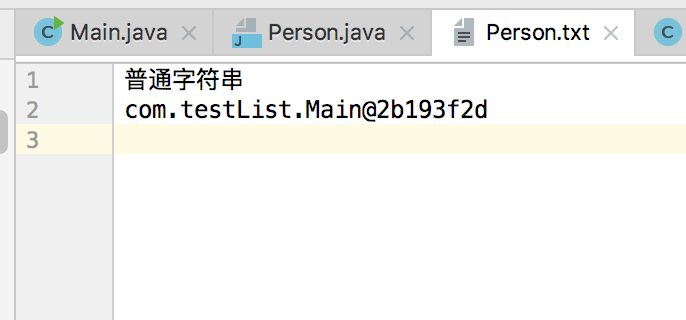
            ps.println("普通字符串");

            ps.println(new Main());

        }catch (IOException ex){

            ex.printStackTrace();

        }

    }

}
廖雪峰Java6IO编程-2input和output-1inputStream的更多相关文章
- 廖雪峰Java6IO编程-1IO基础-1IO简介
1.IO简介 IO是指Input/Output,即输入和输出: Input指从外部读取数据到内存,例如从磁盘读取,从网络读取. * 为什么要把数据读到内存才能处理这些数据呢? * 因为代码是在内存中运 ...
- 廖雪峰Java15JDBC编程-3JDBC接口-5JDBC连接池
1. JDBC连接池 1.1 JDBC连接池简介 线程池可以复用一个线程,这样大量的小任务通过线程池的线程执行,就可以避免反复创建线程带来的开销. 同样JDBC可以复用一个JDBC连接 JDBC的连接 ...
- 廖雪峰Java15JDBC编程-3JDBC接口-4JDBC事务
1 数据库事务:Transaction 1.1 定义 若干SQL语句构成的一个操作序列 要么全部执行成功 要么全部执行不成功 1.2 数据库事务具有ACID特性: Atomicity:原子性 一个事务 ...
- 廖雪峰Java15JDBC编程-3JDBC接口-3JDBC更新
使用update语句的时候,需要通过JDBC实现update语句的执行,这个时候仍然通过PreparedStatement对象来使用,直接传入update语句,然后通过setObject传入占位符的值 ...
- 廖雪峰Java15JDBC编程-3JDBC接口-2JDBC查询
我们可以使用JDBC查询来执行select语句. 1. Statement try(Connection conn = DriverManager.getConnection(JDBC_URL, JD ...
- 廖雪峰Java15JDBC编程-3JDBC接口-1JDBC简介
JDBC:Java DataBase Connectivity Java程序访问数据库的标准接口 使用Java程序访问数据库的时候,Java代码并不是直接通过TCP连接去访问数据库,而是通过JDBC接 ...
- 廖雪峰Java15JDBC编程-2SQL入门-2insert/select/update/delete
1. INSERT用于向数据库的表中插入1条记录 insert into 表名 (字段1,字段2,...) values (数据1,数据2,数据3...) 示例 -- 如果表存在,就删除 drop t ...
- 廖雪峰Java15JDBC编程-2SQL入门-1SQL介绍
1.SQL:结构化查询语言 Structured Query Language 针对关系数据库设计 各种数据库基本一致 允许用户通过SQL查询数据而不关心数据库底层存储结构 1.1 SQL使用: 可以 ...
- 廖雪峰Java15JDBC编程-1关系数据库基础-1关系数据库简介
1.数据库 1.1 定义 数据库是按照数据结构来组合.存储和管理数据的软件. 1.2 数据库模型 数据库有层次模型.网状模型.关系模型三种模型. 2 关系数据库 关系数据库是建立在关系模型上的数据库, ...
随机推荐
- (4)MySQL的外键(不同表之间的数据关联)
问题:下列这张表中部门等列名下输入的数据没有约束,那么可以随便填写符合规则的数据但是不符合实际需求的值,这样就造成了不符合规则的数据在表中存在,外键就是为了解决这个问题,管理员可以在另一张表中设置好符 ...
- powerdesigner基本使用
parent sonPK主键 FK外键 n ------> 1 alter table muniubox.cpa_accounting_book add constraint FK_Refere ...
- 转载 React.createClass 对决 extends React.Component
先给出结论,这其实是殊途同归的两种方式.过去我们一般都会使用 React.createClass 方法来创建组件,但基于 ES6 的小小语法糖,我们还可以通过 extends React.Compon ...
- 配置文件schema约束
解释:https://blog.csdn.net/zh15732621679/article/details/79074380 操作:https://blog.csdn.net/lhg_55/arti ...
- streamdataio 实时数据分发平台
streamdataio 是一个实时的数据分发平台(当然是收费的,但是设计部分可以借鉴),我们可以通过这个平台 方便的拉取rest api 数据,或者发布数据到后端,streamdataio 可以帮助 ...
- 使用ipns 解决ipfs 内容更新的问题
ipds 可以使用dnslink 解决域名访问的问题,但是内容变更我们就会有新的hashid 解决方法我们可以使用ipns ,同时解决dnslink 解决域名的问题 环境准备 docker-compo ...
- FastAdmin Bootstrap-Table 自定义搜索的重写提示
Bootstrap-Table 自定义搜索的重写提示 群友询问:这个搜索能自己写么? [群主]Karson-深圳(请勿@) "★找大神-山西 10:59:32 查看原文 [图片] 这个搜索能 ...
- docker for mac 安装 kubernetes、kubernetes dashboard
安装参考地址(按照此文档,安装成功):https://yq.aliyun.com/articles/508460 官方说明:https://kubernetes.io/docs/tasks/acces ...
- taro 组件的外部样式和全局样式
自定义组件对应的样式文件,只对该组件内的节点生效. 编写组件样式时,需要注意以下几点: 组件和引用组件的页面不能使用 id 选择器(#a).属性选择器([a])和标签名选择器,请改用 class 选择 ...
- bzoj 2870 最长道路tree——边分治
题目:https://www.lydsy.com/JudgeOnline/problem.php?id=2870 关于边分治:https://www.cnblogs.com/Khada-Jhin/p/ ...