
OC屏幕手势解锁
感觉屏幕解锁好像很牛的样子,所以试着写了一个,代码很简单,手势用到的也是原生的,如果该代码帮助了你,记得点赞,如果该代码有任何问题,也可以随时和我联系。改代码用到的两张图片,是我随便找的两张,可以自行找图片代替
效果图:
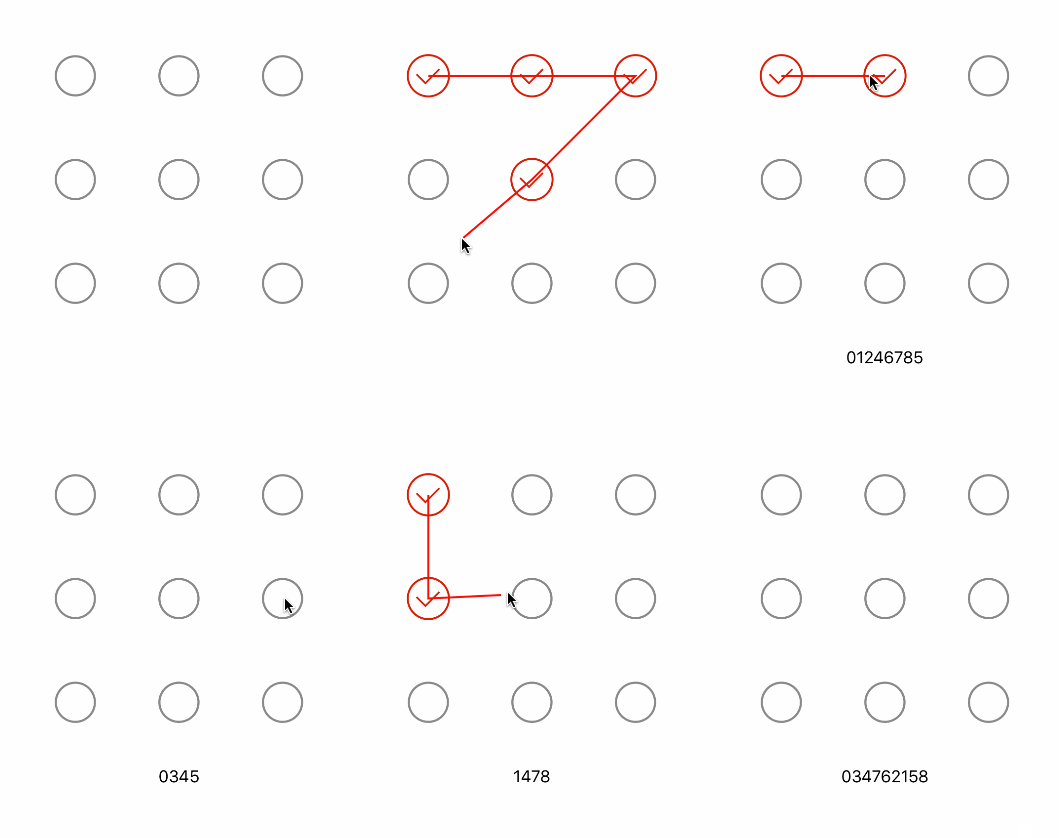
需要用到的代码:
ScreenLockView.h
#import <UIKit/UIKit.h>

@interface ScreenLockView : UIView

@property(nonatomic,copy)void(^blockScreenPas)(NSString *pas);

@end
ScreenLockView.m
#import "ScreenLockView.h"

#define Row 3 //3行

#define Col 3 //3列

#define Width 50 //这边宽度和高度一样,都设置为50

@interface ScreenLockView ()

@property(nonatomic,strong)NSMutableArray *choseArr;

@property(nonatomic,assign)CGPoint currPoint;

@end

@implementation ScreenLockView

-(instancetype)initWithFrame:(CGRect)frame{

    self = [super initWithFrame:frame];

    if(self){

        self.backgroundColor = [UIColor whiteColor];

        self.choseArr = [NSMutableArray array];

        for(int i = 0 ; i < 9 ; i++){

            UIButton *btn = [UIButton buttonWithType:UIButtonTypeCustom];

            int row = i / Row;//行

            int col = i % Col;//列

            //行间距

            int rowMargin = (frame.size.width - Width * Row)/(Row-1);

            //列间距

            int colMargin = (frame.size.height - Width * Col)/(Col-1);

            btn.frame = CGRectMake((Width+rowMargin)*col, (colMargin+Width)*row, Width,  Width);

            [btn setImage:[UIImage imageNamed:@"noChose"] forState:UIControlStateNormal];

            [btn setImage:[UIImage imageNamed:@"chose"] forState:UIControlStateSelected];

            btn.tag = i;

            [self addSubview:btn];

            btn.userInteractionEnabled = NO;

        }

    }

    return self;

}

-(void)touchesBegan:(NSSet<UITouch *> *)touches withEvent:(UIEvent *)event{

    UITouch *touch = [touches anyObject];

    CGPoint touchPoine = [touch locationInView:self];

    [self isContainsWithPoint:touchPoine];

}

-(void)touchesMoved:(NSSet<UITouch *> *)touches withEvent:(UIEvent *)event{

    UITouch *touch = [touches anyObject];

    CGPoint touchPoine = [touch locationInView:self];

    [self isContainsWithPoint:touchPoine];

     self.currPoint = touchPoine;

     [self setNeedsDisplay];

}

-(void)touchesEnded:(NSSet<UITouch *> *)touches withEvent:(UIEvent *)event{

    NSString *pas = @"";

    for(UIButton *btn in self.choseArr){

        btn.selected = NO;

        pas = [pas stringByAppendingString:[NSString stringWithFormat:@"%ld",(long)btn.tag]];

    }

    if(self.blockScreenPas){

        self.blockScreenPas(pas);

    }

    [self.choseArr removeAllObjects];

    [self setNeedsDisplay];

}

/**

 判断point是否被UIButton的frame包含

 */

-(void)isContainsWithPoint:(CGPoint)point{

    for(UIButton *btn in [self subviews]){

        if(CGRectContainsPoint(btn.frame ,point )&& ![self.choseArr containsObject:btn]){

            [self.choseArr addObject:btn];

            btn.selected = YES;

        }

    }

}

- (void)drawRect:(CGRect)rect {

    UIBezierPath * path = [UIBezierPath bezierPath];

    for(int i=0;i<self.choseArr.count;i++){

        UIButton *btn = self.choseArr[i];

        if(i == 0){

            [path moveToPoint:btn.center];//起始点

        }else{

             [path addLineToPoint:btn.center];

        }

    }

    [path addLineToPoint:self.currPoint];

    [path setLineWidth:2.f];

    [[UIColor redColor] set];

    [path stroke];

}

@end
使用:
ScreenLockView *lockView = [[ScreenLockView alloc]initWithFrame:CGRectMake(0, 0, 260, 260)];

    lockView.center = self.view.center;

    [self.view addSubview:lockView];

    UILabel *label = [[UILabel alloc]initWithFrame:CGRectMake(0, 0, 260, 30)];

    label.textAlignment = NSTextAlignmentCenter;

    label.center = CGPointMake(self.view.center.x, lockView.frame.origin.y+lockView.frame.size.height+50);

    [self.view addSubview:label];

    lockView.blockScreenPas = ^(NSString *pas) {

        label.text = pas;

    };
OC屏幕手势解锁的更多相关文章
- HTML5实现屏幕手势解锁
HTML5实现屏幕手势解锁(转载) https://github.com/lvming6816077/H5lockHow to use? <script type="text/java ...
- HTML5实现屏幕手势解锁(转载)
来源:https://github.com/lvming6816077/H5lockhttp://threejs.org/examples/http://www.inf.usi.ch/phd/wett ...
- iOS-高仿支付宝手势解锁(九宫格)
概述 高仿支付宝手势解锁, 通过手势枚举去实现手势密码相对应操作. 详细 代码下载:http://www.demodashi.com/demo/10706.html 基上篇[TouchID 指纹解锁] ...
- SJGestureUnlock快速集成手势解锁
前言:如果页面显示不完整或图片看不了还请移步:简书 SJGestureUnlock.h 常用自定义属性 @interface SJGestureUnlock : UIView @property (n ...
- Quartz2D复习(二) --- 手势解锁
这次支付宝手机客户端升级,把手势解锁那个功能去掉了,引起很多人的抱怨,觉得少了手势解锁的保护,个人信息容易泄漏了... 那么手势解锁功能是怎么是实现的呢,这里使用Quart2D来简单模拟一下, 先看下 ...
- iOS--开发之手势解锁
本文主要介绍通过手势识别实现手势解锁功能,这个方法被广泛用于手机解锁,密码验证,快捷支付等功能实现.事例效果如下所示. 首先,我们先分析功能的实现过程,首先我们需要先看大致的实现过程: 1.加载九宫格 ...
- 2016-1-10 手势解锁demo的实现
一:实现自定义view,在.h,.m文件中代码如下: #import <UIKit/UIKit.h> @class ZLLockView; @protocol ZLLockViewDele ...
- iOS绘制手势解锁密码
手势解锁这个功能其实已经用的越来越少了.但是郁闷不知道我公司为什么每次做一个app都要把手势解锁加上.....于是就自己研究了一下手势解锁页面的实现.. 要想实现这个页面,先说说需要掌握哪些: UIP ...
- [iOS UI进阶 - 5.0] 手势解锁Demo
A.需求 1.九宫格手势解锁 2.使用了绘图和手势事件 code source: https://github.com/hellovoidworld/GestureUnlockDemo B ...
随机推荐
- 和我一起学Effective Java之泛型
泛型 不要在新代码中使用原始类型 泛型(generic):声明中具有一个或多个类型参数 原始类型(raw type):不带任何实际类型参数的泛型名称 格式: 类或接口的名称 < 对应于泛型形式类 ...
- 什么是跨域访问,JSON&JSONP
http://blog.csdn.net/notechsolution/article/details/50394391 更详细的讲解,关于同源策略等: http://www.cnblogs.com/ ...
- [Node.js] 00 - Where do we put Node.js
Ref: 前后端分离的思考与实践(五篇软文) 其实就是在吹淘宝自己的Midway-ModelProxy架构. 第一篇 起因 为了提升开发效率,前后端分离的需求越来越被重视, 同一份数据接口,我们可以定 ...
- tomcat 下安装 MantisBT
环境 OS:win8.1 up1 64bit tomcat :9.0.0 64bit php: php-7.1.7-nts-Win32-VC14-x64.zip postgres: postgresq ...
- Android图片管理组件(双缓存+异步加载)
转自:http://www.oschina.net/code/snippet_219356_18887?p=3#comments ImageManager2这个类具有异步从网络下载图片,从sd读取本地 ...
- 在Ubuntu 14.04.1中安装VMware Tools的步骤
1. 在VMware Fusion 6.0.4下安装Ubuntu镜像:ubuntu-14.04.1-desktop-amd64.iso 2. 点击虚拟机菜单栏-安装VMware Tools 3. 在U ...
- PHP开启伪静态(AppServ服务器)
mod_rewrite是Apache的一个非常强大的功能,它可以实现伪静态页面.下面我详细说说它的使用方法 1.检测Apache是否支持mod_rewrite 通过php提供的phpinfo()函数查 ...
- nginx 动静分离(相同URL)
#报表 location ~* /(report)/ { if ($request_uri !~* .*(jd|taobao|operator).* ){ proxy_pass http://tweb ...
- E - 487--3279
Businesses like to have memorable telephone numbers. One way to make a telephone number memorable is ...
- php链式操作的实现
);//$db->where("id=1");//$db->where("name=2");//$db->order("id des ...