
centos 7.0 修改ssh默认连接22端口 和 添加防火墙firewalld 通过端口
首先 先做的就是 修改ssh的默认端口22
需要修改文件
/etc/ssh/sshd_config
使用命令
vi /etc/ssh/sshd_config
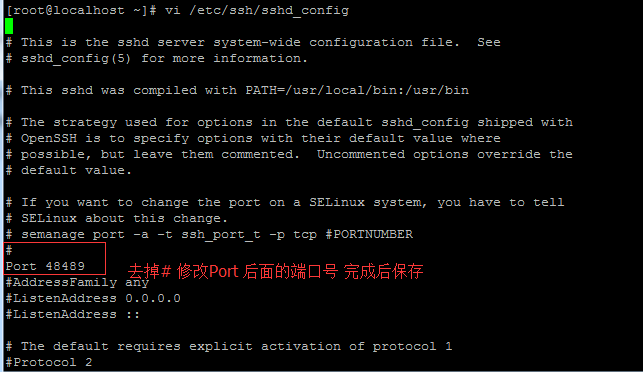
[root@localhost ~]# vi /etc/ssh/sshd_config

#       $OpenBSD: sshd_config,v 1.90 2013/05/16 04:09:14 dtucker Exp $

# This is the sshd server system-wide configuration file.  See

# sshd_config(5) for more information.

# This sshd was compiled with PATH=/usr/local/bin:/usr/bin

# The strategy used for options in the default sshd_config shipped with

# OpenSSH is to specify options with their default value where

# possible, but leave them commented.  Uncommented options override the

# default value.

# If you want to change the port on a SELinux system, you have to tell

# SELinux about this change.

# semanage port -a -t ssh_port_t -p tcp #PORTNUMBER

#

Port 48489

#AddressFamily any

#ListenAddress 0.0.0.0

#ListenAddress ::

# The default requires explicit activation of protocol 1

#Protocol 2

# HostKey for protocol version 1

#HostKey /etc/ssh/ssh_host_key

# HostKeys for protocol version 2

HostKey /etc/ssh/ssh_host_rsa_key

#HostKey /etc/ssh/ssh_host_dsa_key

HostKey /etc/ssh/ssh_host_ecdsa_key

# Lifetime and size of ephemeral version 1 server key

#KeyRegenerationInterval 1h

#ServerKeyBits 1024

# Ciphers and keying

#RekeyLimit default none

# Logging

# obsoletes QuietMode and FascistLogging

#SyslogFacility AUTH

SyslogFacility AUTHPRIV

#LogLevel INFO

# Authentication:

#LoginGraceTime 2m

#PermitRootLogin yes

#StrictModes yes

#MaxAuthTries 6

#MaxSessions 10

#RSAAuthentication yes

#PubkeyAuthentication yes

# The default is to check both .ssh/authorized_keys and .ssh/authorized_keys2

# but this is overridden so installations will only check .ssh/authorized_keys

AuthorizedKeysFile      .ssh/authorized_keys

#AuthorizedPrincipalsFile none

#AuthorizedKeysCommand none
先做就完成了 端口的修改 然后就需要让防火墙通过这个端口
具体操作 就是 按 I 键,进入插入编辑,找到Port前面的#去掉 ,改成自己需要的端口号
centos 7 默认使用的 是 firewalld 所以先看看是否运行
firewall-cmd --state

然后看下 先做默认通过的端口都有哪些
查看端口 规则
firewall-cmd --permanent --list-port

刚才测试 添加了 端口 现在删除这个端口 参数--permanent 是永久配置 机子重启依然有效
删除端口
firewall-cmd --permanent --remove-port=48489/tcp

添加端口 到防火墙例外
firewall-cmd --permanent --zone=public --add-port=48489/tcp

然后通过putty ssh连接软件链接一下就好了~
firewalld 参考资料
http://blog.csdn.net/smstong/article/details/39317277
centos 7.0 修改ssh默认连接22端口 和 添加防火墙firewalld 通过端口的更多相关文章
- CentOS 6.0修改ssh远程连接端口
转自:系统运维 » CentOS 6.0修改ssh远程连接端口 实现目的:把ssh默认远程连接端口修改为2222 方法如下: 1.编辑防火墙配置:vi /etc/sysconfig/iptables ...
- CentOS 7.0 更改SSH 远程连接 端口号
许多学习过redhat 7的同学们,在使用centos的时候总会遇到一些问题,因为centos在安装时会默认开启一些服务,今天我们就来更改下centos 7.0的SSH端口. 操作步骤: 远程登录到c ...
- centos 5.11修改ssh默认端口号
查看下服务器端口号范围: # sysctl -a|grep ip_local_port_range net.ipv4.ip_local_port_range = 32768 61000 新 ...
- RHEL7 修改SSH默认端口及修改SELinux运行状态
RHEL7安装后,默认开启SSH服务以便远程配置,但默认端口22并不安全,一般不建议使用默认端口,那就修改SSH默认端口.在sshd_config里面的修改RHEL7.0上修改和7.0以下类似,但要注 ...
- CentOS7修改SSH远程连接端口
CentOS7修改SSH远程连接端口
- Linux Centos 6.9中SSH默认端口修改的坑
关于Linux Centos6.5的SSH默认端口修改的博客有一大堆,我在这里就不啰嗦了,但是面对Centos 6.9,就会发现有一个巨坑: 修改iptables之后执行下面的命令后: # servi ...
- LINUX 修改SSH默认22端口的方法
首先修改配置文件 vi /etc/ssh/sshd_config 找到#Port 22一段,这里是标识默认使用22端口,修改为如下: Port 22 Port 50000 然后保存退出 执行/etc/ ...
- CentOs 6.5设置使用私钥登录关闭ssh的密码登录修改ssh默认端口
使用SecureCRT工具创建RSA公钥和私钥 [选项]=>[会话选项] 然后在弹出对话框中选择[公钥]然后点击[属性]: 在弹出窗口中选中[使用会话公钥设置],点击[创建身份文件]按钮: 然后 ...
- centos修改ssh默认端口号的方法
修改/etc/ssh/sshd_config配置文件(注意:这里是sshd_config,而不是ssh_config) vi /etc/ssh/sshd_config 在sshd_config文件中添 ...
随机推荐
- ActiveMQ跑起来
转自:http://blog.163.com/chengwei_1104/blog/static/5364527420138231573547/?suggestedreading&wumii ...
- [bzoj4326][NOIP2015]运输计划
Description 公元2044年,人类进入了宇宙纪元. 国有个星球,还有条双向航道,每条航道建立在两个星球之间,这条航道连通了国的所有星球. 小掌管一家物流公司,该公司有很多个运输计划,每个运输 ...
- 如果把表单数据的校验交给了javascript那么后台还有没有必要对数据做校验呢
现在很多同事,包括我,我表单的数据验证交给了javascript来做,那么新的问题来了,如果交给了javascript那么后台还有没有必要对数据做校验呢
- Webpack打包工具实时更新操作(启用观察者模式)
可能存在这样的问题,每次修改完js/css文件之后,都要进行手动打包一下,浏览器上刷新一下. 那么我一般这样做: 1.安装Hbuilder,并启用边编辑边看的模式(其实这个是默认的). 2.启动Web ...
- Oracle数据库查看当前数据库版本的方法
常用的有三种方法: 方法一:v$version SQL> select * from v$version; BANNER ---------------------------------- ...
- 洛谷P1901 发射站
题目描述 某地有 N 个能量发射站排成一行,每个发射站 i 都有不相同的高度 Hi,并能向两边(当 然两端的只能向一边)同时发射能量值为 Vi 的能量,并且发出的能量只被两边最近的且比 它高的发射站接 ...
- Tiny C Compiler(Tcc)
catalog . Tcc introduction . Tcc安装配置 . Tcc Programing 1. Tcc introduction TCC基本和GCC兼容 . 符合ANSI C(C8 ...
- [IOS 静态库]
http://www.2cto.com/kf/201402/276718.html 一.什么是库? 库是共享程序代码的方式,一般分为静态库和动态库. 二.静态库与动态库的区别? 静态库:链接时完整地拷 ...
- RabbitMQ配置文件
配置文件Config 在Web的可视化管理界面中可以看到一些文件的路径 比如 Config文件的地址 数据库存放的文件夹 log文件的地址 进入到这个文件夹会发现有这些文件,其中example是con ...
- MySQL数据库的高可用性分析
MySQL数据库是目前开源应用最大的关系型数据库,有海量的应用将数据存储在MySQL数据库中.存储数据的安全性和可靠性是生产数据库的关注重点.本文分析了目前采用较多的保障MySQL可用性方案. MyS ...