
(Forward) Music Player: From UI Proposal to Code
Some developers have difficult to code when the UI proposal is a bit “sophisticated” or “complex”. Many of them strip a lot of significant portion of the UI or even the Motion when they are coding, and the result ends up quite different of the original proposal.
This post talks about how would be to code an UI proposal, skipping some basic Android details and focusing in the transition and animation approach.
MaterialUp
A great website where designers and developers can find and share resources to build apps and sites using Material Design. There is a lot of user interfaces, experiments, open-source apps, libraries and ready-to-use products in Android, Web, and iOS that you can find there.
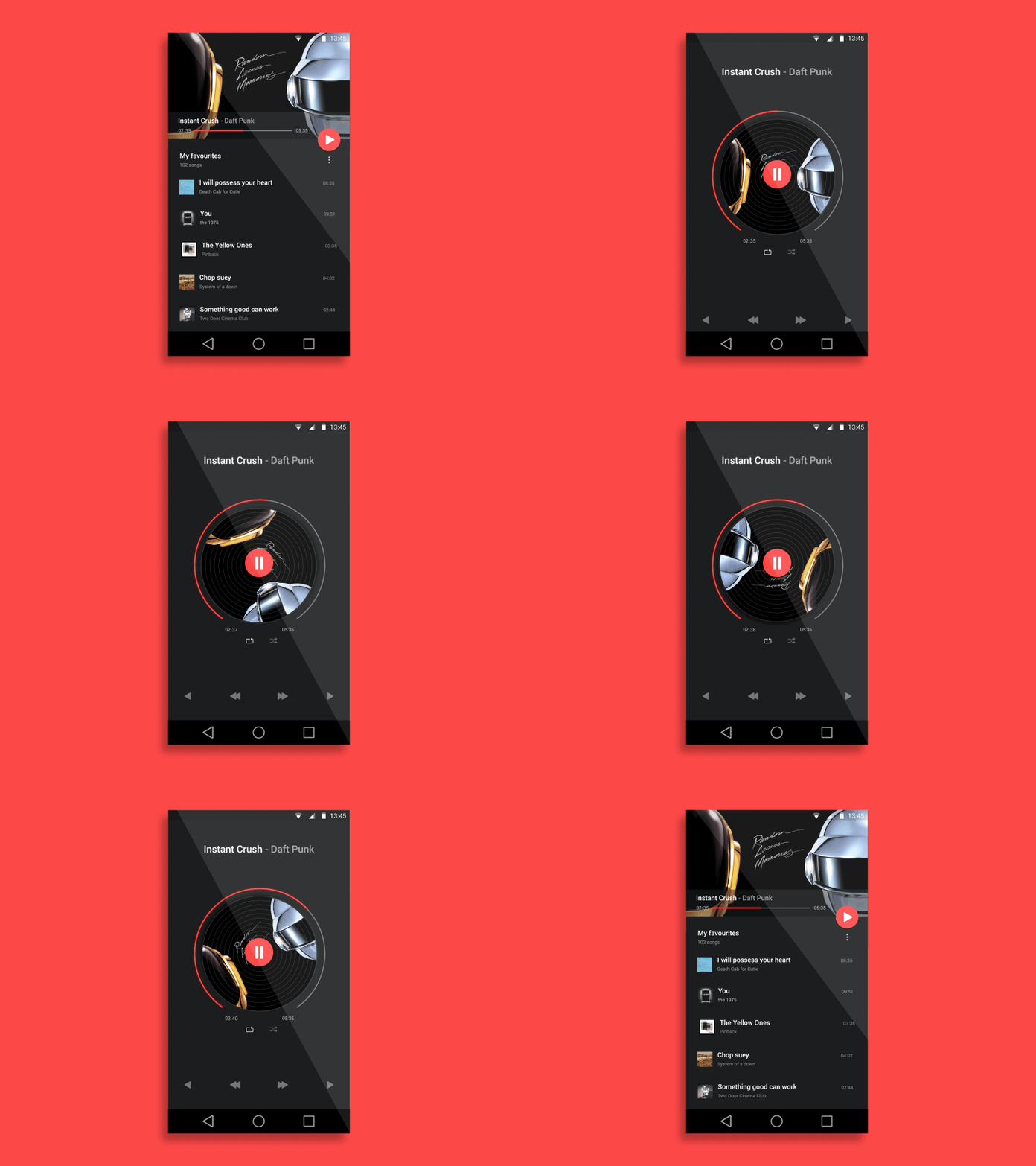
Music Player transition by Anish Chandran
Exploring that website you can find this user interface resource called Music Player created by Anish Chandran.
That proposal gives us a good sample of how would be a music player app that uses Material and Motion design in a fluid and consistent manner.
Warming up
First of all we need to do something that helps us to code all these motion.
Split the motion proposal in frames
Convert the animated proposal file into individual frames. This will help us to view each step of the animations and transitions.
Separate by types
We have a lot of views transitioning and animating at same time, and think how to code this way will be very hard. We can separate those transitions and animations by type, for example: Views sliding to bottom, Views fading out, Views moving out to new Activity, etc.
The next tip is a good one to use in EVERY layout, with motion or not.
Simplify your view hierarchy
Create view hierarchy as simpler as possible, avoiding to use a lot of View Groups in the same layout. This will make easy the transition choreography, will help the maintenance, as well as improve significantly the app performance mainly during the animations.
How the magic happens
In layout files, some View Groups have the android:transitionGroup attribute set to true because they need to be treated as a single entity during the Activity Transitions as in the playlist info container (main layout file) or controls container (detail layout file).
<RelativeLayout
2     android:id="@+id/playlist"
3     android:layout_width="match_parent"
4     android:layout_height="wrap_content"
5     android:layout_below="@id/cover"
6     android:gravity="center_vertical"
7     android:padding="@dimen/activity_vertical_margin"
8     android:transitionGroup="true">
9 …
10

11 <LinearLayout
12     android:id="@+id/controls"
13     android:layout_width="match_parent"
14     android:layout_height="wrap_content"
15     android:layout_alignParentBottom="true"
16     android:gravity="center_horizontal"
17     android:transitionGroup="true"
18     app:layout_marginBottomPercent="5%">
19 …
In styles.xml we have the themes used in our Main Activity and Detail Activity.
- AppTheme.Main
windowSharedElementsUseOverlay.xml  Permalink

1 <item name="android:windowSharedElementsUseOverlay">false</item>
Disable overlaying of shared element views. In this Music Player layouts we need to disable the overlay when shared element views is moving out from Main to Detail Activity. If it’s enabled, some shared element views could overlay other views in a wrong manner.
list_content_exit_reenter_transition.xml  Permalink

1 <item name="android:windowExitTransition">@transition/list_content_exit_transition</item>
2 <item name="android:windowReenterTransition">@transition/list_content_reenter_transition</item>
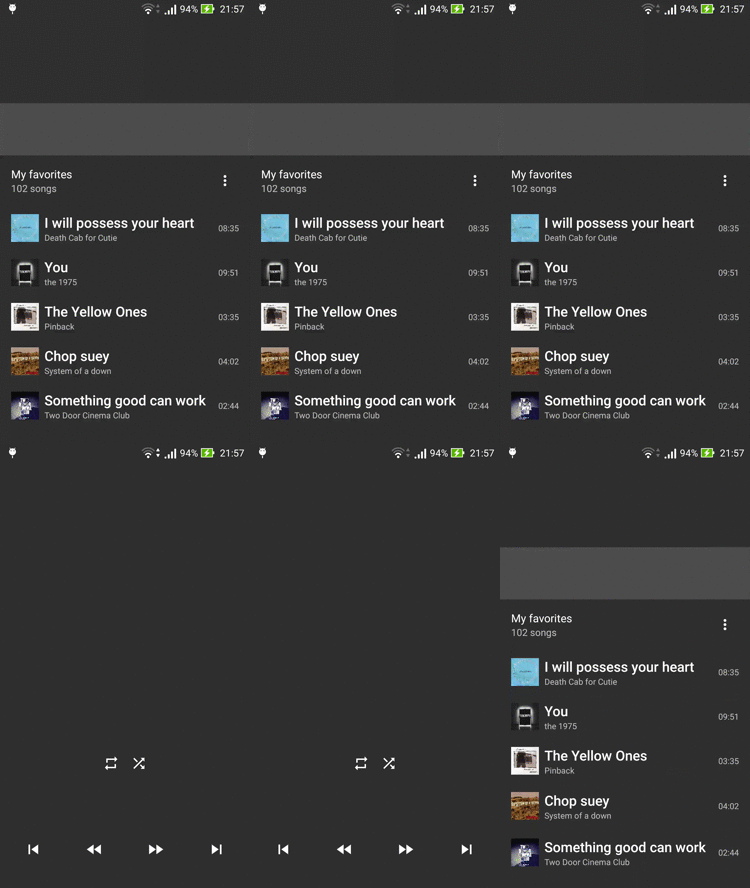
It has the same transition approach in both exit and reenter transition of list content.
list_content_exit_reenter_transition.xml  Permalink

1 <?xml version="1.0" encoding="utf-8"?>
2 <transitionSet xmlns:android="http://schemas.android.com/apk/res/android"
3     android:duration="@integer/anim_duration_default"
4
5     // 1
6     android:startDelay="@integer/anim_duration_default">
7

8     // 2
9     <fade>
10         <targets>
11             <target android:targetId="@id/pane" />
12         </targets>
13     </fade>
14
15     // 3
16     <slide android:slideEdge="bottom">
17         <targets>
18             <target android:excludeId="@android:id/statusBarBackground" />
19             <target android:excludeId="@id/pane" />
20             <target android:excludeId="@android:id/navigationBarBackground" />
21         </targets>
22     </slide>
23

24 </transitionSet>
- Set a start delay to synchronize these transitions with the FAB morph animation.
- Fade just the pane view specified by targetId attribute.
- Slide to bottom the RecyclerView childs and playlist info container, excluding status bar, pane, and navigation bar specified by excludeId attribute.
list_shared_element_exit_reenter_transition.xml  Permalink

1 <item name="android:windowSharedElementExitTransition">@transition/list_shared_element_exit_transition</item>
2 <item name="android:windowSharedElementReenterTransition">@transition/list_shared_element_reenter_transition</item>

It has almost the same transition approach in both exit and reenter transition of list content.
 list_shared_element_exit_reenter_transition.xml  Permalink

1 <transitionSet xmlns:android="http://schemas.android.com/apk/res/android"
2     xmlns:app="http://schemas.android.com/apk/res-auto"
3     android:duration="@integer/anim_duration_default">
4

5     // 1
6     <transition
7         class="com.sample.andremion.musicplayer.transition.PlayButtonTransition"
8         app:mode="play|pause" />
9

10 </transitionSet>
- PlayButtonTransitionis a custom transition that wraps an AnimatedVectorDrawableand used to morph the play icon into pause icon or vice-versa, depending the mode value.
- AppTheme.Detail
  detail_content_enter_return_transition.xml  Permalink

1 <item name="android:windowEnterTransition">@transition/detail_content_enter_transition</item>
2 <item name="android:windowReturnTransition">@transition/detail_content_return_transition</item>

It has the same transition approach in both enter and return transition of detail content.
detail_content_enter_return_transition.xml  Permalink

1 <transitionSet xmlns:android="http://schemas.android.com/apk/res/android"
2     android:duration="@integer/anim_duration_default">
3

4     // 1
5     <fade>
6         <targets>
7             <target android:targetId="@id/ordering" />
8         </targets>
9     </fade>
10
11     // 2
12     <slide android:slideEdge="bottom">
13         <targets>
14             <target android:targetId="@id/controls" />
15         </targets>
16     </slide>
17

18 </transitionSet>
- Fade just the ordering container specified by targetId attribute.
- Slide to bottom just the controls container specified by targetId attribute.
detail_shared_element_enter_transition.xml  Permalink

1 <item name="android:windowSharedElementEnterTransition">@transition/detail_shared_element_enter_transition</item>
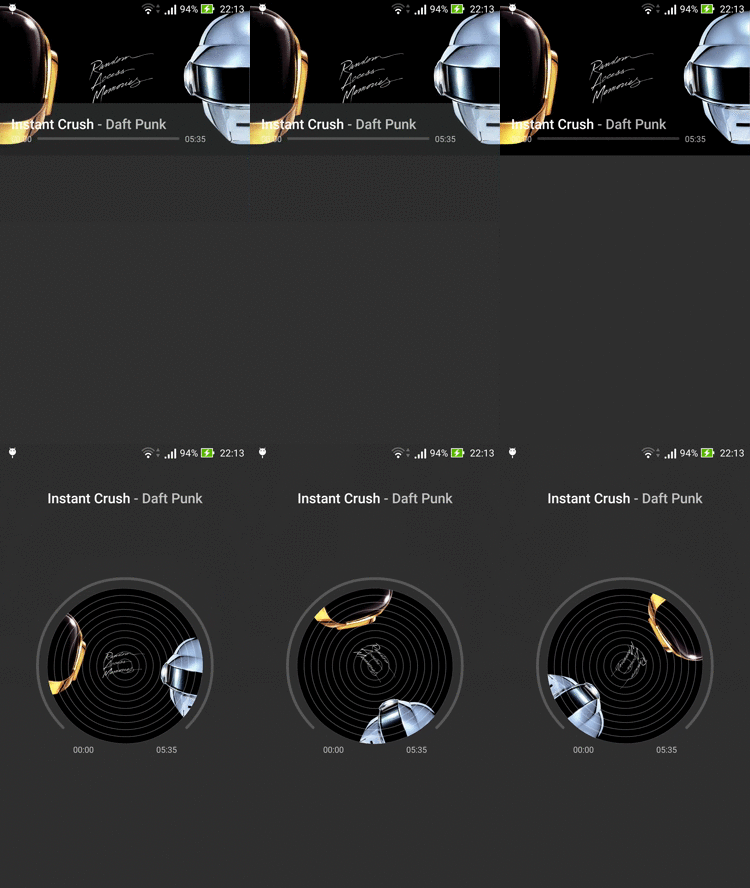
detail_shared_element_enter_transition.xml  Permalink

1 <transitionSet xmlns:android="http://schemas.android.com/apk/res/android"
2     android:duration="@integer/anim_duration_default"
3
4     // 1
5     android:interpolator="@android:interpolator/accelerate_quad">
6
7     // 2
8     <transition class="com.sample.andremion.musicplayer.transition.ProgressViewTransition" />
9
10     // 3
11     <transition class="com.sample.andremion.musicplayer.transition.CoverViewTransition" />
12
13     // 4
14     <transitionSet>
15         <changeBounds />
16         <changeTransform />
17         <changeClipBounds />
18         <changeImageTransform />
19     </transitionSet>
20

21 </transitionSet>
- Define an interpolator to the rate of change of transition, allowing a non-linear motion.
- ProgressViewTransition is a custom transition that uses a ProgressView to “morph” an horizontal progress view to an arc progress view.
- CoverViewTransition is another custom transition that uses CoverView to “morph” the squared cover view to circled cover view with track lines.
- Use default move transitions into the others shared element views.
Raw

  detail_shared_element_return_transition.xml  Permalink

1 <item name="android:windowSharedElementReturnTransition">@transition/detail_shared_element_return_transition</item>
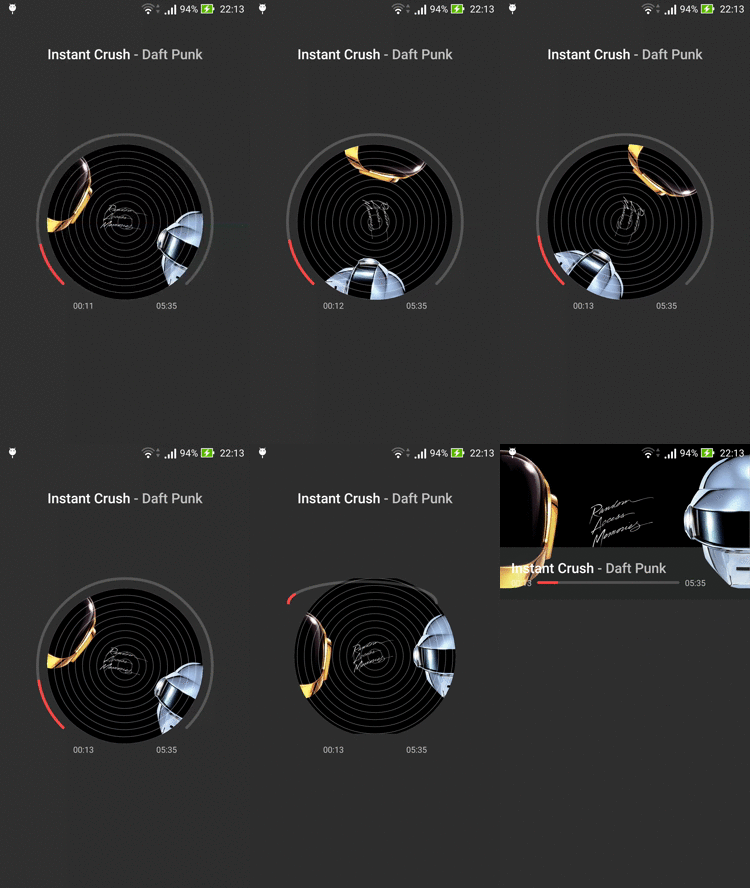
In this transition was used almost the same approach of detail_shared_element_enter_transition. But it was added some delay for each part to match this transition with the proposal.
detail_shared_element_return_transition.xml  Permalink

1 <transitionSet xmlns:android="http://schemas.android.com/apk/res/android"
2     xmlns:app="http://schemas.android.com/apk/res-auto"
3     android:duration="@integer/anim_duration_default"
4     android:interpolator="@android:interpolator/accelerate_quad">
5

6     // 1
7     <transitionSet>
8         <changeBounds />
9         <changeTransform />
10         <changeClipBounds />
11         <changeImageTransform />
12         <transition
13             class="com.sample.andremion.musicplayer.transition.ProgressViewTransition"
14             app:morph="1" />
15         <targets>
16             <target android:targetId="@id/progress" />
17         </targets>
18     </transitionSet>
19

20     // 2
21     <transitionSet android:startDelay="@integer/anim_duration_short">
22         <changeBounds />
23         <changeTransform />
24         <changeClipBounds />
25         <changeImageTransform />
26         <transition
27             class="com.sample.andremion.musicplayer.transition.CoverViewTransition"
28             app:shape="circle" />
29         <targets>
30             <target android:targetId="@id/cover" />
31         </targets>
32     </transitionSet>
33

34     // 3
35     <transitionSet android:startDelay="@integer/anim_duration_default">
36         <changeBounds />
37         <changeTransform />
38         <changeClipBounds />
39         <changeImageTransform />
40     </transitionSet>
41

42 </transitionSet>
- The reverse “morph” mode, from arc progress view to horizontal progress view.
- The reverse “morph” mode, from circled cover view to squared cover view.
- Use default move transitions into the others shared element views.
Final Result
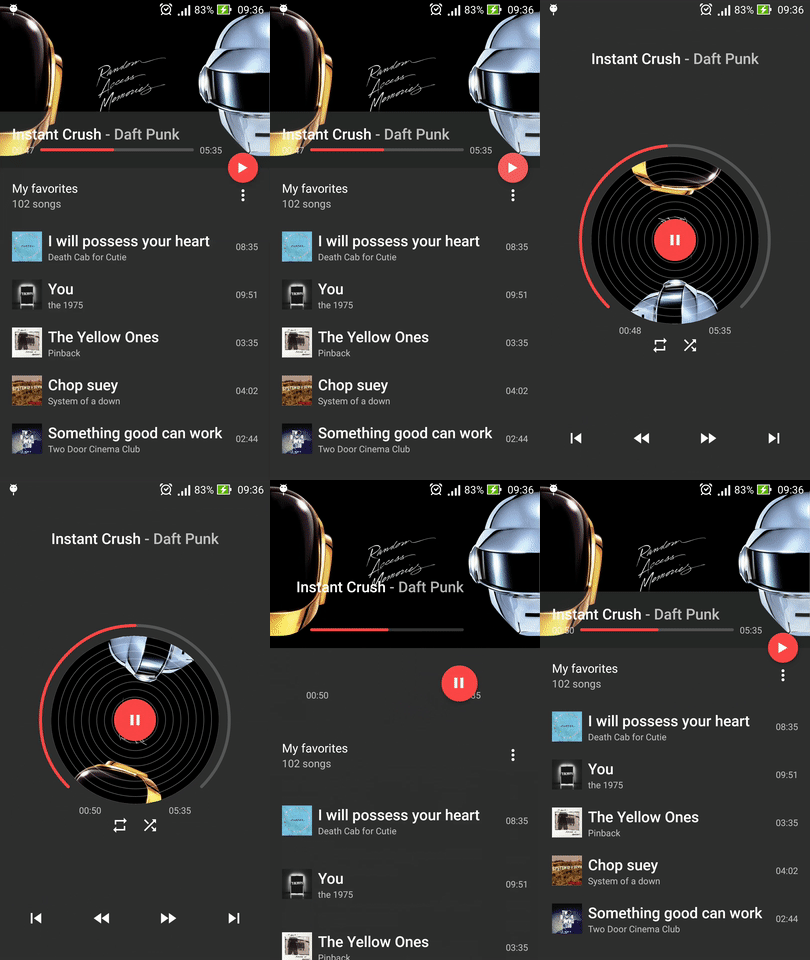
Music Player coded by André Mion
The final result should be like that. Of course, some minimal details can be missed in the final project but it would be a little thing.
The entire project can be found in https://github.com/andremion/Music-Player
At link below you can read more about meaningful motion on Android
(Forward) Music Player: From UI Proposal to Code的更多相关文章
- Sound (audio file) player in java - working source code example
转载自:http://ganeshtiwaridotcomdotnp.blogspot.com/2011/12/sound-audio-file-player-in-java-working.html ...
- IOS开发中UI编写方式——code vs. xib vs.StoryBoard
最近接触了几个刚入门的iOS学习者,他们之中存在一个普遍和困惑和疑问,就是应该如何制作UI界面.iOS应用是非常重视用户体验的,可以说绝大多数的应用成功与否与交互设计以及UI是否漂亮易用有着非常大的关 ...
- Qt中forward declaration of struct Ui::xxx的解决
每当你新键一个 QT设计界面, QT会自动生成yyy.ui文件,如 <?xml version="1.0" encoding="UTF-8"?> & ...
- 解决QT:forward declaration of 'struct Ui::xxx';invalid use of incomplete struct "Ui::Widget" 等莫名奇异错误
今天在进行QT Widget的UI设计时,改了下Widget的对象名,然后在多次成功编译执行后,执行清理,又一次构建,就出现了好多莫名奇异的错误: widget.h:12: 错误:forward de ...
- MVC模式在UI里的应用
In a similar way to other parts of a game, user interfaces usually go through several iterations unt ...
- 计算机视觉code与软件
Research Code A rational methodology for lossy compression - REWIC is a software-based implementatio ...
- Semantic ui 学习笔记 持续更新
这个semantic 更新版本好快~ 首先是代码的标识<code></code> 具体样式就是红框这样的 圈起来代码感觉不错 不过要在semantic.css里在加上如下样式~ ...
- Android Non-UI to UI Thread Communications(Part 1 of 5)
original:http://www.intertech.com/Blog/android-non-ui-to-ui-thread-communications-part-1-of-5/ ANDRO ...
- [EXP]Microsoft Windows CONTACT - Remote Code Execution
[+] Credits: John Page (aka hyp3rlinx) [+] Website: hyp3rlinx.altervista.org [+] Source: http://hyp3 ...
随机推荐
- <转>.php导出excel(多种方法)
基本上导出的文件分为两种:1:类Excel格式,这个其实不是传统意义上的Excel文件,只是因为Excel的兼容能力强,能够正确打开而已.修改这种文件后再保存,通常会提示你是否要转换成Excel文件. ...
- jQuery 的原型关系图,整体把握jQuery
若干个月前,在博客园中看到一篇文章,内容很简单,就是一幅图,展示的是 jQuery 中各对象之间的关系,当时就觉得,这就是我想要的最直观的总结 jQuery 的方式.在那篇文章中,也有 ...
- 黑马程序员:Java编程_基础语法
=========== ASP.Net+Android+IOS开发..Net培训.期待与您交流!=========== 一.数据类型 基本数据类型(简单数据类型.语言所内置的类型) 引用数据类型:(自 ...
- 学习笔记:The Log(我所读过的最好的一篇分布式技术文章)
前言 这是一篇学习笔记. 学习的材料来自Jay Kreps的一篇讲Log的博文. 原文很长,但是我坚持看完了,收获颇多,也深深为Jay哥的技术能力.架构能力和对于分布式系统的理解之深刻所折服.同时也因 ...
- PAT (Basic Level) Practise:1023. 组个最小数
[题目链接] 给定数字0-9各若干个.你可以以任意顺序排列这些数字,但必须全部使用.目标是使得最后得到的数尽可能小(注意0不能做首位).例如:给定两个0,两个1,三个5,一个8,我们得到的最小的数就是 ...
- 【Gerrit】gerrit server搭建
Part 1 Gerrit Prerequisites: 1.Java JDK>1.7 2.Git 3.SSH server 4.DB part 2 Set local gerrit serv ...
- MFC各种控件的常见操作(逐步添加中......)
由于经常切换系统或界面框架进行编程,难免有时会忘记之前的编程函数等等.所有在此自己做一个备份,以防止重新充电带来的痛苦! 1.CButton 1.1 在VC中编程实现按钮的启用(enable)和禁用( ...
- 如何让WordPress支持上传更多文件类型
如何让WordPress支持上传更多文件类型 可以在functions.php中这样写: 1 2 3 4 5 6 7 8 9 add_filter('upload_mimes', 'wpdit_f ...
- (转)Markov Chain Monte Carlo
Nice R Code Punning code better since 2013 RSS Blog Archives Guides Modules About Markov Chain Monte ...
- IntelliJ IDEA15导入jar包
在IDEA中导入jar包和eclipse中是不一样的,那么现在我们就来看看在IDEA中如何导入jar包. 1.点击"File"-->"Project Structu ...