
Newtonsoft.Json之JArray, JObject, JPropertyJValue
JObject staff = new JObject();
staff.Add(new JProperty("Name", "Jack"));
staff.Add(new JProperty("Age", 33));
staff.Add(new JProperty("Department", "Personnel Department"));
staff.Add(new JProperty("Leader", new JObject(new JProperty("Name", "Tom"), new JProperty("Age", 44), new JProperty("Department", "Personnel Department"))));
Console.WriteLine(staff.ToString());

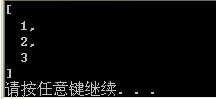
JArray arr = new JArray();
arr.Add(new JValue(1));
arr.Add(new JValue(2));
arr.Add(new JValue(3));
Console.WriteLine(arr.ToString());
string json = "{\"Name\" : \"Jack\", \"Age\" : 34, \"Colleagues\" : [{\"Name\" : \"Tom\" , \"Age\":44},{\"Name\" : \"Abel\",\"Age\":29}] }";
获取该员工的姓名
//将json转换为JObject
JObject jObj = JObject.Parse(json);
//通过属性名或者索引来访问,仅仅是自己的属性名,而不是所有的
JToken ageToken = jObj["Age"];
Console.WriteLine(ageToken.ToString());

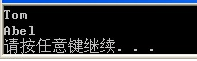
获取该员工同事的所有姓名
//将json转换为JObject
JObject jObj = JObject.Parse(json);
var names=from staff in jObj["Colleagues"].Children()
select (string)staff["Name"];
foreach (var name in names)
Console.WriteLine(name);
"Children()"可以返回所有数组中的对象
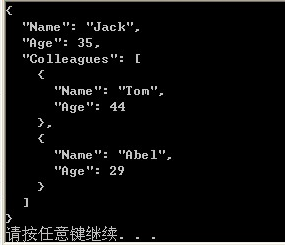
现在我们发现获取的json字符串中Jack的年龄应该为35
//将json转换为JObject
JObject jObj = JObject.Parse(json);
jObj["Age"] = 35;
Console.WriteLine(jObj.ToString());
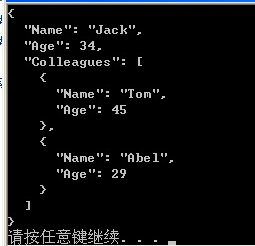
现在我们发现Jack的同事Tom的年龄错了,应该为45
//将json转换为JObject
JObject jObj = JObject.Parse(json);
JToken colleagues = jObj["Colleagues"];
colleagues[0]["Age"] = 45;
jObj["Colleagues"] = colleagues;//修改后,再赋给对象
Console.WriteLine(jObj.ToString());
删除
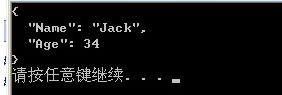
①现在我们想删除Jack的同事
JObject jObj = JObject.Parse(json);
jObj.Remove("Colleagues");//跟的是属性名称
Console.WriteLine(jObj.ToString());
现在我们发现Abel不是Jack的同事,要求从中删除
JObject jObj = JObject.Parse(json);
jObj["Colleagues"][1].Remove();
Console.WriteLine(jObj.ToString());

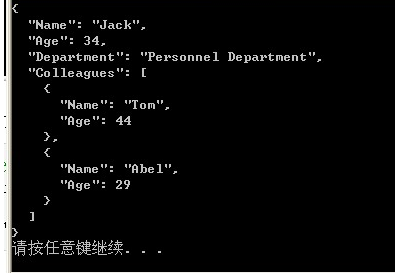
我们发现Jack的信息中少了部门信息,要求我们必须添加在Age的后面
//将json转换为JObject
JObject jObj = JObject.Parse(json);
jObj["Age"].Parent.AddAfterSelf(new JProperty("Department", "Personnel Department"));
Console.WriteLine(jObj.ToString());
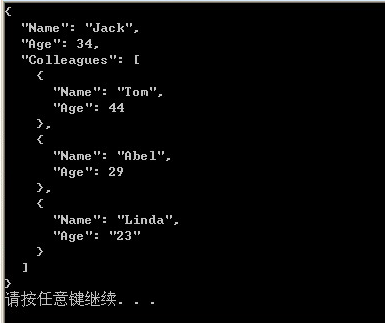
现在我们又发现,Jack公司来了一个新同事Linda
//将json转换为JObject
JObject jObj = JObject.Parse(json);
JObject linda = new JObject(new JProperty("Name", "Linda"), new JProperty("Age", "23"));
jObj["Colleagues"].Last.AddAfterSelf(linda);
Console.WriteLine(jObj.ToString());
使用函数SelectToken可以简化查询语句,具体:
①利用SelectToken来查询名称
JObject jObj = JObject.Parse(json);
JToken name = jObj.SelectToken("Name");
Console.WriteLine(name.ToString());

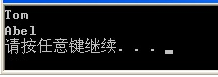
②利用SelectToken来查询所有同事的名字
JObject jObj = JObject.Parse(json);
var names = jObj.SelectToken("Colleagues").Select(p => p["Name"]).ToList();
foreach (var name in names)
Console.WriteLine(name.ToString());
查询最后一名同事的年龄
//将json转换为JObject
JObject jObj = JObject.Parse(json);
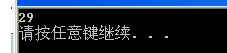
var age = jObj.SelectToken("Colleagues[1].Age");
Console.WriteLine(age.ToString());
定义一个错误提示:
JObject errors = new JObject();
if (productName.Length <= 0)
{
errors.Add("ProductName", new JValue("该输入项为必输项"));
}
//获取json里的值

string jsonStr = "";//Json Str字符串

            JToken json = JToken.Parse(jsonStr);//转化为JToken(JObject基类)

            string xx = json.Value<string>("xx");//获取Json里xx键的值

            JToken arr = json["arr"];//获取Json里的数组  {arr:[{yy:1,zz:2},{yy:3,zz:4}]}

            foreach (JToken baseJ in arr)//遍历数组

            {

                int yy = baseJ.Value<int>("yy");

            }

            string yy1 = json["arr"][].Value<string>("yy");//也可以酱紫,多层的获取

            string yy2 = json["arr"][]["yy"] != null ? json["arr"][]["yy"].ToString() : "";//这个和上面句等价,不要直接ToString,容易报错
JToken.ToObject Method
Overload List Name Description
Public method ToObject<T>() Creates an instance of the specified .NET type from the JToken.
Public method ToObject(Type) Creates an instance of the specified .NET type from the JToken.
Public method ToObject<T>(JsonSerializer) Creates an instance of the specified .NET type from the JToken using the specified JsonSerializer.
Public method ToObject(Type, JsonSerializer) Creates an instance of the specified .NET type from the JToken using the specified JsonSerializer.
http://www.cnblogs.com/usharei/archive/2012/04/24/2467578.html
Newtonsoft.Json之JArray, JObject, JPropertyJValue的更多相关文章
- Newtonsoft.Json之JArray, JObject, JProperty,JValue
JObject staff = new JObject(); staff.Add(new JProperty("Name", "Jack")); staff.A ...
- 使用Newtonsoft.Json.dll(JSON.NET)动态解析JSON、.net 的json的序列化与反序列化(一)
在开发中,我非常喜欢动态语言和匿名对象带来的方便,JSON.NET具有动态序列化和反序列化任意JSON内容的能力,不必将它映射到具体的强类型对象,它可以处理不确定的类型(集合.字典.动态对象和匿名对象 ...
- Newtonsoft.Json解析json字符串和写json字符串
写: StringWriter sw = new StringWriter(); JsonWriter writer = new JsonWriter(sw); //如果报错则使用JsonWriter ...
- Newtonsoft.Json读取txt文件中json数据并存到SQL service 数据库!
using System; using System.Collections.Generic; using System.Text; using System.IO; using Newtonsoft ...
- Newtonsoft.Json解析数组
以下是解析json数组: var jsonInfo=[{"name":"abc","id":"1","coun ...
- C#利用newtonsoft.json读取.so配置文件内容
今天花 了点时间来使用 C#读取json文件 ,文件后缀为 .so文件 ,也是基于文件流的形式 获取 对象 ,然后解析; 之所以尝试 使用 json读取 ,是因为其配置文件的格式 更为友好 和方便,直 ...
- 遍历Newtonsoft.Json.Linq.JObject
JObject 遍历: 引用命名空间:using Newtonsoft.Json.Linq; JObject _jObject = JObject.Parse("{'ID':'001','M ...
- C# Newtonsoft.Json JObject移除属性,在序列化时忽略
原文 C# Newtonsoft.Json JObject移除属性,在序列化时忽略 一.针对 单个 对象移除属性,序列化时忽略处理 JObject实例的 Remove() 方法,可以在 指定序列化时移 ...
- C# Newtonsoft.Json JObject 操作
C# Newtonsoft.Json JObject 操作举例 JArray j = new JArray(); JObject obj = new JObject( ") ); JObje ...
随机推荐
- centos 下使用locate命令
首先安装mlocate yum -y install mlocate 更新数据库:updatedb 查找:locate nginx
- Beeline known issues
If you use nohup myscript.sh , You beeline scripts may not work, Pay attention to this in your job.
- sass揭秘之变量(转载)
出处:http://www.w3cplus.com/preprocessor/sass-basic-variable.html 因为文章内含有很多sass代码,如需自己动手查看编译结果,推荐使用sas ...
- NOIP2010提高组 关押罪犯 -SilverN
(洛谷P1525) 题目描述 S 城现有两座监狱,一共关押着N 名罪犯,编号分别为1~N.他们之间的关系自然也极不和谐.很多罪犯之间甚至积怨已久,如果客观条件具备则随时可能爆发冲突.我们用“怨气值”( ...
- 伪多项式时间算法Pseudo-polynomial Algorithms-----geeksforGeek 翻译
原创翻译加学习笔记,方便国人学习算法知识! 原文链接http://www.geeksforgeeks.org/pseudo-polynomial-in-algorithms/ 什么是伪多项式? 当一个 ...
- 有向图的拓扑排序算法JAVA实现
一,问题描述 给定一个有向图G=(V,E),将之进行拓扑排序,如果图有环,则提示异常. 要想实现图的算法,如拓扑排序.最短路径……并运行看输出结果,首先就得构造一个图.由于构造图的方式有很多种,这里假 ...
- 2014 Super Training #8 G Grouping --Tarjan求强连通分量
原题:ZOJ 3795 http://acm.zju.edu.cn/onlinejudge/showProblem.do?problemCode=3795 题目大意:给定一个有向图,要求把点分为k个集 ...
- bootstrap学习总结-js组件(四)
这次我们来看下js组件的使用,本篇文章会有点长,希望大家可以耐心看,相信收获会有不少.不少园友加我好友,表示喜欢我写文字的风格,简单明了,这里,再次谢谢你们的支持.一方面,博主自身技术有限,写的东西都 ...
- JMeter学习(五)检查点
JMeter也有像LR中的检查点,本篇就来介绍下JMeter的检查点如何去实现. JMeter里面的检查点通过添加断言来完成. 检查点:上一章讲到,我们对用户名和密码进行了参数化,那么怎样来判断jme ...
- angularjs: ng-select和ng-options
angular.js有一个很强大的指令: ng-select 它可以帮助你通过数据模型来创建select元素.它很好的支持了select标签的语法,但是却有点坑. 假设有如下一段json数据: { & ...