
How to Get SharePoint Client Context in SharePoint Apps (Provider Hosted / SharePoint Access ) in CSOM (Client Side Object Model)
http://www.codeproject.com/Articles/581060/HowplustoplusGetplusSharePointplusClientplusContex
Introduction
The first step of app development is to correctly get access to SharePoint client context. I have struggled to develop a simple model to initialize the SharePoint Client context. Most of the App development includes ASP Master pages. So I need to figure out a working model for app development.
First, you need to know how SharePoint offers the contextString. contextString offers when SharePoint gets redirected from appredirect.aspx URL.
At that point, we need to capture the contextString and generate either AccessToken or RefreshToken and save it for accessing the SharePoint Client Context at a later time. Otherwise, it will result in generating the error The parameter 'token' cannot be a null or empty string (This is a nasty error which drove me crazy.).
Normally AccessToken is valid for 12 hours and RefreshToken is valid for 6 months.
In my approach, I used another key which is called as CacheKey to identify the user uniquely. Therefore I use this value to maintain a cookie based on the user.
Reference: Tips and FAQs: OAuth and remote apps for SharePoint 2013
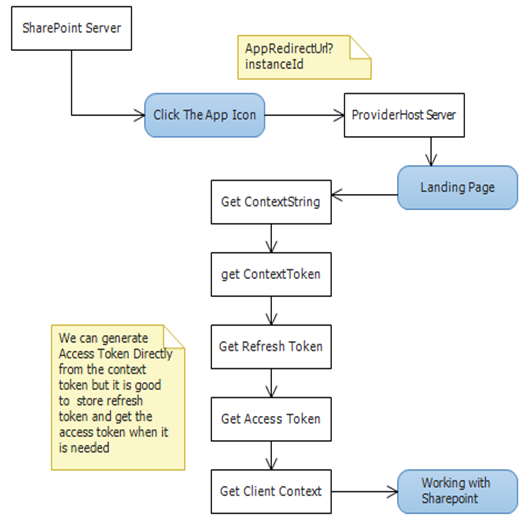
The following shows my approach to do this. If you have a master page, you need to put the code in the onInit()rather than page load.
 Collapse | Copy Code
protected void Page_Load(object sender, EventArgs e)

{

   var key = Session["CashKey"];

   // sharepoint url (app hosted url)

   var hostWeb = Page.Request["SPHostUrl"];

   // Sharepoint url with app Title (app deployed sp url)

   Uri SharePointUri = new Uri(hostWeb + "/SharePointApp1/");

   // This is first time the app is running

   if (key == null)

   {

       // get the TokenString

       var contextTokenString = TokenHelper.GetContextTokenFromRequest(Page.Request);

       // Get the contexttoken by passing the token string

       var contextToken = TokenHelper.ReadAndValidateContextToken

       		(contextTokenString, Request.Url.Authority);

       //Since some browsers does not support cookie name more than 40 chars

       // Im taking first 40 chars

       var cookieName = contextToken.CacheKey.Substring(0, 40);

       //Add User specific cookie name to the Session

       Session.Add("CashKey", cookieName);

       // Get the Refresh Token

       var refreshToken = contextToken.RefreshToken;

       // Add the cookie value (refresh Token)

       Response.Cookies.Add(new HttpCookie(cookieName, refreshToken));

   }

   else

   {

       // USER already in the application,  means it is not getting redirect from the appRedirect

       // So contextstring is null

   }

}
This is code for button click.
Collapse | Copy Code
protected void Button1_Click(object sender, EventArgs e)

{

    // sharepoint url (app hosted url)

    var hostWeb = Page.Request["SPHostUrl"];

    // Sharepoint url with app name (app deployed sp url)

    Uri SharePointUri = new Uri(hostWeb + "/SharePointApp1/");

    // Get the cookie name from the session

    var key = Session["CashKey"] as string;

    // Get the refresh token from the cookie

    var refreshToken = Request.Cookies[key].Value;

    //Get the access Token By passing refreshToken

    // 00000003-0000-0ff1-ce00-000000000000 is principal name for SP2013 it is unique

    var accessToken = TokenHelper.GetAccessToken(refreshToken,

        "00000003-0000-0ff1-ce00-000000000000",

        SharePointUri.Authority, TokenHelper.GetRealmFromTargetUrl(SharePointUri));

    // Access the Sharepoint Do your work

    using (var clientContext = TokenHelper.GetClientContextWithAccessToken

    ("https://rajee.sharepoint.com/SharepointApp1", accessToken.AccessToken))

    {

        clientContext.Load(clientContext.Web, web => web.Title);

        clientContext.ExecuteQuery();

        Response.Write(clientContext.Web.Title);

    }

}
Note: In the middle of the app, if the context is broken due to expiration or some other case you need to initialize the app from the AppRedirect, therefore you can:
Collapse | Copy Code
var hostWeb = Page.Request["SPHostUrl"];

var val = TokenHelper.GetAppContextTokenRequestUrl(hostWeb, Server.UrlEncode(Request.Url.ToString()));
How to Get SharePoint Client Context in SharePoint Apps (Provider Hosted / SharePoint Access ) in CSOM (Client Side Object Model)的更多相关文章
- 在C#开发中如何使用Client Object Model客户端代码获得SharePoint 网站、列表的权限情况
自从人类学会了使用火,烤制的方式替代了人类的消化系统部分功能,从此人类的消化系统更加简单,加速了人脑的进化:自从SharePoint 2010开始有了Client Side Object Model ...
- SharePoint Client Object Model API 介绍以及工作原理解析
CSOM和ServerAPI 的对比 SharePoint从2010开始引入了Client Object Model的API(后文中用CSOM来代替),从名字来看,我们可以简单的看出,该API是面向客 ...
- SharePoint 2010 匿名用户调用Client Object Model访问列表项
最近有个小需求,在门户首页上加个通知公告的版块,新闻来源是列表项,需要有垂直滚动的效果. 第一个想法就是通过SharePoint的Client Object Model获取列表数据再加上JQuery来 ...
- c# sharepoint client object model 客户端如何创建中英文站点
c# sharepoint client object model 客户端如何创建中英文站点 ClientContext ClientValidate = tools.GetContext(Onlin ...
- 关于SharePoint 的Client object model该何时load和execut query的一点自己的看法
很多人在用client object model的时候,不知道何时或者该不该load,今天看到一个观点描述这个问题,觉得很有道理,和大家分享.那就是写client object model就像写sql ...
- SharePoint 2013中Office Web Apps的一次排错
转自http://www.cnblogs.com/awpatp/archive/2013/06/06/3121420.html, 仅供自己查看 笔者尝试在自己的测试环境中为SharePoint 201 ...
- SharePoint安全 - 在Goolge和Bing中查找SharePoint相关内容
博客地址 http://blog.csdn.net/foxdave 本篇提供两个查询串字典,分别对应Google和Bing的搜索,用来查询SharePoint网站的相关内容 Google ShareP ...
- SharePoint 2010 最佳实践学习总结------第1章 SharePoint Foundation开发基础
----前言 这段时间项目出在验收阶段,不是很忙,就潜心把SharePoint学一下,不求有多深刻,初衷只是先入门再说.后续会发布一系列的学习总结.主要学习的书籍为<SharePoint2010 ...
- 【Office Web Apps】在 SharePoint 中使用 Office Web Apps
在 SharePoint 中使用 Office Web Apps 在安装并配置了 Microsoft Office Web Apps 的 SharePoint 网站上,通过 Office Web Ap ...
随机推荐
- 十五、EnterpriseFrameWork框架核心类库之系统启动入口与初始化
本章内容是讲三种开发模式,web模式.Winform模式和Wcf模式的系统启动入口有什么区别,以及启动后系统初始化的内容:为什么要把这些单独提出来讲一章,因为我觉得本章非常重要,我们都知道程序中的ma ...
- JAVA多线程编程之生产者消费者模式
Java中有一个BlockingQueue可以用来充当堵塞队列,下面是一个桌面搜索的设计 package net.jcip.examples; import java.io.File; import ...
- Android 开发框架汇总
Android 开发框架汇总 时间过的真快,转眼间就要进入到16年的8月了,现在应该是三伏期间,一个字“热”.前端时间整理了一篇“JS前端框架汇总”,然后紧接着又抽时间学习了一下Android开发,在 ...
- hdu 2014鞍山赛区 5073 Galaxy
题意:就是给你 n 个数,代表n个星球的位置,每一个星球的重量都为 1 ! 开始的时候每一个星球都绕着质心转动,那么质心的位置就是所有的星球的位置之和 / 星球的个数 现在让你移动 k 个星球到任意位 ...
- Mergely – 免费的在线文档对比和合并工具
任何类型的文件(无论是否代码),我们可能要比较不同的版本,看发生了什么变化. 有些编辑器都有这个内置功能,其中一些则没有. Mergely 是一个免费使用的 Web 应用程序,帮你你迅速作出文档的差异 ...
- 浅谈DOM性能考虑
浅谈DOM性能考虑 很多人都会忽视脚本对Web应用整体性能的影响.为保证应用的流畅运行,在为文档编写和应用脚本时,需要注意一些问题.一.尽量减少访问DOM和尽量减少标记 访问DOM的方式对脚本性 ...
- 谈Mysql索引
myisam和innodb的索引有什么区别? 两个索引都是B+树索引,但是myisam的表存储和索引存储是分开的,索引存储中存放的是表的地址.而innodb表存储本身就是一个B+树,它是用主键来做B+ ...
- CentOS6.5菜鸟之旅:安装输入法(小呀小企鹅)
一.前言 假如在登录系统的时候语言选择了中文,那么是系统会自带ibus的中文输入法.但由于我打算用英文版,于是就被小企鹅输入法(FCITX)折腾了两个晚上. 二.检查系统编码 在bash中输入 loc ...
- [Solution] ASP.NET Identity(2) 空的项目使用
在本节中,我将说明将ASP.NET Identity添加到现有的项目或者一个空项目.我将介绍你需要添加的Nuget和Class.此示例中,会使用LocalDB. 本节目录: 注册用户 登入登出 注册用 ...
- Mybatis 中在传参时,${} 和#{} 的区别
介绍 MyBatis中使用parameterType向SQL语句传参,parameterType后的类型可以是基本类型int,String,HashMap和java自定义类型. 在SQL中引用这些参数 ...