
jQuery---EasyUI小案列
分页[pagination]
实例:
<html>

<head>

    <meta charset="GBK">

    <title>客户端分页demo</title>

    <link rel="stylesheet" type="text/css" href="http://www.jeasyui.com/easyui/themes/bootstrap/easyui.css">

    <link rel="stylesheet" type="text/css" href="http://www.jeasyui.com/easyui/themes/icon.css">

    <link rel="stylesheet" type="text/css" href="http://www.jeasyui.com/easyui/demo/demo.css">

    <script type="text/javascript" src="http://www.jeasyui.com/easyui/jquery-1.8.0.min.js"></script>

    <script type="text/javascript" src="http://www.jeasyui.com/easyui/jquery.easyui.min.js"></script>

</head>

<body>

    <h2>客户端分页dem</h2>

    <div class="demo-info">

        <div class="demo-tip icon-tip"></div>

        <div></div>

    </div>

    <div style="margin:10px 0;"></div>

    <table id="dg" title="Client Side Pagination" style="width:700px;height:300px" data-options="

                rownumbers:true,

                singleSelect:true,

                autoRowHeight:false,

                pagination:true,

                pageSize:10">

        <thead>

            <tr>

                <th field="inv" width="80">Inv No</th>

                <th field="date" width="100">Date</th>

                <th field="name" width="80">Name</th>

                <th field="amount" width="80" align="right">Amount</th>

                <th field="price" width="80" align="right">Price</th>

                <th field="cost" width="100" align="right">Cost</th>

                <th field="note" width="110">Note</th>

            </tr>

        </thead>

    </table>

    <script>

        function getData(){//模拟数据

            var rows = [];

            for(var i=1; i<=80000; i++){

                var amount = Math.floor(Math.random()*1000);

                var price = Math.floor(Math.random()*1000);

                rows.push({

                    inv: 'Inv No '+i,

                    date: $.fn.datebox.defaults.formatter(new Date()),

                    name: 'Name '+i,

                    amount: amount,

                    price: price,

                    cost: amount*price,

                    note: 'Note '+i

                });

            }

            //console.log(JSON.stringify(rows));

            return rows;

        }

        function pagerFilter(data){

            if (typeof data.length == 'number' && typeof data.splice == 'function'){    // 判断数据是否是数组

                data = {

                    total: data.length,

                    rows: data

                }

            }

            var dg = $(this);

            var opts = dg.datagrid('options');

            var pager = dg.datagrid('getPager');

            pager.pagination({

                onSelectPage:function(pageNum, pageSize){

                    opts.pageNumber = pageNum;

                    opts.pageSize = pageSize;

                    pager.pagination('refresh',{

                        pageNumber:pageNum,

                        pageSize:pageSize

                    });

                    dg.datagrid('loadData',data);

                }

            });

            if (!data.originalRows){

                data.originalRows = (data.rows);

            }

            var start = (opts.pageNumber-1)*parseInt(opts.pageSize);

            var end = start + parseInt(opts.pageSize);

            data.rows = (data.originalRows.slice(start, end));

            return data;

        }

        $(function(){//加载数据

            $('#dg').datagrid({loadFilter:pagerFilter}).datagrid('loadData', getData());

        });

    </script>

</body>

</html>
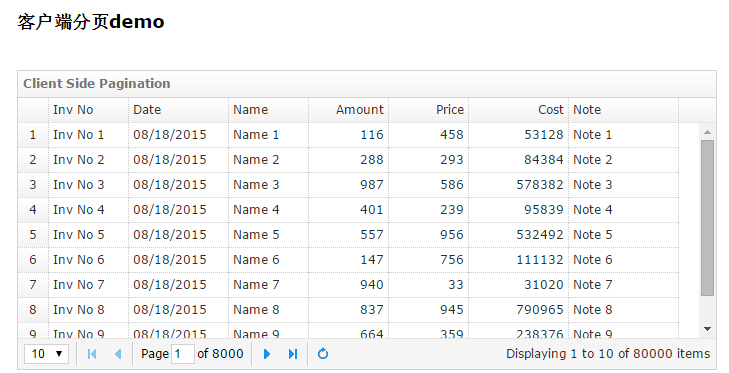
效果图:
进度条[progressbar]
<html>

<head>

    <meta charset="GBK">

    <link rel="stylesheet" type="text/css" href="http://www.jeasyui.com/easyui/themes/bootstrap/easyui.css">

    <link rel="stylesheet" type="text/css" href="http://www.jeasyui.com/easyui/themes/icon.css">

    <link rel="stylesheet" type="text/css" href="http://www.jeasyui.com/easyui/demo/demo.css">

    <script type="text/javascript" src="http://www.jeasyui.com/easyui/jquery-1.8.0.min.js"></script>

    <script type="text/javascript" src="http://www.jeasyui.com/easyui/jquery.easyui.min.js"></script>

	<script>

		function test(){

			var value = $('#p').progressbar('getValue');

			if (value < 100){

				value += Math.floor(Math.random() * 10);

				$('#p').progressbar('setValue', value);

				setTimeout(arguments.callee, 200);

			}

		}

	</script>

</head>

<body>

	进度条

	<div class="demo-info">

		<div class="demo-tip icon-tip"></div>

		<div>Click below button to show progress information.</div>

	</div>

	<div style="margin: 10px 0">

		<a href="#" class="easyui-linkbutton" onclick="test()">Test</a>

	</div>

	<div id="p" class="easyui-progressbar" style="width:400px;"></div>

</body>

</html>
树形菜单[tree]
<html>

<head>

    <meta charset="GBK">

    <title>客户端分页demo</title>

    <link rel="stylesheet" type="text/css" href="http://www.jeasyui.com/easyui/themes/bootstrap/easyui.css">

    <link rel="stylesheet" type="text/css" href="http://www.jeasyui.com/easyui/themes/icon.css">

    <link rel="stylesheet" type="text/css" href="http://www.jeasyui.com/easyui/demo/demo.css">

    <script type="text/javascript" src="http://www.jeasyui.com/easyui/jquery-1.8.0.min.js"></script>

    <script type="text/javascript" src="http://www.jeasyui.com/easyui/jquery.easyui.min.js"></script>

    <style type="text/css">

        .menuLink {

            cursor: pointer;

        }

    </style>

    <script type="text/javascript">

$(function () {

    //动态菜单数据

    var treeData = [{

            text : "菜单",

            children : [{

                    text : "一级菜单1",

                    attributes : {

                        url : ""

                    }

                }, {

                    text : "一级菜单2",

                    attributes : {

                        url : ""

                    }

                }, {

                    text : "一级菜单3",

                    state : "closed",

                    children : [{

                            text : "二级菜单1",

                            attributes : {

                                url : ""

                            }

                        }, {

                            text : "二级菜单2",

                            attributes : {

                                url : ""

                            }

                        }, {

                            text : "二级菜单3",

                            attributes : {

                                url : ""

                            }

                        }

                    ]

                }

            ]

        }

    ];

    //实例化树形菜单

    $("#tree").tree({

        data : treeData,

        lines : true,

        onClick : function (node) {

            if (node.attributes) {

                Open(node.text, node.attributes.url);

            }

        }

    });

    //在右边center区域打开菜单,新增tab

    function Open(text, url) {

        if ($("#tabs").tabs('exists', text)) {

            $('#tabs').tabs('select', text);

        } else {

            $('#tabs').tabs('add', {

                title : text,

                closable : true,

                content : text

            });

        }

    }

    //绑定tabs的右键菜单

    $("#tabs").tabs({

        onContextMenu : function (e, title) {

            e.preventDefault();

            $('#tabsMenu').menu('show', {

                left : e.pageX,

                top : e.pageY

            }).data("tabTitle", title);

        }

    });

    //实例化menu的onClick事件

    $("#tabsMenu").menu({

        onClick : function (item) {

            CloseTab(this, item.name);

        }

    });

    //几个关闭事件的实现

    function CloseTab(menu, type) {

        var curTabTitle = $(menu).data("tabTitle");

        var tabs = $("#tabs");

        if (type === "close") {

            tabs.tabs("close", curTabTitle);

            return;

        }

        var allTabs = tabs.tabs("tabs");

        var closeTabsTitle = [];

        $.each(allTabs, function () {

            var opt = $(this).panel("options");

            if (opt.closable && opt.title != curTabTitle && type === "Other") {

                closeTabsTitle.push(opt.title);

            } else if (opt.closable && type === "All") {

                closeTabsTitle.push(opt.title);

            }

        });

        for (var i = 0; i < closeTabsTitle.length; i++) {

            tabs.tabs("close", closeTabsTitle[i]);

        }

    }

});

</script>

</head>

<body class="easyui-layout">

   <style>

  article, aside, figure, footer, header, hgroup,

  menu, nav, section { display: block; }

  .west{

    width:200px;

    padding:10px;

  }

  .north{

    height:100px;

  }

</style>

</head>

<body class="easyui-layout">

  <div region="north" class="north" title="">

    <h1>最简单的左右结构实现,及tab的右键菜单实现,右键查看源码</h1>

  </div>

  <div region="center" title="center">

    <div class="easyui-tabs" fit="true" border="false" id="tabs">

      <div title="首页"></div>

    </div>

  </div>

  <div region="west" class="west" title="menu">

    <ul id="tree"></ul>

  </div>

  <div id="tabsMenu" class="easyui-menu" style="width:120px;">

    <div name="close">关闭</div>

    <div name="Other">关闭其他</div>

    <div name="All">关闭所有</div>

  </div>

</body>

</html>
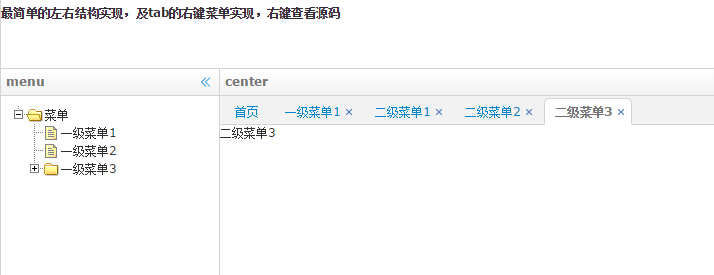
效果图
jQuery---EasyUI小案列的更多相关文章
- 雷林鹏分享:jQuery EasyUI 数据网格 - 列运算
jQuery EasyUI 数据网格 - 列运算 在本教程中,您将学习如何在可编辑的数据网格(datagrid)中包含一个运算的列.一个运算列通常包含一些从一个或多个其他列运算的值. 首先,创建一个可 ...
- jquery easyui 动态绑定数据列
function doSearch2() { var strsql = $('#sssql').val(); $.ajax({ url: "../HttpHandler/DownloadHa ...
- Jquery局部刷新小案列
/* 调用showTest()方法去后台拿到处理数据后返回到part.jsp页面,main.jsp再调用html()方法 和显示的结果集show()方法把part.jsp显示到当前的页面,实现局部页面 ...
- 使用nosql实现页面静态化的一个小案列
页面静态化,其实就是将动态生成的php页面,变成静态的HTML页面,让用户直接访问.有一下几方面好处: 1,首先就是访问速度,不需要去访问数据库,或者缓存来获取哪些数据,浏览器直接加载渲染html页即 ...
- canvas小案列-绚丽多彩的倒计时
本次随笔中,我将实现一个绚丽的倒计时效果,这个效果主要是结合canvas和js实现的,具体代码如下 index.html文件 <!DOCTYPE html> <html> &l ...
- 表格排序tablesort小案列
<!DOCTYPE html> <html lang="en"> <head> <meta charset="utf-8&quo ...
- JQuery EasyUI之DataGrid列名和数据列分别设置不同对齐方式(转)
需求如下 现有数据列三列 Name,Age,CreateDate 数据 张三,18,2000-12-09 :12:34:56 李四,28,2000-12-09 :12:34:56 王麻子,38,200 ...
- 让jquery easyui datagrid列支持绑定嵌套对象
嵌套对象是指返回的json数据,是对象的某个属性自带有属性.而我们恰恰又需要这个属性,默认情况下easyui的datagrid是不支持绑定嵌套对象的.比如:datagrid的field属性只能为fie ...
- 雷林鹏分享:jQuery EasyUI 数据网格 - 设置冻结列
jQuery EasyUI 数据网格 - 设置冻结列 本实例演示如何冻结一些列,当用户在网格上移动水平滚动条时,冻结列不能滚动到视图的外部. 为了冻结列,您需要定义 frozenColumns 属性. ...
随机推荐
- 样式中的url加载探疑
当一个项目多人维护,特别是接手别人的项目,而项目又在改之又改的基础上再改,我一直遵循,别人的样式我不动的原则,尽量不因为一时不察,导致整站或部分页面出现错位的现象,因些在修改样式与写样式时都是在原有的 ...
- atitit.动态加载数据库配置in orm hibernate mybatis
atitit.动态加载数据库配置in orm 1. 动态加载数据库配置的优点::: 1 1.1. 组合多个配置文件... 1 1.2. 连接多个数据库 1 2. 基本的流程:::getCfg内存对象, ...
- 更新日志 - 关于 iOS9 设备的安装及其他优化
新版 fir.im 上线整 3 周了,感谢你们对 fir.im 的关注和支持!无以言表,唯有做更好用的产品给大家.本周我们对新版做了以下的功能更新和 bug 修复: 功能更新 在使用过程中,请注意: ...
- JAVA学习绘图颜色及其笔画属性设置字体显示文字
package com.graphics; import java.awt.*; import java.awt.geom.Rectangle2D; import java.util.Date; im ...
- 详解Bootstrap列表组组件
列表组可以用来制作列表清单.垂直导航等效果,也可以配合其他的组件制作出更漂亮的组件,列表组在bootstrap框架中也是一个独立的组件,所以也对应有自己独立源码: LESS:list-group.le ...
- 【Python排序搜索基本算法】之深度优先搜索、广度优先搜索、拓扑排序、强联通&Kosaraju算法
Graph Search and Connectivity Generic Graph Search Goals 1. find everything findable 2. don't explor ...
- RFID 仿真/模拟/监控/拦截/检测/嗅探器
Sound card based RFID sniffer/emulator (Too tired after recon.cx to do draw the schematics better th ...
- 如何向Openstack社区提交一个新项目
前几天有个朋友问我:自己有一个idea不错的项目,也把基本的框架写好了,想贡献到Openstack社区,却不知道应该怎么做.正好之前我有过类似的经历,那么来分享一下我是如何向Openstack社区提交 ...
- 无线局域网络 WIFI/WAPI/WLAN区别浅析
WIFI和WAPI的区别 既然WIFI和WAPI都是WLAN的传输协议,那么两者究竟都有怎样的区别? 首先第一点区别在于,两者的缔造者不一样.WIFI是又国外制定的一个协议,而WAPI是由中国制定的, ...
- int android.graphics.Bitmap.getRowBytes()
int android.graphics.Bitmap.getRowBytes() Return the number of bytes between rows in the bitmap's pi ...