
C#winform中ListView的使用
使用ListView模仿Windows系统的资源管理器界面,实现文件(夹)的浏览、重命名、删除及查询等功能,主要功能界面展示如下:
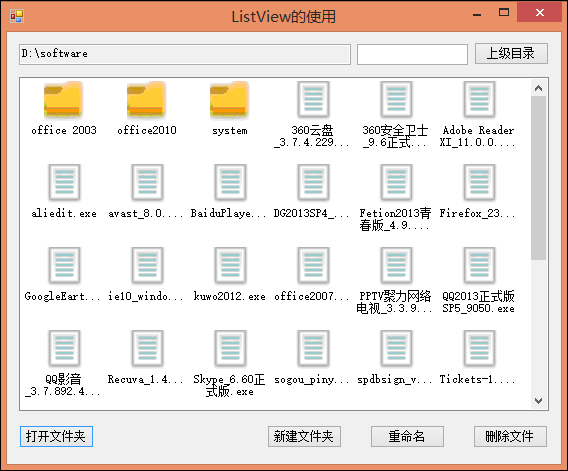
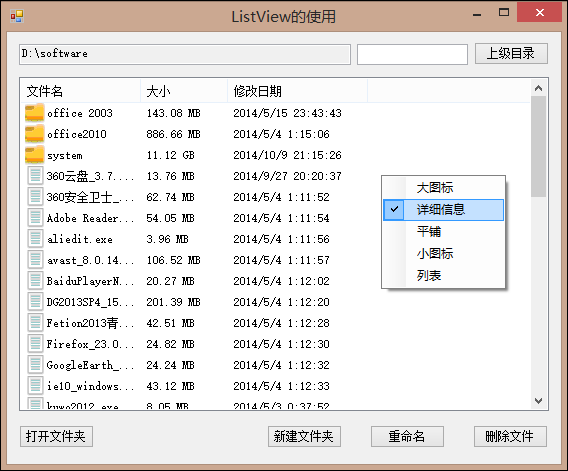
1.MainForm.cs及MainForm.Designer.cs
using System;
using System.Collections.Generic;
using System.ComponentModel;
using System.Data;
using System.Drawing;
using System.Linq;
using System.Text;
using System.Windows.Forms;
using System.IO; namespace Controls
{
public partial class MainForm : Form
{
#region 成员变量
/// <summary>
/// 用于递归计算文件夹大小
/// </summary>
private long folderSize = ; /// <summary>
///打开文件夹根路径
/// </summary>
private string rootPath = string.Empty;
#endregion #region 初期化
/// <summary>
/// 默认构造函数
/// </summary>
public MainForm()
{
InitializeComponent();
//给窗体注册键盘事件
this.KeyPreview = true;
} /// <summary>
/// 初始化窗体,绑定事件
/// </summary>
/// <param name="sender"></param>
/// <param name="e"></param>
private void MainForm_Load(object sender, EventArgs e)
{
this.大图标ToolStripMenuItem.Click += new System.EventHandler(this.ToolStripMenuItem_Click);
this.详细信息ToolStripMenuItem.Click += new System.EventHandler(this.ToolStripMenuItem_Click);
this.平铺ToolStripMenuItem.Click += new System.EventHandler(this.ToolStripMenuItem_Click);
this.小图标ToolStripMenuItem.Click += new System.EventHandler(this.ToolStripMenuItem_Click);
this.列表ToolStripMenuItem.Click += new System.EventHandler(this.ToolStripMenuItem_Click);
}
#endregion #region 事件处理
/// <summary>
/// 搜索框符合条件的文件夹或文件
/// </summary>
/// <param name="sender"></param>
/// <param name="e"></param>
private void btnSearch_Click(object sender, EventArgs e)
{
AddItemsToListView(txtPath.Text, txtSearch.Text.Trim());
AddHeaderToListView(this.lvwData);
} /// <summary>
/// 给搜索框添加Enter快捷键
/// </summary>
/// <param name="sender"></param>
/// <param name="e"></param>
private void MainForm_KeyDown(object sender, KeyEventArgs e)
{
//搜索框获得焦点且按下Enter键时,执行搜索
if (txtSearch.Focused && e.KeyCode == Keys.Enter)
{
this.btnSearch_Click(sender, e);
}
} /// <summary>
/// 返回上级目录
/// </summary>
/// <param name="sender"></param>
/// <param name="e"></param>
private void btnUp_Click(object sender, EventArgs e)
{
if (txtPath.Text == rootPath || !txtPath.Text.Contains("\\"))
{
return;
}
//找到文件夹上级目录的绝对路径
txtPath.Text = txtPath.Text.Substring(, txtPath.Text.LastIndexOf("\\"));
AddItemsToListView(txtPath.Text);
AddHeaderToListView(this.lvwData);
} /// <summary>
/// 打开文件夹,显示文件夹
/// </summary>
/// <param name="sender"></param>
/// <param name="e"></param>
private void btnFolder_Click(object sender, EventArgs e)
{
DialogResult dr = fbdData.ShowDialog();
string path = fbdData.SelectedPath.ToString();
if (dr == DialogResult.OK && path != "")
{
rootPath = path;
txtPath.Text = path;
}
} /// <summary>
/// 新建文件夹,选中文件夹
/// </summary>
/// <param name="sender"></param>
/// <param name="e"></param>
private void btnAdd_Click(object sender, EventArgs e)
{
string fullpath = string.Empty;
AddForm addForm = new AddForm(btnAdd.Text);
addForm.ShowDialog();
if (addForm.ButtonFlag)
{
fullpath = txtPath.Text + "\\" + addForm.TxtName;
}
else
{
return; //排除关闭窗口异常
}
try
{
if (Directory.Exists(fullpath))
{
MessageBox.Show("该文件名已经存在!", "提示");
return;
}
Directory.CreateDirectory(fullpath);
AddItemsToListView(txtPath.Text);
AddHeaderToListView(this.lvwData);
}
catch (NullReferenceException ex)
{
MessageBox.Show(ex.Message, "提示");
}
finally
{
//选中新增的项,并显示在视野范围内
for (int i = ; i < lvwData.Items.Count; i++)
{
if (lvwData.Items[i].Tag.ToString() == fullpath)
{
//先设置ListView选中
lvwData.Focus();
lvwData.Items[i].Selected = true;
//在视野范围内显示
lvwData.EnsureVisible(i);
break;
}
}
}
} /// <summary>
/// 重命名文件夹
/// </summary>
/// <param name="sender"></param>
/// <param name="e"></param>
private void btnRename_Click(object sender, EventArgs e)
{
if (lvwData.SelectedItems.Count <= )
{
return;
}
string fullName = lvwData.SelectedItems[].Tag.ToString();
string path = fullName.Substring(, fullName.LastIndexOf("\\") + );//文件路径
string suffix = GetSuffixName(fullName);//后缀名
//文件名或文件夹名
string fileName = string.Empty;
if (suffix != string.Empty)
{
fileName = fullName.Substring(fullName.LastIndexOf("\\") + ,
fullName.LastIndexOf(".") - fullName.LastIndexOf("\\") - );//文件名
}
else
{
fileName = fullName.Substring(fullName.LastIndexOf("\\") + );//文件夹名
}
string fullPath = string.Empty;
AddForm addForm = new AddForm(btnRename.Text, fileName);
addForm.ShowDialog();
if (suffix != string.Empty)
{
fullPath = path + addForm.TxtName + "." + suffix;
}
else
{
fullPath = path + addForm.TxtName;
}
//直接关闭窗口时
if (!addForm.ButtonFlag)
{
return;
}
try
{
//重命名文件夹
if (suffix == string.Empty)
{
if (Directory.Exists(fullPath))
{
MessageBox.Show("该文件名已经存在!", "提示");
return;
}
Directory.Move(fullName, fullPath);
}
//重命名文件
else
{
if (File.Exists(fullPath))
{
MessageBox.Show("该文件名已经存在!", "提示");
return;
}
File.Move(fullName, fullPath);
}
AddItemsToListView(txtPath.Text);
AddHeaderToListView(this.lvwData);
}
catch (NullReferenceException ex)
{
MessageBox.Show(ex.Message);
}
} /// <summary>
/// 删除文件夹
/// </summary>
/// <param name="sender"></param>
/// <param name="e"></param>
private void btnDelete_Click(object sender, EventArgs e)
{
int count = lvwData.SelectedItems.Count;
if (count <= )
{
return;
}
DialogResult result = MessageBox.Show("你确定删除这" + count + "项吗?", "提示",
MessageBoxButtons.YesNo, MessageBoxIcon.Question);
if (result == DialogResult.Yes)
{
string path;
ListViewItem selectitem;
for (int i = ; i < lvwData.SelectedItems.Count; ) //此处不能i++
{
selectitem = lvwData.SelectedItems[i];
path = selectitem.Tag.ToString();
lvwData.Items.Remove(selectitem);
if (File.Exists(path))
{
File.Delete(path);
}
else if (Directory.Exists(path))
{
Directory.Delete(path, true);
}
lvwData.Update();
}
}
} /// <summary>
/// List选中项时发生
/// </summary>
/// <param name="sender"></param>
/// <param name="e"></param>
private void lvwData_ItemActivate(object sender, EventArgs e)
{
ListView lv = (ListView)sender;
if (lv.SelectedItems.Count <= )
{
return;
}
string filename = lv.SelectedItems[].Tag.ToString();
//如果是文件夹,就打开它
if (Directory.Exists(filename))
{
AddItemsToListView(filename);
AddHeaderToListView(this.lvwData);
//获取打开的文件夹路径
txtPath.Text = filename;
}
//如果是文件,就执行它
else
{
System.Diagnostics.Process.Start(filename);
}
} /// <summary>
/// 根据路径,获取ListView中的显示项
/// </summary>
/// <param name="sender"></param>
/// <param name="e"></param>
private void txtPath_TextChanged(object sender, EventArgs e)
{
AddItemsToListView(txtPath.Text);
AddHeaderToListView(this.lvwData);
} /// <summary>
/// ListView列表显示样式
/// </summary>
/// <param name="sender"></param>
/// <param name="e"></param>
private void ToolStripMenuItem_Click(object sender, EventArgs e)
{
ToolStripMenuItem tsMenumItem = sender as ToolStripMenuItem;
if (tsMenumItem.Checked)
{
return;//已经选中则返回
}
else
{
//清除勾选的右键菜单项
ClearCheckState(cmsStyle);
//勾选选中的右键菜单项
tsMenumItem.Checked = true;
}
switch (tsMenumItem.Text)
{
case "大图标":
lvwData.View = View.LargeIcon;
break;
case "详细信息":
lvwData.View = View.Details;
break;
case "小图标":
lvwData.View = View.SmallIcon;
break;
case "列表":
lvwData.View = View.List;
break;
case "平铺":
lvwData.View = View.Tile;
break;
}
} /// <summary>
/// 清除勾选的右键菜单项
/// </summary>
/// <param name="cms">右键菜单</param>
/// <param name="clearAll">是否全部清除</param>
private void ClearCheckState(ContextMenuStrip cms, bool clearAll = false)
{
ToolStripMenuItem tsMenumItemTemp;
for (int i = ; i < cms.Items.Count; i++)
{
if (!(cms.Items[i] is ToolStripMenuItem))
{
continue;
}
tsMenumItemTemp = cms.Items[i] as ToolStripMenuItem;
if (tsMenumItemTemp.Checked)
{
tsMenumItemTemp.Checked = false;
if (!clearAll)
{
break;
}
}
}
}
#endregion #region 设置ListView的显示项
/// <summary>
/// 根据根节点类型,设置listview显示项
/// </summary>
/// <param name="root">根节点</param>
/// <param name="keywords">搜索关键字</param>
private void AddItemsToListView(string root, string keywords = "")
{
//把当前ListView里的所有选项与所有列名都删除
lvwData.Clear();
lvwData.BeginUpdate();
//根节点是文件
if (File.Exists(root))
{
AddFileToListView(new FileInfo(root), keywords);
}
//根节点是文件夹
else
{
DirectoryInfo dir = new DirectoryInfo(root);
DirectoryInfo[] dirs = dir.GetDirectories();
FileInfo[] files = dir.GetFiles();
//把子文件夹信息添加到ListView中显示
foreach (DirectoryInfo directoryInfo in dirs)
{
AddFolderToListView(directoryInfo, keywords);
}
//把文件夹下文件信息添加到ListView中显示
foreach (FileInfo fileInfo in files)
{
AddFileToListView(fileInfo, keywords);
}
}
this.lvwData.EndUpdate();
} /// <summary>
/// 将文件添加到ListView中显示
/// </summary>
/// <param name="fileInfo">文件全路径</param>
/// <param name="keywords">搜索关键字</param>
private void AddFileToListView(FileInfo fileInfo, string keywords)
{
ListViewItem lvi = new ListViewItem();//文件项
lvi.Tag = fileInfo.FullName;
lvi.Text = fileInfo.Name;
lvi.ImageIndex = imgLarge.Images.Count - ;
if (keywords != "" && (!lvi.Text.Contains(keywords)))
{
return;//搜索不到关键字,不将文件添加到ListView中显示
}
//文件的名称属性项
lvi.SubItems[].Tag = lvi.Tag;
lvi.SubItems[].Text = lvi.Text;
//文件大小属性项
ListViewItem.ListViewSubItem lvsi = new ListViewItem.ListViewSubItem();
lvsi.Tag = fileInfo.Length;
lvsi.Text = FormatFolderSize(fileInfo.Length);
lvi.SubItems.Add(lvsi);
//修改日期属性项
lvsi = new ListViewItem.ListViewSubItem();
lvsi.Tag = fileInfo.LastAccessTime.ToString();
lvsi.Text = fileInfo.LastAccessTime.ToString();
lvi.SubItems.Add(lvsi);
//添加文件
this.lvwData.Items.Add(lvi);
} /// <summary>
/// 将文件夹添加到ListView中显示
/// </summary>
/// <param name="DirectoryInfo">文件夹</param>
/// <param name="keywords">搜索关键字</param>
private void AddFolderToListView(DirectoryInfo DirectoryInfo, string keywords)
{
ListViewItem lvi = new ListViewItem();
lvi.Tag = DirectoryInfo.FullName;
lvi.Text = DirectoryInfo.Name;//显示名称
lvi.ImageIndex = ;
if (keywords != "" && (!lvi.Text.Contains(keywords)))
{
return;//搜索不到关键字,不将文件夹添加到ListView中显示
}
// 文件夹的名称属性项
lvi.SubItems[].Tag = lvi.Tag;
lvi.SubItems[].Text = lvi.Text;
//文件夹大小属性项
ListViewItem.ListViewSubItem lvsi = new ListViewItem.ListViewSubItem();
lvsi.Tag = GetFolderSize(DirectoryInfo);
lvsi.Text = FormatFolderSize(folderSize);
folderSize = ;//清零计算文件夹大小的变量
lvi.SubItems.Add(lvsi);
//修改日期属性项
lvsi = new ListViewItem.ListViewSubItem();
lvsi.Tag = DirectoryInfo.LastAccessTime.ToString();
lvsi.Text = DirectoryInfo.LastAccessTime.ToString();
lvi.SubItems.Add(lvsi);
//添加文件夹
this.lvwData.Items.Add(lvi);
} /// <summary>
/// 递归计算文件夹的大小
/// </summary>
/// <param name="DirectoryInfo">文件夹</param>
/// <returns>文件夹大小</returns>
private long GetFolderSize(DirectoryInfo DirectoryInfo)
{
DirectoryInfo[] dirs = DirectoryInfo.GetDirectories();
FileInfo[] files = DirectoryInfo.GetFiles();
//是文件夹时,继续递归
if (dirs.Length > )
{
foreach (DirectoryInfo dir in dirs)
{
GetFolderSize(dir);
}
}
//是文件时,进行累加计算
foreach (FileInfo fi in files)
{
folderSize = folderSize + fi.Length;
}
return folderSize;
} /// <summary>
/// 将文件夹大小转化为直观的文字显示
/// </summary>
/// <param name="size">文件夹大小</param>
/// <returns>文件夹大小的文字表示</returns>
private string FormatFolderSize(long size)
{
if ((size >> ) > )
{
//保留两位小数
return ((size >> ) / 1024.0).ToString("F2") + " GB";
}
else if ((size >> ) > )
{
//保留两位小数
return ((size >> ) / 1024.0).ToString("F2") + " MB";
}
else
{
return (size >> ) + " KB";
}
} /// <summary>
/// 为listview添加列标题
/// </summary>
private void AddHeaderToListView(ListView listView)
{
ColumnHeader ch = new ColumnHeader();
ch.Text = "文件名";
ch.Width = ;
listView.Columns.Add(ch); ch = new ColumnHeader();
ch.Width = ;
ch.Text = "大小";
listView.Columns.Add(ch); ch = new ColumnHeader();
ch.Text = "修改日期";
ch.Width = ;
listView.Columns.Add(ch);
}
#endregion #region 经常使用的公共方法
/// <summary>
/// 获取文件后缀名(小写)
/// </summary>
/// <param name="path">文件全路径或文件名</param>
public string GetSuffixName(string path)
{
string suffix = string.Empty;
if (path.Contains("."))
{
suffix = path.Substring(path.LastIndexOf(".") + );//后缀名
}
return suffix.ToLower();
} /// <summary>
/// 获取应用程序根路径
/// </summary>
public string GetApplicationPath()
{
string path = Application.StartupPath;
string folderName = String.Empty;
while (folderName.ToLower() != "bin")
{
path = path.Substring(, path.LastIndexOf("\\"));
folderName = path.Substring(path.LastIndexOf("\\") + );
}
return path.Substring(, path.LastIndexOf("\\") + );
}
#endregion
}
}
 namespace Controls

 {

     partial class MainForm

     {

         /// <summary>

         /// 必需的设计器变量。

         /// </summary>

         private System.ComponentModel.IContainer components = null;

         /// <summary>

         /// 清理所有正在使用的资源。

         /// </summary>

         /// <param name="disposing">如果应释放托管资源,为 true;否则为 false。</param>

         protected override void Dispose(bool disposing)

         {

             if (disposing && (components != null))

             {

                 components.Dispose();

             }

             base.Dispose(disposing);

         }

         #region Windows 窗体设计器生成的代码

         /// <summary>

         /// 设计器支持所需的方法 - 不要

         /// 使用代码编辑器修改此方法的内容。

         /// </summary>

         private void InitializeComponent()

         {

             this.components = new System.ComponentModel.Container();

             System.ComponentModel.ComponentResourceManager resources = new System.ComponentModel.ComponentResourceManager(typeof(MainForm));

             this.lvwData = new System.Windows.Forms.ListView();

             this.imgLarge = new System.Windows.Forms.ImageList(this.components);

             this.imgSmall = new System.Windows.Forms.ImageList(this.components);

             this.btnDelete = new System.Windows.Forms.Button();

             this.btnFolder = new System.Windows.Forms.Button();

             this.btnRename = new System.Windows.Forms.Button();

             this.txtPath = new System.Windows.Forms.TextBox();

             this.txtSearch = new System.Windows.Forms.TextBox();

             this.btnUp = new System.Windows.Forms.Button();

             this.btnAdd = new System.Windows.Forms.Button();

             this.fbdData = new System.Windows.Forms.FolderBrowserDialog();

             this.cmsStyle = new System.Windows.Forms.ContextMenuStrip(this.components);

             this.大图标ToolStripMenuItem = new System.Windows.Forms.ToolStripMenuItem();

             this.详细信息ToolStripMenuItem = new System.Windows.Forms.ToolStripMenuItem();

             this.平铺ToolStripMenuItem = new System.Windows.Forms.ToolStripMenuItem();

             this.小图标ToolStripMenuItem = new System.Windows.Forms.ToolStripMenuItem();

             this.列表ToolStripMenuItem = new System.Windows.Forms.ToolStripMenuItem();

             this.cmsStyle.SuspendLayout();

             this.SuspendLayout();

             //

             // lvwData

             //

             this.lvwData.Anchor = ((System.Windows.Forms.AnchorStyles)((((System.Windows.Forms.AnchorStyles.Top | System.Windows.Forms.AnchorStyles.Bottom)

                         | System.Windows.Forms.AnchorStyles.Left)

                         | System.Windows.Forms.AnchorStyles.Right)));

             this.lvwData.ContextMenuStrip = this.cmsStyle;

             this.lvwData.LargeImageList = this.imgLarge;

             this.lvwData.Location = new System.Drawing.Point(, );

             this.lvwData.Name = "lvwData";

             this.lvwData.Size = new System.Drawing.Size(, );

             this.lvwData.SmallImageList = this.imgSmall;

             this.lvwData.TabIndex = ;

             this.lvwData.UseCompatibleStateImageBehavior = false;

             this.lvwData.ItemActivate += new System.EventHandler(this.lvwData_ItemActivate);

             //

             // imgLarge

             //

             this.imgLarge.ImageStream = ((System.Windows.Forms.ImageListStreamer)(resources.GetObject("imgLarge.ImageStream")));

             this.imgLarge.TransparentColor = System.Drawing.Color.Transparent;

             this.imgLarge.Images.SetKeyName(, "folder.png");

             this.imgLarge.Images.SetKeyName(, "file.png");

             //

             // imgSmall

             //

             this.imgSmall.ImageStream = ((System.Windows.Forms.ImageListStreamer)(resources.GetObject("imgSmall.ImageStream")));

             this.imgSmall.TransparentColor = System.Drawing.Color.Transparent;

             this.imgSmall.Images.SetKeyName(, "folder.png");

             this.imgSmall.Images.SetKeyName(, "file.png");

             //

             // btnDelete

             //

             this.btnDelete.Anchor = ((System.Windows.Forms.AnchorStyles)((System.Windows.Forms.AnchorStyles.Bottom | System.Windows.Forms.AnchorStyles.Right)));

             this.btnDelete.Location = new System.Drawing.Point(, );

             this.btnDelete.Name = "btnDelete";

             this.btnDelete.Size = new System.Drawing.Size(, );

             this.btnDelete.TabIndex = ;

             this.btnDelete.Text = "删除文件";

             this.btnDelete.UseVisualStyleBackColor = true;

             this.btnDelete.Click += new System.EventHandler(this.btnDelete_Click);

             //

             // btnFolder

             //

             this.btnFolder.Anchor = ((System.Windows.Forms.AnchorStyles)((System.Windows.Forms.AnchorStyles.Bottom | System.Windows.Forms.AnchorStyles.Left)));

             this.btnFolder.Location = new System.Drawing.Point(, );

             this.btnFolder.Name = "btnFolder";

             this.btnFolder.Size = new System.Drawing.Size(, );

             this.btnFolder.TabIndex = ;

             this.btnFolder.Text = "打开文件夹";

             this.btnFolder.UseVisualStyleBackColor = true;

             this.btnFolder.Click += new System.EventHandler(this.btnFolder_Click);

             //

             // btnRename

             //

             this.btnRename.Anchor = ((System.Windows.Forms.AnchorStyles)((System.Windows.Forms.AnchorStyles.Bottom | System.Windows.Forms.AnchorStyles.Right)));

             this.btnRename.Location = new System.Drawing.Point(, );

             this.btnRename.Name = "btnRename";

             this.btnRename.Size = new System.Drawing.Size(, );

             this.btnRename.TabIndex = ;

             this.btnRename.Text = "重命名";

             this.btnRename.UseVisualStyleBackColor = true;

             this.btnRename.Click += new System.EventHandler(this.btnRename_Click);

             //

             // txtPath

             //

             this.txtPath.Anchor = ((System.Windows.Forms.AnchorStyles)(((System.Windows.Forms.AnchorStyles.Top | System.Windows.Forms.AnchorStyles.Left)

                         | System.Windows.Forms.AnchorStyles.Right)));

             this.txtPath.Location = new System.Drawing.Point(, );

             this.txtPath.Name = "txtPath";

             this.txtPath.ReadOnly = true;

             this.txtPath.Size = new System.Drawing.Size(, );

             this.txtPath.TabIndex = ;

             this.txtPath.TextChanged += new System.EventHandler(this.txtPath_TextChanged);

             //

             // txtSearch

             //

             this.txtSearch.Anchor = ((System.Windows.Forms.AnchorStyles)((System.Windows.Forms.AnchorStyles.Top | System.Windows.Forms.AnchorStyles.Right)));

             this.txtSearch.Location = new System.Drawing.Point(, );

             this.txtSearch.Name = "txtSearch";

             this.txtSearch.Size = new System.Drawing.Size(, );

             this.txtSearch.TabIndex = ;

             //

             // btnUp

             //

             this.btnUp.Anchor = ((System.Windows.Forms.AnchorStyles)((System.Windows.Forms.AnchorStyles.Top | System.Windows.Forms.AnchorStyles.Right)));

             this.btnUp.Location = new System.Drawing.Point(, );

             this.btnUp.Name = "btnUp";

             this.btnUp.Size = new System.Drawing.Size(, );

             this.btnUp.TabIndex = ;

             this.btnUp.Text = "上级目录";

             this.btnUp.UseVisualStyleBackColor = true;

             this.btnUp.Click += new System.EventHandler(this.btnUp_Click);

             //

             // btnAdd

             //

             this.btnAdd.Anchor = ((System.Windows.Forms.AnchorStyles)((System.Windows.Forms.AnchorStyles.Bottom | System.Windows.Forms.AnchorStyles.Right)));

             this.btnAdd.Location = new System.Drawing.Point(, );

             this.btnAdd.Name = "btnAdd";

             this.btnAdd.Size = new System.Drawing.Size(, );

             this.btnAdd.TabIndex = ;

             this.btnAdd.Text = "新建文件夹";

             this.btnAdd.UseVisualStyleBackColor = true;

             this.btnAdd.Click += new System.EventHandler(this.btnAdd_Click);

             //

             // cmsStyle

             //

             this.cmsStyle.Items.AddRange(new System.Windows.Forms.ToolStripItem[] {

             this.大图标ToolStripMenuItem,

             this.详细信息ToolStripMenuItem,

             this.平铺ToolStripMenuItem,

             this.小图标ToolStripMenuItem,

             this.列表ToolStripMenuItem});

             this.cmsStyle.Name = "cmsStyle";

             this.cmsStyle.Size = new System.Drawing.Size(, );

             //

             // 大图标ToolStripMenuItem

             //

             this.大图标ToolStripMenuItem.Checked = true;

             this.大图标ToolStripMenuItem.CheckState = System.Windows.Forms.CheckState.Checked;

             this.大图标ToolStripMenuItem.Name = "大图标ToolStripMenuItem";

             this.大图标ToolStripMenuItem.Size = new System.Drawing.Size(, );

             this.大图标ToolStripMenuItem.Text = "大图标";

             //

             // 详细信息ToolStripMenuItem

             //

             this.详细信息ToolStripMenuItem.Name = "详细信息ToolStripMenuItem";

             this.详细信息ToolStripMenuItem.Size = new System.Drawing.Size(, );

             this.详细信息ToolStripMenuItem.Text = "详细信息";

             //

             // 平铺ToolStripMenuItem

             //

             this.平铺ToolStripMenuItem.Name = "平铺ToolStripMenuItem";

             this.平铺ToolStripMenuItem.Size = new System.Drawing.Size(, );

             this.平铺ToolStripMenuItem.Text = "平铺";

             //

             // 小图标ToolStripMenuItem

             //

             this.小图标ToolStripMenuItem.Name = "小图标ToolStripMenuItem";

             this.小图标ToolStripMenuItem.Size = new System.Drawing.Size(, );

             this.小图标ToolStripMenuItem.Text = "小图标";

             //

             // 列表ToolStripMenuItem

             //

             this.列表ToolStripMenuItem.Name = "列表ToolStripMenuItem";

             this.列表ToolStripMenuItem.Size = new System.Drawing.Size(, );

             this.列表ToolStripMenuItem.Text = "列表";

             //

             // MainForm

             //

             this.AutoScaleDimensions = new System.Drawing.SizeF(6F, 12F);

             this.AutoScaleMode = System.Windows.Forms.AutoScaleMode.Font;

             this.ClientSize = new System.Drawing.Size(, );

             this.Controls.Add(this.btnAdd);

             this.Controls.Add(this.btnUp);

             this.Controls.Add(this.txtSearch);

             this.Controls.Add(this.txtPath);

             this.Controls.Add(this.btnRename);

             this.Controls.Add(this.btnFolder);

             this.Controls.Add(this.btnDelete);

             this.Controls.Add(this.lvwData);

             this.Name = "MainForm";

             this.StartPosition = System.Windows.Forms.FormStartPosition.CenterScreen;

             this.Text = "ListView的使用";

             this.Load += new System.EventHandler(this.MainForm_Load);

             this.KeyDown += new System.Windows.Forms.KeyEventHandler(this.MainForm_KeyDown);

             this.cmsStyle.ResumeLayout(false);

             this.ResumeLayout(false);

             this.PerformLayout();

         }

         #endregion

         private System.Windows.Forms.ListView lvwData;

         private System.Windows.Forms.Button btnDelete;

         private System.Windows.Forms.Button btnFolder;

         private System.Windows.Forms.Button btnRename;

         private System.Windows.Forms.TextBox txtPath;

         private System.Windows.Forms.TextBox txtSearch;

         private System.Windows.Forms.Button btnUp;

         private System.Windows.Forms.Button btnAdd;

         private System.Windows.Forms.FolderBrowserDialog fbdData;

         private System.Windows.Forms.ImageList imgSmall;

         private System.Windows.Forms.ImageList imgLarge;

         private System.Windows.Forms.ContextMenuStrip cmsStyle;

         private System.Windows.Forms.ToolStripMenuItem 大图标ToolStripMenuItem;

         private System.Windows.Forms.ToolStripMenuItem 详细信息ToolStripMenuItem;

         private System.Windows.Forms.ToolStripMenuItem 小图标ToolStripMenuItem;

         private System.Windows.Forms.ToolStripMenuItem 列表ToolStripMenuItem;

         private System.Windows.Forms.ToolStripMenuItem 平铺ToolStripMenuItem;

     }

 }
2.AddForm.cs及AddForm.Designer.cs
 using System;

 using System.Collections.Generic;

 using System.ComponentModel;

 using System.Data;

 using System.Drawing;

 using System.Linq;

 using System.Text;

 using System.Windows.Forms;

 using System.Text.RegularExpressions;

 namespace Controls

 {

     public partial class AddForm : Form

     {

         #region 公开字段及属性

         /// <summary>

         /// 检查输入是否为空

         /// </summary>

         public bool ButtonFlag = false;

         /// <summary>

         /// 文件夹名或文件名

         /// </summary>

         public string TxtName

         {

             get { return this.txtName.Text.Trim(); }

         }

         #endregion

         #region 初期化

         /// <summary>

         /// 默认构造函数

         /// </summary>

         public AddForm()

         {

             InitializeComponent();

             //给窗体注册键盘事件

             this.KeyPreview = true;

         }

         /// <summary>

         /// 构造函数,用于新增文件夹

         /// </summary>

         /// <param name="title">标题</param>

         public AddForm(string title)

             : this()

         {

             this.Text = title;

         }

         /// <summary>

         /// 构造函数,用于更新文件夹

         /// </summary>

         /// <param name="title">标题</param>

         /// <param name="name">内容</param>

         public AddForm(string title, string name)

             : this(title)

         {

             this.txtName.Text = name;

         }

         #endregion

         #region 事件处理

         /// <summary>

         /// 输入只能是字母、下划线、数字及中文字符

         /// </summary>

         /// <param name="sender"></param>

         /// <param name="e"></param>

         private void txtName_KeyPress(object sender, KeyPressEventArgs e)

         {

             //全选(1)、复制(3)、退格键(8)、粘贴(22)、下划线(95)

             int[] chars = { , , , ,  };

             // 允许输入字母、下划线、数字、中文字符,允许全选、复制、删除、粘贴

             if (Char.IsLetter(e.KeyChar) || Char.IsDigit(e.KeyChar)

                 || (e.KeyChar >= 0x4e00 && e.KeyChar <= 0x9fa5) || chars.Contains(e.KeyChar))

             {

                 e.Handled = false;

             }

             else

             {

                 e.Handled = true;

             }

         }

         /// <summary>

         /// 粘贴时过滤不是字母,下划线,数字及中文的字符

         /// </summary>

         /// <param name="sender"></param>

         /// <param name="e"></param>

         private void txtName_TextChanged(object sender, EventArgs e)

         {

             TextBox textBox = sender as TextBox;

             //匹配字母,下划线,数字及中文字符的正则表达式

             var reg = new Regex("^[A-Z|a-z|_|0-9|\u4e00-\u9fa5]*$");

             var str = textBox.Text.Trim();

             var sb = new StringBuilder();

             if (!reg.IsMatch(str))

             {

                 for (int i = ; i < str.Length; i++)

                 {

                     if (reg.IsMatch(str[i].ToString()))

                     {

                         sb.Append(str[i].ToString());

                     }

                 }

                 textBox.Text = sb.ToString();

                 //定义输入焦点在最后一个字符

                 textBox.SelectionStart = textBox.Text.Length;

             }

         }

         /// <summary>

         /// 提交信息

         /// </summary>

         /// <param name="sender"></param>

         /// <param name="e"></param>

         private void btnSave_Click(object sender, EventArgs e)

         {

             //新增或编辑文件夹名或文件名

             if (txtName.Text.Trim() != "")

             {

                 ButtonFlag = true;

                 this.Close();

             }

             else

             {

                 MessageBox.Show(this.lblName.Text + "不能为空!", "提示");

             }

         }

         /// <summary>

         /// 给确定按钮添加快捷键

         /// </summary>

         /// <param name="sender"></param>

         /// <param name="e"></param>

         private void AddForm_KeyDown(object sender, KeyEventArgs e)

         {

             if (e.KeyCode == Keys.Enter)

             {

                 this.btnSave_Click(sender, e);

             }

         }

         #endregion

     }

 }
 namespace Controls

 {

     partial class AddForm

     {

         /// <summary>

         /// Required designer variable.

         /// </summary>

         private System.ComponentModel.IContainer components = null;

         /// <summary>

         /// Clean up any resources being used.

         /// </summary>

         /// <param name="disposing">true if managed resources should be disposed; otherwise, false.</param>

         protected override void Dispose(bool disposing)

         {

             if (disposing && (components != null))

             {

                 components.Dispose();

             }

             base.Dispose(disposing);

         }

         #region Windows Form Designer generated code

         /// <summary>

         /// Required method for Designer support - do not modify

         /// the contents of this method with the code editor.

         /// </summary>

         private void InitializeComponent()

         {

             this.lblName = new System.Windows.Forms.Label();

             this.txtName = new System.Windows.Forms.TextBox();

             this.btnSave = new System.Windows.Forms.Button();

             this.SuspendLayout();

             //

             // lblName

             //

             this.lblName.AutoSize = true;

             this.lblName.Font = new System.Drawing.Font("宋体", 9.75F, System.Drawing.FontStyle.Regular, System.Drawing.GraphicsUnit.Point, ((byte)()));

             this.lblName.Location = new System.Drawing.Point(, );

             this.lblName.Name = "lblName";

             this.lblName.Size = new System.Drawing.Size(, );

             this.lblName.TabIndex = ;

             this.lblName.Text = "文件夹名";

             //

             // txtName

             //

             this.txtName.Font = new System.Drawing.Font("宋体", 9.75F, System.Drawing.FontStyle.Regular, System.Drawing.GraphicsUnit.Point, ((byte)()));

             this.txtName.Location = new System.Drawing.Point(, );

             this.txtName.Name = "txtName";

             this.txtName.Size = new System.Drawing.Size(, );

             this.txtName.TabIndex = ;

             this.txtName.TextChanged += new System.EventHandler(this.txtName_TextChanged);

             this.txtName.KeyPress += new System.Windows.Forms.KeyPressEventHandler(this.txtName_KeyPress);

             //

             // btnSave

             //

             this.btnSave.Font = new System.Drawing.Font("宋体", 9.75F, System.Drawing.FontStyle.Regular, System.Drawing.GraphicsUnit.Point, ((byte)()));

             this.btnSave.Location = new System.Drawing.Point(, );

             this.btnSave.Name = "btnSave";

             this.btnSave.Size = new System.Drawing.Size(, );

             this.btnSave.TabIndex = ;

             this.btnSave.Text = "确定";

             this.btnSave.UseVisualStyleBackColor = true;

             this.btnSave.Click += new System.EventHandler(this.btnSave_Click);

             //

             // AddForm

             //

             this.AutoScaleDimensions = new System.Drawing.SizeF(6F, 12F);

             this.AutoScaleMode = System.Windows.Forms.AutoScaleMode.Font;

             this.ClientSize = new System.Drawing.Size(, );

             this.Controls.Add(this.btnSave);

             this.Controls.Add(this.txtName);

             this.Controls.Add(this.lblName);

             this.Font = new System.Drawing.Font("宋体", 9F, System.Drawing.FontStyle.Regular, System.Drawing.GraphicsUnit.Point, ((byte)()));

             this.MaximizeBox = false;

             this.Name = "AddForm";

             this.StartPosition = System.Windows.Forms.FormStartPosition.CenterScreen;

             this.Text = "新建文件夹";

             this.KeyDown += new System.Windows.Forms.KeyEventHandler(this.AddForm_KeyDown);

             this.ResumeLayout(false);

             this.PerformLayout();

         }

         #endregion

         private System.Windows.Forms.Label lblName;

         private System.Windows.Forms.TextBox txtName;

         private System.Windows.Forms.Button btnSave;

     }

 }
3.添加文件夹及图片资源
1.文件夹Resource目录下包含:文件夹图片 (folder.png),文件图片
 (file.png)两个文件
2.为ImageList(imgLarge,imgSmall)控件添加Images属性、设置ImageSize属性(imgLarge--40*40, imgSmall--20*20)
===相关参考链接===
1.C#winform中ListView及ContextMenuStrip的使用:http://www.cnblogs.com/makesense/p/4079835.html
2.C#winform点击ListView列标题进行排序:http://bbs.csdn.net/topics/350071962
3.C#删除文件和文件夹到回收站:http://www.cnblogs.com/lazycoding/archive/2012/09/25/2702007.html
C#winform中ListView的使用的更多相关文章
- 【2017-04--28】Winform中ListView控件
ListView 1.先设置列,设置视图属性选择Details. 添加列,修改列名. 2.编辑项(添加行数据) 添加一个ListViewItem对象,该对象的Text对应着是第一列的数据, 在该对象的 ...
- C# winform中listview排序
本文解决方案是采用下面链接中的解决方案.十分感谢这篇文章的作者bright:http://blog.163.com/shensc@126/blog/static/1312896522010614103 ...
- C#winform中ListView及ContextMenuStrip的使用
1.新建一个Windows窗体应用程序 2.添加文件夹及图片资源 文件夹图片(folder.png),文件图片(file.png) 3.在设计模式下添加控件 即:1个ListView(lvwData) ...
- Winform中ListView鼠标移动使用toolTip显示信息
今天在做一个酒店管理系统的时候用到了ListView,突然想到是否能够当鼠标移动到某一项的时候给出具体房间的信息呢! 首先设置Listview的MouseMove事件 1.获取当前坐标的项 ListV ...
- C# winform中ListView用法
this.listView1.GridLines = true; //显示表格线 this.listView1.View = View.Details;//显示表格细节 this.listView1. ...
- winform中listview imagelist问题
参考:http://www.it165.net/pro/html/201410/23603.html 关于imagelist失真问题: 1.颜色 将ColorDepth属性设置成Depth32Bit ...
- WinForm中ListView的使用
每一行是一个ListViewItem对象,每一项是一个ListViewSubItem对象 样式 整行选择:this.lvDataSourceSearchHistory.FullRowSelect = ...
- 20150226—C# winform中的ListView解析
ListView在WinForm中多用于表的构建,可以直观的显示表的信息,其格式如同SQL的表 这是他的位置,在公共控件中: Listview的几个重要属性:Columms(集合).Groups(集合 ...
- C# winform项目中ListView控件使用CheckBoxes属性实现单选功能
C# winform项目中ListView控件使用CheckBoxes属性实现单选功能 在做项目时需要使用ListView控件的CheckBoxes属性显示,还要在点击行时自动选中CheckBoxes ...
随机推荐
- 菜鸟学Linux命令:bg fg jobs命令 任务管理
jobs命令 jobs命令用于查看当前终端后台运行的任务 注意和ps的区别: ps命令用于查看瞬间进程的动态 通过一个实例可以理解它们之间的区别,依次执行如下命令:vim & //后台执行vi ...
- [杂]DeadLock, Isolation Level, EntityFramework
由于没有注意到EF事务的默认隔离级别是Serializable,(据说EF6.0以后默认隔离级别改成了Read_Commit_Snapshot)--这里有误,应该是加了TransactionScope ...
- wp8 入门到精通 LINQ to SQL
http://msdn.microsoft.com/zh-cn/library/bb397924.aspx LINQ 查询操作中的类型关系 (C#) 使用一个人类发明快速检索的方法 // Northw ...
- org.apache.log4j与org.apache.commons.logging这两个包有什么区别
apache common logging是一种log的框架接口,它本身并不实现log记录的功能,而是在运行时动态查找目前存在的日志库,调用相关的日志函数,从而隐藏具体的日志实现log4j是具体的日志 ...
- 【HTML5】拖放(Drag 和 drop)
效果图: <!DOCTYPE HTML> <html> <head> <style type="text/css"> #div1 { ...
- android 自定义相机画面倒立解决方案
有部分手机的影像是倒立的,如何解决这个问题呢? 请看下面 public static void setCameraDisplayOrientation(Activity activity, int c ...
- Myeclipse 60.激活
Myeclipse 用来开发java web应用是十分的方便的,不过如果没有激活的话,用起来感觉会非常不爽. 当然,个人来说还是非常支持正版的,也鼓励大家支持正版. 好了,下面介绍一下怎么破解Myec ...
- WPF如何实现拖拽打开文件(将文件拖进窗体打开)
在WPF中的实现和WinForm中的实现99%相似,将要实现接受拖拽释放的控件添加DragEnter事件和Drop事件,本例中控件Grid grid作为接受控件,添加事件操作如下: private v ...
- eBay Notification介绍
1.简介 "通知服务"(约定为Notification的中文名称),是EbayAPI提供的一个便捷的工具,具有实时性的特点. 其设计思想基于发布-订阅模式.一旦客户端订阅了 ...
- ! cocos2d sprintf的问题
char dong[100]; sprintf(dong,"%s","dongshen"); CCLOG(dong); 以上正确 char dong[100]; ...