
[Cocos2d-x For WP8]Progress 进度条
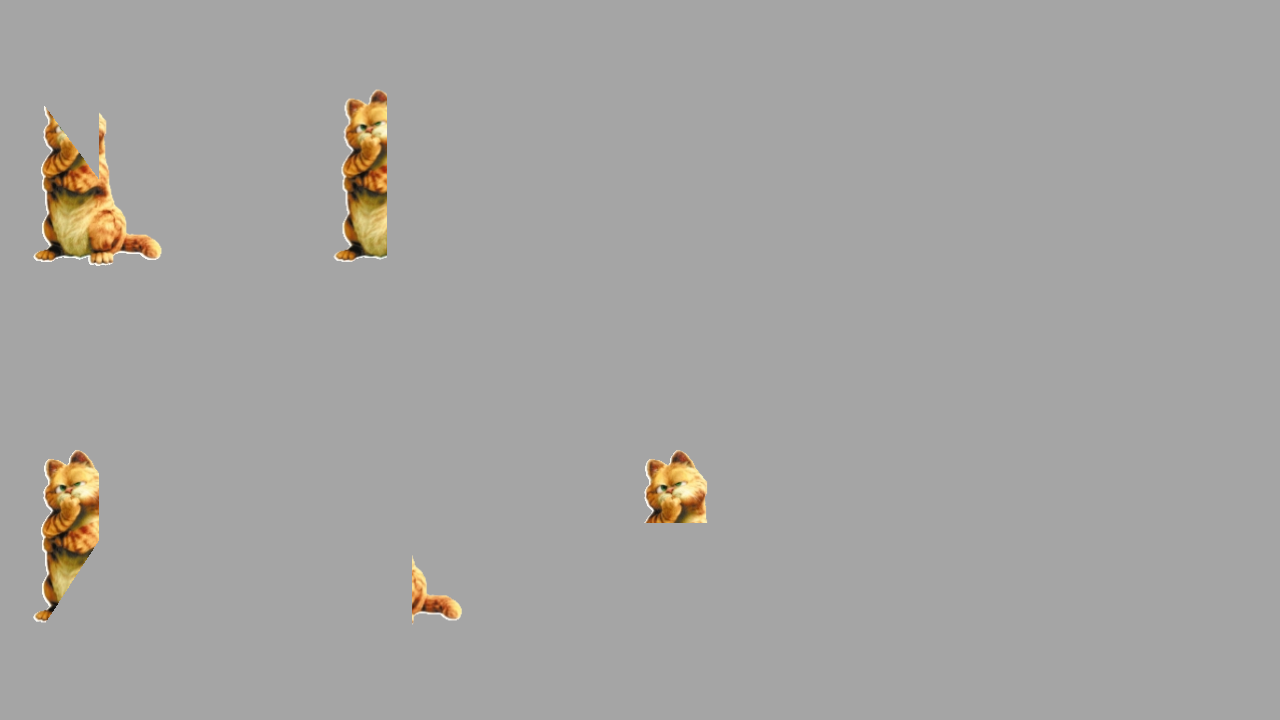
Cocos2d-x可以有多种进度条的展示方式,进度条的种类是根据进度条运动的方向来区分,包括顺时针,逆时针,从左到右,从右到左,从下到上和从上到下6种方式,这和WP8的进度条是由很大的区别的。那么Cocos2d-x的进度条是需要用图片来进行展示,然后从不同的方向来渐渐把图片显示出来实现进度条的效果。
第一步需要创建一个CCProgressTo对象和CCProgressTimer对象,我们可以通过CCProgressTo::create(2, 100)方法创建CCProgressTo定义了进度条的时间和图片的百分比,第一个参数是时间是一个CCTime对象,第二个参数是结果显示图片的百分比。通过CCProgressTimer::progressWithFile("cat.png")方法创建CCProgressTimer定义了进度条的图片文件。
CCProgressTo *to1 = CCProgressTo::create(2, 100);
CCProgressTimer *left = CCProgressTimer::progressWithFile("cat.png");
第二步通过CCProgressTimer指针设置进度条的类型。
调用setType设置类型,
kCCProgressTimerTypeRadialCW 顺时针生成
kCCProgressTimerTypeRadialCCW 逆时针生成
kCCProgressTimerTypeHorizontalBarLR 从左到右生成
kCCProgressTimerTypeHorizontalBarRL 从右到左生成
kCCProgressTimerTypeVerticalBarBT 从下到上生成
kCCProgressTimerTypeVerticalBarTB 从上到下生成
left->setType( kCCProgressTimerTypeRadialCW );
第三步添加到场景,设置位置和重复的频率
addChild(left);
left->setPosition(CCPointMake(100, size.height*3/4));
left->runAction( CCRepeatForever::create(to1));
示例代码:
         //逆时针转动

        CCProgressTo *to1 = CCProgressTo::create(, );

        CCProgressTimer *left = CCProgressTimer::progressWithFile("cat.png");

        left->setType( kCCProgressTimerTypeRadialCW );

        addChild(left);

        left->setPosition(CCPointMake(, size.height*/));

        left->runAction( CCRepeatForever::create(to1));

        //顺时针转动

        CCProgressTo *to2 = CCProgressTo::create(, );

        CCProgressTimer *right = CCProgressTimer::progressWithFile("cat.png");

        right->setType( kCCProgressTimerTypeRadialCCW );

        addChild(right);

        right->setPosition(CCPointMake(, size.height/));

        right->runAction( CCRepeatForever::create(to2));

        //从左到右

        CCProgressTo *toHorizontalBar1 = CCProgressTo::create(, );

        CCProgressTimer *leftHorizontalBar = CCProgressTimer::progressWithFile("cat.png");

        leftHorizontalBar->setType( kCCProgressTimerTypeHorizontalBarLR );

        addChild(leftHorizontalBar);

        leftHorizontalBar->setPosition(CCPointMake(, size.height*/));

        leftHorizontalBar->runAction( CCRepeatForever::create(toHorizontalBar1));

        //从右到左

        CCProgressTo *toHorizontalBar2 = CCProgressTo::create(, );

        CCProgressTimer *rightHorizontalBar = CCProgressTimer::progressWithFile("cat.png");

        rightHorizontalBar->setType( kCCProgressTimerTypeHorizontalBarRL );

        addChild(rightHorizontalBar);

        rightHorizontalBar->setPosition(CCPointMake(, size.height/));

        rightHorizontalBar->runAction( CCRepeatForever::create(toHorizontalBar2));

        //从底部到顶部

        CCProgressTo *toVerticalBar1 = CCProgressTo::create(, );

        CCProgressTimer *leftVerticalBar = CCProgressTimer::progressWithFile("cat.png");

        leftVerticalBar->setType( kCCProgressTimerTypeVerticalBarBT );

        addChild(leftVerticalBar);

        leftVerticalBar->setPosition(CCPointMake(, size.height*/));

        leftVerticalBar->runAction( CCRepeatForever::create(to1));

        //从顶部到底部

        CCProgressTo *toVerticalBar2 = CCProgressTo::create(, );

        CCProgressTimer *rightVerticalBar = CCProgressTimer::progressWithFile("cat.png");

        rightVerticalBar->setType( kCCProgressTimerTypeVerticalBarTB );

        addChild(rightVerticalBar);

        rightVerticalBar->setPosition(CCPointMake(, size.height/));

        rightVerticalBar->runAction( CCRepeatForever::create(toVerticalBar2));
运行的效果:

[Cocos2d-x For WP8]Progress 进度条的更多相关文章
- 微信小程序组件解读和分析:六、progress进度条
progress进度条组件说明: 进度条,就是表示事情当前完成到什么地步了,可以让用户视觉上感知事情的执行.progress进度条是微信小程序的组件,和HTML5的进度条progress类似. pro ...
- 微信小程序 progress 进度条 内部圆角及内部条渐变色
微信小程序progress进度条内部圆角及渐变色 <view class="progress-box"> <progress percent="80&q ...
- android中progress进度条的使用
activity.xml: <LinearLayout xmlns:android="http://schemas.android.com/apk/res/android" ...
- progress 进度条
进度条. 属性名 类型 默认值 说明 percent Float 无 百分比0~100 show-info Boolean false 在进度条右侧显示百分比 stroke-width Numb ...
- progress进度条的样式修改
由于公司在做的公众号上需要进度条,我就想着用progress标签,可是progress标签很难修改样式,因而在网上查询了一番. 现在总结一下. progress是H5新标签,主要用于显示进度条.由于他 ...
- bootstrap3的 progress 进度条
: 2.3版 3.0版 .bar .progress-bar .bar-* .progress-bar-* 2.代码: <!DOCTYPE html PUBLIC & ...
- 使用div实现progress进度条
在百度上搜了很多方法去修改HTML5 progress的样式,然而并没有实现. 所以自己用div实现了一个. 简单粗暴(*^-^*) 可以在CSS里改样式,可以JS里改进度. <div cla ...
- html。PROGRESS进度条使用测试
效果图 : 代码: ----------------------------------- //本文来自:https://www.cnblogs.com/java2sap/p/11199126.htm ...
- 详解HTML5中的进度条progress元素简介及兼容性处理
一.progress元素基本了解 1.基本知识 progress元素属于HTML5家族,指进度条.IE10+以及其他靠谱浏览器都支持. 注释:Internet Explorer 9 以及更早的版本不支 ...
随机推荐
- MFC获取系统当前时间的几种方法
1.使用CTime类 CString str; //获取系统时间 CTime tm; tm=CTime::GetCurrentTime(); str=tm.Format("现在时间是%Y年% ...
- CF#310 d2
A:|c[1]-c[0]| B:A+-(oc)A[0]==0..n-1 C: #include <cstdio> int n,m,i,j,k,p; int ll,ca,cb,cc; int ...
- 获取oracle 表字段,表名,以及主键之类等等的信息。
获取表名: Oracle的user_talbes用于记录了用户表信息. select * from user_tables 获取某个表的字段: USER_TAB_COLS中记录了用户表的列信息.下 ...
- 【leetcode】4Sum
4Sum Given an array S of n integers, are there elements a, b, c, and d in S such that a + b + c + d ...
- 2.设计包含 min 函数的栈[StackWithMinValue]
[题目]: 定义栈的数据结构,要求添加一个min函数,能够得到栈的最小元素.要求函数min.push以及pop的时间复杂度都是O(1). [解法一]: 使用一个辅助栈来保存最小元素,其栈顶元素为当前栈 ...
- 【转】MySQL Temporary Table相关问题的探究
本文转载自:http://itindex.net/detail/10901-mysql-temporary-table 问题的引入 让我们先来观察几条非常简单的MySQL语句: mysql> c ...
- fcitx-sogoupinyin下载地址和安装
伴随着Deepin 12.12 beta的发布,搜狗输入法也与我们见面了.在发布前几日Deepiner也通过各种途径向我们展示了搜狗Linux输入法,当然也掉足了胃口. 来自官方的截图: 当然令很多U ...
- POJ 2478 Farey Sequence(欧拉函数前n项和)
A - Farey Sequence Time Limit:1000MS Memory Limit:65536KB 64bit IO Format:%I64d & %I64u ...
- google登录不了解决喽
大家好,google 每到这个时候就登录不聊了.... 解法: 修改host 文件 下载地址点我
- Android之XML序列化和解析
XML文件是一种常用的文件格式,可以用来存储与传递数据 ,本文是XML文件序列化与解析的一个简单示例 写文件到本地,并用XML格式存储 /** * 写xml文件到本地 */ private void ...