
OAF 使用 javascript 使某个按钮在5秒内不能重复点击
首先要保证按钮是BUTTON,并且按钮事件设置firePartialAction。
public class CuxXXXXPGCO

  extends OAControllerImpl

{

  public static final String RCS_ID = "$Header$";

  public static final boolean RCS_ID_RECORDED =

    VersionInfo.recordClassVersion(RCS_ID, "%packagename%");
private String disableButtonMultiClickByIdJs ="function submitApprove(evt) { \n" +
" console.log('function start evt ' + evt);\n" +
" disabledButton(); \n" +
" console.log('evt execute');\n" +
" MyPeriodicalExecuter(); \n" +
" } \n" +
" function disabledButton(){ \n" +
" var text = document.getElementById(\"Test\");\n" + //此处的ID改为你要在5秒后启用的ID
" console.log('Test');\n" +
" text.disabled=true;\n" +
" } \n" +
" \n" +
" function MyPeriodicalExecuter(){ \n" +
" succ.loop=0; \n" +
" console.log('111');\n" +
" sh=setInterval(succ,1000); \n" +
" console.log('777');\n" +
" } \n" +
" \n" +
" function succ(){ \n" +
" console.log('222');\n" +
" with(arguments.callee){ \n" +
" console.log('333');\n" +
" console.log('loop = '+loop);\n" +
" loop++;\n" +
" //obj.value=str+\"(\"+(loop++)+\"/15)retry\"; \n" +
" if (loop > 5 ){ \n" +
" console.log('444');\n" +
" enabledButton(); \n" +
" console.log('555');\n" +
" clearInterval(sh); \n" +
" console.log('666');\n" +
" return; \n" +
" } \n" +
" } \n" +
" } \n" +
" \n" +
" function enabledButton(){ \n" +
" console.log('enabledButton evt End');\n" +
" var text = document.getElementById(\"Test\");\n" + //此处的ID改为你要在5秒后启用的ID
" console.log('text getElementById FinSign');\n" +
" text.disabled=false; \n" +
" }";
/**

   * Layout and page setup logic for a region.

   * @param pageContext the current OA page context

   * @param webBean the web bean corresponding to the region

   */

  public void processRequest(OAPageContext pageContext,

                             OAWebBean webBean)

  {

    super.processRequest(pageContext, webBean);

      pageContext.removeJavaScriptFunction("submitApprove");

//      pageContext.putJavaScriptFunction("submitApprove", disableButtonMultiClickJs);

      pageContext.putJavaScriptFunction("submitApprove", disableButtonMultiClickByIdJs);

      String submitJs = "javascript:submitApprove(this.id);";

      OAButtonBean button = (OAButtonBean)webBean.findChildRecursive("Test");

      button.setAttributeValue(OAWebBeanConstants.ON_CLICK_ATTR,submitJs);  //两个方法是一致的

//      button.setOnClick(submitJs);  //两个方法是一致的

    //your other business logic ...
  }
/**
* Procedure to handle form submissions for form elements in
* a region.
* @param pageContext the current OA page context
* @param webBean the web bean corresponding to the region
*/
public void processFormRequest(OAPageContext pageContext,
OAWebBean webBean)
{
//your business logic
}
}
此方法仍然有一个可以优化的地方,js代码中getElementById中的id值是写死了的,可以其实通过传入button.id的形式,使用全局变量,使得查找button通过id的方式,代码如下
1. 要清楚在哪个地方声明定义的是 全局变量 还是 局部变量 。
2. 全局变量所带来的 bug 问题非常多,可能很偶然的把代码放到其他页面里,把新页面的同名变量给覆盖,造成隐藏的 bug 。最好尽量少用全局变量。
所以这里要使用全局变量还是局部变量就见仁见智了
(不过经过测试,在IE浏览器中,此段代码不能正常运行,导致Test Button中的业务逻辑不能正常执行,猜测可能是Console.log引起的,建议删除Console.log,不然IE浏览器不能正确运行。)
(IE不支持console.log,会阻止程序的进一步执行)
public class CuxXXXXPGCO
extends OAControllerImpl
{
public static final String RCS_ID = "$Header$";
public static final boolean RCS_ID_RECORDED =
VersionInfo.recordClassVersion(RCS_ID, "%packagename%");
//禁用按钮在5秒内连续点击
private String disableButtonMultiClickByIdJs ="var buttonId ='buttonId';\n" + //JavaScript全局变量
//全局变量所带来的 bug 问题非常多,可能很偶然的把代码放到其他页面里,把新页面的同名变量给覆盖,造成隐藏的 bug 。最好尽量少用全局变量。
"function submitApprove(evt) { \n" +
" buttonId = evt;\n" +
" disabledButton(buttonId); \n" +
" MyPeriodicalExecuter(); \n" +
" } \n" +
" function disabledButton(){ \n" +
" var text = document.getElementById(buttonId);\n" + //此处的ID改为你要在5秒后启用的ID
" text.disabled=true;\n" +
" } \n" +
" \n" +
" function MyPeriodicalExecuter(){ \n" +
" succ.loop=0; \n" +
" sh=setInterval(succ,1000); \n" +
" } \n" +
" \n" +
" function succ(){ \n" +
" with(arguments.callee){ \n" +
" loop++;\n" +
" if (loop > 5 ){ \n" +
" enabledButton(); \n" +
" clearInterval(sh); \n" +
" return; \n" +
" } \n" +
" } \n" +
" } \n" +
" \n" +
" function enabledButton(){ \n" +
" var text = document.getElementById(buttonId);\n" + //此处的ID改为你要在5秒后启用的ID
" text.disabled=false; \n" +
" return; \n" +
" }";
/**
* Layout and page setup logic for a region.
* @param pageContext the current OA page context
* @param webBean the web bean corresponding to the region
*/
public void processRequest(OAPageContext pageContext,
OAWebBean webBean)
{
super.processRequest(pageContext, webBean);
pageContext.removeJavaScriptFunction("submitApprove");
// pageContext.putJavaScriptFunction("submitApprove", disableButtonMultiClickJs);
pageContext.putJavaScriptFunction("submitApprove", disableButtonMultiClickByIdJs);
String submitJs = "javascript:submitApprove(this.id);";
OAButtonBean button = (OAButtonBean)webBean.findChildRecursive("Test");
button.setAttributeValue(OAWebBeanConstants.ON_CLICK_ATTR,submitJs); //与下面的等价
// button.setOnClick(submitJs);//与上面的等价
//
}
/**
* Procedure to handle form submissions for form elements in
* a region.
* @param pageContext the current OA page context
* @param webBean the web bean corresponding to the region
*/
public void processFormRequest(OAPageContext pageContext,
OAWebBean webBean)
{
//your logic
}
}
同时还有一个未解决的bug,如果在按钮执行之后发生了跳转,通过控制台可以看到loop会一直递增,直到发生下一个事件时终止。
Chrome浏览器在开启了F12日志诊断功能之后,可以看到console.log输出的日志如下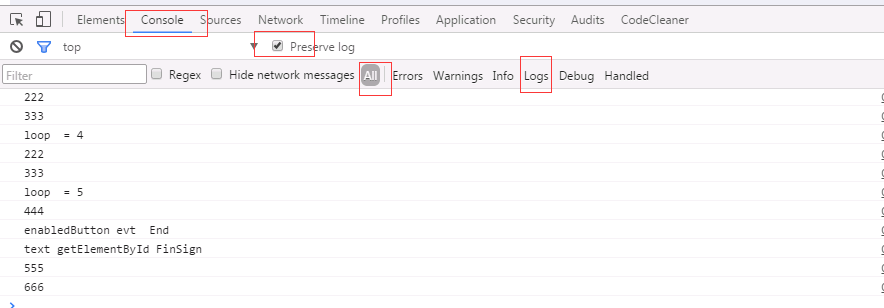
OAF 使用 javascript 使某个按钮在5秒内不能重复点击的更多相关文章
- 使用js使某个按钮在5秒内不能重复点击
<head> <!--参考:http://illy.iteye.com/blog/1534276 --> <!-- http://y.dobit.top/Detail/1 ...
- VS2010 使用时选择代码或双击时出错,点击窗口按钮后VS自动重启问题
VS2010 使用时选择代码或双击时出错崩溃,点击窗口按钮后VS自动重启问题 下载补丁,打上补丁之后,重启电脑,解决了问题. WindowsXP的下载地址:Windows XP 更新程序 (KB971 ...
- 关于javascript中限定时间内防止按钮重复点击的思路
前面的话 有一天心血来潮,1分钟内重复点击了多次博客园首页的刷新博文列表的刷新按钮.果不其然,ip当时就被禁用了.后来,重启自己的路由器,重新获取ip才可以访问博客园主页.那么,设置一个限定时间内(比 ...
- Qt和JavaScript使用QWebChannel交互一——和Qt内嵌网页交互
Qt和JavaScript使用QWebChannel交互一--和Qt内嵌网页交互 目录 Qt和JavaScript使用QWebChannel交互一--和Qt内嵌网页交互 前言 一.效果 二.实现过程 ...
- 关于Android避免按钮重复点击事件
最近测试人员测试我们的APP的时候,喜欢快速点击某个按钮,出现一个页面出现多次,测试人员能不能禁止这样.我自己点击了几下,确实存在这个问题,也感觉用户体验不太好.于是乎后来我搜了下加一个方法放在我们U ...
- iOS之防止用户重复点击Button(按钮)问题
在项目中,我们往往会遇到这样的问题:因为网络较慢的原因,用户会不耐烦的一直去点击按钮,这样导致的结果时:相关代码一遍一遍的被重复执行,如果按钮的事件是网络请求的话,这样又导致一种网络请求的循环.所以我 ...
- asp.net中如何防止用户重复点击提交按钮
asp.net中如何防止用户重复点击提交按钮 asp.net 中防止因为网速慢等影响交互的问题导致用户可能点击多次提交按钮,从而导致数据库中出现多条重复的记录,经过亲自验证在网上找的方法,找到两个 ...
- 重复点击主界面(TabBar)按钮刷新界面--点击状态栏回到顶部
1.监听按钮点击 2.判断是否是点击的同一个按钮(记录上次点击的按钮) 3.当重复点击相同按钮时,需要获取当前按钮对应控制器刷新界面 3.1 判断是否重复点击按钮,代码写在哪里? ...
- 使用JavaScript动态的绑定、解绑 a 标签的onclick事件,防止重复点击
页面上的 a 标签如下: <a class="more" style="cursor: pointer;" id="commentMore&qu ...
随机推荐
- Swift开发第四篇——柯里化
本篇分为两部分: 一.柯里化的基本使用 二.柯里化的使用场景 一.柯里化的基本使用 柯里化(Currying):也就是把接受多个参数的方法变换成接受第一个参数的方法,并且返回接受余下的参数并且返回结果 ...
- iOS开发之NSTimer使用初探
创建一个定时器(NSTimer) - (void)viewDidLoad { [super viewDidLoad]; [NSTimer scheduledTimerWithTimeInterval: ...
- C语言-02-基本运算
一.算术运算 种类 1> 加(+),同时可以表示正号 2> 减(-),同时可以表示负号 3> 乘(*) 4>除(/) 5>取余(%) 关于类型转换 1>自动类型转换 ...
- Greenplum 4.3 For Centos 6.5 安装指南
1.greenplum数据库安装前期准备工作 1.1 安装Linux l 内存:最小1GB,推荐2GB或以上. l 交换空间: 内存大小是1-2GB时,交换空间是内存的1.5倍,内存大小2-16G ...
- ehcache整合spring注解方式
一.简介 在hibernate中就是用到了ehcache 充当缓存.spring对ehcache也提供了支持,使用也比较简单,只需在spring的配置文件中将ehcache的ehcache.xml文件 ...
- db2 常用命令(一)
DB2数据库常用命令小结 ========操作数据库命令========== -- 启动数据库实例 #db2start -- 停止数据库实例 #db2sto # 如 ...
- 【嵌入式开发板】8月终极暑促迅为Cortex-a9四核入门开发板
核心板参数 尺寸 50mm*60mm 高度 连同连接器在内0.26cm CPU Exynos4412,四核Cortex-A9,主频为1.4GHz-1.6GHz 内存 1GB 双通道 DDR3(2GB ...
- 动手学习TCP:4种定时器
上一篇中介绍了TCP数据传输中涉及的一些基本知识点.本文让我们看看TCP中的4种定时器. TCP定时器 对于每个TCP连接,TCP管理4个不同的定时器,下面看看对4种定时器的简单介绍. 重传定时器使用 ...
- nopcommerce之权限模块
这篇文章简单介绍一下nopcommerce的权限模块,nopcommerce里面的权限设计相对比较简单,主要针对后台的action和前台的是否显示(比如产品.品牌等),虽然简单但是应付一般的项目应该没 ...
- leetcode_401_Binary Watch_回溯法_java实现
题目: A binary watch has 4 LEDs on the top which represent the hours (0-11), and the 6 LEDs on the bot ...