
Python:使用psycopg2模块操作PostgreSQL
安装psycopg2模块:
postgresql client ---Navicat Premium
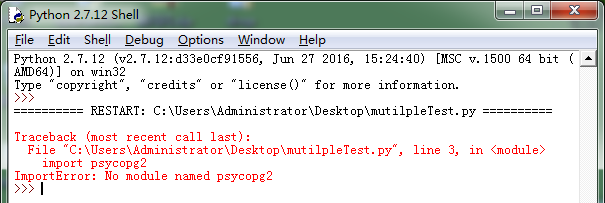
- 怎么验证是否已经安装过psycopy2?
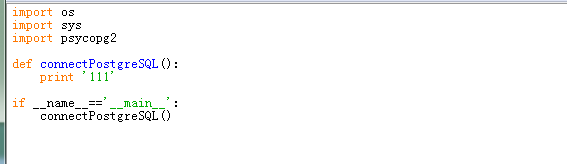
编写上面代码,运行看是否抛出缺少psycopg2模块。
- 安装方法1:
1)使用psycopg2-2.4.2.win-amd64-py2.7-pg9.0.4-release.exe安装,下载地址:http://vdisk.weibo.com/s/Cd8pPaw56Ozys
直接运行exe,不出错误,运行上边代码验证代码无错误,基本算是安装完成了。
2)怎么卸载?
2.1)找到安装目录:C:\Python27,发现下边包含文件:Removepsycopg2.exe,运行,来删除;
2.2)如果运行失败的话,进入目录:C:\Python27\Lib\site-packages下,找到psycopg2文件夹和psycopg2-2.4.2-py2.7.egg-info文件,右键删除。
2.3)运行上边的代码,确认是否删除成功。
- 安装方法2:
使用.whl安装,下载地址:https://pypi.python.org/pypi/psycopg2/
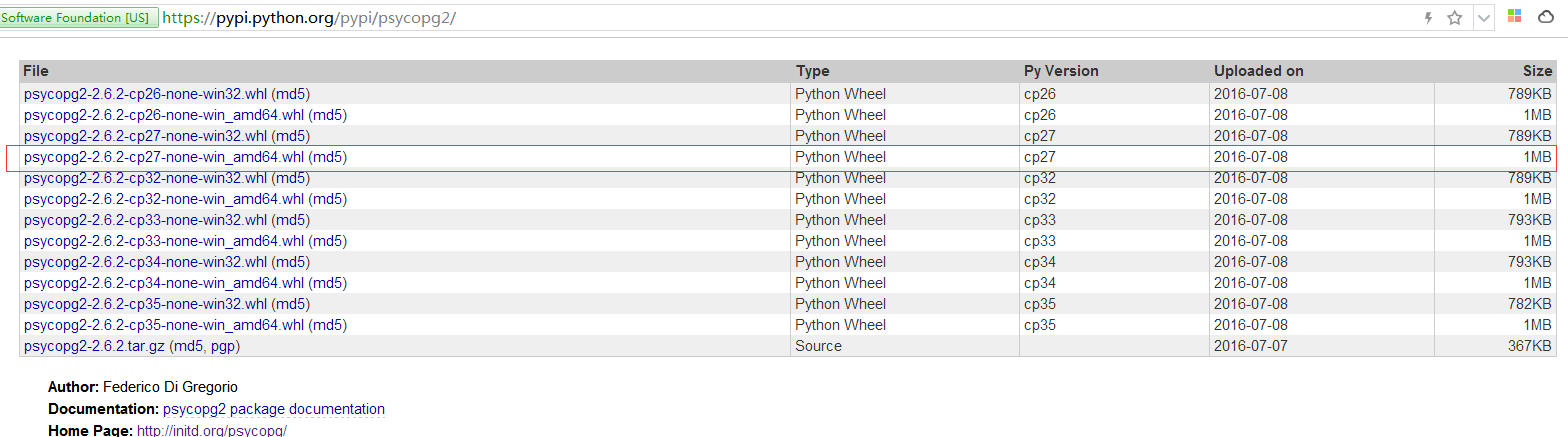
下载文件:psycopg2-2.6.2-cp27-none-win_amd64.whl
我这里把psycopg2-2.6.2-cp27-none-win_amd64.whl拷贝到安装目录下Scripts文件夹中。
cmd中运行代码:pip install C:\Python27\Scripts\psycopg2-2.6.2-cp27-none-win_amd64.whl
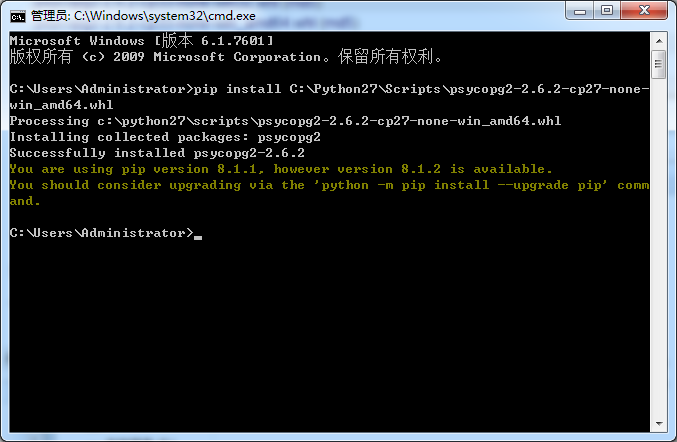
运行上边的代码,确认是否删除成功。
- 通过psycopg2操作数据库:
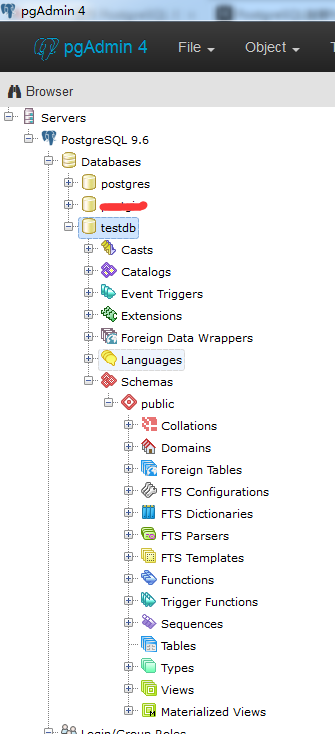
使用账户postgres,创建测试数据库testdb。
参考yiibai.comAPI:
S.N. API & 描述
1 psycopg2.connect(database="testdb", user="postgres", password="cohondob", host="127.0.0.1", port="5432")
这个API打开一个连接到PostgreSQL数据库。如果成功打开数据库时,它返回一个连接对象。
2 connection.cursor()
该程序创建一个光标将用于整个数据库使用Python编程。
3 cursor.execute(sql [, optional parameters])
此例程执行SQL语句。可被参数化的SQL语句(即占位符,而不是SQL文字)。 psycopg2的模块支持占位符用%s标志
例如:cursor.execute("insert into people values (%s, %s)", (who, age))
4 curosr.executemany(sql, seq_of_parameters)
该程序执行SQL命令对所有参数序列或序列中的sql映射。
5 curosr.callproc(procname[, parameters])
这个程序执行的存储数据库程序给定的名称。该程序预计为每一个参数,参数的顺序必须包含一个条目。
6 cursor.rowcount
这个只读属性,它返回数据库中的行的总数已修改,插入或删除最后 execute*().
7 connection.commit()
此方法提交当前事务。如果不调用这个方法,无论做了什么修改,自从上次调用commit()是不可见的,从其他的数据库连接。
8 connection.rollback()
此方法会回滚任何更改数据库自上次调用commit()方法。
9 connection.close()
此方法关闭数据库连接。请注意,这并不自动调用commit()。如果你只是关闭数据库连接而不调用commit()方法首先,那么所有更改将会丢失!
10 cursor.fetchone()
这种方法提取的查询结果集的下一行,返回一个序列,或者无当没有更多的数据是可用的。
11 cursor.fetchmany([size=cursor.arraysize])
这个例程中取出下一个组的查询结果的行数,返回一个列表。当没有找到记录,返回空列表。该方法试图获取尽可能多的行所显示的大小参数。
12 cursor.fetchall()
这个例程获取所有查询结果(剩余)行,返回一个列表。空行时则返回空列表。
- 打开数据库连接:
 import os

 import sys

 import psycopg2

 def connectPostgreSQL():

     conn = psycopg2.connect(database="testdb", user="postgres", password="new.1234", host="127.0.0.1", port="")

     print 'connect successful!'

 if __name__=='__main__':

     connectPostgreSQL()
- 创建表操作:
 import os

 import sys

 import psycopg2

 def connectPostgreSQL():

     conn = psycopg2.connect(database="testdb", user="postgres", password="new.1234", host="127.0.0.1", port="")

     print 'connect successful!'

     cursor=conn.cursor()

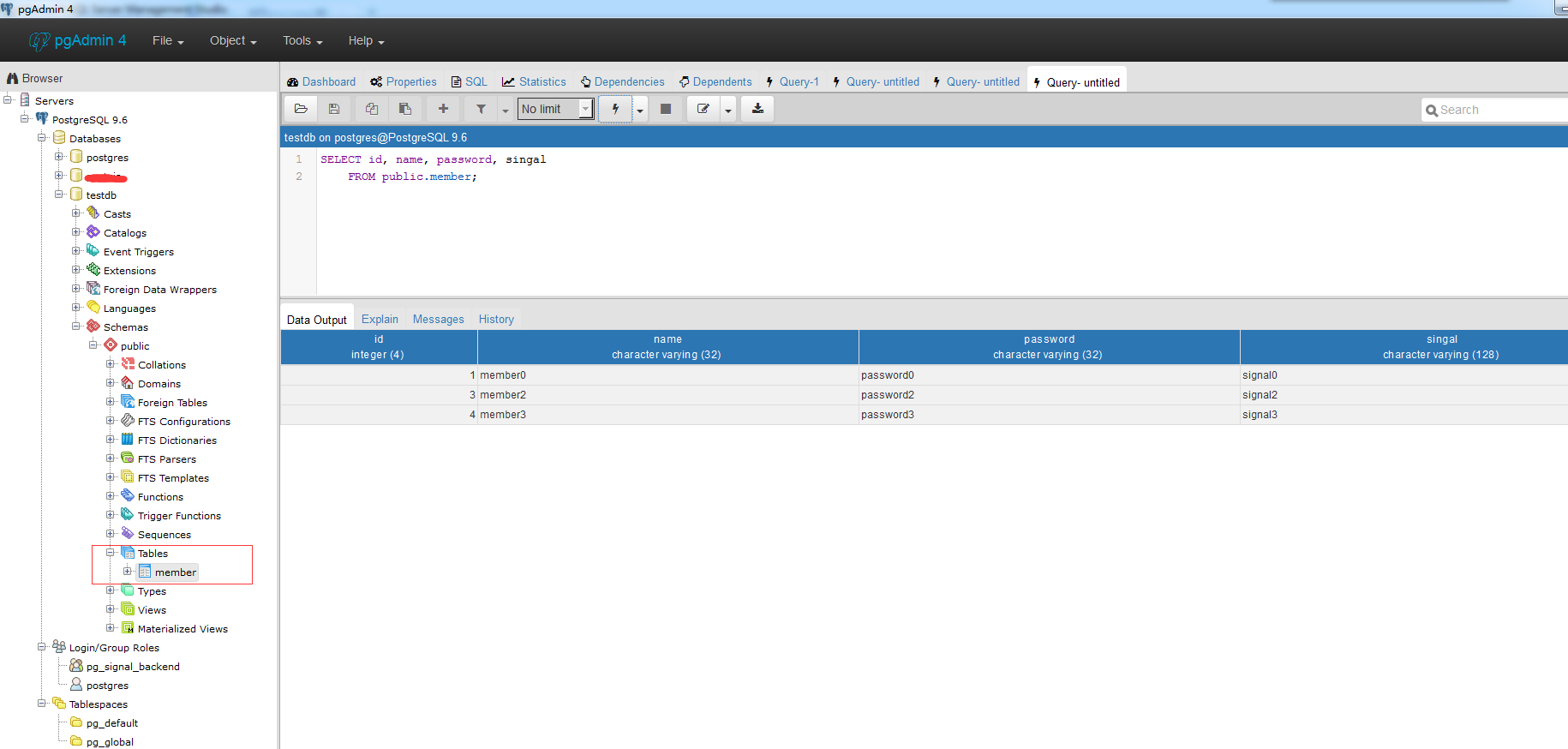
     cursor.execute('''create table public.member(

 id integer not null primary key,

 name varchar(32) not null,

 password varchar(32) not null,

 singal varchar(128)

 )''')

     conn.commit()

     conn.close()

     print 'table public.member is created!'

 if __name__=='__main__':

     connectPostgreSQL()
- Insert 操作:
 import os

 import sys

 import psycopg2

 def connectPostgreSQL():

     conn = psycopg2.connect(database="testdb", user="postgres", password="new.1234", host="127.0.0.1", port="")

     print 'connect successful!'

     cursor=conn.cursor()

     cursor.execute('''create table public.member(

 id integer not null primary key,

 name varchar(32) not null,

 password varchar(32) not null,

 singal varchar(128)

 )''')

     conn.commit()

     conn.close()

     print 'table public.member is created!'

 def insertOperate():

     conn = psycopg2.connect(database="testdb", user="postgres", password="new.1234", host="127.0.0.1", port="")

     cursor=conn.cursor()

     cursor.execute("insert into public.member(id,name,password,singal)\

 values(1,'member0','password0','signal0')")

     cursor.execute("insert into public.member(id,name,password,singal)\

 values(2,'member1','password1','signal1')")

     cursor.execute("insert into public.member(id,name,password,singal)\

 values(3,'member2','password2','signal2')")

     cursor.execute("insert into public.member(id,name,password,singal)\

 values(4,'member3','password3','signal3')")

     conn.commit()

     conn.close()

     print 'insert records into public.memmber successfully'

 if __name__=='__main__':

     #connectPostgreSQL()

     insertOperate()
- Select 操作:
 import os

 import sys

 import psycopg2

 def connectPostgreSQL():

     conn = psycopg2.connect(database="testdb", user="postgres", password="new.1234", host="127.0.0.1", port="")

     print 'connect successful!'

     cursor=conn.cursor()

     cursor.execute('''create table public.member(

 id integer not null primary key,

 name varchar(32) not null,

 password varchar(32) not null,

 singal varchar(128)

 )''')

     conn.commit()

     conn.close()

     print 'table public.member is created!'

 def insertOperate():

     conn = psycopg2.connect(database="testdb", user="postgres", password="new.1234", host="127.0.0.1", port="")

     cursor=conn.cursor()

     cursor.execute("insert into public.member(id,name,password,singal)\

 values(1,'member0','password0','signal0')")

     cursor.execute("insert into public.member(id,name,password,singal)\

 values(2,'member1','password1','signal1')")

     cursor.execute("insert into public.member(id,name,password,singal)\

 values(3,'member2','password2','signal2')")

     cursor.execute("insert into public.member(id,name,password,singal)\

 values(4,'member3','password3','signal3')")

     conn.commit()

     conn.close()

     print 'insert records into public.memmber successfully'

 def selectOperate():

     conn = psycopg2.connect(database="testdb", user="postgres", password="new.1234", host="127.0.0.1", port="")

     cursor=conn.cursor()

     cursor.execute("select id,name,password,singal from public.member where id>2")

     rows=cursor.fetchall()

     for row in rows:

         print 'id=',row[0], ',name=',row[1],',pwd=',row[2],',singal=',row[3],'\n'

     conn.close()

 if __name__=='__main__':

     #connectPostgreSQL()

     #insertOperate()

     selectOperate()
结果:
Python 2.7.12 (v2.7.12:d33e0cf91556, Jun 27 2016, 15:24:40) [MSC v.1500 64 bit (AMD64)] on win32

Type "copyright", "credits" or "license()" for more information.

>>>

========== RESTART: C:\Users\Administrator\Desktop\mutilpleTest.py ==========

id= 3 ,name= member2 ,pwd= password2 ,singal= signal2

id= 4 ,name= member3 ,pwd= password3 ,singal= signal3

>>>
- update操作:
 import os

 import sys

 import psycopg2

 def connectPostgreSQL():

     conn = psycopg2.connect(database="testdb", user="postgres", password="new.1234", host="127.0.0.1", port="")

     print 'connect successful!'

     cursor=conn.cursor()

     cursor.execute('''create table public.member(

 id integer not null primary key,

 name varchar(32) not null,

 password varchar(32) not null,

 singal varchar(128)

 )''')

     conn.commit()

     conn.close()

     print 'table public.member is created!'

 def insertOperate():

     conn = psycopg2.connect(database="testdb", user="postgres", password="new.1234", host="127.0.0.1", port="")

     cursor=conn.cursor()

     cursor.execute("insert into public.member(id,name,password,singal)\

 values(1,'member0','password0','signal0')")

     cursor.execute("insert into public.member(id,name,password,singal)\

 values(2,'member1','password1','signal1')")

     cursor.execute("insert into public.member(id,name,password,singal)\

 values(3,'member2','password2','signal2')")

     cursor.execute("insert into public.member(id,name,password,singal)\

 values(4,'member3','password3','signal3')")

     conn.commit()

     conn.close()

     print 'insert records into public.memmber successfully'

 def selectOperate():

     conn = psycopg2.connect(database="testdb", user="postgres", password="new.1234", host="127.0.0.1", port="")

     cursor=conn.cursor()

     cursor.execute("select id,name,password,singal from public.member where id>2")

     rows=cursor.fetchall()

     for row in rows:

         print 'id=',row[0], ',name=',row[1],',pwd=',row[2],',singal=',row[3],'\n'

     conn.close()

 def updateOperate():

     conn = psycopg2.connect(database="testdb", user="postgres", password="new.1234", host="127.0.0.1", port="")

     cursor=conn.cursor()

     cursor.execute("update public.member set name='update ...' where id=2")

     conn.commit()

     print "Total number of rows updated :", cursor.rowcount

     cursor.execute("select id,name,password,singal from public.member")

     rows=cursor.fetchall()

     for row in rows:

         print 'id=',row[0], ',name=',row[1],',pwd=',row[2],',singal=',row[3],'\n'

     conn.close()

 if __name__=='__main__':

     #connectPostgreSQL()

     #insertOperate()

     #selectOperate()

     updateOperate()
结果:
Python 2.7.12 (v2.7.12:d33e0cf91556, Jun 27 2016, 15:24:40) [MSC v.1500 64 bit (AMD64)] on win32

Type "copyright", "credits" or "license()" for more information.

>>>

========== RESTART: C:\Users\Administrator\Desktop\mutilpleTest.py ==========

Total number of rows updated : 1

id= 1 ,name= member0 ,pwd= password0 ,singal= signal0

id= 3 ,name= member2 ,pwd= password2 ,singal= signal2

id= 4 ,name= member3 ,pwd= password3 ,singal= signal3

id= 2 ,name= update ... ,pwd= password1 ,singal= signal1

>>>
- Delete操作:
 import os

 import sys

 import psycopg2

 def connectPostgreSQL():

     conn = psycopg2.connect(database="testdb", user="postgres", password="new.1234", host="127.0.0.1", port="")

     print 'connect successful!'

     cursor=conn.cursor()

     cursor.execute('''create table public.member(

 id integer not null primary key,

 name varchar(32) not null,

 password varchar(32) not null,

 singal varchar(128)

 )''')

     conn.commit()

     conn.close()

     print 'table public.member is created!'

 def insertOperate():

     conn = psycopg2.connect(database="testdb", user="postgres", password="new.1234", host="127.0.0.1", port="")

     cursor=conn.cursor()

     cursor.execute("insert into public.member(id,name,password,singal)\

 values(1,'member0','password0','signal0')")

     cursor.execute("insert into public.member(id,name,password,singal)\

 values(2,'member1','password1','signal1')")

     cursor.execute("insert into public.member(id,name,password,singal)\

 values(3,'member2','password2','signal2')")

     cursor.execute("insert into public.member(id,name,password,singal)\

 values(4,'member3','password3','signal3')")

     conn.commit()

     conn.close()

     print 'insert records into public.memmber successfully'

 def selectOperate():

     conn = psycopg2.connect(database="testdb", user="postgres", password="new.1234", host="127.0.0.1", port="")

     cursor=conn.cursor()

     cursor.execute("select id,name,password,singal from public.member where id>2")

     rows=cursor.fetchall()

     for row in rows:

         print 'id=',row[0], ',name=',row[1],',pwd=',row[2],',singal=',row[3],'\n'

     conn.close()

 def updateOperate():

     conn = psycopg2.connect(database="testdb", user="postgres", password="new.1234", host="127.0.0.1", port="")

     cursor=conn.cursor()

     cursor.execute("update public.member set name='update ...' where id=2")

     conn.commit()

     print "Total number of rows updated :", cursor.rowcount

     cursor.execute("select id,name,password,singal from public.member")

     rows=cursor.fetchall()

     for row in rows:

         print 'id=',row[0], ',name=',row[1],',pwd=',row[2],',singal=',row[3],'\n'

     conn.close()

 def deleteOperate():

     conn = psycopg2.connect(database="testdb", user="postgres", password="new.1234", host="127.0.0.1", port="")

     cursor=conn.cursor()

     cursor.execute("select id,name,password,singal from public.member")

     rows=cursor.fetchall()

     for row in rows:

         print 'id=',row[0], ',name=',row[1],',pwd=',row[2],',singal=',row[3],'\n'

     print 'begin delete'

     cursor.execute("delete from public.member where id=2")

     conn.commit()

     print 'end delete'

     print "Total number of rows deleted :", cursor.rowcount

     cursor.execute("select id,name,password,singal from public.member")

     rows=cursor.fetchall()

     for row in rows:

         print 'id=',row[0], ',name=',row[1],',pwd=',row[2],',singal=',row[3],'\n'

     conn.close()

 if __name__=='__main__':

     #connectPostgreSQL()

     #insertOperate()

     #selectOperate()

     #updateOperate()

     deleteOperate()
结果:
Python 2.7.12 (v2.7.12:d33e0cf91556, Jun 27 2016, 15:24:40) [MSC v.1500 64 bit (AMD64)] on win32

Type "copyright", "credits" or "license()" for more information.

>>>

========== RESTART: C:\Users\Administrator\Desktop\mutilpleTest.py ==========

id= 1 ,name= member0 ,pwd= password0 ,singal= signal0

id= 3 ,name= member2 ,pwd= password2 ,singal= signal2

id= 4 ,name= member3 ,pwd= password3 ,singal= signal3

id= 2 ,name= update ... ,pwd= password1 ,singal= signal1

begin delete

end delete

Total number of rows deleted : 1

id= 1 ,name= member0 ,pwd= password0 ,singal= signal0

id= 3 ,name= member2 ,pwd= password2 ,singal= signal2

id= 4 ,name= member3 ,pwd= password3 ,singal= signal3

>>>
参考文章:
http://www.cnblogs.com/qiongmiaoer/archive/2013/09/30/3346984.html
http://www.yiibai.com/html/postgresql/2013/080998.html
Python:使用psycopg2模块操作PostgreSQL的更多相关文章
- Python使用psycopg2模块操作PostgreSQL
https://blog.csdn.net/pcent/article/details/78643611
- Python使用cx_Oracle模块操作Oracle数据库--通过sql语句和存储操作
https://www.jb51.net/article/125160.htm?utm_medium=referral Python使用cx_Oracle调用Oracle存储过程的方法示例 http ...
- python的pika模块操作rabbitmq
上一篇博文rabbitmq的构架和原理,了解了rabbitmq的使用原理,接下来使用python的pika模块实现使用rabbitmq. 环境搭建 安装python,不会的请参考Linux安装配置py ...
- python中OS模块操作文件和目录
在python中执行和操作目录和文件的操作是通过内置的python OS模块封装的函数实现的. 首先导入模块,并查看操作系统的类型: >>> import os os.name # ...
- python 通过 pymysql模块 操作 mysql 数据库
Python 中操作 MySQL 步骤 安装模块 pip install pymysql 引入模块 在py文件中引入pymysql模块 from pymysql import * Connection ...
- python用sqlite3模块操作sqlite数据库-乾颐堂
SQLite是一个包含在C库中的轻量级数据库.它并不需要独立的维护进程,并且允许使用非标准变体(nonstandard variant)的SQL查询语句来访问数据库. 一些应用可是使用SQLite保存 ...
- python使用elasticsearch模块操作elasticsearch
1.创建索引 命令如下 from elasticsearch import Elasticsearch es = Elasticsearch([{"host":"10.8 ...
- Python使用xlwt模块 操作Excel文件
导出Excel文件 1. 使用xlwt模块 import xlwt import xlwt # 导入xlwt # 新建一个excel文件 file = xlwt.Workbook() # ...
- python中os模块操作
学习时总结的一些常用方法>>>> 目录函数 os.getcwd() 返回当前工作目录 os.chdir() 改变工作目录 os.listdir(path="path& ...
随机推荐
- PHP防止用户重复提交表单
我们提交表单的时候,不能忽视的一个限制是防止用户重复提交表单,因为有可能用户连续点击了提交按钮或者是攻击者恶意提交数据,那么我们在提交数据后的处理如修改或添加数据到数据库时就会惹上麻烦. 那么如何规避 ...
- 总结android项目的基本开发步骤(转帖)
总结android项目的基本开发步骤(转帖) 做了几个android企业应用项目后,总结了项目的基本开发步骤,希望能够交流.一 应用规划: ※确定功能. ※必须的界面及界面跳转的流程. ...
- Solr 连接数据库
实际工程应用中,从数据库导出数据创建索引再常见不过了,现在实验一下从数据库导入数据创建索引. 一.版本说明 Solr版本:4.7.0 数据库:sqlserver2005 二.配置步骤 1. 准备的j ...
- buffer overflow
Computer Systems A Programmer's Perspective Second Edition We have seen that C does not perform any ...
- sentinel
Computer Science An Overview _J. Glenn Brookshear _11th Edition Inherent in processing a sequential ...
- mybatis 中#{}与${}的区别 (面试题)
MyBatis/Ibatis中#和$的区别 1. #将传入的数据都当成一个字符串,会对自动传入的数据加一个双引号. 如:order by #user_id#,如果传入的值是111,那么解析成sql时的 ...
- fstream 坑解决办法
status_t SysWatcher::setWVer() { fstream myfile; myfile.open("/data/w_version", io ...
- UML 关系
1. 关联关系(association) 关联关系式是用一条直线表示的,如A—B.表示在一段时间内将多个类的实例连接在一起,关联关系描述了某个对象在一段时间内一直知道另一个对象的存在.在Rose中为了 ...
- JBoss的安装与配置(对应eclipse配置)【转】
安装JBoss纯粹是目的就是学习EJB3...至少现在是这样的 EJB需要运行在EJB容器中.每个J2EE应用服务器都含有EJB容器和Web容器.这样,既支持运行EJB,也可以运行Web应用 目前EJ ...
- 15 款最好的 C/C++ 编译器和集成开发环境
我们有很多编程语言来进行 web 开发,比如 Java,.Net,PHP,Ruby,Perl,Python 等等.今天我们主要讨论的是两大古老而又流行的语言: C 和 C++ ,它们有着许多卓越的特性 ...