
jquery-4 完整表单验证实例
jquery-4 完整表单验证实例
一、总结
一句话总结:在form的jquery对象中返回false即可终止表单提交。
1、验证的显示错误消息如何布局?
开始时隐藏,出现错误后显示
 10         .error{

 11             color:#f00;

 12             font-weight: bold;

 13             display: none;

 14         }
 54     if(val.length<6){

 55         $(this).data({'s':0});

 56         $(this).next().show();

 57     }else{
2、如何设置限制表单最多输入11位?
用maxlength属性
42 <input type="text" class="auth" name='phone' maxlength='11'>
3、如何给元素添加data方法来给元素添加属性?
不影响其它属性的属性
58 $(this).data({'s':1});
语法规则是json
4、选择input里面name属性为email的?
88 $('input[name=email]').blur(function(){
5、jquery中如何用this属性?
和在js中一模一样
 88 $('input[name=email]').blur(function(){

 89     val=this.value;
 88 $('input[name=email]').blur(function(){

 89     val=this.value;

 90

 91     if(!val.match(/^\w+@\w+\.\w+$/i)){

 92         $(this).data({'s':0});

 93         $(this).next().show();

 94     }else{

 95         $(this).data({'s':1});

 96         $(this).next().hide();

 97     }

 98 });
6、如何验证邮箱(什么方法,正则怎么写)?
string的match方法
91 if(!val.match(/^\w+@\w+\.\w+$/i)){
7、如何取到input:password的下一个span?
jquery中next()方法
105 $(this).next().show();
8、文本框失去焦点事件(jquery)?
blur方法
75 $('input[name=repassword]').blur(function(){
9、如何触发所有class为auth的失去焦点方法?
blue方法
112 $('form').submit(function(){

113     $('.auth').blur();
10、如何在表单提交的时候验证所有表单控件的失去焦点方法?
在form的submit方法中执行blur方法
112 $('form').submit(function(){

113     $('.auth').blur();
11、如何在表单提交的时候验证所有表单控件都验证通过?
给用data()方法给所有的表单控件添加一个属性,属性值为0为1表示是否就绪,最后求所有控件的属性和,结果为控件数说明所有的表单都验证通过
103     if(!val.match(/^139\d{8}$/)){

104         $(this).data({'s':0});

105         $(this).next().show();

106     }else{
115     tot=0;

116

117     $('.auth').each(function(){

118         tot+=$(this).data('s');

119     });
12、如何终止表单的提交?
在form的jquery对象的submit()方法中返回false即可
112 $('form').submit(function(){
121     if(tot!=5){

122         return false;

123     }
13、如何遍历出jquery选择器选择出来的jquery对象?
each方法
117     $('.auth').each(function(){

118         tot+=$(this).data('s');

119     });
14、jquery中控件的显示隐藏用什么方法?
show()和hide()方法
105 $(this).next().show();
108 $(this).next().hide();
二、完整表单验证实例
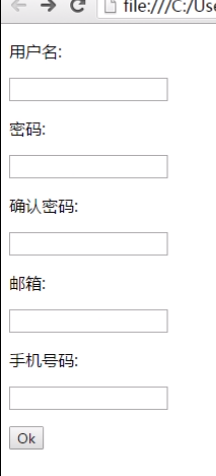
表单验证完整实例
 <!doctype html>

 <html lang="en">

 <head>

     <meta charset="UTF-8">

     <title>index</title>

     <style>

         *{

             font-family: 微软雅黑;

         }

         .error{

             color:#f00;

             font-weight: bold;

             display: none;

         }

     </style>

     <script src="jquery.js"></script>

 </head>

 <body>

     <form action="reg.php" method='get'>

         <p>用户名:</p>

         <p>

             <input type="text" name='username' class='auth'>

             <span class='error'>用户名长度至少6位!</span>

         </p>

         <p>密码:</p>

         <p>

             <input type="text" name="password" class='auth'>

             <span class='error'>密码长度至少8位!</span>

         </p>

         <p>确认密码:</p>

         <p>

             <input type="text" name='repassword' class='auth'>

             <span class='error'>两次密码不一致!</span>

         </p>

         <p>邮箱:</p>

         <p>

             <input type="text" class="auth" name='email'>

             <span class='error'>邮箱格式不正确!</span>

         </p>

         <p>手机号码:</p>

         <p>

             <input type="text" class="auth" name='phone' maxlength='11'>

             <span class='error'>手机号码不正确!</span>

         </p>

         <p><input type="submit" value="Ok"></p>

     </form>

 </body>

 <script>

 // 表单验证

 $('input[name=username]').blur(function(){

     val=this.value;

     if(val.length<6){

         $(this).data({'s':0});

         $(this).next().show();

     }else{

         $(this).data({'s':});

         $(this).next().hide();

     }

 });

 $('input[name=password]').blur(function(){

     val=this.value;

     if(val.length<8){

         $(this).data({'s':0});

         $(this).next().show();

     }else{

         $(this).data({'s':1});

         $(this).next().hide();

     }

 });

 $('input[name=repassword]').blur(function(){

     val1=$('input[name=password]').val();

     val2=this.value;

     if(val1!=val2){

         $(this).data({'s':0});

         $(this).next().show();

     }else{

         $(this).data({'s':1});

         $(this).next().hide();

     }

 });

 $('input[name=email]').blur(function(){

     val=this.value;

     if(!val.match(/^\w+@\w+\.\w+$/i)){

         $(this).data({'s':});

         $(this).next().show();

     }else{

         $(this).data({'s':1});

         $(this).next().hide();

     }

 });

 $('input[name=phone]').blur(function(){

     val=this.value;

     if(!val.match(/^139\d{8}$/)){

         $(this).data({'s':0});

         $(this).next().show();

     }else{

         $(this).data({'s':1});

         $(this).next().hide();

     }

 });

 $('form').submit(function(){

     $('.auth').blur();

     tot=0;

     $('.auth').each(function(){

         tot+=$(this).data('s');

     });

     if(tot!=5){

         return false;

     }

 });

 </script>

 </html>
jquery-4 完整表单验证实例的更多相关文章
- jQuery Validation Engine 表单验证
功能强大的 jQuery 表单验证插件,适用于日常的 E-mail.电话号码.网址等验证及 Ajax 验证,除自身拥有丰富的验证规则外,还可以添加自定义的验证规则. 兼容 IE 6+, Chrome, ...
- Jquery.validate.js表单验证插件的使用
作为一个网站web开发人员,以前居然不知道还有表单验证这样好呀的插件,还在一行行写表单验证,真是后悔没能早点知道他们的存在. 最近公司不忙,自己学习一些东西的时候,发现了validation的一个实例 ...
- 基于Jquery Validate 的表单验证
基于Jquery Validate 的表单验证 jquery.validate.js是jquery下的一个验证插件,运用此插件我们可以很便捷的对表单元素进行格式验证. 在讲述基于Jquery Vali ...
- jQuery-easyui和validate表单验证实例
jQuery EasyUI 表单 - 表单验证插件validatebox 使用时需要向页面引入两个css文件如下: <link rel="stylesheet" href=& ...
- 基于jQuery的Validate表单验证
表单验证可以说在前端开发工作中是无处不在的~ 有数据,有登录,有表单, 都需要前端验证~~ 而我工作中用到最多的就是基于基于jQuery的Validate表单验证~ 就向下面这样~ 因为今天有个朋 ...
- jquery.validation.js 表单验证
jquery.validation.js 表单验证 官网地址:http://bassistance.de/jquery-plugins/jquery-plugin-validation jQuer ...
- 异步提交form的时候利用jQuery validate实现表单验证
异步提交form的时候利用jQuery validate实现表单验证相信很多人都用过jquery validate插件,非常好用,并且可以通过下面的语句来自定义验证规则 // 电话号码验证 ...
- Bootstrap+PHP表单验证实例
简单实用的Bootstrap+PHP表单验证实例,非常适合初学者及js不熟悉者,还有ajax远程验证 js验证表单 1 $(document).ready(function() { 2 $('#def ...
- 基于Bootstrap+jQuery.validate Form表单验证实践
基于Bootstrap jQuery.validate Form表单验证实践 项目结构 : github 上源码地址:https://github.com/starzou/front-end- ...
随机推荐
- jodd-servlet工具集锦
Jodd提供了许多servlet和jsp相关的工具. Utils ServletUtils类集成了不同的servlet工具,你可以检测multipart请求,读取授权头,下载预备,cookie操作,读 ...
- TrueSec引导的Linux系统和安全检测工具预览
650) this.width=650;" onclick='window.open("http://blog.51cto.com/viewpic.php?refimg=&qu ...
- cc1.exe -fno-stack-protector
# github.com/mattn/go-sqlite3 cc1.exe: error: unrecognized command line option "-fno-stack-prot ...
- Java 批量修改文件后缀
import java.io.*; public class test { public void reName(String path, String from, String to) { File ...
- BZOJ1576: [Usaco2009 Jan]安全路经Travel(树链剖分)
Description Input * 第一行: 两个空格分开的数, N和M * 第2..M+1行: 三个空格分开的数a_i, b_i,和t_i Output * 第1..N-1行: 第i行包含一个数 ...
- redirect_uri 参数错误
http://www.cnblogs.com/zitjubiz/p/5935712.html http://blog.csdn.net/u014033756/article/details/52038 ...
- Activity学习
http://www.360doc.com/content/13/1106/11/203871_327110236.shtml http://www.jianshu.com/p/e6971e8a8da ...
- 业余学习react 学习记录
http://www.ruanyifeng.com/blog/2015/03/react (阮一峰 react 学习) 1.搭建环境:npm 使用 React npm install -g cnpm ...
- AIX上安装Oracle10G软件
安装准备 (1)确认系统版本号.内核版本号 # oslevel –r //查看操作系统版本号 //-08能够安装10g,-09能够安装11g watermark/2/text/aHR0cDovL2 ...
- WebClient HttpWebRequest从网页中获取请求数据
WebClient HttpWebRequest //HttpWebRequest webRequest = (HttpWebRequest)WebRequest.Create(urlAddress) ...