
MAMP PRO mysql无法启动
mac上可能勾选了软件自动更新,然后MAMP PRO 升级了。
升级了之后,mysql启动就出问题了,看报错日志:
InnoDB: The error means the system cannot find the path specified.

InnoDB: If you are installing InnoDB, remember that you must create

InnoDB: directories yourself, InnoDB does not create them.

InnoDB: Error: could not open single-table tablespace file ./wordpress/wp_term_taxonomy.ibd

InnoDB: We do not continue the crash recovery, because the table may become

InnoDB: corrupt if we cannot apply the log records in the InnoDB log to it.

InnoDB: To fix the problem and start mysqld:

InnoDB: 1) If there is a permission problem in the file and mysqld cannot

InnoDB: open the file, you should modify the permissions.

InnoDB: 2) If the table is not needed, or you can restore it from a backup,

InnoDB: then you can remove the .ibd file, and InnoDB will do a normal

InnoDB: crash recovery and ignore that table.

InnoDB: 3) If the file system or the disk is broken, and you cannot remove

InnoDB: the .ibd file, you can set innodb_force_recovery > 0 in my.cnf

InnoDB: and force InnoDB to continue crash recovery here.

 mysqld_safe mysqld from pid file /Applications/MAMP/tmp/mysql/mysql.pid ended
很迷茫,百度搜了一圈,没什么好的方案。转google,终于看到一个:
https://stackoverflow.com/questions/40904630/mamp-wont-start-mysql-server-mac
经测试,执行以下命名,删除这些东西,就可以重启mysql了
$ rm /Library/Application\ Support/appsolute/MAMP\ PRO/db/mysql56/ib_logfile0

$ rm /Library/Application\ Support/appsolute/MAMP\ PRO/db/mysql56/ib_logfile1

$ rm /Library/Application\ Support/appsolute/MAMP\ PRO/db/mysql56/ibdata1
如果你现在链接数据库没问题了,那就不要往下看了。
——————————————————————————————
接着用数据库可视化工具打开mysql,我用的是MySQLworkbench,发现有些不久前建立的表出问题了。
于是利用MySQLworkbench导出数据。然后清空原先的数据库。
rm -r /Library/Application\ Support/appsolute/MAMP\ PRO/db/mysql56
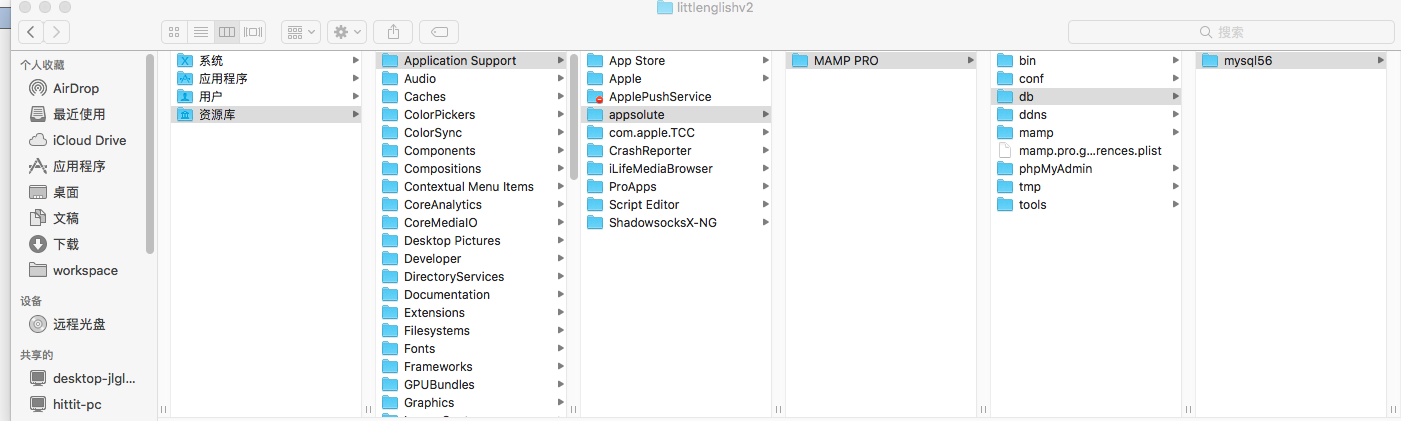
目录就是上面的这个。
重新导入数据建立schema,一切OK。
MAMP PRO mysql无法启动的更多相关文章
- MAMP mysql无法启动 总结(以后有发现再添加)
1.错误信息Can't start server : Bind on unix socket: Address already in use 解析:主要原因是上次关闭Mysql是出现异常而导致的, 解 ...
- php大力力 [002节]mac php环境安装,mamp安装 ,phpMyAdmin启动
php大力力 [002节]mac php环境安装,mamp安装 ,phpMyAdmin启动 每个人机器不一样,我手头是个air book,查了一下现在最好在mac下,用mamp, mamp百科介绍 , ...
- MAMP pro mac 本地集成环境 php sal apache等集成软件
http://www.sdifen.com/mamppro411.html 已存在我的百度云盘 安装后,打开 MAMP 第一步:配置启动和停止选项 默认启动项.默认停止项,只需要勾选: 1.Star ...
- 关于在安装MySQL时报错"本地计算机上的mysql服务启动后停止,某些服务在未由其他服务或程序使用时将自动停止"的解决方法
首先将你下载的MySQL安装或者解压(对应安装版和解压版),下载地址http://dev.mysql.com/downloads/mysql/ 然后复制你安装目录中的my-default.ini,更改 ...
- CentOS 7下MySQL服务启动失败的解决思路
今天,启动MySQL服务器失败,如下所示: [root@spark01 ~]# /etc/init.d/mysqld start Starting mysqld (via systemctl): Jo ...
- Mysql服务启动的时候 如何加载配置文件
Mysql服务启动的时候 如何引导配置文件 (启动加载顺序)
- MySQL 安装和启动服务,“本地计算机 上的 MySQL 服务启动后停止。某些服务在未由其他服务或程序使用时将自动停止。”
MySQL 安装和启动服务,以及遇到的问题 MySQL版本: mysql-5.7.13-winx64.zip (免安装,解压放到程序文件夹即可,比如 C:\Program Files\mysql-5. ...
- 一台MySQL服务器启动多个端口
一台MySQL服务器启动多个端口 在测试Mysql多主一从服务器,即一个从服务器多端口同步不同主库.本文记录了开启不同端口的操作. 详细步骤: 1.首先要先把my.cnf配置文件复制一份,开几个端口要 ...
- MySQL 安装 启动 基本语法概述
MySQL 安装 启动 基本语法概述 MySQL安装和配置 我是直接使用安装包:mysql-installer-community-5.6.10.1.msi 安装的时候其中有几点要注意: 1.记住端口 ...
随机推荐
- not in 和 <> 不走索引
首先我们要知道的一点就是CBO的代码oracle是不会对我们公开的,起码现在是.所以本文中的结论不一定适用所有的版本.在应用本文的结论之前最好先试一下. ok 下面就是本文的结论,当你在where语句 ...
- Clojure:ZeroMQ的入门DEMO
假设你已经知道什么是ZeroMQ(不知道的话可以看这个:http://zh.wikipedia.org/wiki/%C3%98MQ),以下就给出在Clojure中如何使用ZeroMQ(感谢此文作者:h ...
- HTML5:去除IE10中输入框和密码框的X按钮和小眼睛
在IE10和之后的IE版本中,当在输入框和密码框中输入的时候,后面会自动出现X按钮和小眼睛,如下图所示: 令人苦恼的是,这个效果只有IE才有,其它浏览器是没有这个功能的.为了统一,我们就需要去掉这个 ...
- mysql无密码重启
mysql无密码重启 /etc/init.d/mysql stopnohup /usr/bin/mysqld_safe --user=mysql --skip-grant-tables &
- AVPlayer的使用,带缓冲
#import "ViewController.h" #import <AVFoundation/AVFoundation.h> @interface ViewCont ...
- 微信小程序的小问题(1)
1. imgUrls: [ '../../images/index/banner1.jpg', '../../images/index/banner2.jpg', '../../images/inde ...
- 一张图告诉你Git的所有命令
- 【Linux】Linux下配置apache
一.获取软件: http://httpd.apache.org/ httpd-2.4.10.tar.gz 二.安装步骤: 解压源文件: 1) tar zvxf httpd-2.4.10.tar. ...
- BNU 13259.Story of Tomisu Ghost 分解质因子
Story of Tomisu Ghost It is now 2150 AD and problem-setters are having a horrified time as the ghost ...
- 杂项:MIS(管理信息系统)
ylbtech-杂项:MIS(管理信息系统) 管理信息系统(Management Information System,简称MIS)是一个以人为主导,利用计算机硬件.软件.网络通信设备以及其他办公设备 ...